AnkiLens
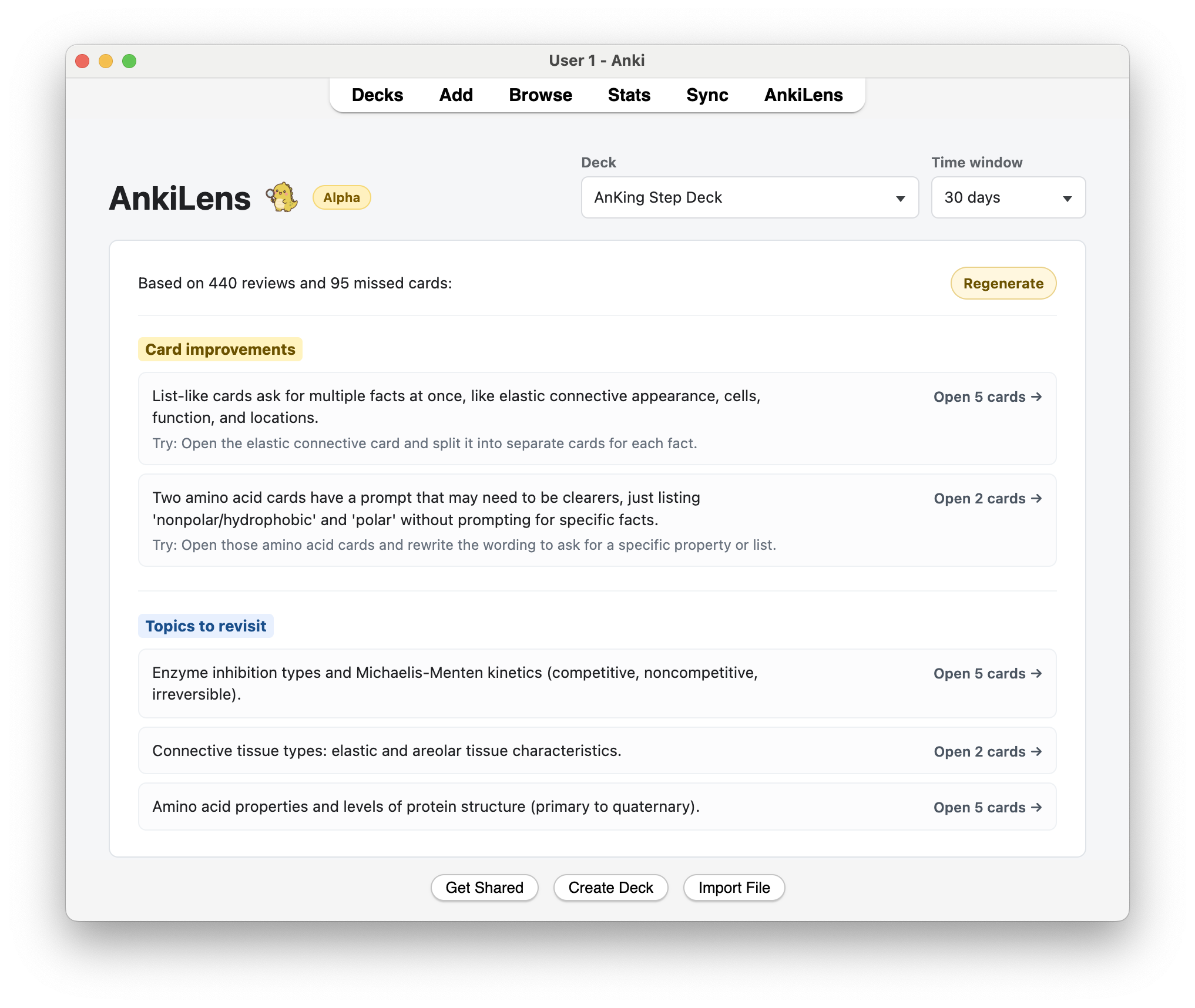
AnkiLens is a read-only Anki add-on for reviewing missed cards.
Pick a deck, choose a time window, and AnkiLens shows a short summary of what
has been going well and which missed cards may be worth checking next. It uses
your recent review history and missed-card text, but it does not change Anki
scheduling or edit any cards.
This alpha uses a bring-your-own OpenRouter API key for generated insights.
What It Does
- Looks at recent reviews for one deck at a time.
- Supports 7, 30, and 90 day windows.
- Summarizes missed cards in plain language.
- Shows what went well and where to focus.
- Opens the relevant missed cards in Anki Browse.
- Stays read-only: no scheduling, card, note, deck, or review-log changes.
Local Setup
Symlink the add-on into Anki:
ln -s "$(pwd)/addon" "$HOME/Library/Application Support/Anki2/addons21/ankilens"
Restart Anki after Python changes.
Alpha Setup
AnkiLens needs an OpenRouter API key for generated insights.
Create a key at:
https://openrouter.ai/keys
Advanced users can also use the OPENROUTER_API_KEY environment variable:
export OPENROUTER_API_KEY="your-key-here"
open -a Anki
On macOS, launching Anki from the Dock may not include shell environment
variables. If insights do not load, quit Anki and start it from Terminal with
the commands above.
You can also set the key in Anki:
Tools -> AnkiLens -> Set API key
Paste the key into the dialog and AnkiLens will save it locally.
The default model is deepseek/deepseek-v4-flash. Advanced users can change
llm_model in addon/config.json, but the main alpha does not include an
in-app model picker.
OpenRouter usage and billing stay in the user's OpenRouter account. AnkiLens
does not show token pricing in the UI.
Privacy
When generated insights are enabled, AnkiLens sends selected missed-card text
and review metadata for the chosen deck/window to the configured LLM endpoint.
It does not send the whole collection.
The add-on is read-only. It does not change scheduling, notes, cards, decks, or
review logs.
Configuration
Configuration lives in addon/config.json.
Useful settings:
llm_summary_enabled: turns generated insights on or off.llm_model: model name.llm_api_url: chat-completions compatible API endpoint.llm_api_key_env: environment variable that contains the API key.llm_api_key: local API key. Do not commit a real value.llm_max_cards: maximum missed cards sent for summarization.llm_max_chars: maximum prompt size.demo_data_enabled: adds local demo review data.count_hard_as_miss: treats both Again and Hard as misses by default. Set to false for Again-only.
The default API key environment variable is:
OPENROUTER_API_KEY
Do not commit API keys.
Development
Run tests with:
make test
The tests do not require a live Anki GUI.
To check LLM output against realistic missed-card content without opening Anki:
OPENROUTER_API_KEY="your-key-here" make llm-check
You can also pass your own card sample:
OPENROUTER_API_KEY="your-key-here" python3 scripts/check_llm_output.py --input cards.json
The JSON file should be a list of cards:
[
  {
    "label": "Smooth ER role",
    "text": "Front: Smooth ER role. Back: lipid synthesis, detoxification, calcium storage.",
    "misses": 3,
    "reviews": 5
  }
]
Build an uploadable add-on package with:
make package
The package is written to dist/ankilens.ankiaddon.
Code Map
addon/anki_entry.py - Anki menu, toolbar, page loading, and webview messages.addon/anki_gateway.py - reads Anki review logs and cleans card text.addon/anki_browser.py - builds Browse searches and opens Anki Browse.addon/analytics.py - turns review logs into missed-card summaries.addon/debrief.py - small data models for evidence and generated insights.addon/debrief_page.py - the Insights page HTML/CSS/JS.addon/llm_summary.py - prompt, API request, and response parsing.addon/demo_data.py - local demo review history.scripts/check_llm_output.py - queries the configured LLM with sample card content.tests/ - unit tests for the core behavior.docs/ - notes for verification and future work.