Ever finish your Anki reviews and wonder what you should study next?
Study Triage+ helps you figure that out. Instead of just showing stats, it looks at how you're actually missing cards and points you toward the topics and resources most likely to help.
Essentially
- Find what you’re missing: Identifies high-yield weak areas from Again/Hard patterns.
- Get actionable recommendations: Pairs missed topics with relevant resources.
- Direct resource links: Click straight into supported resources when available.
Note: Resource coverage varies by source.
- Save a study plan: one-click “to-do” list so nothing gets lost.
Install it and it’ll immediately show you your highest-yield weak areas based on your past reviews.
Triage
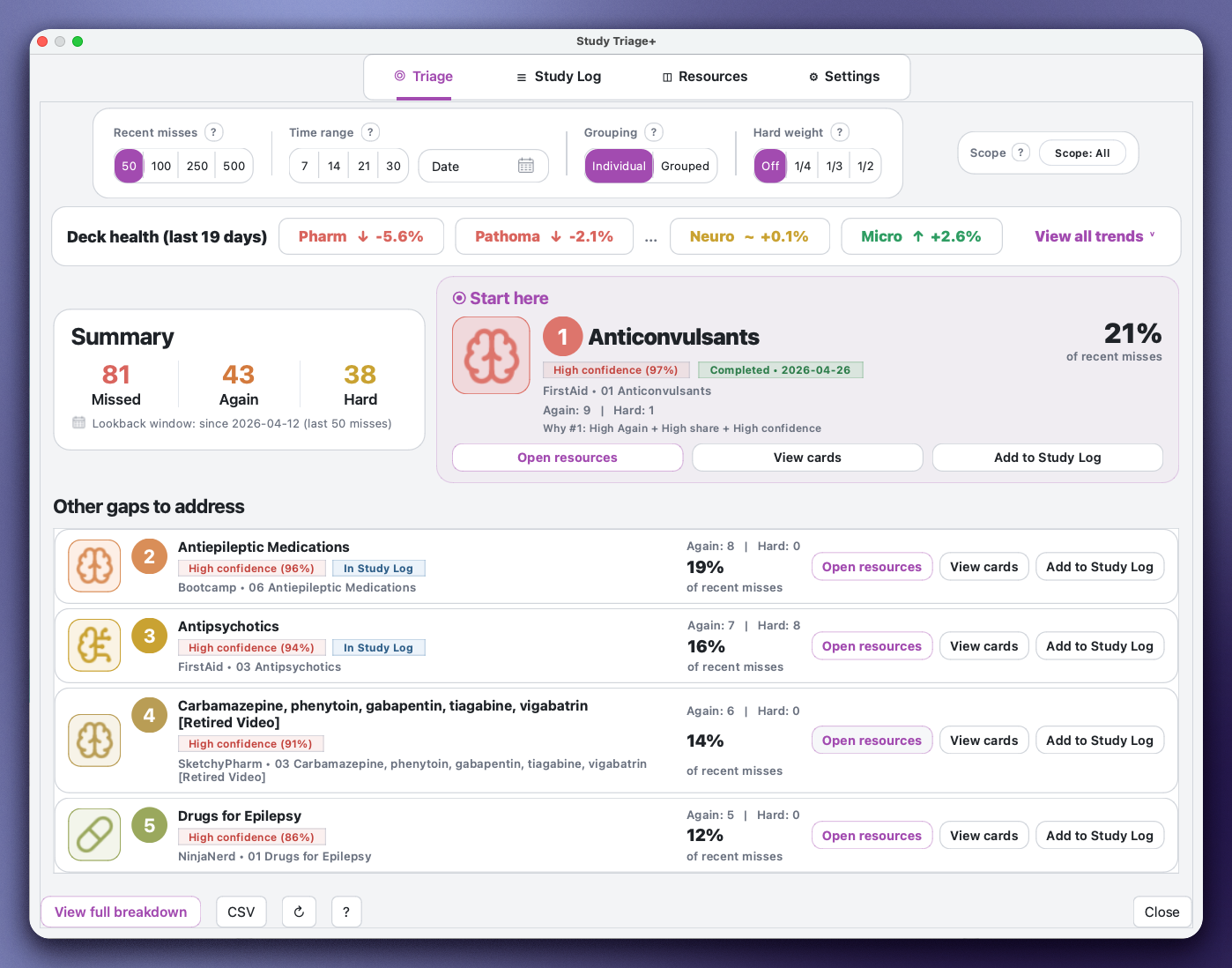
- Triage: Instantly shows your highest-yield weak areas based on recent misses and tells you what to study next. Prioritizes topics and resources, while also tracking deck health, retention trends, and performance changes over time.
Study Log
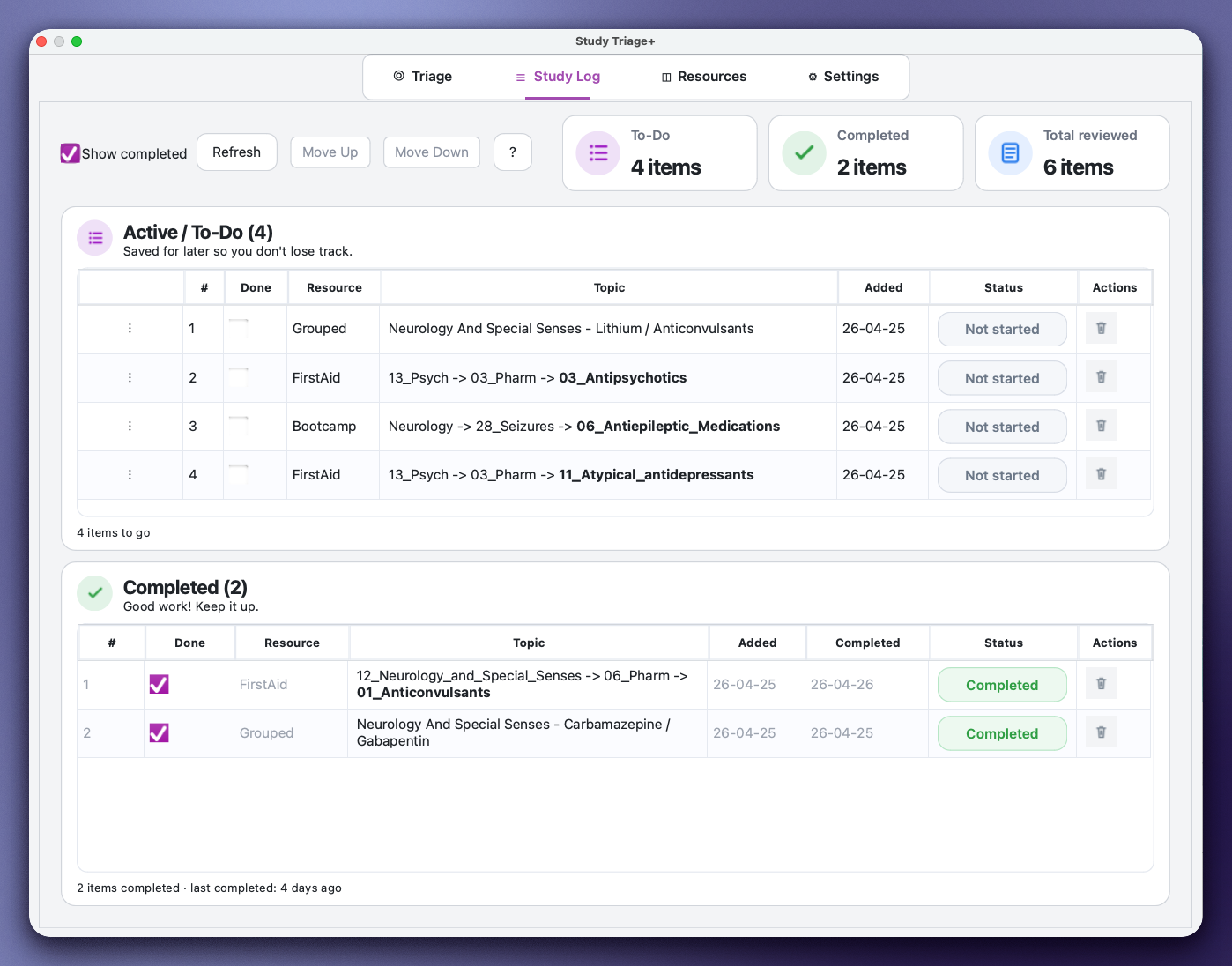
- Study Log: Save recommendations into a persistent to-do list so nothing gets lost. Each saved item is clickable: open linked videos/images (when available) or jump straight to matching cards from the tag.
Resources
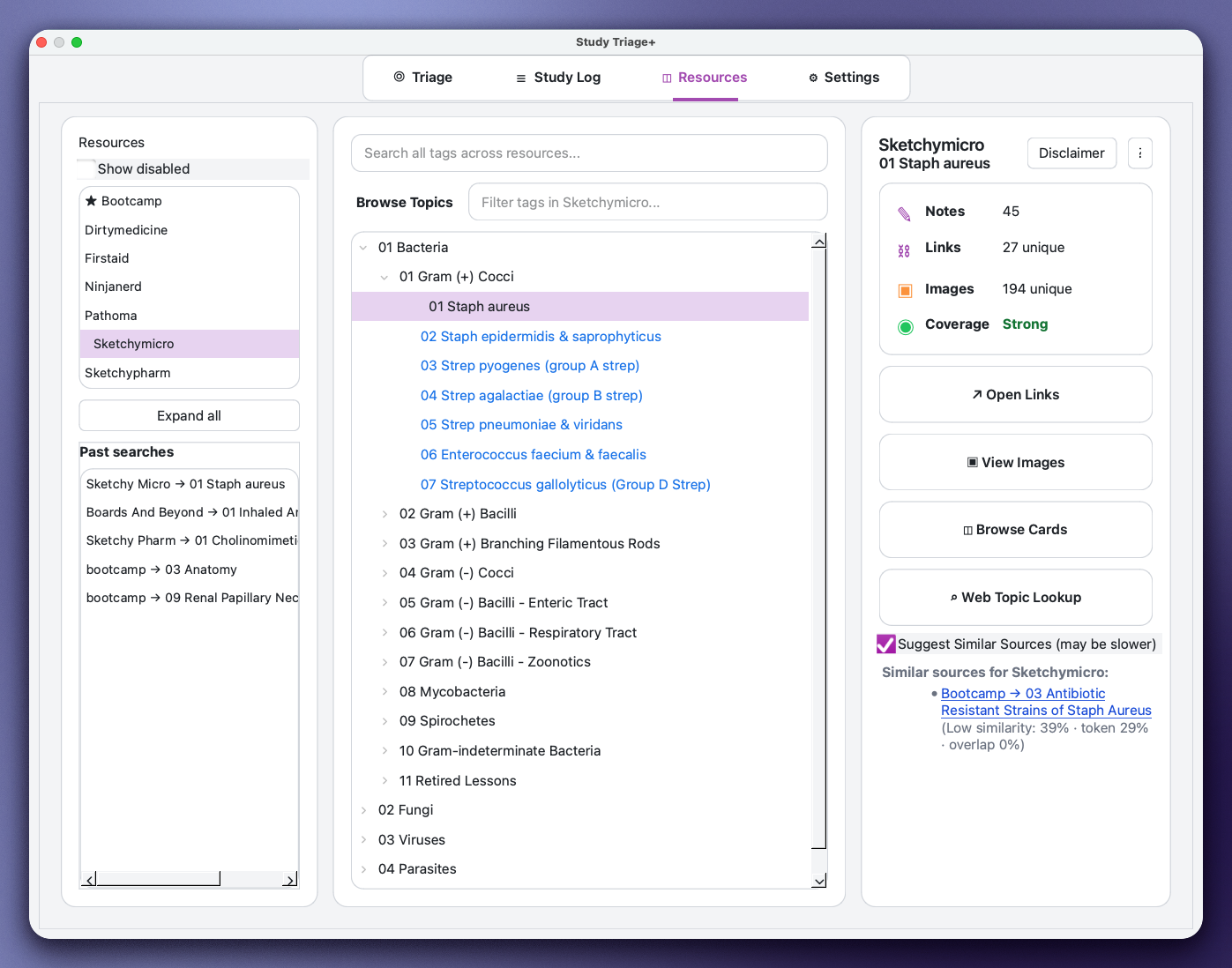
- Resources: Browse your tag index by resource, explore topics directly, and open linked videos/images where available. For resources without direct links (such as First Aid), you can still jump to the relevant chapters using the tag path as a guide.
Practice Tests
Study Triage+ can also turn your weak areas into targeted practice-question sets.
Instead of guessing what to do next, you can generate practice based on the topics you are actually missing in Anki.
- UWorld: Build matching QID lists from selected weak topics and copy them into UWorld.
- AMBOSS: Start an AMBOSS session from matching selected cards when AMBOSS access and the AMBOSS Anki add-on are available.
Generate Test is available from Triage, Study Log, and Resources, so you can make question sets from your current gaps, saved study plan, or selected resource topics.
UWorld QID Note
Study Triage+ can generate UWorld QID lists from the UWorld tags already present in your local AnKing collection.
These QIDs are bank-specific, so Step and COMLEX may use different question IDs even when the underlying topic overlaps.
Select the UWorld bank that matches your subscription before copying QIDs. If you use the COMLEX QBank, choose COMLEX;
if you use the Step QBank, choose Step.
Some QIDs may still be rejected by UWorld because questions can be retired, renumbered, unavailable in your subscription,
or no longer active. If UWorld reports rejected questions, paste those IDs into the add-on’s Ignored QIDs list so they are
filtered out in future generated lists.
Designed for AnKing-style decks
Works best with hierarchical tags and resource tags (Bootcamp, First Aid, Pathoma, Sketchy, etc.).
Optional: Resource Indexer Add-On (for custom decks or future updates)
You do not need anything extra. Study Triage+ ships with an included resource database and works out of the box.
If you use a non-AnKing deck, add your own resources, or want an up-to-date database in the future without waiting for a full Study Triage+ release, you can install the optional Resource Indexer add-on to generate an updated resource index directly from your collection.
What’s New
Version 2.7.1
- Generate Test: Added a shared practice-test workflow across Triage, Study Log, and Resources.
- UWorld Support: Builds matching QID lists from selected topics and lets you copy them directly.
- AMBOSS Support: Launches an AMBOSS session from matching cards when the AMBOSS Anki add-on is installed.
- Smart vs Random: Smart prioritizes weaker topics, while Random samples more evenly.
- Forecast Predictor: Identifies topics likely to become weak before they show up as major gaps. Because apparently your future mistakes weren’t stressful enough.
- Resources: Improved similar-topic recommendations.
Version 2.7.0
- UI/UX Rework: Cleaned up the main workflow so it’s easier to read and faster to use.
- Settings Simplified: Removed low-value settings and switched to better defaults.
- Quick Tour: Added a simple guided walkthrough of the tabs.
- Recommendations: More focused suggestions on what to study next.
- Dark Mode: Actually works properly now.
- Performance: Improved speed, especially with larger collections.
- Stability: Fixed freezes, editor quirks, and other edge cases.
- Code Cleanup: Removed stale code and simplified maintenance.
- Packaging: Improved release files and metadata for smoother updates.
Older Updates (2.6.5 and earlier)
Version 2.6.5
- Faster Launch: Removed an extra loading popup.
- Utilities Fixed: Restored Resources and Filtered Tags settings.
- Filtered Tags: Brought back full functionality with a cleaner chip-style UI.
- Stability: Added better guardrails and reduced log spam.
Version 2.6.4
- Hover Fix: Fixed popup freezes on newer Anki versions.
- Cross-Platform: Improved consistency across Mac and Windows.
Version 2.6
- Grouping Mode: Groups missed topics into more useful clusters.
- Fixes: General bug fixes and performance improvements.
Version 2.5
- Review Modes: Improved Grace Mode and Learn Mode behavior.
- Resources: Added Dirty Medicine and Ninja Nerd links.
- Help: Added explanations and quick settings shortcuts.
Version 2.4
- Filtered Tags: Hide tag branches without deleting anything.
- Performance: Switched to SQLite and improved stability.
- Resources: Added First Aid page references.
Support / Issues: If you find a bug, the best place to report it is GitHub (link below).
You can also leave a comment on AnkiWeb, but GitHub is much easier for me to track and fix things.
Troubleshooting
Sending this info saves a lot of back-and-forth.
Generate debug info
- Open add-on folder: Anki → Tools → Add-ons → StudyTriage → View Files
- Log file:
data/study_triage.log
- Debug Report (recommended): StudyTriage → Settings → Advanced → Debug Report
Include in bug reports
- What you did + what you expected vs what actually happened
- Anki version (e.g., 2.1.xx) and Qt version (Qt5 or Qt6)
- Relevant log lines or Debug Report output
Report bugs here:
https://github.com/k8fn2v2bvp-sketch/study-triage-plus/issues