Fast Crop and Image Editor Enhanced

AnkiWeb addon 1177622942

Fork of 🖼️Image Editor - Edit image by right click in the Editor (Fixed by Shigeඞ) (AI-detected; may be wrong)

2 other versions of this addon exist. Compare versions ↓

Enables fast cropping, rotating, flipping, annotating, and drawing on images directly within Anki’s note editor, with shortcut access, aspect-ratio presets, and multilingual support.
AI-generated summary; may contain mistakes.

card-creationshortcutsfork-or-reupload

Open on AnkiWeb GitHub Find alternatives

AnkiWeb

Votes
1 (👍 1 · 👎 0)
Updated
2026-10-23
Anki versions
23.09~
License
AGPL-3.0 (from the license file in the package)
Virus scan
No ClamAV match A match does not prove malware. No match does not prove that the code is safe.
Languages
JavaScript, JSON, Python, CSS, HTML, CSV, HTML+ERB, PHP
Description language
en

Maintenance

active

  • Last update or commit: 2026-10-23 (9 days before the snapshot).
  • Commits in the last year: 9.
  • Issues: 0 open, 0 closed.
  • Pull requests: 0 open, 0 merged.

Will it work on my Anki?

Version branches
Min AnkiMax AnkiUpdated
2.1.123.09+2026-10-23
History across monthly snapshots

Loading…

Compare versions

The original addon and its forks. The best value in each column is in bold.

VersionWorks on Anki 26.09.3MaintenanceLast activity VotesApprovalGitHub starsNotes
Image Editor original likely abandoned 8 Sep 2022 👍 61 · 👎 9 77% 9 obsolete
↳ 🖼️Image Editor - Edit image by right click in the Editor (Fixed by Shigeඞ) (AI-detected; may be wrong) likely stale 5 Nov 2025 👍 13 · 👎 1 69% 12
↳ Fast Crop and Image Editor Enhanced this addon (AI-detected; may be wrong) likely active 23 Oct 2026 👍 1 · 👎 0 21% 0

Forks can add features or work in a different way. Read the description before you change to another version. Fork detection is incomplete, so other versions can exist.

Similar addons

anki drawing(Direct Writing with Pen on Anki Cards)

Enables direct pen-tablet writing on flashcards, with color selection, adjustable pen thickness, and geometric shape drawing for annotations, sketches, and visual concept notes.

formatting

3 votes 44% approval 👍 3 · 👎 0 Anki 2.1.1~ Updated 2024-11-22
Export Anki cards as picture

Exports Anki cards as images using customizable Jinja2 HTML templates and CSS, with configurable resolution, auto-cropping, cloze replacement, excluded fields, and per-note/card-type templates.

exportcard-templates

1 votes 0% approval 👍 0 · 👎 1 ⭐ 0 Anki 24.06.2~ Updated 2024-06-18

Description

Image Editor (Enhanced Edition) - Fast Crop, Annotate & Draw

An advanced, high-performance image editing and cropping add-on for Anki. Crop, rotate, flip, annotate, and edit images directly within the Note Editor in seconds without interrupting your review or card creation workflow.

Key Enhancements vs Original Add-on (789309990)

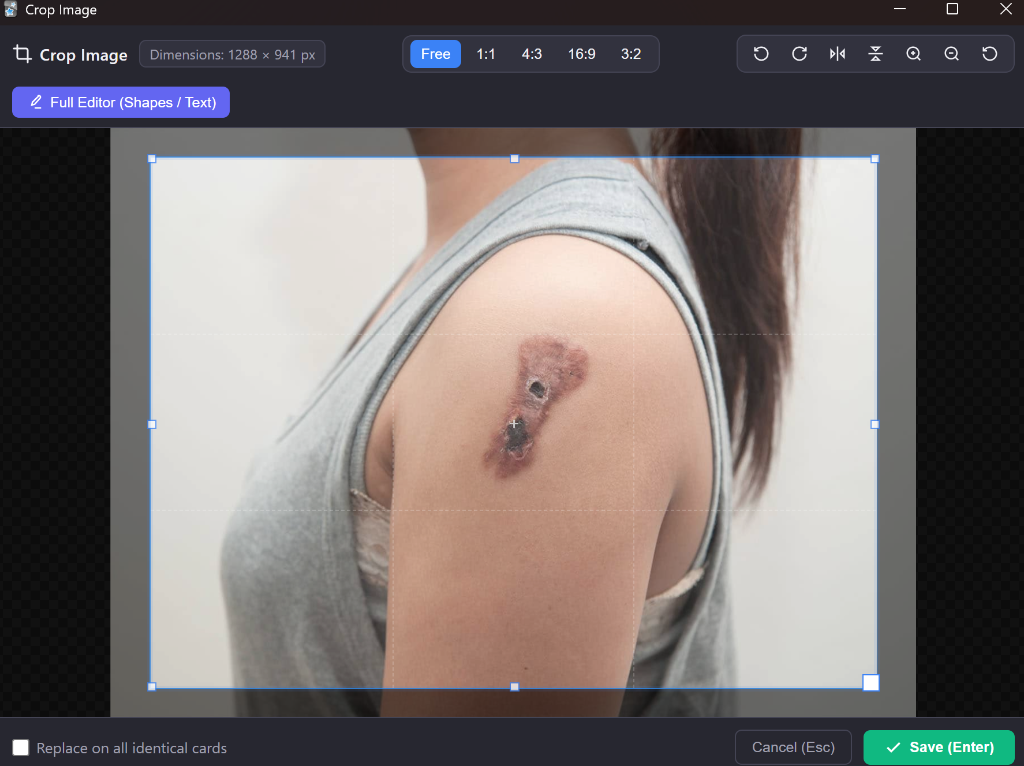
  • Built-in Fast Cropper: Instant cropping dialog with aspect ratio presets (Free, 1:1, 4:3, 16:9, 3:2), lossless rotations (-90° / +90°), horizontal and vertical flips, live dimensions badge, and zoom controls.
  • Floating Bubble Menu Integration: Injects an Image Editor action button directly into Anki's floating image popover.
  • Full Internationalization (i18n): Native translation into over 40 Anki languages (French, German, Spanish, Japanese, Chinese, Russian, Italian, Portuguese, Arabic, Korean, and many more) with automatic locale detection.
  • Robust UTF-8 Handling: Full compatibility with international and non-ASCII filenames.
  • Minimalist & Sober Design: Clean, modern interface without distractions or emojis.

Screenshot

Fast Cropper Interface

How to Use

  1. Floating Toolbar: Select an image and click the Image Editor icon in the floating bubble toolbar.
  2. Context Menu: Right-click any image and choose Image Editor (Crop / Edit).
  3. Toolbar Button / Shortcut: Press Ctrl + Shift + I to edit the selected image, or open a blank canvas to create a new vector drawing from scratch.
  4. Switch to Full Vector Editor: From the Cropper, click Full Editor (Shapes / Text) to add arrows, text labels, shapes, and freehand drawings.

Keyboard Shortcuts

  • Ctrl + Shift + I: Open Image Editor on selected image (or open blank drawing).
  • Enter: Save and apply crop.
  • Esc: Cancel and close dialog.

Credits & Attribution

This add-on is an enhanced edition building upon the contributions of the Anki open-source community:

Compatibility

  • Anki 2.1.20 up to the latest Anki 23.x / 24.x / 25.x+
  • Full Qt5 and Qt6 support
  • Windows, macOS, and Linux

README

Anki Image Editor (Enhanced Edition)

An advanced image editing, cropping, and annotation add-on for Anki. It allows you to quickly crop, rotate, flip, annotate, and edit images directly within the Anki Note Editor without leaving your study workflow.


Credits & Attribution

This project is an enhanced fork of the original work by community developers:

  • Original Author: BlueGreenMagick (GitHub Repository)
  • Upstream Fixes & Maintenance: Shigeyuki (AnkiWeb Add-on #789309990 / Patreon)
  • Enhanced Edition: Developed with modern cropping tools, multi-language internationalization (i18n), floating popover integration, remote image handling, and performance optimizations.

Comparison: Enhancements vs Original Add-on

Feature Original / Upstream (789309990) Enhanced Edition
Instant Cropper Tool Not available (only full SVG vector canvas) Built-in fast cropper with aspect ratio presets (1:1, 4:3, 16:9, 3:2, Free), rotations (-90°/+90°), horizontal/vertical flips, and zoom controls
Floating Popover Button Not supported Automatic quick-action button injected into Anki's floating image bubble menu
Internationalization (i18n) English only Full localization across 40+ Anki languages (French, German, Spanish, Japanese, Chinese, Russian, Italian, Portuguese, Arabic, Korean, etc.)
UTF-8 & Non-ASCII Filenames Risk of corrupted paths on special characters Robust TextDecoder UTF-8 parsing for international filenames

Screenshot

Fast Cropping Modal


How to Use

1. Fast Cropping

  • Click the Image Editor button on the floating image bubble popover.
  • Adjust your crop area, select an aspect ratio preset, or use rotation/flip buttons.
  • Press Enter or click Save to update the image in your card.

2. Full Vector Drawing & Annotation

  • From the Cropper window, click Full Editor (Shapes / Text) to switch to the vector editor.
  • Add arrows, shapes, text boxes, freehand drawings, or highlights on top of your image.
  • Click Save to replace the image with the annotated SVG version.

3. Creating a New Drawing from Scratch

  • With no image selected, click the Image Editor toolbar button or press Ctrl + Shift + I.
  • Draw your diagram or illustration and click Save to insert it directly into your current field.

Keyboard Shortcuts

  • Ctrl + Shift + I: Open Image Editor on selected image, or open a blank canvas if nothing is selected.
  • Enter (in Cropper): Save the cropped image.
  • Esc (in Cropper): Cancel and close dialog.

Supported Languages

The add-on automatically detects your Anki language setting and provides native translations for:

  • Arabic (ar)
  • Bulgarian (bg)
  • Catalan (ca)
  • Czech (cs)
  • Danish (da)
  • Dutch (nl)
  • English (en)
  • Esperanto (eo)
  • Estonian (et)
  • Basque (eu)
  • Persian (fa)
  • Finnish (fi)
  • French (fr)
  • German (de)
  • Greek (el)
  • Hebrew (he)
  • Croatian (hr)
  • Hungarian (hu)
  • Indonesian (id)
  • Italian (it)
  • Japanese (ja)
  • Korean (ko)
  • Malay (ms)
  • Norwegian (nb_NO)
  • Polish (pl)
  • Portuguese / Brazil (pt_BR, pt_PT)
  • Romanian (ro)
  • Russian (ru)
  • Slovak (sk)
  • Slovenian (sl)
  • Spanish (es)
  • Serbian (sr)
  • Swedish (sv)
  • Thai (th)
  • Turkish (tr)
  • Ukrainian (uk)
  • Vietnamese (vi)
  • Chinese Simplified & Traditional (zh_CN, zh_TW)

Compatibility

  • Anki 2.1.20 through Anki 23.x / 24.x / 25.x+
  • Compatible with both Qt5 and Qt6 builds
  • Tested on Windows, macOS, and Linux

License

This program is free software: you can redistribute it and/or modify it under the terms of the GNU Affero General Public License (AGPLv3) as published by the Free Software Foundation, either version 3 of the License, or (at your option) any later version.