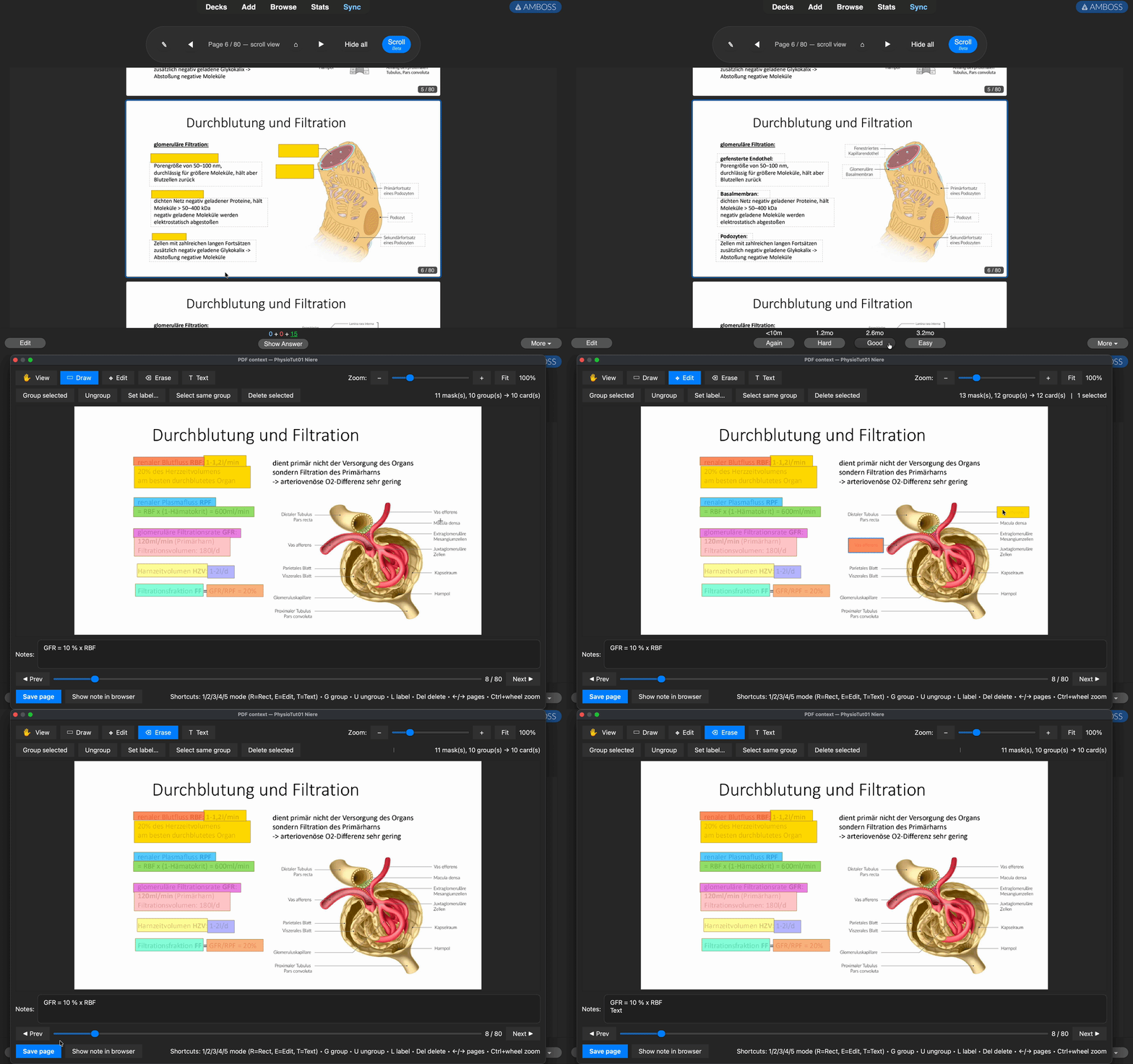
PDF Occlusion — Anki add-on
Import a PDF, get one Anki note per page, draw image-occlusion masks,
group them into cards, and review them as proper cloze flashcards with
an inline page-peek and context navigation.
Version: 0.6.3
Requires: Anki 24.x or later (bundles Qt 6 with the QtPdf module).
Install
Option A — AnkiWeb upload (recommended, see below for how to upload).
Option B — Install .ankiaddon file:
Drag pdf_occlusion.ankiaddon onto Anki, or:
Tools → Add-ons → Install from file… → pick the .ankiaddon.
Option C — Copy folder manually:
Put the pdf_occlusion folder into Anki's add-ons directory:
- macOS:
~/Library/Application Support/Anki2/addons21/pdf_occlusion/
- Windows:
%APPDATA%\Anki2\addons21\pdf_occlusion\
- Linux:
~/.local/share/Anki2/addons21/pdf_occlusion/
Usage
Import a PDF
Tools → PDF Occlusion → Import PDF…
Pick a PDF and a target deck. Each page is rendered to 150 DPI PNG and
stored as a "PDF Occlusion" note. The editor opens automatically.
Draw masks
- Mode
2 (Draw): drag to add a mask — each mask starts its own group.
- Mode
3 (Edit): click/shift-click to select, drag to move, G to
group selected, U to ungroup, Delete to remove.
Ctrl+S or "Save page": writes the masks and regenerates cards.
Each mask (or group) becomes one flashcard. The tooltip after saving
shows N mask(s) → M group(s) → K active card(s).
Review
Cards show the page with the current group's masks opaque and the other
masks transparent — you see the full context. Above the image there's
a ◀ Page 5 / 30 ▶ navigation bar, plus small peek strips of the
adjacent pages on either side. Click the arrows, the page strip or
just the peek strips to jump pages. ⌂ returns to the question page.
Manage PDFs
Tools → PDF Occlusion → Manage PDFs…
Lists all imported PDFs with page/card counts. Per PDF:
- Open the editor
- Rename
- Move all cards to a different deck
- Delete (removes notes + media files)
Other commands
- Open PDF viewer… — pick from dropdown and edit
- Open context viewer for current card (
Ctrl+Shift+P) — during
review, open a floating side-panel synced to the current card
- Repair note metadata — run the idempotent in-place migration
- Migrate legacy notes… — one-time upgrade from the pre-0.2 type
How it's stored
A cloze note type called PDF Occlusion is created with these fields:
| Field |
Contents |
| PDF Name |
Logical name (used to group pages) |
| Page Number |
1-based |
| Page Image |
Bare filename of the PNG |
| Occlusions |
JSON: [{x,y,w,h,group}, ...] (normalised to 0–1) |
| Groups |
Cloze deletions, e.g. {{c1::g1::g1}}{{c2::g2::g2}} |
| Notes |
Free-form text shown on the back |
| PDF Prefix |
Filename prefix for adjacent-page navigation |
| Total Pages |
Total page count of the PDF |
Card template shows each group as one cloze deletion; the JS layer
renders masks from the JSON positioned as percentage overlays.
Notes & limits
- Encrypted PDFs are rejected by Qt's PDF reader.
- Render DPI is 150 by default. For very small fonts, bump
RENDER_DPI in importer.py.
- Large PDFs: each page becomes one PNG in the media folder. A
500-page PDF at 150 DPI is ~200 MB of media.
- AnkiWeb sync: the add-on is carefully written not to touch the
collection on startup unless something genuinely needs updating, so
regular syncs should be conflict-free after the first launch with a
new version.
Uploading to AnkiWeb
First-time upload
- Go to https://ankiweb.net/shared/addons/ and log in (same account
as Anki's sync).
- Click Share a new add-on.
- Fill in:
- Title:
PDF Occlusion
- Tags:
pdf, occlusion, image-occlusion, study, medicine
- Description: copy the "Usage" section above.
- Branch: pick
2.1 or whichever Anki branch you want to target
(current Anki is on the 2.1 / qt6 branch).
- Supported Anki versions: set
min point version to 231000
(Anki 23.10) to match manifest.json.
- Upload the
pdf_occlusion.ankiaddon file.
- Submit — you'll get an add-on code (e.g.
123456789) that others
use to install it.
Updating an existing upload
- Go to https://ankiweb.net/shared/addons/ → My add-ons.
- Click on your add-on.
- Click Upload new version.
- Bump
human_version in manifest.json (e.g. 0.6.3 → 0.6.4),
rebuild the .ankiaddon (see below), upload.
- Write a short change log in the description.
Rebuilding the .ankiaddon
If you edit any file, rebuild the package by zipping the contents of
the pdf_occlusion/ folder (not the folder itself!) with a .ankiaddon
extension:
cd pdf_occlusion
zip -r ../pdf_occlusion.ankiaddon . -x "*.pyc" "__pycache__/*"
On macOS/Linux this is one command. On Windows, right-click inside the
folder → "Send to → Compressed folder", then rename .zip to
.ankiaddon. The archive root must contain manifest.json,
__init__.py, etc. directly — not inside a subfolder.
Private distribution (no AnkiWeb)
If you just want to share with a few people, send them the
pdf_occlusion.ankiaddon file directly. They install via
Tools → Add-ons → Install from file…. No account needed.