Move Reviews from Weekends and Holidays (works with already learnt and mobile)

AnkiWeb addon 1222550498

Reschedules already-scheduled reviews away from weekends, holidays, or chosen weekdays, moving them before or after, and works with mobile Anki and other scheduler-modifying add-ons.
AI-generated summary; may contain mistakes.

scheduling

Open on AnkiWeb GitHub Find alternatives

AnkiWeb

Votes
16 (πŸ‘ 12 Β· πŸ‘Ž 4)
Updated
2020-10-01
Anki versions
2.1.36~
License
Not found (this does not mean that the addon has no license)
Virus scan
No ClamAV match A match does not prove malware. No match does not prove that the code is safe.
Languages
Python, JSON
Description language
en

Maintenance

abandoned

  • Last update or commit: 2021-01-04 (2127 days before the snapshot).
  • Commits in the last year: 0.
  • Issues: 0 open, 6 closed.
  • Pull requests: 0 open, 0 merged.
  • Median first response: 39 hours (5 answered issues and pull requests).

Will it work on my Anki?

Version branches
Min AnkiMax AnkiUpdated
2.1.12.1.36+2020-10-01
History across monthly snapshots

Loading…

Similar addons

Weekends and Holidays

Reschedules already scheduled cards away from chosen weekdays, weekends, holidays, or vacations by moving them before or after those days, while limiting interval changes and supporting mobile use.

schedulingmobile-compatible

7 votes 36% approval πŸ‘ 5 Β· πŸ‘Ž 2 Anki 25.09.2~ Updated 2026-05-15
Postpone card's review

Postpones scheduled reviews by a chosen number of days for all cards, a deck and its subdecks, or selected cards, adjusting due dates and intervals.

scheduling

162 votes 82% approval πŸ‘ 143 Β· πŸ‘Ž 19 ⭐ 13 Anki 2.1.62~ Updated 2023-04-15
Anki Time Warp

Rewrites card due dates via shifting, stretching, or daily caps, with filtered deck/tag selection, simulation previews, timeline charts, and single-step undo.

scheduling

2 votes 34% approval πŸ‘ 2 Β· πŸ‘Ž 0 ⭐ 1 Anki 25.02.1~ Updated 2026-09-16

Description

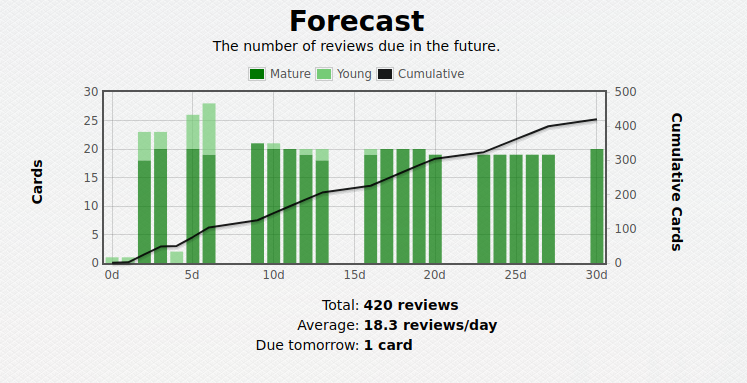
Differences from the "Free weekend" addon This addon is heavily inspired by the "Free weekend - or Any Other Day" addon (accomplishes a similar task, but works completely differently - can also be used together). As the former only works with newly learned cards (cards already in review won't be affected), does not work with mobile apps, and might conflict with other add-ons that change the Scheduler behavior. This add-on aims to solve these shortcomings by instead of patching the Scheduler, it reschedules already scheduled cards. Thus, it will also work for someone who uses both AnkiMobile/AnkiDroid and Anki desktop, and for someone who already has many cards scheduled for the future. It can seamlessly be used together with the "Free weekend" add-on linked above, as well as other add-ons that affect the scheduler (for example, LoadBalancer). Addon description Do you want to take a break from doing your Anki reviews without having them pile up on the weekends, holidays or a vacation? Or do you have specific days on the week when you're too busy to do the reviews? Then this add-on is the solution to your problem! It works by re-scheduling the already scheduled cards anytime by moving them either before, or after the specified days. By default, the intervals never change by more than 10%, or by 7 days in any case. Compatibility with mobile apps and other addons This add-on plays well with mobile versions of Anki (AnkiMobile/AnkiDroid), assuming that the user also uses the desktop version, as the cards scheduled on mobile will be moved away from the specified days when the rescheduling is run (with _Ctrl+Shift+r_), or at every startup if run at startup is chosen at configuration options. The add-on does not directly modify the scheduler, but instead reschedules already schedules cards, so it should play well with addons that patch the scheduler (for example, load balancer), *but this is untested*. Images Before using the add-on reschedule: After: Usage and configuration By default, the add-on will free up the weekends and nothing else. However, this behaviour can be changed to move the reviews away from specific dates and/or any day of the week. Config can be edited in the Tools -> Add-on(Ctrl+Shift+A) -> Move Reviews from Weekends and Holidays. *Make sure to restart Anki after editing the configuration*. Once you've set the dates and days of the week that you want to free up, you can use the shortcut *Ctrl+Shift+r* (by default) to reschedule the cards. Bug reports and source code The source code is accessible at: https://github.com/vasarmilan/AnkiWeekendsAndHolidays Please submit bug reports here, if you encounter any problems. PRs are also welcome.

README

Get the addon for your Anki from here

Move Reviews from Weekends and Holidays

Do you want to take a break from doing your Anki reviews without having them pile up on the weekends, holidays or a vacation? Or do you have specific days on the week when you're too busy to do the reviews? Then this add-on is the solution to your problem!

It works by re-scheduling the already scheduled cards anytime by moving them either before, or after the specified days. By default, the intervals never change by more than 10%, or by 7 days in any case.

Mobile and other addons

This add-on plays well with mobile versions of Anki (AnkiMobile/AnkiDroid), assuming that the user also uses the desktop version, as the cards scheduled on mobile will be moved away from the specified days when the rescheduling is run (with Ctrl+Shift+r), or at every startup if run at startup is chosen at configuration options.

The add-on does not directly modify the scheduler, but instead reschedules already schedules cards, so it should play well with addons that patch the scheduler (for example, load balancer), but this is untested.

Images

Before using the add-on reschedule: Before
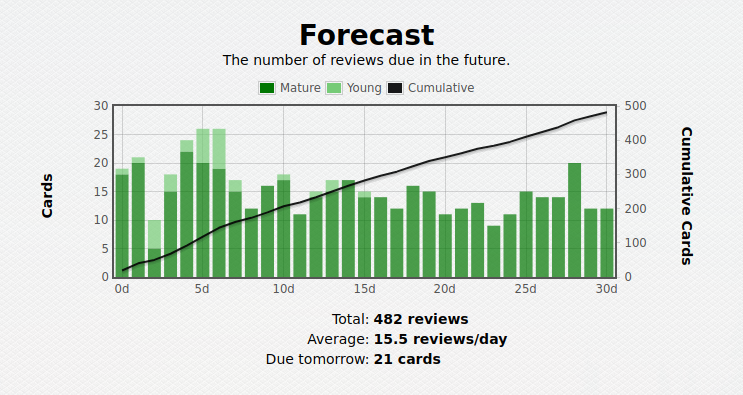
After: After

Usage and configuration

By default, the add-on will free up the weekends and nothing else. However, this behaviour can be changed to move the reviews away from specific dates and/or any day of the week.

Config can be edited in the Tools -> Add-on(Ctrl+Shift+A) -> Move Reviews from Weekends and Holidays. Make sure to restart Anki after editing the configuration.

Once you've set the dates and days of the week that you want to free up, you can use the shortcut Ctrl+Shift+r (by default) to reschedule the cards.

Bug reports and source code

The source code is accessible at: https://github.com/vasarmilan/AnkiWeekendsAndHolidays

Please submit bug reports here, if you encounter any problems. PRs are also welcome.