Scale Images

AnkiWeb addon 1312865748 GitHub repository archived

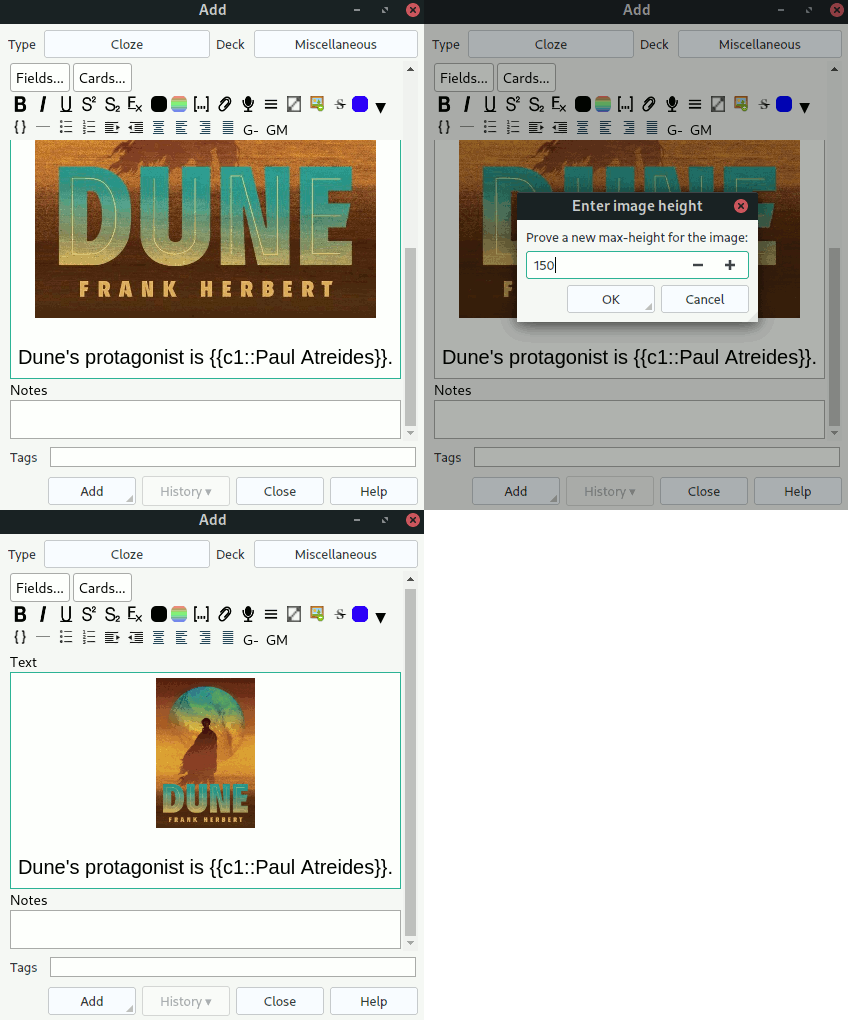
Scales images while editing notes by setting a configurable CSS max-height for selected fields, offering individual and bulk scaling via keyboard shortcuts or buttons.
AI-generated summary; may contain mistakes.

note-managementformattingshortcuts

Open on AnkiWeb GitHub Find alternatives

AnkiWeb

Votes
18 (πŸ‘ 18 Β· πŸ‘Ž 0)
Updated
2025-03-13
Anki versions
25.02~
License
GPL-3.0 (from the GitHub repository)
Virus scan
No ClamAV match A match does not prove malware. No match does not prove that the code is safe.
Languages
Python, JSON
Description language
en

Maintenance

abandoned

  • The GitHub repository is archived.

Will it work on my Anki?

Version branches
Min AnkiMax AnkiUpdated
2.1.2025.02+2025-03-13
History across monthly snapshots

Loading…

Similar addons

Hyphenate Words

Hyphenates words in a selected Anki editor field via a button, customizable keyboard shortcut, or optional experimental automatic hyphenation on note saves.

note-managementformattingshortcuts

8 votes 53% approval πŸ‘ 7 Β· πŸ‘Ž 1 ⭐ 5 Anki 25.02~ Updated 2025-03-13
ImageResizer

Automatically resizes pasted or drag-and-dropped images to configurable dimensions, with shortcut resizing, aspect-ratio options, upscaling control, and transformation quality settings.

card-creationformattingshortcutsfork-or-reupload

155 votes 65% approval πŸ‘ 113 Β· πŸ‘Ž 42 ⭐ 9 Anki 23.10~ Updated 2023-12-03
Editor scale images

Enables resizing images by clicking and dragging their lower-right corner in Anki's desktop editor, preserving aspect ratio; double-clicking clears scaling, with a configurable selection border.

formattingobsoletemobile-compatible

5 votes 57% approval πŸ‘ 5 Β· πŸ‘Ž 0 ⭐ 0 Anki 2.1.49~ Updated 2022-02-11
Image Style Editor

Resizes images by individually setting CSS width and height through a right-click editor menu, preserving quality and supporting Image Occlusion notes.

formattingimage-occlusionmobile-compatible

55 votes 85% approval πŸ‘ 52 Β· πŸ‘Ž 3 ⭐ 6 Anki 24.04.1~ Updated 2021-12-17

Description

An Anki plugin that scales images during editing. This plugin sets CSS max-height property of all images in a note field to the desired value.

Use

  1. Select the field with images that you want to scale.
  2. To scale individual images, press CTRL+S or click the scale button added by the plugin.
  3. To scale all images at once, press CTRL+ALT+B or click the bulk scale button added by the plugin.

Configuration

See https://github.com/gregorias/anki-image-scaler#configuration.

Feedback

If you have any suggestions, let me know at this plugin's GitHub. I use the plugin personally, and I'm open to improving it.

README

βš–οΈ Anki Image Scaler

[!NOTE] This plugin is no longer maintained. I have archived this plugin due to losing interest.

An Anki plugin that scales images during editing. This plugin sets CSS max-height property (configurable) of all images in a note field to the desired value.

Background

I spend a lot of time solving Anki cards, and I believe that Anki notes should look good. I solve most of my cards on my phone that, as any phone, has a small screen, so when I create a new card, I usually scale down added images, so that the card is pleasant to look at.

Installation

From AnkiWeb

You can install directly from AnkiWeb using Anki's addon management.

From GitHub Releases

You can fetch an addon package from the GitHub Releases tab.

From Source

  1. Run package.
  2. Import imagescaler.ankiaddon in Anki.

Usage

Select a field with an image and press CTRL+S or CTRL+ALT+B.

Configuration

You can configure the plugin using Anki's configuration with the following variables:

  • size-property (default: "max-height") – the CSS property used by the plugin.
  • default-size (default: 150) – the default pixel value suggested for size-property.
  • shortcut β€” the keyboard shortcut for scaling individual images.
  • bulk_shortcut β€” the keyboard shortcut for scaling all images in bulk.
  • add_editor_buttons (default: true) – whether to show editor button (keyboard shortcuts will still be active).

To apply a new configuration, you need to restart Anki.