Hyphenate Words

AnkiWeb addon 1140138750

Hyphenates words in a selected Anki editor field via a button, customizable keyboard shortcut, or optional experimental automatic hyphenation on note saves.
AI-generated summary; may contain mistakes.

note-managementformattingshortcuts

Open on AnkiWeb GitHub Find alternatives

AnkiWeb

Votes
8 (👍 7 · 👎 1)
Updated
2025-03-13
Anki versions
25.02~
License
GPL-3.0 (from the GitHub repository)
Virus scan
No ClamAV match A match does not prove malware. No match does not prove that the code is safe.
Languages
JSON, Ignore List, CSV, Python, Prolog, MATLAB, Makefile, Shell
Description language
en

Maintenance

active

  • Last update or commit: 2026-10-26 (6 days before the snapshot).
  • Test files: 1.
  • GitHub Actions workflows: 3.
  • Commits in the last year: 9.
  • Issues: 0 open, 3 closed.
  • Pull requests: 6 open, 27 merged.
  • Median first response: 15 hours (1 answered issues and pull requests).

Will it work on my Anki?

Version branches
Min AnkiMax AnkiUpdated
2.1.2023.102023-11-03
23.10.125.02+2025-03-13
History across monthly snapshots

Loading…

Similar addons

Scale Images archived

Scales images while editing notes by setting a configurable CSS max-height for selected fields, offering individual and bulk scaling via keyboard shortcuts or buttons.

note-managementformattingshortcuts

18 votes 82% approval 👍 18 · 👎 0 ⭐ 6 Anki 25.02~ Updated 2025-03-13
Bullet-Converter

Converts selected hyphen-bulleted or numbered text in the Anki editor into properly formatted HTML unordered or ordered lists, via a toolbar button or Ctrl+Shift+B shortcut.

formattingshortcuts

3 votes 6% approval 👍 1 · 👎 2 Anki 25.02.1~ Updated 2026-02-23
Add Table has 1 fork →

Inserts customizable HTML tables through a dialog or keyboard shortcut, or converts selected pipe-delimited markdown-like text into a table; it does not edit existing tables.

formattingshortcutsfork-or-reupload

144 votes 93% approval 👍 140 · 👎 4 ⭐ 7 Anki 2.1.65~ Updated 2023-06-18
Quick Lookup fork

Looks up words, sentences, or kanji from a card's question field via button, keyboard shortcut, or right-click, with customizable shortcuts and search website.

shortcutsdictionary

6 votes 44% approval 👍 5 · 👎 1 ⭐ 0 Anki 2.1.48~ Updated 2022-09-19
Cloze List Items

Adds an editor button that wraps list items in the current field with sequential cloze deletions, with a configurable Alt+Shift+L shortcut and an option to target only selected items.

shortcutscloze
2 votes 34% approval 👍 2 · 👎 0 Anki 23.12.1~ Updated 2024-03-05

Description

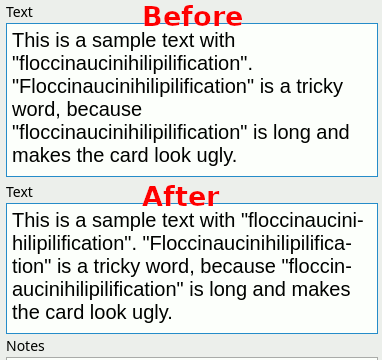
An Anki plugin that hyphenates words.

Use

  1. Select a field that you want to hyphenate.
  2. Press CTRL+- or click on the hyphenation button added by the plugin.

Configuration This plugin allows you to configure:

  • the keyboard shortcut (default is CTRL+-)
  • whether to apply hyphenation on note changes (experimental) (default is false)

Feedback If you have any suggestions, let me know at this plugin’s GitHub. I use the plugin, and I’m open to improving it.

README

Anki Word Hyphenator

An Anki plugin that hyphenates words during editing.

a GIF showing Hyphenator at work

Installation

From AnkiWeb

You can install directly from AnkiWeb using Anki’s addon management.

From GitHub Releases

You can fetch an addon package from the GitHub Releases tab.

From Source

  1. Run package from the main directory. This will create wordhyphenator.ankiaddon.
  2. Import wordhyphenator.ankiaddon in Anki.

🚀 Usage

  1. Write some text in a field.
  2. Press CTRL+- (on macOS, ⌘+-) or click this add-on’s button in the editor’s button bar.

⚙️ Configuration

The addon accepts the following configuration options:

  • shortcut (default: "ctrl+-" or "cmd+-") — The keyboard shortcut for the hyphenation action.
  • apply_on_note_flush (default: false) — Whether to apply the hyphenation action on note saves. This feature is experimental. Let the maintainer know if there any issues.