This add-on for Anki displays automatic reminders to get back to studying, even when you're browsing outside of review mode, and also detects inactivity during reviews to help you stay focused and disciplined.
Changelog
- v1.3 - 2025-05-05 - Bug Fix:
- Fixed error when accessing addon settings during review mode
- Added automatic initialization of settings manager when needed
- Improved error handling for timer management
Features
- Periodic Reminder: Shows a popup in the corner of the screen after a configurable interval, if you are outside review mode.
- Inactivity Detection: If enabled, monitors inactivity during review and shows a popup after the configured extra time.
- Easy Configuration: GUI to choose deck, reminder frequency, enable/disable the feature, and adjust inactivity time.
- Modern Popup: Stylish window with quick action buttons for "Study Now" or "Later".
- Smart Window Management: When clicking "Study Now", the Anki window is restored and brought to front already in review mode.
Screenshots
Configuration Screen
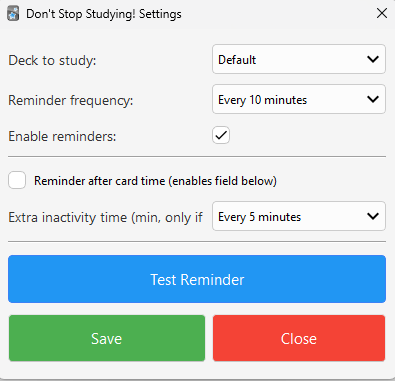
Configure the default deck, reminder frequency, and inactivity time.
Reminder Popup

The popup appears automatically with options to start studying now or postpone the reminder.
How to Use
-
Configuration
- Go to the "Tools" menu > Configure Study Reminder
- Choose the deck, reminder frequency, and adjust inactivity time
- Save your settings
-
During Use
- The popup will appear automatically according to the configured rules
- You can test the reminder in the settings screen using the "Test Reminder" button
Configuration Options
You can adjust options via the GUI or directly in the settings.json file:
"deck": Default deck for the reminder"frequency": Periodic reminder frequency (in minutes)"enabled": Enables/disables the reminder"window_location": Popup position (bottom right, bottom left, center)"inactivity_after_max_answer": Enables inactivity reminder during review"inactivity_extra_minutes": Extra inactivity time (in minutes) after the card's time runs out
Technical Details
- Uses Qt timers to control reminders
- Uses Anki hooks to detect start/end of review
- The popup is an independent window, always visible even if Anki is minimized
- The timer is paused during review and resumes when returning to the main screen
- User settings are automatically preserved during updates
Changelog
-
v1.3 - 2025-05-05 - Bug Fix:
- Fixed error when accessing addon settings during review mode
- Added automatic initialization of settings manager when needed
- Improved error handling for timer management
-
v1.2 - 2025-04-30 - Improvements:
- Added sequential popup position rotation (changes every 10s)
- Enhanced popup appearance with a more elegant and uniform border
-
v1.1 - 2025-04-30 - Improvements:
- Added window position configuration
- Added unsaved changes warning
- Added automatic user settings preservation
- Fixed Qt imports to use aqt instead of PyQt6 for better Anki compatibility
-
v1.0 - 2025-04-28 - Initial Release:
- Periodic and inactivity reminders
- GUI configuration
- Modern and responsive popup
- Smart window management
- Improved timer control during review
Report Bugs
For issues or suggestions, open an issue at:
https://github.com/cjdduarte/DonStopStudying/issues
License
If you want any adjustments, badges, or extra instructions, just ask!