✅️Anki Spell Checker - Check misspelled in the Editor (Fixed by Shigeඞ)

AnkiWeb addon 143753963 GitHub repository archived

Fork of [Deprecated] Spell Checker (AI-detected; may be wrong)

1 other version of this addon exists. Compare versions ↓

Enables spell checking in Anki's Editor using downloadable language dictionaries, with right-click suggestions and custom word lists, supported on Windows, Linux, and macOS.
AI-generated summary; may contain mistakes.

formattingfork-or-reupload

Open on AnkiWeb GitHub Forum topic Find alternatives

AnkiWeb

Votes
60 (👍 49 · 👎 11)
Updated
2026-10-15
Anki versions
26.09.3~
License
GPL-3.0 (from the license file in the package)
Virus scan
No ClamAV match A match does not prove malware. No match does not prove that the code is safe.
Languages
Python, JavaScript, C++, C, CSV, JSON, Batchfile, HTML, YAML
Description language
en

Maintenance

abandoned

  • The GitHub repository is archived.

Will it work on my Anki?

Version branches
Min AnkiMax AnkiUpdated
2.1.126.09.3+2026-10-15
History across monthly snapshots

Loading…

Compare versions

The original addon and its forks. The best value in each column is in bold.

VersionWorks on Anki 26.09.3MaintenanceLast activity VotesApprovalGitHub starsNotes
[Deprecated] Spell Checker original likely abandoned 22 Apr 2025 👍 41 · 👎 16 59% 13 obsolete, archived
↳ ✅️Anki Spell Checker - Check misspelled in the Editor (Fixed by Shigeඞ) this addon (AI-detected; may be wrong) supported abandoned 15 Oct 2026 👍 49 · 👎 11 70% 13 archived

Forks can add features or work in a different way. Read the description before you change to another version. Fork detection is incomplete, so other versions can exist.

Similar addons

[Deprecated] Spell Checker archived has 1 fork →

Spell-checks flashcard entries in multiple languages, letting users correct mistakes and add custom words through downloadable personal dictionaries.

formattingobsolete

57 votes 59% approval 👍 41 · 👎 16 ⭐ 13 Anki 2.1.66~ Updated 2023-10-11
Placeholder- SCwCD

Acts as a placeholder for a planned built-in spell-checker with customizable dictionaries, beta-tested by VIP members before eventual public release.

formattingno-descriptionpaidbeta

7 votes 8% approval 👍 2 · 👎 5 Anki 2.1.54~ Updated 2022-11-26
DirectEdit

Enables direct in-reviewer flashcard text editing with formatting, cloze and list tools, a medical spellchecker, and image resizing, avoiding the browser or edit window.

note-managementformattingshortcutscloze

3 votes 21% approval 👍 2 · 👎 1 Anki 2.1.1~ Updated 2026-10-25
Simple Spell Check

Checks spelling via a button or keyboard shortcut, lets users review suggestions and replace words or add specialized terms to the dictionary, and requires Aspell.

note-managementshortcutsaccessibility

1 votes 21% approval 👍 1 · 👎 0 Anki 2.1.50~ Updated 2025-08-05
Update Checker

Compares your installed Anki Desktop version against the latest stable release, offering manual and scheduled checks plus a native upgrade prompt or download page fallback.

backup-maintenance

4 votes 51% approval 👍 4 · 👎 0 ⭐ 0 Anki 25.09.2~ Updated 2026-03-22

Description

banner_shigeyuki_2

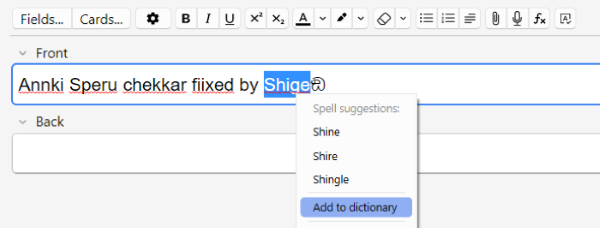
spell check image

Add spell check functionality to Anki by downloading dictionaries (Editor Only). This add-on is a fixed and customized version of SpellingPolice by lovac42 and Spell Checker by Valentin, and credit goes to them.


Update 2026-10-16: Added support for MacOS dictionary conversion feature.
Update 2026-10-16: Added Medical Dictionaries (english, 300,000+ words)


📖How to use

This add-on needs to download a dictionary before you can use it. Click on "🔍️Add New Dict" to find available dictionaries. Menu -> Tools -> Spell Checker

Dict tab

Basically the spell checker should work with just this tab. It supports Windows, Linux, and Mac.
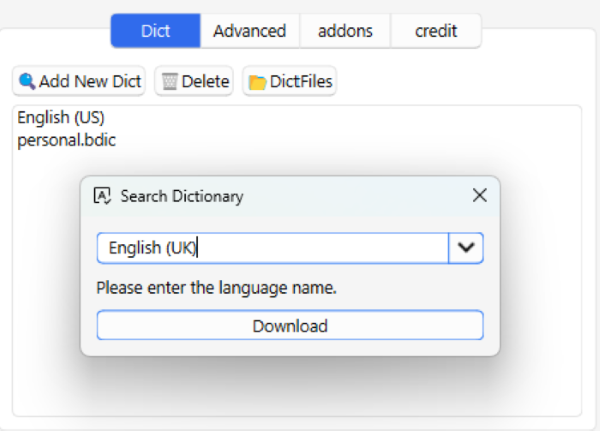
Dict tab image

  1. Add New Dict: Download downloads available dictionaries.
  2. Delete: Deletes a dictionary that has already been downloaded.
  3. Dict Files: Open the folder where the dictionaries are located.

Note:

  1. Basically the spell checker should work just by downloading.
  2. These dictionaries are for spell checking only, so they cannot be used as learning dictionaries.
  3. Downloading similar languages may interfere.
  4. If you cannot find a language it is not, please send me a request.

Advanced tab

This tab has the same features as the original spell checker. For now it supports Windows and Linux, Mac support is still under development. (This tab is not essential so if you are not sure how to use it feel free to ignore it.)
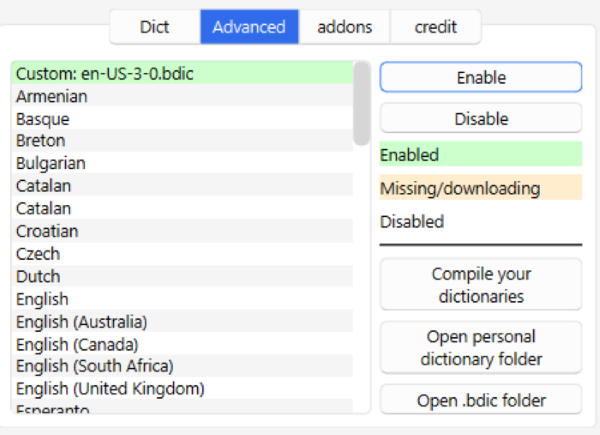
Advanced tab image

For detailed instructions on how to use this tab please read the original Add-on page.

Q. What is the difference between the Dict tab and the Advanced tab?

  • A. To use the spell checker in Anki, you need a dictionary file named “.bdic”. The Dict tab is used by downloading the complete “.bdic” file from the website. The Advanced tab allows you to generate your own “.bdic” file from the dictionary data. The code required for this generation is still available only for Windows and Linux, so it is not yet available for Mac. (It is under development, please wait.)

Q. What is the advantage of creating my own dictionary?

  • A. You can add new words. And you can create and add your own dictionaries that are not available in the download.

Note: This compile function is relatively fragile, if it does not work well please contact me.

Editor

This add-on only works in the Editor for now. Spell check is only available for the field you are typing in.
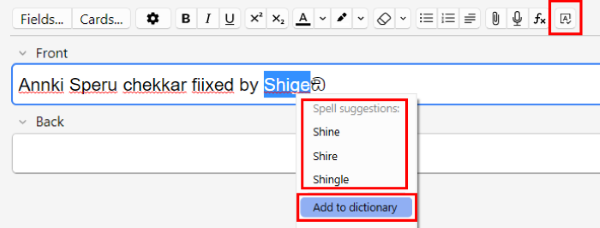
Editor image

  1. Click the top right button to enable or disable SpellChecker.
  2. Right click on a spell checked word to see the suggested words, and click on it to replace it with the correct word.
  3. Spell checked words can be added to a custom dictionary as correct words. This feature is only available on Windows and Linux, not yet on Macx. Added words can be edited in the advanced tab.


Manually download dictionary files

If you cannot download the dictionary, please manually download the Dict file (.bdic) from these links and place it in the "DictFiles" folder. (Tools -> Spell Checker -> Dict tab -> DictFils button)

🚨Report

If you have any problems or requests feel free to send them to me.

  1. 👍️Rate Comment : You can contact me anonymously, and AnkiWeb will send you an email when I reply, a high rating increases priority of development.
  2. 👩‍🚀Reddit : You can request me to repair broken Add-ons.
  3. 🌟AnkiForums : You can request me to repair broken Add-ons, and it is ideal for open discussions.
  4. 🐙Github : Makes it easier to track problems.
  5. 💖Patreon DM : Response will be prioritized.


💖Please Support Shige's Anki add-ons development!

Hi thank you for using this add-on I'm Shigeඞ!

  1. [ 🛠️Fix add-ons ] So far I fixed and customized 80+ broken add-ons for free and developed over 30 add-ons as a hobby (all add-ons). If you have requests to fix broken add-ons feel free to contact me. Fix broken addons (Free)
  2. [ 💖Donation ] I'm looking for supporters for my add-ons development because I like Anki!👍️ If you support my volunteer development you will get 14 add-ons for patrons only and 15 game themes included in AnkiArcade ($5/month).

patrons_banner
Get Patrons only addons | Patrons Q and A | Contact

[ Special Thanks ]
So far I received donations from 702 patrons and without their support I never could develop this, thank you very much!🙏

Patrons: Arthur Bookstein Haruka Luis Alberto, Letona Quispe 07951350313540 Tim NamelessGO Kyle Mondlak Daniel Kohl-Fink ElAnki Lily Abhi S findus161 K Juan Salgado Peasant of Anki Matthew Hartford Jesse Asiedu David C Yaeerrrrrr Christopher Lam Xiuxuan Wang Steven Banner Heidi Aydin Herik gus forester Hoang Hung Take Root Iggi Jonathan Contreras Carly Burdorf Austin Regal Terence Bartenbach Vivian Cao Pansanity Anh-Tai Nguyen Elisabeth Barber Zarina Balde Devon Williams Leonora Lomoki Akporyoe Ernest Chan Kmyungc Will S. Meeyah Davis Eric Allen Andrew Yick Robert Remedios GP O'Byrne Joseph Howell Orlando Frey KM Ujwal Chadha Kolorophyll Jake Stucki Kaitlyn Bowler Isabel Guan Mia Kyle Anthony ellie Tobias Klös mootcourt Marlee Davis Seth Stidham Miguel Dittrich Ali Abid iuventius Patrick ellis Katherine Geromini Nabeel Elhaj tarek Efrain Garcia Fonseca qiting zeng Muneeb Khan Looptime IsAble Hussain Almoumen lionheart3003 Sameer Al Matheus Chagas Niiick Bryn Price pie_is_good Svel1989 Jack ivy tian Zuhair alpha male, shredded af Brandon Anamah Keeler Kime Yashar Hadi Kurt Grabow Justin Magda Subhash Gutti alex han Celeste Achatz Gabriel Farrugia R Rebecca Audreylyn Shannon Pneumaniac 1 Lis Y. Jolene Galbreath Fahim Shaik Augusto Stein ...full list

📥 How do I install this add-on?

  1. Copy and paste the add-on code ( 143753963 ) into Anki and you can install it. ( Menu -> Tools -> Add-ons -> Get Add-ons -> Code [ add-on code ] )
  2. When I develop bug fixes, create new features, or compatibility for New Anki, I will notify you and you can install it.
  3. Add-ons will be broken when the official Anki gets a major update, so if you like this add-on please support my volunteer development by rating, sharing, and donating. Thank you!

Click here and please Rate this add-on, Thank you! :-)

Please rate this

README

[DEPRECATED] Spell Checker for Anki

This is no longer supported, please consider using (https://ankiweb.net/shared/info/143753963) instead.

Legacy Documentation

Welcome to Spell Checker for Anki! This add-on enhances your Anki flashcard experience by ensuring your entries are error-free. The spell-checker identifies and lets you correct spelling mistakes in multiple languages, seamlessly integrating into the Anki interface. You can add your own words via the integrated personal dictionary.

Installation

AnkiWeb

The easiest way to install Spell Checker is through AnkiWeb.

Manual installation

  1. Download the latest .ankiaddon file from the releases tab.
  2. Open the folder where your downloads are located and double-click on the downloaded .ankiaddon file.
  3. Follow the installation prompt and restart Anki if it asks you to.

Setup

Basic

The Add-on is able to download dictionary files for all main languages. To activate your language:

  1. On the main page, go to Tools > Dictionary configuration.
  2. Choose your desired language(s) from the list and click Enable.
  3. Once the list items turn green, the language is successfully downloaded.

You can disable languages by selecting them and clicking Disable.

Custom dictionaries

You can simply right-click on words and then choose Add to dictionary, to save custom words. If you have a more extensive word list, you can integrate them in the following ways:

.txt files

You should have a .txt file, which consists of one word per line.

  1. On the main page, go to Tools > Dictionary configuration.
  2. Start by clicking on Open Personal Dictionary Folder. Once the specific folder opens, please transfer the .txt file into this folder.
  3. Go back to the Dictionary configuration screen and click the button Compile your dictionaries.
  4. Your dictionary should appear in the list. You may have to reopen the configuration window.
.dic files

If you have a .dic file with the accompanying .aff file, you can proceed the same way as described for the .txt files. If you do not supply a .aff file, a clear one with no additional rules is created.

.bdic files

If you have a precompiled .bdic file, proceed as follows:

  1. On the main page, go to Tools > Dictionary configuration.
  2. Start by clicking on Open .bdic folder. Once the specific folder opens, please transfer the .bdic file into this folder.
  3. Your dictionary should appear in the list. You may have to reopen the configuration window.

License and Credits

This project is based on the legacy plugin Spelling Police by lovac42.

The binaries for the .bidc conversion are downloaded from jankelmen's project convert-dict-tool-from-chromium.

The dictionaries are provided by dictionaries from wooorm. See their repository for specific licenses. You can also report errors in the dictionaries there.

The plugin icon is created by Carbon Design in Apache License via SVG Repo.