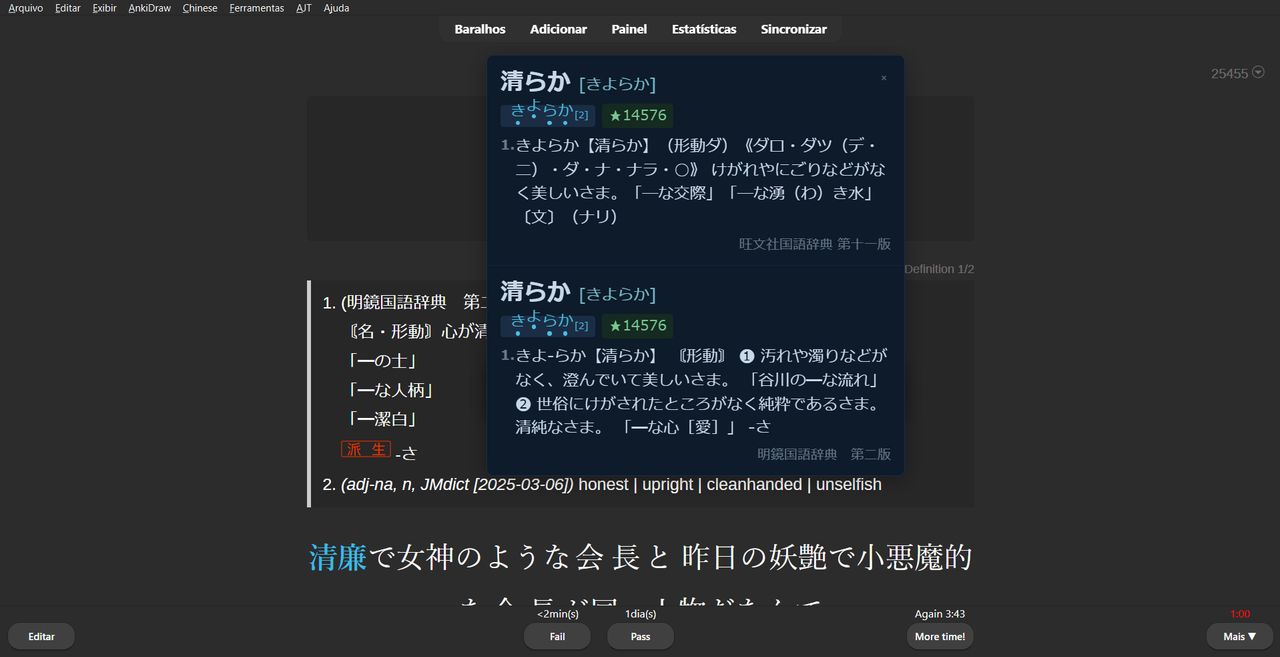
Yomitan Popup Dictionary for Anki (made by A.I)
Yomitan Popup Dictionary is a lightweight, high-performance Japanese-Japanese/Japanese-English dictionary lookup tool integrated directly into the Anki interface. Inspired by browser extensions like Yomichan/Yomitan, it allows you to look up definitions, pitch accents, and word frequency instantly without leaving your study session.
🚀 Key Features
Instant Popup: Hold a hotkey (Shift, Alt, etc.) and hover over any Japanese word to see the definition.
Yomitan Compatible: Works with standard Yomitan/Yomichan dictionary files (.zip).
Smart Deinflection: Automatically recognizes verb and adjective conjugations (e.g., searching for 食べていた will find 食べる).
Pitch Accent Visualizer: Displays pitch accent diagrams for words (requires a dictionary with pitch data).
Highly Customizable:
    Appearance: 10 built-in color themes (Dracula, Nord, Solarized, Sakura, etc.) or create your own.
    Typography: Adjustable font sizes for definitions and expressions.
    Dimensions: Custom width and height for the popup window.
    Behavior: "Sticky" mode keeps the popup open for scrolling, with adjustable auto-close timers.
Context Support: Works in the Reviewer, Note Editor, and Card Previewer.
🛠 How to Setup
Install the Addon: Copy the addon folder to your Anki addons directory.
Download Dictionaries: Obtain Yomitan-compatible dictionary files (available at repositories like Yomitan-Import). Keep them in a folder on your computer.
Configure:
    In Anki, go to Tools → Yomitan Popup Settings.
    In the General tab, click Browse to select the folder where your dictionaries are stored.
    Click Reload to index the dictionaries.
Personalize: Switch to the Appearance tab to choose your favorite color theme and font sizes.
📖 How to Use
Start your Review or open the Editor.
Hold the activation key (default is Shift).
Hover your mouse over a Japanese word.
The popup will appear. If Sticky Mode is on, you can release the key and move your mouse into the popup to scroll through long definitions.
Press Escape or click anywhere else to close the popup manually.
💻 Compatibility
Anki Versions: 2.1.50+ (including 23.12, 24.04 and newer).
Platforms: Windows, macOS, and Linux.
Note: This addon is designed for the desktop version of Anki. It does not work on AnkiMobile (iOS) or AnkiDroid.
📝 Technical Notes
Performance: Uses an internal SQLite database to cache dictionary entries, ensuring lookups are near-instant even with massive dictionaries (like JMdict or Daijirin).
Privacy: All lookups are performed locally on your machine. No data is sent to external servers.