Record Own Voice History

AnkiWeb addon 1508039970

Saves reviewer voice recordings in the add-on folder instead of notes, adds a GUI to play or delete each card's recordings, and replays the most recent one.
AI-generated summary; may contain mistakes.

review-flow

Open on AnkiWeb GitHub Forum topic Find alternatives

AnkiWeb

Votes
5 (πŸ‘ 5 Β· πŸ‘Ž 0)
Updated
2024-02-18
Anki versions
23.12.1~
License
AGPL-3.0 (from the license file in the package)
Virus scan
No ClamAV match A match does not prove malware. No match does not prove that the code is safe.
Languages
Python, CSV, JSON
Description language
en

Maintenance

abandoned

  • Last update or commit: 2024-07-15 (839 days before the snapshot).
  • Test files: 1.
  • GitHub Actions workflows: 2.
  • Commits in the last year: 0.
  • Issues: 0 open, 0 closed.
  • Pull requests: 1 open, 0 merged.

Will it work on my Anki?

Version branches
Min AnkiMax AnkiUpdated
2.1.4523.12.1+2024-02-18
History across monthly snapshots

Loading…

Similar addons

Transcribe Own Voice

Transcribes Record Own Voice recordings during review via the Speech Recognition add-on and displays the text in a small window, with configurable ASR service and language.

sync-integrationreview-flow

1 votes 21% approval πŸ‘ 1 Β· πŸ‘Ž 0 ⭐ 0 Anki 23.12.1~ Updated 2024-02-18
Hands-Free Voice Review

Enables fully offline, hands-free deck review using spoken commands to reveal answers, grade cards, and undo actions, with configurable vocabulary, timing, and noise filtering.

review-flowaccessibility

3 votes 21% approval πŸ‘ 2 Β· πŸ‘Ž 1 ⭐ 0 Anki 25.09~ Updated 2026-07-03
BiDi Tools for right-to-left languages

Adds editor buttons for setting left-to-right or right-to-left direction on entire lines/blocks or selected text, plus inserting Unicode characters that control bidirectional text.

formatting

14 votes 78% approval πŸ‘ 14 Β· πŸ‘Ž 0 ⭐ 1 Anki 2.1.65~ Updated 2026-02-22

Description

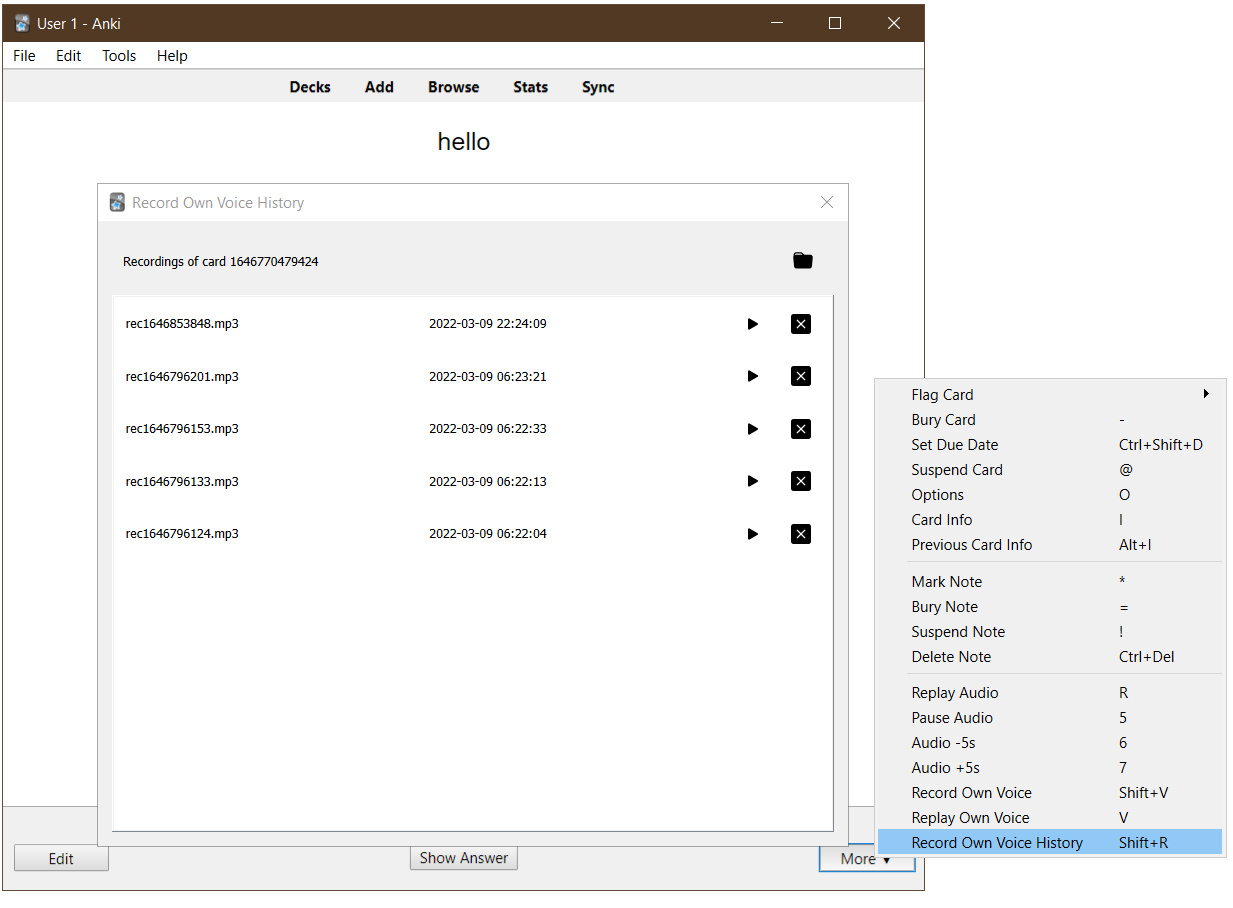
This changes the behavior of the reviewer's "Record Own Voice" option in the following ways:

  • Recordings are saved to the add-on's folder and a GUI is provided to play or delete each card's recordings.
  • Pressing V to replay own voice plays the most recent recording associated with the current card if any.
The add-on's interface

I find this useful to quickly record my pronunciation and track my progress between reviews without having to edit the notes to add the sounds each time.

Changelog

See CHANGELOG.md for a list of changes.

Support & feature requests

Please post any questions, bug reports, or feature requests in the support page or the issue tracker.

If you want priority support for your feature/help request, I'm available for hire. Get in touch via email or the UpWork link below.

Support me

Consider supporting me if you like my work:

Buy Me A Coffee

I'm also available for freelance add-on development:

README

This Anki add-on enhances the "Record Own Voice" option in the reviewer by keeping all recorded audio files and providing a GUI to see previous recordings.

I wanted to record my pronunciation each time I see a word/sentence card and timestamp the recordings to track my progress. I initially wrote a simpler add-on that just prepends a timestamp before sound tags Anki generates after recording in the editor window. But then I noticed this takes me a lot of time, as I have to open the editor window each time, select the appropriate field, and click F5 to record. I then remembered Anki's "Record Own Voice" option and thought of tweaking it to make my life easier.

I also tweaked the "Replay Own Voice" option to make it look for any previous recordings associated with the current card.

The add-on doesn't modify the note contents in any way; it saves the recordings in its folder and not in Anki's media folder. Thus, recordings are not synced to AnkiWeb.

The add-on's GUI

AnkiWeb

You can download the add-on from its AnkiWeb page: https://ankiweb.net/shared/info/1508039970

Credit

Icons are taken from Bootstrap Icons and licensed under the MIT license.

Changelog

See CHANGELOG.md for a list of changes.

Support & feature requests

Please post any questions, bug reports, or feature requests in the support page or the issue tracker.

If you want priority support for your feature/help request, I'm available for hire. Get in touch via email or the UpWork link below.

Support me

Consider supporting me if you like my work:

Buy Me A Coffee

I'm also available for freelance add-on development: