BiDi Tools for right-to-left languages

AnkiWeb addon 281067366

Adds editor buttons for setting left-to-right or right-to-left direction on entire lines/blocks or selected text, plus inserting Unicode characters that control bidirectional text.
AI-generated summary; may contain mistakes.

formatting

Open on AnkiWeb GitHub Forum topic Find alternatives

AnkiWeb

Votes
14 (👍 14 · 👎 0)
Updated
2026-02-22
Anki versions
2.1.65~
License
GPL-3.0 (from the GitHub repository)
Virus scan
No ClamAV match A match does not prove malware. No match does not prove that the code is safe.
Languages
Python, JavaScript, JSON
Description language
en

Maintenance

stale

  • Last update or commit: 2026-02-22 (252 days before the snapshot).
  • Commits in the last year: 5.
  • Issues: 0 open, 0 closed.
  • Pull requests: 0 open, 1 merged.
  • Median first response: 43 hours (1 answered issues and pull requests).
  • Outside pull requests: 100% of 1 merged.

GitHub

Repository
abdnh/anki-bidi-tools · more by abdnh
Stars
⭐ 1 · forks 1 · open issues 0
Last commit
2026-02-15
License
GPL-3.0
Languages
Python, HTML, JavaScript, Makefile
Tests
0

Will it work on my Anki?

Version branches
Min AnkiMax AnkiUpdated
2.1.222.1.65+2026-02-22
History across monthly snapshots

Loading…

Similar addons

Anki-Coder

Adds a CodeMirror code editor to Anki flashcards with syntax highlighting, themes, live preview, double-click editing, configurable languages and note types, and mobile and cloze-card support.

formattingappearancemobile-compatible

9 votes 45% approval 👍 7 · 👎 2 ⭐ 4 Anki 25.07.6~ Updated 2026-04-22
Code Highlight

Adds non-invasive automatic syntax highlighting to code blocks in Anki's editor preview and reviewer, auto-detecting languages or accepting manual class specifications, with configurable font size and color scheme.

formattingappearance

18 votes 55% approval 👍 14 · 👎 4 ⭐ 2 Anki 23.12.1~ Updated 2024-02-20
Simple Markdown

Converts Markdown notes to HTML automatically after editing, with an optional manual conversion button and configurable Markdown extensions such as fenced code blocks.

formatting

8 votes 41% approval 👍 6 · 👎 2 ⭐ 3 Anki 25.02.5~ Updated 2025-11-21
Reviews Visualizer

Displays each card's first review per day as a clickable, hoverable grid on the deck congratulations and overview screens, with configurable sizes, limits, ordering, and due-day markers.

statisticsobsolete

8 votes 68% approval 👍 8 · 👎 0 ⭐ 4 Anki 23.10.1~ Updated 2023-12-15

Description

This add-on adds some editor tools for bidirectional text (BiDi)—text containing different types of alphabets that have different directionalities (e.g. mixed English and Arabic text).

Anki provides an option to set each field's direction under the Fields screen, but there are cases when it's necessary to override the direction of certain parts of the field text.

Usage

The add-on provides buttons to set the direction of the selected text to either LTR (left to right, like the Latin script and most scripts), or RTL (right to left, like in Arabic, Hebrew, Persian, etc.)

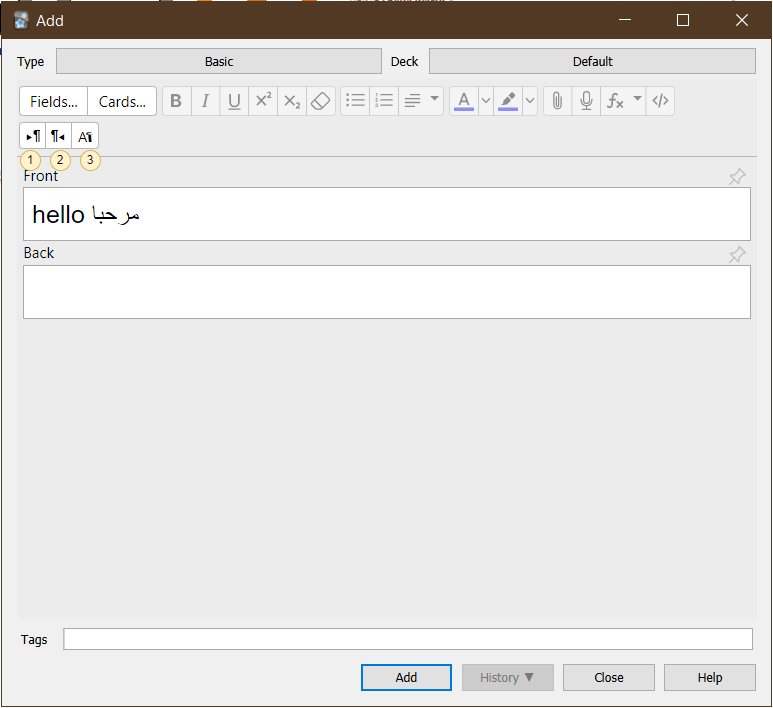
Add-on's buttons in the editor

The following actions are available in the editor:

  1. Left-To-Right: Apply left-to-right direction to the entire line where the cursor is currently at (technically, it modifies the HTML block element surrounding the text)
  2. Right-To-Left: Ditto, but for RTL.
  3. More options under the third icon:
    • LTR Selected: Apply left-to-right to direction to the selected text only.
    • RTL Selected: Ditto, but for RTL.
    • Insert Characters: A menu for inserting common Unicode characters used to affect text directionality. You probably don't need to use any of these as the previous options should cover most cases, but see https://en.wikipedia.org/wiki/Bidirectional_text#Unicode_bidi_support for an explanation of the characters.

Translations

The add-on is localized to English and Arabic. You can help translate the add-on to your langauge and send me the translated strings and I will include them (or you can open a PR if you're technical). There are only a few strings to translate. See i18n.py for a list of the strings and how they are defined for each language.

Support

Please report issues and suggestions on the support page.

Support me

Consider supporting me on Ko-fi or Patreon if you like my add-ons: Buy Me a Coffee at ko-fi.com

README

BiDi Tools For Anki

An add-on for Anki that adds some editor tools for bidirectional text (BiDi)—text containing different types of alphabets that have different directionalities (e.g. mixed English and Arabic text).

Anki already provides an option to set each field's direction under the Fields screen, and modern systems do a decent job handling mixed text thanks to the Unicode Bidirectional Algorithm, but there are cases when it's necessary to explicitly specify the direction of certain parts of the field text because of limitations in what the algorithm can do automatically.

BiDi Intro

You can read some incomplete notes I've written about the BiDi algorithm in technical.md

Usage

The add-on provides buttons to set the direction of the selected text to either LTR (left to right, like the Latin script and most scripts), or RTL (right to left, like in Arabic, Hebrew, Persian, etc.)

Add-on's buttons in the editor

The following actions are available in the editor:

  1. Left-To-Right: Apply left-to-right direction to the HTML block element surrounding the selected text (if any). If you're not familiar with HTML, you can think of this as roughly setting the direction of the entire line where the cursor is currently at.
  2. Right-To-Left: Ditto, but for RTL.
  3. More options under the third icon:
    • LTR Selected: Apply left-to-right to direction to the selected text only.
    • RTL Selected: Ditto, but for RTL.
    • Insert Characters: A menu for inserting common Unicode characters used to affect text directionality. You probably don't need to use any of these as the previous options should cover most cases, but see https://en.wikipedia.org/wiki/Bidirectional_text#Unicode_bidi_support for an explanation of the characters.

AnkiWeb

You can download the add-on from AnkiWeb: https://ankiweb.net/shared/info/281067366

Translations

The add-on is localized to English and Arabic. You can help translate the add-on to your langauge and send me the translated strings and I will include them (or you can open a PR if you're technical). There are only a few strings to translate. See i18n.py for a list of the strings and how they are defined for each language.

Support me

Consider supporting me on Ko-fi or Patreon if you like my add-ons:

Buy Me a Coffee at ko-fi.com

I'm also available for freelance add-on development at Fiverr: