Multiple Choice for Anki

AnkiWeb addon 1566095810

2 other versions of this addon exist. Compare versions ↓

Adds multiple-choice, single-choice, and Kprim question cards to Anki, reviewable across platforms, with configurable answer styling and automatic correctness highlighting.
AI-generated summary; may contain mistakes.

formattingcard-templatesquizmobile-compatible

Open on AnkiWeb GitHub Find alternatives

AnkiWeb

Votes
242 (πŸ‘ 168 Β· πŸ‘Ž 74)
Updated
2023-11-17
Anki versions
23.10.1~
License
AGPL-3.0 (from the license file in the package)
Virus scan
No ClamAV match A match does not prove malware. No match does not prove that the code is safe.
Languages
Python, Vue, CSS, JSON
Description language
en

Maintenance

stale

  • Last update or commit: 2025-10-06 (391 days before the snapshot).
  • Test files: 1.
  • GitHub Actions workflows: 1.
  • Commits in the last year: 0.
  • Issues: 31 open, 91 closed.
  • Pull requests: 0 open, 25 merged.
  • Median first response: 36 hours (101 answered issues and pull requests).
  • Outside pull requests: 73% of 11 merged.
  • Forks that may still be maintained: "multiple choice with 12 options" (1573325751), "Multiple Choice Extended" (1744375818).

GitHub

Repository
zjosua/anki-mc Β· more by zjosua
Stars
⭐ 62 · forks 20 · open issues 31
Last commit
2025-10-06
License
AGPL-3.0
Languages
Python, HTML, CSS
Tests
1

Will it work on my Anki?

Version branches
Min AnkiMax AnkiUpdated
2.1.442.1.542023-11-12
2.1.5523.10.1+2023-11-17
History across monthly snapshots

Loading…

Compare versions

The original addon and its forks. The best value in each column is in bold.

VersionWorks on Anki 26.09.3MaintenanceLast activity VotesApprovalGitHub starsNotes
Multiple Choice for Anki this addon original likely stale 6 Oct 2025 πŸ‘ 168 Β· πŸ‘Ž 74 63% 62
↳ multiple choice with 12 options unknown stale 4 Feb 2025 πŸ‘ 27 Β· πŸ‘Ž 0 88% 1
↳ Multiple Choice Extended supported active 13 May 2026 πŸ‘ 0 Β· πŸ‘Ž 0 – 1

Forks can add features or work in a different way. Read the description before you change to another version. Fork detection is incomplete, so other versions can exist.

Similar addons

MCQ Generator

Creates and reviews single- and multiple-choice questions in Anki with an exam-style interface showing your selections, correct answers, color-coded feedback, and optional explanations.

card-creationreview-flowcard-templatesquiz

7 votes 25% approval πŸ‘ 4 Β· πŸ‘Ž 3 ⭐ 3 Anki 23.10~ Updated 2026-01-07
Multiple Choice Note Type

Provides a multiple-choice note type with radio or checkbox answers, configurable shuffling, answer letters, text-to-speech, reference and explanation fields.

card-templatesquiz

27 votes 68% approval πŸ‘ 23 Β· πŸ‘Ž 4 ⭐ 4 Anki 2.1.1~ Updated 2025-02-26
Multiple Choice [UPDATED AS OF 2.1.29]

Creates multiple-choice Anki cards with randomized answer choices, configurable field prefixes, and highlighted correct answers, though it is incompatible with Anki mobile versions and multi-answer selection.

card-templatesquizfork-or-reupload

37 votes 38% approval πŸ‘ 20 Β· πŸ‘Ž 17 Anki 2.1.29~ Updated 2020-09-03

Description

Adds multiple choice cards to Anki.

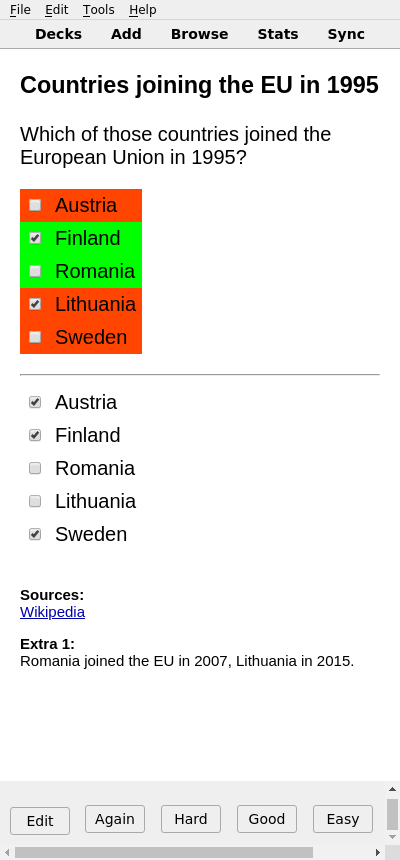
SCREENSHOTS
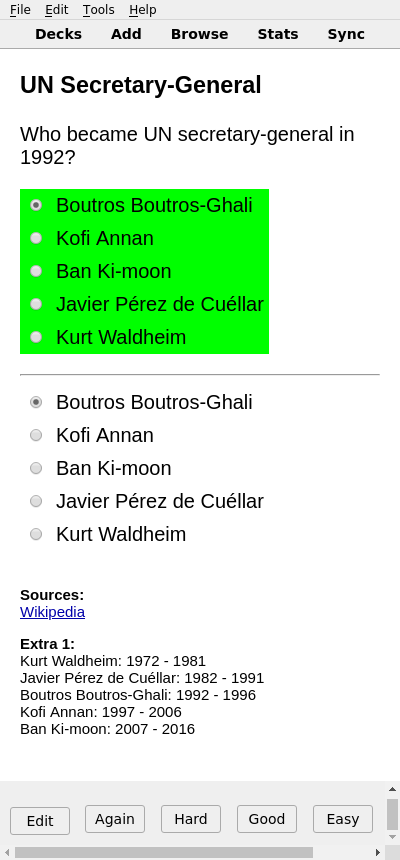
COMPATIBILITY

Anki 2.1.55 or higher is required for the most recent version of this add-on to work. For Anki 2.1.44 to 2.1.54, you can use v2.8.0 (or lower) of the add-on.

Cards created with this add-on can be reviewed with all Computer and mobile apps and on AnkiWeb.

USAGE

Creating / Editing

The note type is automatically added the first time you start Anki after installing the add-on.

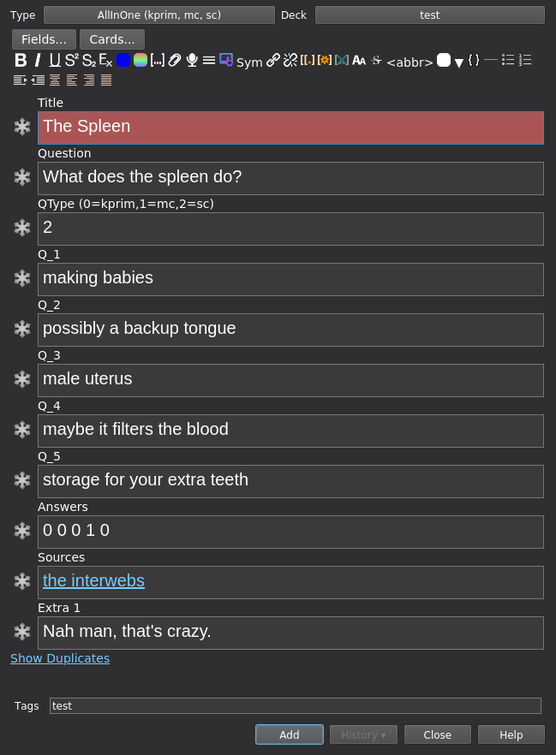
When creating cards, write a "1" for correct choices or a "0" for incorrect choices in the "Answers" field. The question type can be selected with the field "QType". It can be either 0 (Kprim), 1 (Multiple Choice) or 2 (Single Choice). The Screenshots section shows how the question types look. These values in the "Answer" field must be separated by a single space. The order and number of values in the "Answer" field must correspond with the choices "Q_1" to "Q_5". If you don't need all the choices, just leave the remaining "Q_" fields blank and only enter as many values as you need in the "Answers" field.
Reviewing

Select the correct and incorrect choices accordingly and click "Show Answer". The add-on will automatically style your choices based on whether you answered correctly or not.

Addon Config

If you want to change the way your answers are styled (e.g. color green what you should have chosen instead of what you have chosen correctly) you can use the addon's config to switch between different styles: (Tools -> Addons -> "Select the multiple choice addon" -> Config)

Known Issues

LICENSE AND CREDITS

Multiple Choice for Anki is Copyright Β© 2023 3ter and zjosua

It is licensed under the AGPLv3. For more information refer to the LICENSE file.

A bunch of code in this add-on is based on the Anki add-ons Image Occlusion Enhanced and Cloze Overlapper by Glutanimate. Click here to support Glutanimate's work.

Persistence is achieved using the code from Simon Lammer's anki-persistence. Great work Simon!

Hax merged my Multiple Choice card template with Simon Lammer's persistence code. He also reworked my card templates into one single all-in-one template. Thanks a lot!

Simon's and Hax's work made the multiple choice cards compatible with all platforms.

Volker Umpfenbach contributed a change that allows to customize how the questions and answers are colorized. He also provided the code to calculate and display the percentage of correctly answered items per question.

This add-on uses the packaging library.

SUPPORT

Please use the issue tracker on GitHub if you run into any issues.

README

anki-mc

Adds multiple choice cards to Anki.

Screenshots

Single Choice Multiple Choice Kprim

Compatibility

Anki 2.1.55 or higher is required for the most recent version of this add-on to work. For Anki 2.1.44 to 2.1.54, you can use v2.8.0 (or lower) of the add-on.

Cards created with this add-on can be reviewed with all Computer and mobile apps and on AnkiWeb.

Usage

Creating / Editing

The note type is automatically added the first time you start Anki after installing the add-on.

When creating cards, write a "1" for correct choices or a "0" for incorrect choices in the "Answers" field. The question type can be selected with the field "QType". It can be either 0 (Kprim), 1 (Multiple Choice) or 2 (Single Choice). The Screenshots section shows how the question types look. These values in the "Answer" field must be separated by a single space. The order and number of values in the "Answer" field must correspond with the choices "Q_1" to "Q_5". If you don't need all the choices, just leave the remaining "Q_" fields blank and only enter as many values as you need in the "Answers" field.

Editing

Reviewing

Select the correct and incorrect choices accordingly and click "Show Answer". The add-on will automatically style your choices based on whether you answered correctly or not.

Addon Config

If you want to change the way your answers are styled (e.g. color green what you should have chosen instead of what you have chosen correctly) you can use the addon's config to switch between different styles: Addon Config Window (Tools -> Addons -> "Select the multiple choice addon" -> Config)

Known Issues

License and Credits

Multiple Choice for Anki is Copyright Β© 2023 3ter and zjosua

It is licensed under the AGPLv3. For more information refer to the LICENSE file.

A bunch of code in this add-on is based on the Anki add-ons Image Occlusion Enhanced and Cloze Overlapper by Glutanimate. Click here to support Glutanimate's work.

Persistence is achieved using the code from Simon Lammer's anki-persistence. Great work Simon!

Hax merged my Multiple Choice card template with Simon Lammer's persistence code. He also reworked my card templates into one single all-in-one template. Thanks a lot!

Simon's and Hax's work made the multiple choice cards compatible with all platforms.

Volker Umpfenbach contributed a change that allows to customize how the questions and answers are colorized. He also provided the code to calculate and display the percentage of correctly answered items per question.

This add-on uses the packaging library.