Multiple Choice Note Type

AnkiWeb addon 1859136708

Provides a multiple-choice note type with radio or checkbox answers, configurable shuffling, answer letters, text-to-speech, reference and explanation fields.
AI-generated summary; may contain mistakes.

card-templatesquiz

Open on AnkiWeb GitHub Find alternatives

AnkiWeb

Votes
27 (πŸ‘ 23 Β· πŸ‘Ž 4)
Updated
2025-02-26
Anki versions
2.1.1~
License
GPL-3.0 (from the license file in the package)
Virus scan
No ClamAV match A match does not prove malware. No match does not prove that the code is safe.
Languages
HTML, Python, CSS, JSON
Description language
en

Maintenance

stale

  • Last update or commit: 2025-02-26 (613 days before the snapshot).
  • Commits in the last year: 0.
  • Issues: 6 open, 5 closed.
  • Pull requests: 1 open, 0 merged.
  • Median first response: 1884 hours (9 answered issues and pull requests).

Will it work on my Anki?

Version branches
Min AnkiMax AnkiUpdated
2.1.0–2025-02-26
2.1.1+2025-02-26
History across monthly snapshots

Loading…

Similar addons

Multiple Choice [UPDATED AS OF 2.1.29]

Creates multiple-choice Anki cards with randomized answer choices, configurable field prefixes, and highlighted correct answers, though it is incompatible with Anki mobile versions and multi-answer selection.

card-templatesquizfork-or-reupload

37 votes 38% approval πŸ‘ 20 Β· πŸ‘Ž 17 Anki 2.1.29~ Updated 2020-09-03
Simple Multiple Choice by Denis

Converts Anki cards into interactive multiple-choice quizzes with up to five options, optional shuffling and explanations, colour-coded selected-answer feedback, image support, and customizable settings.

card-templatesquizmobile-compatible

31 votes 71% approval πŸ‘ 27 Β· πŸ‘Ž 4 Anki 25.02.4~ Updated 2026-09-29
Quizlet Learn Mode Mimic

Mimics Quizlet's Learn Mode in Anki with progressive multiple-choice, true/false, typing and matching phases, plus cloze support, text-to-speech, and per-note-type configuration.

review-flowgamificationclozequiz

4 votes 51% approval πŸ‘ 4 Β· πŸ‘Ž 0 Anki 2.1.1~ Updated 2026-07-20
MCQ Generator

Creates and reviews single- and multiple-choice questions in Anki with an exam-style interface showing your selections, correct answers, color-coded feedback, and optional explanations.

card-creationreview-flowcard-templatesquiz

7 votes 25% approval πŸ‘ 4 Β· πŸ‘Ž 3 ⭐ 3 Anki 23.10~ Updated 2026-01-07

Description

This add-on provide a Multiple Choice Note Type

Radio Format

Checkbox Format

Shuffle Enabled

Fields

  • number: Question Number
  • question: Question
  • a, b, c, d, e, f, g, h, i, j: The list of answers
  • answers: Correct answers (Delimiter: commas(,)) - More than one answers show as Checkbox format, otherwise, Radio format
  • ref: Reference
  • explanation: Explanation Box

Example - Radio Format

Example - Checkbox Format

Example - Limit The Number of Choice

  • You may leave the answer field empty to hide the choice.

Configuration

How?

Tools -> Add-ons -> Select "Multiple Choice Note Type" -> Config

Change the order of the list of answers.

  • Default - The list of choices is displayed in a fixed order. ( Chnage isShuffle value to false )
  • The list of choices is displayed in a shuffle order. ( Chnage isShuffle value to true )

Change the display of letters of answers.

  • Default - The list of choices is displayed with letters. ( Chnage isDisplayAnswerLetters value to true )
  • The list of choices is displayed without letters. ( Chnage isDisplayAnswerLetters value to false )

Enable / Disable text to speech.

  • Default - Enable text to speech. ( Chnage isTTS value to true )
  • Disable text to speech. ( Chnage isTTS value to false )

Change voice language of text to speech.

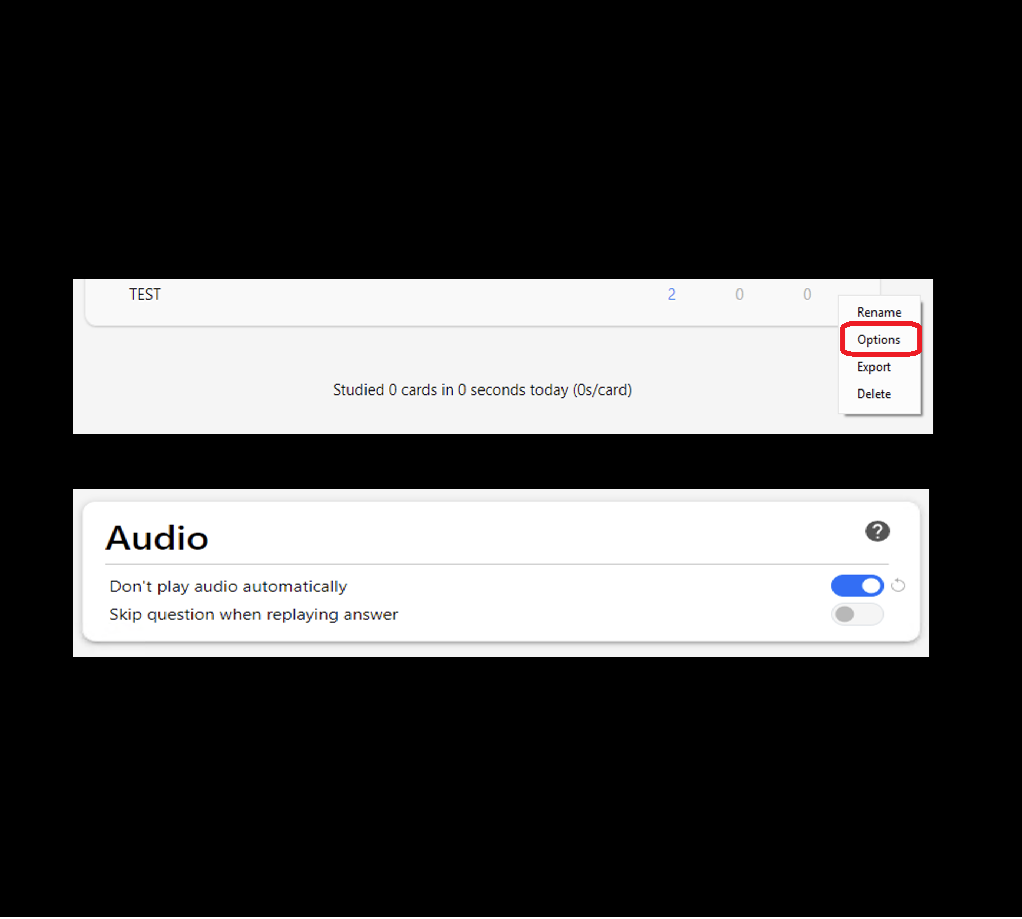
How to set "Don't play audio automatically"

  • In the deck options, Enable Don't play audio automatically under Audio section.

Changelog

V1.0.0 - 2024-08-28

  • First Release of Multiple Choice Note Type

V1.0.1 - 2024-09-11

  • Bugfix - Only one radio button allow select

V1.0.2 - 2025-02-13

  • Enhance - Change the display of letters of answers

V1.0.3 - 2025-02-26

  • Enhance - Allow to enable / disable text to speech
  • Enhance - Allow to change voice language

Author

Jason Leung (jasonlws)

CREDITS AND LICENSE

License File

Source Code

The source code of is available on GitHub.

Bug Reports

Please report any issues via issue tracker on GitHub!

README

anki-addon-mcnt

This add-on provide a Multiple Choice Note Type in Anki (Link)

Radio Format

Checkbox Format

Shuffle Enabled

Fields

  • number: Question Number
  • question: Question
  • a, b, c, d, e, f, g, h, i, j: The list of answers
  • answers: Correct answers (Delimiter: commas(,)) - More than one answers show as Checkbox format, otherwise, Radio format
  • ref: Reference
  • explanation: Explanation Box

Example - Radio Format

Example - Checkbox Format

Example - Limit The Number of Choice

  • You may leave the answer field empty to hide the choice.

Configuration

How?

Tools -> Add-ons -> Select "Multiple Choice Note Type" -> Config

Change the order of the list of answers.

  • Default - The list of choices is displayed in a fixed order. ( Chnage isShuffle value to false )
  • The list of choices is displayed in a shuffle order. ( Chnage isShuffle value to true )

Change the display of letters of answers.

  • Default - The list of choices is displayed with letters. ( Chnage isDisplayAnswerLetters value to true )
  • The list of choices is displayed without letters. ( Chnage isDisplayAnswerLetters value to false )

Enable / Disable text to speech.

  • Default - Enable text to speech. ( Chnage isTTS value to true )
  • Disable text to speech. ( Chnage isTTS value to false )

Change voice language of text to speech.

How to set "Don't play audio automatically"

  • In the deck options, Enable Don't play audio automatically under Audio section.

Changelog

V1.0.0 - 2024-08-28

  • First Release of Multiple Choice Note Type

V1.0.1 - 2024-09-11

  • Bugfix - Only one radio button allow select

V1.0.2 - 2025-02-13

  • Enhance - Change the display of letters of answers

V1.0.3 - 2025-02-26

  • Enhance - Allow to enable / disable text to speech
  • Enhance - Allow to change voice language