Colours of Marked, Suspended, and Flagged Cards

AnkiWeb addon 1590588489

Lets users customize the background colours of marked, suspended, and flag1–4 cards by editing a configuration file with hexadecimal or standard colour names.
AI-generated summary; may contain mistakes.

appearance

Open on AnkiWeb GitHub Find alternatives

AnkiWeb

Votes
10 (👍 8 · 👎 2)
Updated
2019-12-17
Anki versions
<=2.1.22
License
AGPL-3.0 (from the headers of the Python files)
Virus scan
No ClamAV match A match does not prove malware. No match does not prove that the code is safe.
Languages
Python, JSON
Description language
en

Maintenance

abandoned

  • Last update or commit: 2020-01-18 (2479 days before the snapshot).
  • Commits in the last year: 0.
  • Issues: 0 open, 0 closed.
  • Pull requests: 0 open, 0 merged.

Will it work on my Anki?

Version branches
Min AnkiMax AnkiUpdated
2.1.02.1.222019-12-17
History across monthly snapshots

Loading…

Similar addons

ReColor

Customizes Anki desktop colors via a dialog offering preset and custom HTML color themes, advanced options, and downloadable user-shared themes.

appearance

63 votes 83% approval 👍 58 · 👎 5 ⭐ 67 Anki 25.07.5~ Updated 2025-08-11
Flag Column in Browser

Adds a flag column to the Browse window, keeping suspended and buried cards visually distinct, and optionally shows compact state badges in the Sort Field.

appearance

6 votes 61% approval 👍 6 · 👎 0 ⭐ 1 Anki 25.09.2~ Updated 2026-06-02
Custom Background Image and Gear Icon

Customizes the main Anki screen with configurable background images and replaces the gear icon, with options for toolbar styling, background color and reviewer images.

appearance

419 votes 86% approval 👍 375 · 👎 44 ⭐ 29 Anki 24.11~ Updated 2025-12-17
(Legacy) Customize Sidebar

Customized the browser sidebar by expanding/collapsing note types, decks and filters and showing/hiding marked, suspended, leech, flags and today; now obsolete since Anki 2.1.41.

appearanceobsolete

92 votes 56% approval 👍 61 · 👎 31 ⭐ 1 Anki <=2.1.40 Updated 2020-01-15
Browser Colors in Notes Mode

Displays flag, buried and suspended colors on note rows in the browser's Notes mode, prioritizing suspended then buried then flagged states, using cached queries for large collections.

searchappearance

3 votes 44% approval 👍 3 · 👎 0 Anki 25.09.2~ Updated 2026-04-03
QuickSearch has 1 fork →

Adds a toggleable quick filter bar to the Browser for filtering due, new, studied, added, introduced, again, flagged, marked, and suspended cards, hiding suspended cards by default.

search

3 votes 44% approval 👍 3 · 👎 0 ⭐ 0 Anki 26.05~ Updated 2026-08-04

Description

As its name suggests, this little addon allows one to change the standard background-colours of cards that are marked, suspended, or equipped with either flag1, flag2, flag3, or flag4. To configure, proceed as follows:
  1. Go to the initial Decks screen.
  2. Click on Tools > Add-Ons (or press ⇧⌘A).
  3. Select Colours of Marked, Suspended, and Flagged Cards.
  4. Select View Files on the lower right side.
  5. Open the file colours_of_cards․py with a text editor.
  6. Choose the desired colours.
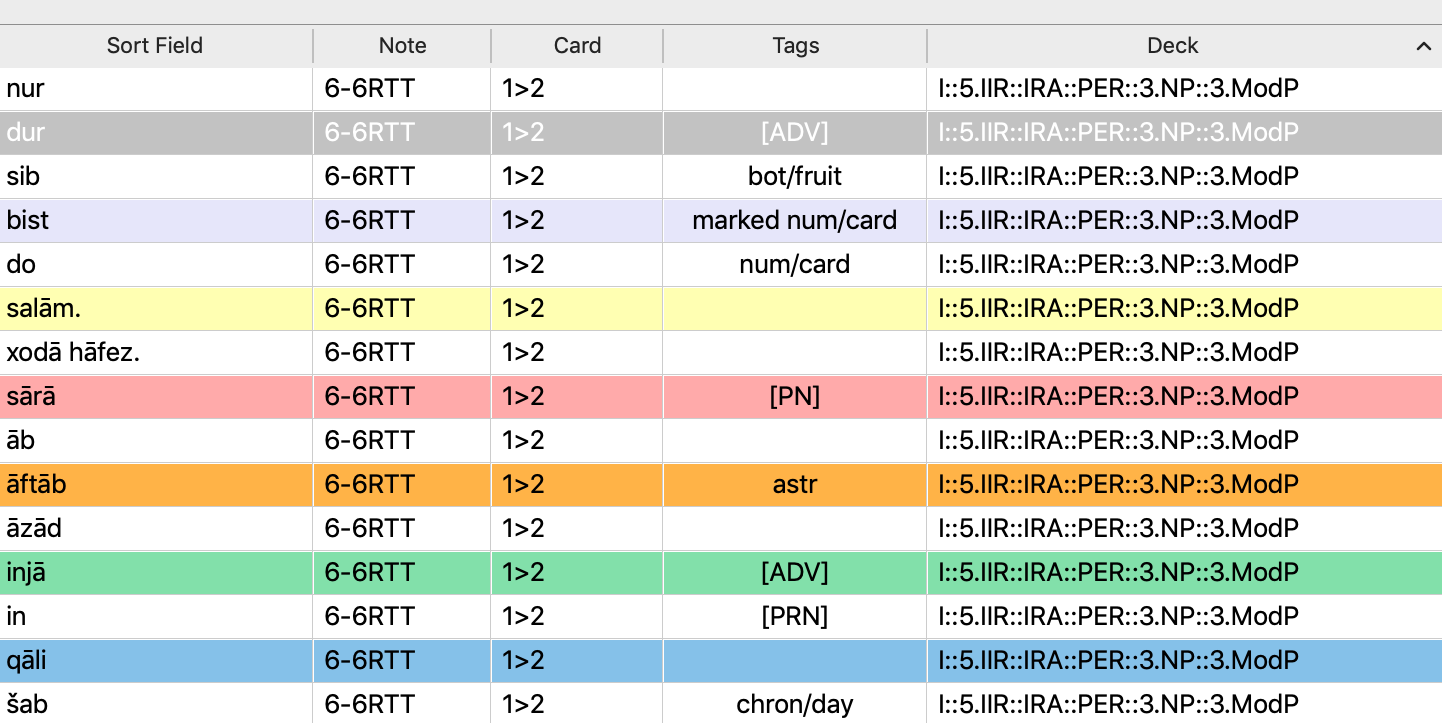
The six colours in question can be specified by using hexadecimal numerals or one of the standard colour names. Upon install, users of Anki 2.1.0–19 will notice only one change: marked cards appear no longer in grey (#cccccc) – which made it difficult to distinguish them from selected cards, painted in dark grey – but in lavender (#e6e6fa). In the example shown below, for instance, you may see that the line starting with the word “dur” is currently selected (and thus grey), whereas the line starting with “bist” is marked (and thus lavender). This change has now been incorporated into Anki 2.1.20ff. The five following coloured lines have the standard colours for suspension and flags 1 to 4.
Please rate the addon, so that others can see if it works as described. For suggestions, etc., create a new issue at github.com/schmidhauser.  

README

Colours of Marked, Suspended, and Flagged Cards

As its name suggests, this little addon allows one to change the standard background-colours of cards that are marked, suspended, or equipped with either flag1, flag2, flag3, or flag4.

To configure, proceed as follows:

  1. Go to the initial Decks screen.
  2. Click on Tools > Add-Ons (or press ⇧⌘A).
  3. Select Colours of Marked, Suspended, and Flagged Cards.
  4. Select View Files on the lower right side.
  5. Open the file colours_of_cards․py with a text editor.
  6. Choose the desired colours.
The six colours in question can be specified by using hexadecimal numerals or one of the standard colour names.

Upon install, there is only one immediately noticeable change: marked cards appear no longer in grey (#cccccc) – which made it difficult to distinguish them from selected cards, painted in dark grey – but in lavender (#e6e6fa). In the example shown infra, for instance, you may see that the line starting with the word “dur” is currently selected (and thus grey), whereas the line starting with “bist” is marked (and thus lavender). The five following coloured lines have the standard colours for suspension and flags 1 to 4.