Batch Edit Tools

AnkiWeb addon 1609139780

Batch adds tags from vocabulary lists, replaces or clears specified field content, and fetches word pronunciations via API into card fields.
AI-generated summary; may contain mistakes.

sync-integrationnote-managementtagging

Open on AnkiWeb GitHub Find alternatives

AnkiWeb

Votes
4 (๐Ÿ‘ 3 ยท ๐Ÿ‘Ž 1)
Updated
2024-05-26
Anki versions
23.09~
License
GPL-3.0 (from the GitHub repository)
Virus scan
No ClamAV match A match does not prove malware. No match does not prove that the code is safe.
Languages
Python
Description language
en

Maintenance

stale

  • Last update or commit: 2025-07-11 (478 days before the snapshot).
  • Commits in the last year: 0.
  • Issues: 0 open, 1 closed.
  • Pull requests: 0 open, 0 merged.
  • Median first response: 2062 hours (1 answered issues and pull requests).

Will it work on my Anki?

Version branches
Min AnkiMax AnkiUpdated
2.1.6023.09+2024-05-26
History across monthly snapshots

Loadingโ€ฆ

Similar addons

Batch Editing has 1 fork โ†’

Adds a card browser menu item for batch-adding information or media to a field and batch-replacing field contents across selected notes.

note-management

197 votes 95% approval ๐Ÿ‘ 193 ยท ๐Ÿ‘Ž 4 โญ 19 Anki 23.10~ Updated 2023-10-26
Korean Native Audio

Fetches recorded Korean dictionary pronunciations into chosen Anki fields, with configurable note-type mappings, optional ElevenLabs text-to-speech, and Naver, KRDICT, and Forvo sources.

card-creationsync-integrationdictionary

6 votes 44% approval ๐Ÿ‘ 5 ยท ๐Ÿ‘Ž 1 โญ 0 Anki 25.09.4~ Updated 2026-07-29
AI-Hints and Options

Generates AI hints and multiple-choice options for flashcards during review, with multi-provider fallback, batch generation, inline editing, undo, and mobile support.

aischedulingreview-flowquizmobile-compatible

4 votes 30% approval ๐Ÿ‘ 3 ยท ๐Ÿ‘Ž 1 โญ 2 Anki 26.05~ Updated 2026-10-31

Description

Batch add tags according to the specified vocabulary list, batch changes the content of the field.

If you have a need to batch edit card tag or field or audio, you should try this plugin.

----------------------------------------------------------------------------

NOTE: The plug-in only in the windows operating system has been tested, the test text for the English language, if you edit the text of other languages, please make a backup first!

----------------------------------------------------------------------------

Tested version:

Win 11 23H2(10-10.0.22621), Anki 23.10.1 (Pyqt6), Python 3.9.15 Qt 6.6.0 PyQt 6.6.0

Win 10 22H2(10-10.0.19045), Anki 2.1.61 (Pyqt5), Python 3.9.15 Qt 6.4.2 PyQt 6.4.0

Win 10 21H2(10-10.0.22621), Anki 23.10.1 (Pyqt6), Python 3.9.15 Qt 5.15.2 PyQt 5.15.5

----------------------------------------------------------------------------

white black

----------------------------------------------------------------------------

Plugin Launch Portal:

black

----------------------------------------------------------------------------

Batch add tags according to the specified vocabulary list.

black

Filter the cards according to the specified tags, then look up the contents of the card field, compare it with the word list, and add the specified tags to this card after a successful match.

The tag item is optional, it can make the search to the scope of more accurate, if you want to find the card does not contain the tag can be unselected.

As you can see, the word list file only supports the .txt .xls .xlsx file format.

For .xls .xlsx files, the plug-in reads only the first column of the first sheet.

Please check your list of words carefully to make sure each is a complete word!

You need to reopen the browser window to see the new add tags.

----------------------------------------------------------------------------

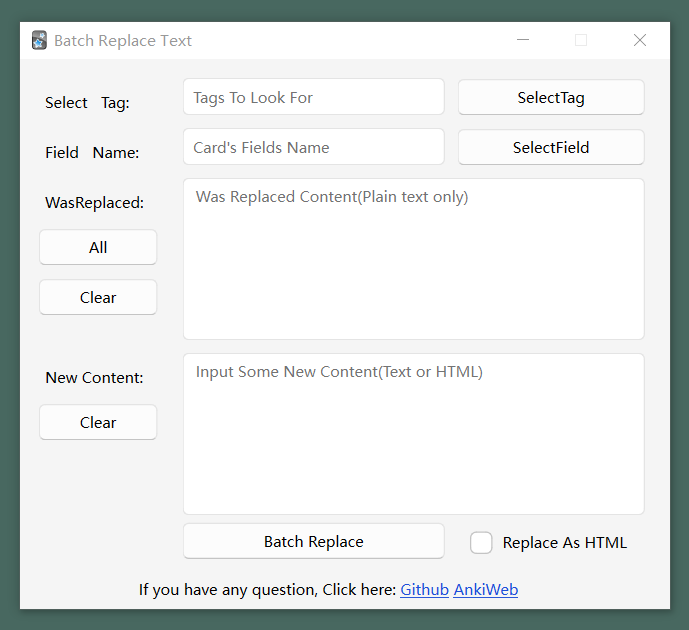
Batch Replaces(or Empty ) the contents of the specified fields.
black

NOTE: If the field contains hypertext elements such as HTML, you need to be aware that incorrect text substitution can cause display problems for your card!

Filter the cards according to the specified tags, find the text of the specified fields in the card, and match the part of the text to be replaced.

Some Additional Features:

Batch Empty Field Content: Clicking the AllContent button will populate the totally-all-content character, the plugin will select the content of the specified field of the card, and if the Input New Some Content text box is left empty, it will perform a field clearing operation.

----------------------------------------------------------------------------

Batch add word pronunciations based on API.

black

Get the pronunciation of the word through the API, then save the media file locally and add the media file to the specified field of the card.

The plugin uses Youdao's API by default, you can also use other APIs, but be careful to make sure the format matches. The plugin gets the address of the audio file in the format api_link + word + sound_type, which will eventually be combined into a link that can be accessed in the browser, all the plugin does is to simulate accessing and saving the file in the browser.

----------------------------------------------------------------------------

If you trigger this error message, don't worry, the plugin will still work fine, I haven't figured out what's going on yet.

Caught exception:
Traceback (most recent call last):
File "aqt.main", line 275, in on_focus_changed
File "_aqt.hooks", line 3460, in __call__
File "aqt.main", line 822, in on_focus_did_change
AttributeError: 'QObject' object has no attribute 'window'

If you trigger another bug, please copy the detailed error message and submit an issue in Github and I'll fix it as soon as possible.

----------------------------------------------------------------------------

If this plugin has helped you, please don't be stingy with your compliments, I'll be very happy!

README

Batch Edit Tools

็ฎ€ไฝ“ไธญๆ–‡ | English

If you have a need to batch edit card tag or field or audio, you should try this plugin.

NOTE: The plug-in only in the windows operating system has been tested, the test text for the English language, if you edit the text of other languages, please make a backup first!

Tested version:

Win 11 23H2(10-10.0.22621), Anki 23.10.1 (Pyqt6), Python 3.9.15 Qt 6.6.0 PyQt 6.6.0
Win 10 22H2(10-10.0.19045), Anki 2.1.61 (Pyqt5), Python 3.9.15 Qt 6.4.2 PyQt 6.4.0
Win 10 21H2(10-10.0.22621), Anki 23.10.1 (Pyqt6), Python 3.9.15 Qt 5.15.2 PyQt 5.15.5

white black

Plugin Launch Portal:

black

Batch add tags according to the specified vocabulary list.

black

Filter the cards according to the specified tags, then look up the contents of the card field, compare it with the word list, and add the specified tags to this card after a successful match.

The tag item is optional, it can make the search to the scope of more accurate, if you want to find the card does not contain the tag can be unselected.

As you can see, the word list file only supports the .txt .xls .xlsx file format.

For .xls .xlsx files, the plug-in reads only the first column of the first sheet.

Please check your list of words carefully to make sure each is a complete word!

You need to reopen the browser window to see the new add tags.


Batch Replaces(or Empty ) the contents of the specified fields.

black

NOTE: If the field contains hypertext elements such as HTML, you need to be aware that incorrect text substitution can cause display problems for your card!

Filter the cards according to the specified tags, find the text of the specified fields in the card, and match the part of the text to be replaced.

Batch Empty Field Content: Clicking the All button will populate the totally-all-content character, the plugin will select the content of the specified field of the card, and if the Input New Some Content text box is left empty, it will perform a field clearing operation.


Batch add word pronunciations based on API.

black

Get the pronunciation of the word through the API, then save the media file locally and add the media file to the specified field of the card.

The plugin uses Youdao API by default, you can also use other APIs, but be careful to make sure the format matches. The plugin gets the address of the audio file in the format api_link + word + sound_type, which will eventually be combined into a link that can be accessed in the browser, all the plugin does is to simulate accessing and saving the file in the browser.


If you trigger this error message, don't worry, the plugin will still work fine, I haven't figured out what's going on yet.

Caught exception:
Traceback (most recent call last):
  File "aqt.main", line 275, in on_focus_changed
  File "_aqt.hooks", line 3460, in __call__
  File "aqt.main", line 822, in on_focus_did_change
AttributeError: 'QObject' object has no attribute 'window'

If you trigger another bug, please copy the detailed error message and submit an issue, and I'll fix it as soon as possible.


Gets the plug-in installation number: AnkiWeb