find-replace-tags
Find and Replace Tags in Anki using Regular Expressions.
This add-on supports Anki 2.1.28 to 2.1.44. Starting with version 2.1.45, RegEx replacing for tags is possible with vanilla Anki.
Features
- Full RegEx support (including backreferencing)
- Live preview
- Search history

Download
You can download the add-on via Ankiweb or build it from Github.
Usage
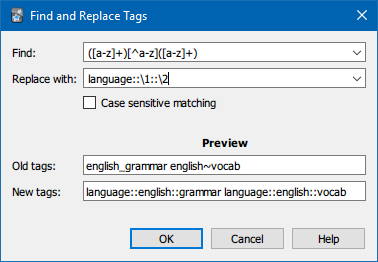
In the browser, select the notes whose tags you want to edit. Then, choose “Find and Replace Tags (RegEx)” in the “Notes“ menu or use the shortcut Ctrl+Alt+Shift+R to open the Find and Replace dialog. Here you can type in the search and replacement patterns, toggle case sensitivity and enter arbitrary tags to preview how they would be changed. You will be able to confirm the Dialog only while both RegEx fields contain compilable patterns. When editing has completed, a brief summary is shown and you have the option to clear unused tags to reflect the changes in the browser's tag list.
About Tags
Tags are Anki's straightforward way to organise notes independently of the deck structure. When editing them you should be aware that they are space-seperated and case-insensitive. So “foo bar” is a list of two tags and “Foo” is the same tag as “foo”.
With tags you can browse your collection, create custom studies and keep track of certain notes without splitting your collection into subdecks (which is advised against). To make best use of them, one of Anki's most popular add-ons allows you to have hierarchical tags.
About Regular Expressions (RegEx)
RegEx are a powerful tool in analysing and manipulating text-based data. If you have never heard of them before, you might want to check out one of the many excellent resources on the internet to learn about them. But while every decent word processor supports their usage, the syntax often differs slightly. You can find a Python-specific introduction here (note, though, that it covers far more than you need to know to make use of this add-on).
Support
I appreciate bug reports and feedback on Github or the Anki forum. Feel free to ask for help there as well.
License
Copyright © 2020 RumovZ
This program is free software: you can redistribute it and/or modify it under the terms of the GNU Affero General Public License as published by the Free Software Foundation, either version 3 of the License, or (at your option) any later version.
This program is distributed in the hope that it will be useful, but WITHOUT ANY WARRANTY; without even the implied warranty of MERCHANTABILITY or FITNESS FOR A PARTICULAR PURPOSE. See the GNU Affero General Public License for more details.
 Installation
You can install the add-on via Ankiweb or build it from Github.
Usage
In the browser, select the notes whose tags you want to edit. Then, choose “Find and Replace Tags (RegEx)” in the “Notes“ menu or use the shortcut Ctrl+Alt+Shift+R to open the Find and Replace dialog. Here you can type in the search and replacement patterns, toggle case sensitivity and enter arbitrary tags to preview how they would be changed. You will be able to confirm the Dialog only while both RegEx fields contain compilable patterns. When editing has completed, a brief summary is shown and you have the option to clear unused tags to reflect the changes in the browser's tag list.
Support
I appreciate bug reports and feedback on GitHub or the Anki forum. Feel free to ask for help and find further information there as well.
Anki 2.1.45+
Starting with version 2.1.45, vanilla Anki supports RegEx replacing for tags. Therefore this add-on will not be updated to work on versions newer than 2.1.44.
License
Copyright © 2020 RumovZ
This program is free software: you can redistribute it and/or modify it under the terms of the GNU Affero General Public License as published by the Free Software Foundation, either version 3 of the License, or (at your option) any later version.
This program is distributed in the hope that it will be useful, but WITHOUT ANY WARRANTY; without even the implied warranty of MERCHANTABILITY or FITNESS FOR A PARTICULAR PURPOSE. See the GNU Affero General Public License for more details.