Refine
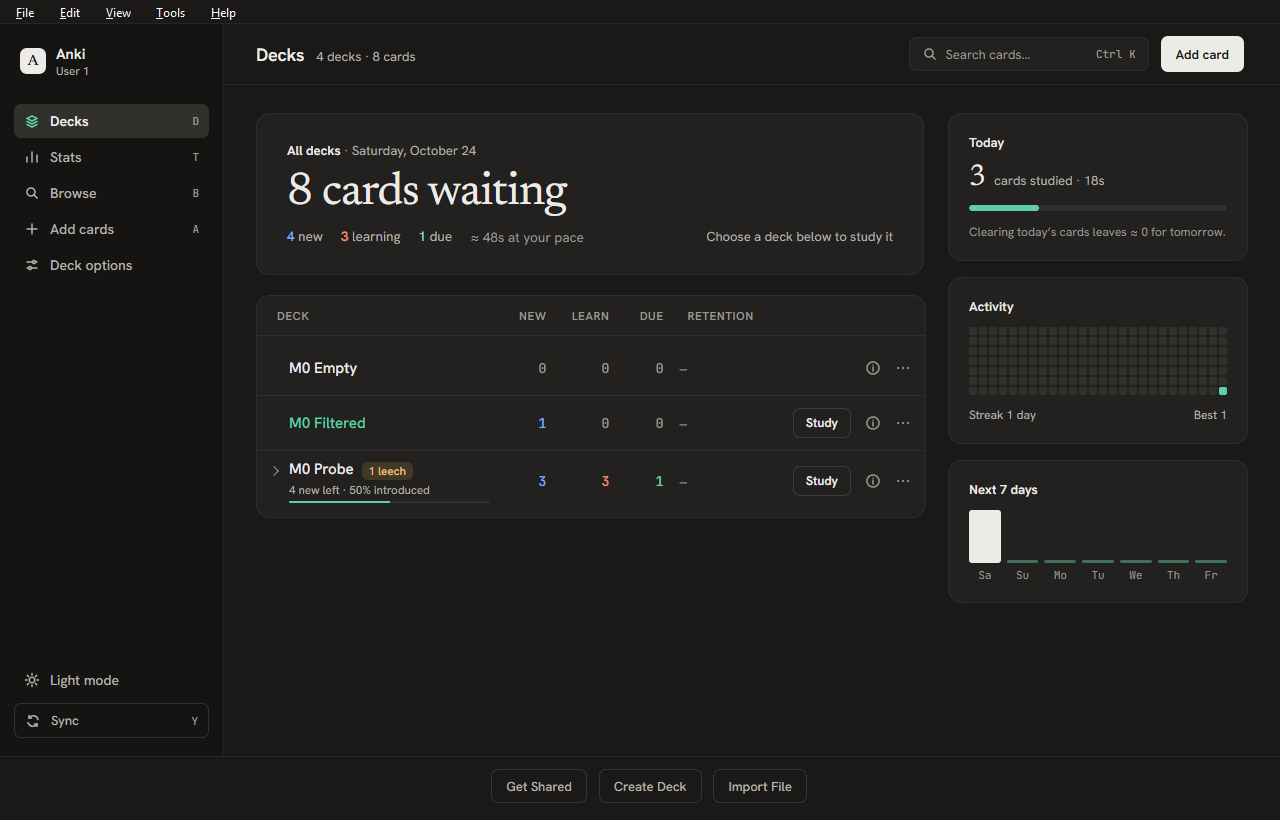
Refine is an add-on for Anki Desktop that gives the home screen, deck overview, toolbar, reviewer answer bar and menus a cleaner, more modern look. It never changes your card templates, your scheduling or your data. Everything it shows is read from Anki's own data, and nothing is written to your collection.

| Home, light |
Deck overview |
 |
 |
| Answer bar (card content untouched) |
Statistics inside the main window |
 |
 |
| Hover any day for its figures |
Settings |
 |
 |
Features
Home screen
- A sidebar with Decks, Stats, Browse, Add cards, Deck options, a light/dark theme switch and Sync, plus a header with card search (Ctrl+K) and Add card.
- A headline with the cards waiting, the new / learning / due counts and how long they'll take at your recent pace. Click anywhere on a deck row to see that deck's numbers and a Study button; click elsewhere or press Esc for all decks again.
- Deck list with a Study button on every deck that has cards waiting, an ⓘ button for the deck overview, and:
- Retention: share of reviews remembered in the last 30 days (Anki's "true retention").
- New cards left: how many new cards remain, the share already introduced and, at a steady pace, when you'll finish.
- Leech warning: a small badge on decks with leech-tagged cards; click it to open those cards in the Browser.
- Side panels (each can be turned off): Today (cards studied, time, progress), Activity (26-week heatmap with streaks) and Next 7 days (forecast). Hover any square or bar for that day's figures.
Studying
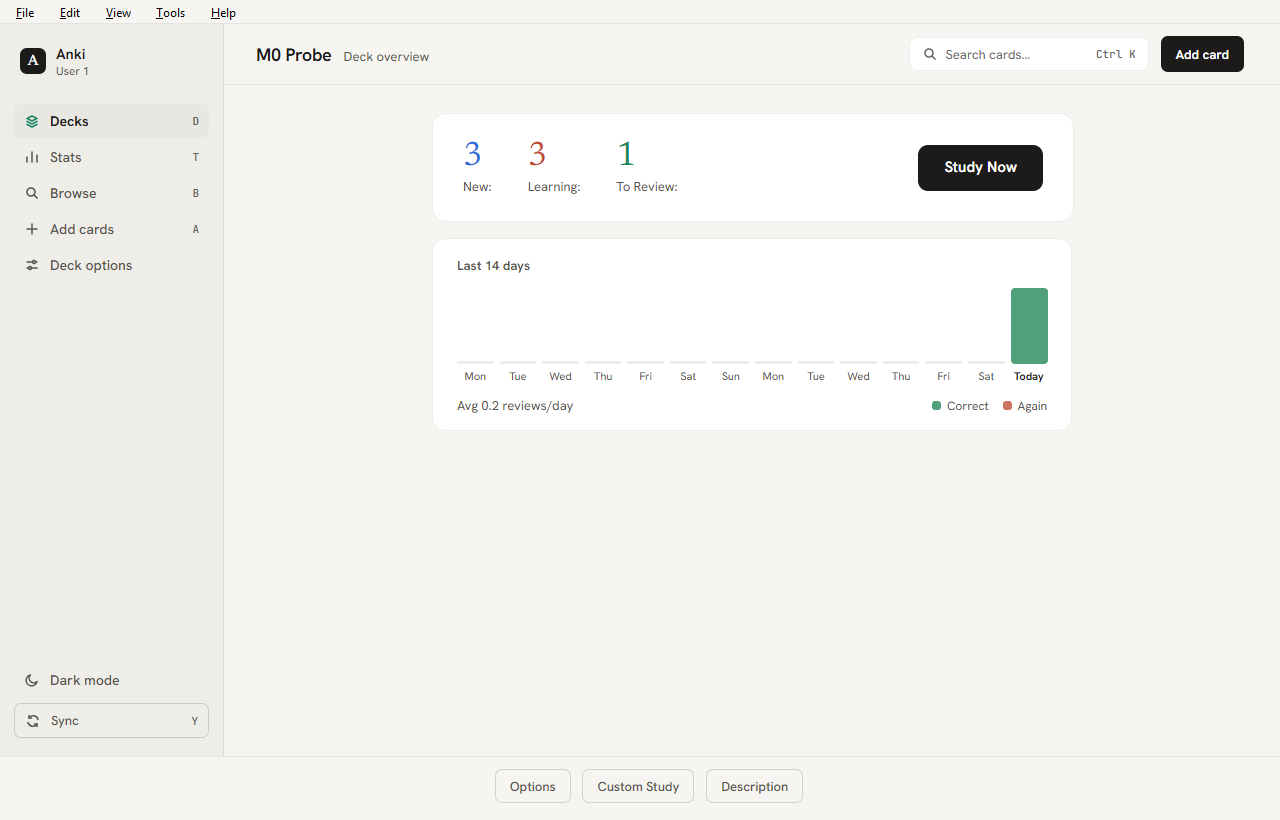
- Deck overview with the counts, a Study Now button and a Last 14 days chart (correct vs. Again, reviews per day, percent correct).
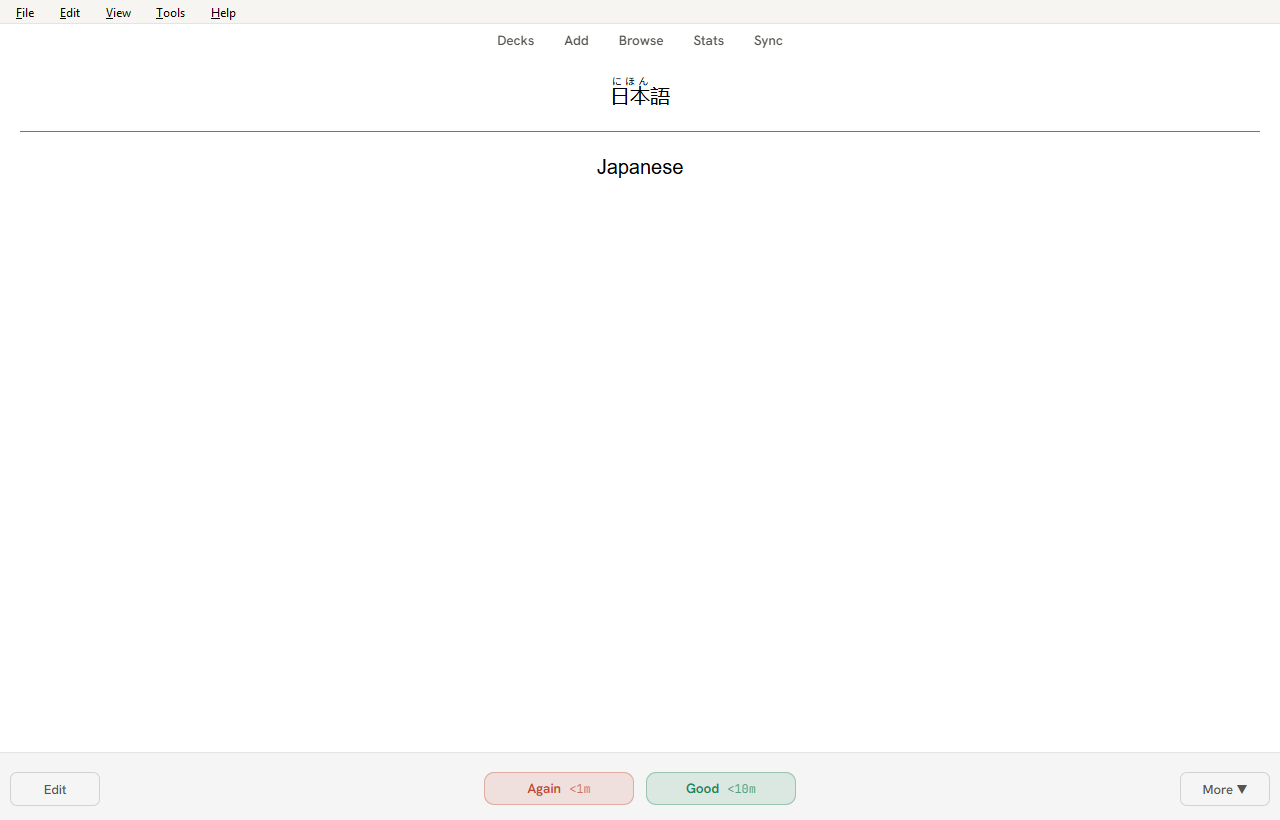
- Answer bar with tinted Again and Good buttons showing the interval inside. Only Again and Good are shown by default; keys 2 and 4 still answer Hard and Easy, and Settings brings all four back.
- A one-line session summary when you finish a deck: cards, time, percent correct, tomorrow's load and your streak.
- Statistics open inside the main window, next to the sidebar, instead of a separate window.
Everywhere
- Light and dark themes follow Anki's own theme setting. Eight accent colours, two densities, and smooth or reduced motion.
- Layouts adapt from a small window up to full screen on large monitors.
- The card browser's table and sidebar, the top toolbar and Qt menus and scrollbars are restyled to match.
- Optional, off by default: Japanese reading polish (a proper Japanese font for
lang="ja" text, tidier furigana, furigana on hover).
- Each screen can be switched off on its own, or all at once with the master switch. If one screen fails, Refine turns just that screen off, logs the error and leaves Anki working normally.
What Refine never touches: your card templates and card content, scheduling, and your collection. Everything it shows is read from Anki's own data; nothing is written.
Compatibility
- Anki Desktop 25.09 to 26.09.3. Other versions are blocked by the manifest or untested.
- Tested on Windows. macOS and Linux are untested; the add-on uses only Anki's public hooks and should work, but no promises.
- Other add-ons that restyle the same screens may conflict. See Troubleshooting.
Install
From AnkiWeb (add-on page): in Anki, open Tools ▸ Add-ons ▸ Get Add-ons…, enter the code 1616260025, and restart Anki.
From GitHub:
- Download
refine-<version>.ankiaddon from the latest release.
- In Anki: Tools ▸ Add-ons ▸ Install from file… and pick the file.
- Restart Anki.
Updating from 0.3.0 or 0.3.1 (Windows, one time only)
If updating Refine shows PermissionError: Access is denied … user_files, that is a bug in those two versions: they keep a log file open, which blocks Anki's update. It is fixed from 0.3.2 on, so you only need to do this once. Your Refine settings are kept.
Method 1: switch Refine off, update, switch it back on
- Tools ▸ Add-ons, click Refine, then Toggle Enabled (right-hand column, below Check for Updates; make the window taller if you can't see it). The list should show Refine (disabled).
- Close Anki completely and start it again.
- Tools ▸ Add-ons, check Refine still says "(disabled)", then Check for Updates and update Refine.
- Click Refine, Toggle Enabled again, and restart Anki.
Method 2: install the file with Anki closed
- Download
refine-0.3.2.ankiaddon (or newer) from the latest release and close Anki completely.
- In PowerShell (change the path if your download isn't in Downloads):
Copy-Item "$env:USERPROFILE\Downloads\refine-0.3.2.ankiaddon" "$env:TEMP\refine.zip"
Expand-Archive "$env:TEMP\refine.zip" -DestinationPath "$env:APPDATA\Anki2\addons21\1616260025" -Force
- Start Anki; Tools ▸ Add-ons should list Refine 0.3.2.
Method 2 assumes you installed from AnkiWeb (folder 1616260025); if you used "Install from file" the folder name differs, so use Method 1.
Settings
Open Tools ▸ Refine ▸ Settings… to choose the accent colour and density, switch screens and home panels on or off, and reset to defaults. Advanced users can edit the same values under Tools ▸ Add-ons ▸ Refine ▸ Config; every key is described there.
Troubleshooting
- See what Refine is doing: Tools ▸ Refine ▸ Diagnostics… shows the Anki version, which screens are active and any screens Refine turned off after an error.
- Log file:
<add-on folder>/user_files/logs/refine.log (open Tools ▸ Add-ons, select Refine, View Files). Include it when reporting a problem.
- A screen looks wrong: turn that screen off in Settings. Reviewing keeps working with the stock look.
- Anki will not start normally: hold Shift while Anki starts to run with all add-ons disabled, then disable or delete Refine in Tools ▸ Add-ons.
- Conflict with another add-on: disable the other add-on (or Refine) and restart to see which one is responsible.
Rollback and uninstall
- Quick: turn off the master switch in Settings, or untick Refine in Tools ▸ Add-ons, then restart Anki.
- Remove: select Refine in Tools ▸ Add-ons and choose Delete. Refine stores nothing in your collection, so decks, cards, scheduling and sync are unaffected and there is nothing to clean up.
- Older version: install the earlier
.ankiaddon file over the current one.
Privacy
Refine makes no network requests and sends no data anywhere. Settings live in Anki's add-on config and the log stays on your computer.
License
Refine is licensed under the GNU Affero General Public License v3.0, the same licence as Anki. Bundled fonts (Hanken Grotesk, JetBrains Mono, Newsreader) are under the SIL Open Font License; copies are in src/refine/LICENSES/.
Development
Design and plan: PLAN.md. Milestone 0 verification: docs/M0-REPORT.md. Change history: CHANGELOG.md.
Setup (Windows; macOS/Linux use the same commands)
Requirements: Python 3.10–3.13 on PATH (py), Git. An installed Anki is optional.
py scripts/devenv.py venvs          # PyPI builds of Anki 25.09.5 and 26.09.3 in .venv/
py scripts/devenv.py targets        # shows which Anki builds were found
Run a dev Anki
py scripts/devenv.py run 26.09.3-installed --port 8080
- Uses an isolated base folder
.anki-dev/<target>/. Your normal profile is never opened, and a running Anki is left alone.
addons21/refine is a junction/symlink to src/refine. Edit, then restart Anki.- Webview DevTools: open
http://127.0.0.1:8080 in Chrome or Edge.
- Targets:
26.09.3-installed (official installer), 26.09.3-pypi, 25.09.5-pypi.
Snapshots and contract tests
py scripts/devenv.py snapshot --all              # drives each Anki build, captures HTML, writes docs/M0-RESULTS.md
py -m unittest discover -s tests -t .            # selector contract + unit tests (no Anki needed)
snapshot seeds a throwaway collection in .anki-dev/<target>/. It deletes and recreates that folder on every run. Never point it at real data. The probe refuses to run outside .anki-dev.
Screenshots
py scripts/devenv.py shots 26.09.3-installed # add --keep-profile to reuse .anki-dev/<target>
Launches an isolated Anki with the dev-only refine_ui_probe add-on, which seeds the throwaway collection and writes full-window PNGs (light_/dark_ + deck_browser, deck_browser_narrow, overview, reviewer_question, reviewer_answer, settings) plus shots.json and anki-console.log to out/ui/<target>/ (git-ignored). The settings shot is skipped if the add-on exposes no _ctx.
Build a release file
py scripts/build.py            # writes dist/refine-<version>.ankiaddon and validates it
py scripts/build.py --check    # only re-validates the existing file
The archive holds the contents of src/refine/ (no top-level folder, no __pycache__, no meta.json, nothing from user_files/ except its README.txt). The same input always produces the same bytes. The version comes from src/refine/manifest.json; add a matching entry to CHANGELOG.md.
Layout
| Path |
What |
src/refine/ |
The add-on (this is what gets packaged) |
devtools/m0_probe/ |
Dev-only probe add-on; inert unless REFINE_M0_OUT is set; never shipped |
devtools/ui_probe/ |
Dev-only screenshot add-on; inert unless REFINE_UI_OUT is set; never shipped |
devtools/htmlinventory.py |
Stdlib HTML/selector helpers used by the report and tests |
scripts/build.py |
Builds dist/refine-<version>.ankiaddon |
scripts/devenv.py |
venvs, isolated profiles, linking, launching, snapshots, report |
tests/contract/fixtures/<target>/ |
Captured HTML + probe/DevTools data per Anki build |
Troubleshooting (development)
- Anki shows a language dialog / hangs on first start: the profile wasn't pre-seeded. Run
py scripts/devenv.py setup <target> --fresh.
- Nothing happens on launch: another dev instance of the same target is still open. Close it.
- Rollback: delete
.anki-dev/. Nothing outside the repository is modified.