AnkiFuzzy - Identifying Identical, Similar and Repetitive Cards

AnkiWeb addon 1665515487

Compares text in a selected deck to find identical, similar and repetitive cards, tagging them by similarity level so redundant duplicates can be reviewed, suspended or deleted.
AI-generated summary; may contain mistakes.

taggingduplicates

Open on AnkiWeb GitHub Find alternatives

AnkiWeb

Votes
8 (πŸ‘ 7 Β· πŸ‘Ž 1)
Updated
2024-09-23
Anki versions
24.06.3~
License
AGPL-3.0 (from the AnkiWeb description)
Virus scan
No ClamAV match A match does not prove malware. No match does not prove that the code is safe.
Languages
Python, JSON
Description language
en

Maintenance

abandoned

  • Last update or commit: 2024-09-23 (769 days before the snapshot).
  • Commits in the last year: 0.
  • Issues: 4 open, 0 closed.
  • Pull requests: 0 open, 0 merged.

Will it work on my Anki?

Version branches
Min AnkiMax AnkiUpdated
23.1024.06.3+2024-09-23
History across monthly snapshots

Loading…

Similar addons

Deck duplication has 1 fork β†’

Clones a deck and its subdecks in place, retaining media references but not tags, and deletes duplicate notes whose fields are completely identical.

duplicatesdeck-management

50 votes 84% approval πŸ‘ 47 Β· πŸ‘Ž 3 Anki 2.1.66~ Updated 2022-06-11
Note Comparer

Compares notes for duplicates by grouping them by deck, note type, tag, or browser selection, matching specified fields, conditions, or regular expressions, then deletes, suspends, tags, or replaces fields.

note-managementtaggingduplicates

4 votes 30% approval πŸ‘ 3 Β· πŸ‘Ž 1 ⭐ 2 Anki 2.1.38~ Updated 2021-09-17
Crowd Stats (BETA)

Displays a review-screen overlay comparing your Again/Hard/Good/Easy ratings with anonymous community averages for mapped decks, while uploading limited anonymized card and rating data.

sync-integrationreview-flowstatisticsbeta

7 votes 65% approval πŸ‘ 7 Β· πŸ‘Ž 0 Anki 2.1.1~ Updated 2026-05-22
Anki ID Copy & Compare

Copies selected note IDs as a search string and compares them with a friend's collection to show missing, extra, shared, and suspended cards by deck or tag, plus due siblings.

schedulingnote-managementsearchfiltered-decks

4 votes 30% approval πŸ‘ 3 Β· πŸ‘Ž 1 ⭐ 0 Anki 25.12.2~ Updated 2026-06-30

Description

AnkiFuzzy: Identifying Identical, Similar and Repetitive Cards

This add-on for Anki helps you locate identical, similar and Repetitive cards in your deck. It compares the card text content in the selected deck and tags those that meet specific similarity criteria, making it easier to manage redundant or very similar cards.

Report Bugs

For any problems or bug reports, visit:
https://github.com/cjdduarte/AnkiFuzzy/issues

Features

  • Identifies identical cards: Cards with the same or nearly identical content.
  • Finds similar cards: Cards that are partially similar, based on token sort and partial ratio similarity calculations.

How It Works

  1. Deck Selection: When you activate the add-on, it identifies the currently selected deck in Anki. A prompt will ask if you want to proceed with the analysis on the selected deck or switch to another one.

  2. Similarity Analysis:

    • The add-on extracts the text from configurable fields (e.g., "Front", "Question") from each card in the deck. It cleans the HTML content to focus only on the text for comparison.
    • Cards are then grouped based on the length of their text (in blocks of 40 characters).
    • The add-on compares cards within the same length group using two main measures:
      • Token sort ratio: Measures how similar two texts are when words are sorted.
      • Partial ratio: Checks the similarity between parts of the text.
  3. Tagging Similar Cards:

    • Cards that meet certain similarity thresholds are tagged with one of the following:
      • Identical (AnkiFuzzy::2-Analysis::1-Identical) for cards that are very close or exactly the same.
      • Similar (AnkiFuzzy::2-Analysis::2-Similar) for cards with significant overlap, but not perfect.
      • Needs confirmation (AnkiFuzzy::2-Analysis::3-Confirm) for cards that are somewhat similar but require further review.
    • Cards considered very similar may also be automatically suspended, adding the tag AnkiFuzzy::1-Suspend. This tag helps identify one of the duplicates, making it easier to suspend or delete redundant cards.
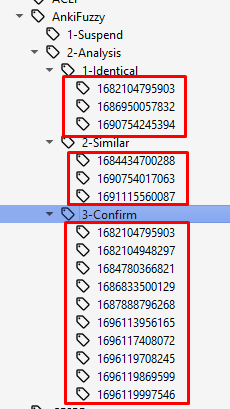
    • Each tagged card is assigned a unique key that links each duplicate, making it simpler to compare and manage.

How to Use

  1. Start the Add-on:

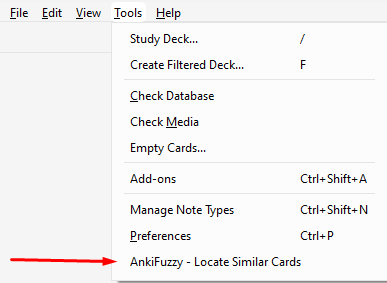
    • Activate the add-on from the Anki "Tools" menu by clicking "AnkiFuzzy - Locate Similar Cards".

    Tools Menu

  2. Monitor the Analysis:

    • When the analysis begins, you'll see a window with a progress bar showing the card checking status. A "Cancel" button is available if you wish to stop the analysis.

    Progress Bar

  3. Review Results Using Tags:

    • The add-on doesn't generate a separate report. Instead, it directly tags the cards in Anki to indicate their similarity:
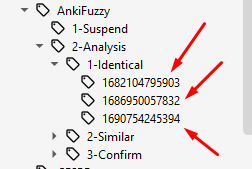
      • AnkiFuzzy::2-Analysis::1-Identical: for identical cards.
      • AnkiFuzzy::2-Analysis::2-Similar: for similar cards.
      • AnkiFuzzy::2-Analysis::3-Confirm: for cards that require confirmation.
    • The tag AnkiFuzzy::1-Suspend is used to highlight one card among duplicates, making it easier to identify which cards should be suspended or deleted.
    • Each group of duplicates is assigned a unique identifier to easily track and compare cards.
    • You can use Anki's search bar to find the tagged cards and decide which to keep, edit, or suspend.

    Tags Example

    Below is an example of how the tags are structured, showing the linkage between duplicates:

    Key and Tags Example

AnkiFuzzy Configuration

Configuring the Fields

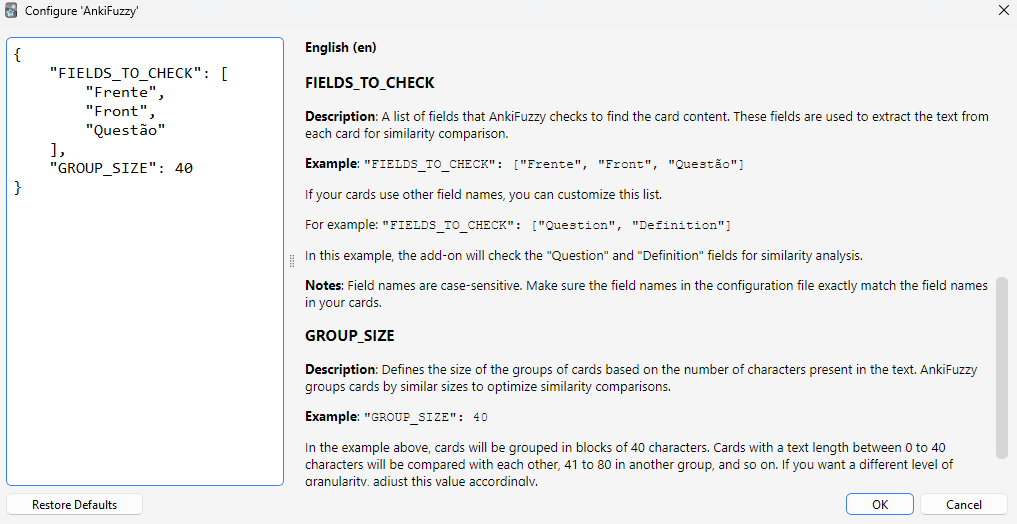
This add-on allows you to customize the fields that will be checked to find the card content.

Configuration

FIELDS_TO_CHECK

English (en)
  • Description: A list of fields that AnkiFuzzy checks to find the card content. These fields are used to extract the text from each card for similarity comparison.

  • Example:

    "FIELDS_TO_CHECK": ["Front", "Question"]
    

    If your cards use other field names, you can customize this list. For example:

    "FIELDS_TO_CHECK": ["Question", "Definition"]
    

    In this example, the add-on will check the "Question" and "Definition" fields for similarity analysis.

  • Notes: Field names are case-sensitive. Make sure the field names in the configuration file exactly match the field names in your cards.

Technical Details

The add-on uses the following libraries and functions:

  • BeautifulSoup: To clean the HTML content from the card text.
  • RapidFuzz: To calculate text similarity using:
    • fuzz.token_sort_ratio (for sorting and comparing word tokens),
    • fuzz.partial_ratio (for comparing parts of the text for partial overlap).

Similarity Thresholds

  • token_sort_ratio: Set to 70 by default. Cards with a token sort ratio equal to or greater than 70 are considered for further analysis.
  • partial_ratio: Set to 85 by default. If a card passes the token sort ratio test, it will be further analyzed using the partial ratio.
  • Cards that meet both thresholds will be tagged as described above.

Change Log

  • v1.1.1 - Warning Handling:

    • Implemented warning suppression when using the fallback difflib.SequenceMatcher.
  • v1.1 - Tag and Menu Improvements:

    • Improved tag removal to clear all tags starting with "AnkiFuzzy," including sub-tags.
    • Added parent menu "Anki AnkiFuzzy" with submenus for locating similar cards and clearing tags.
    • Ensured the tag panel updates immediately after clearing tags.
  • v1.0 - Initial Release:

    • Added functionality to compare cards based on token sort and partial ratio.
    • Introduced a tagging system for "Identical", "Similar", and "Needs confirmation" cards.
    • Added a cancel button to stop long-running processes.

Future Enhancements

  • Include additional types of filters for more advanced card analysis.
  • Introduce configurable similarity thresholds directly within the Anki settings.
  • Add support for comparing cards across multiple decks.

License

With this release, you provide users with a robust tool to manage redundant cards in their Anki decks.

README

AnkiFuzzy: Identifying Identical, Similar and Repetitive Cards

This add-on for Anki helps you locate identical, similar and Repetitive cards in your deck. It compares the card text content in the selected deck and tags those that meet specific similarity criteria, making it easier to manage redundant or very similar cards.


Report Bugs

For any problems or bug reports, visit:
https://github.com/cjdduarte/AnkiFuzzy/issues


Features

  • Identifies identical cards: Cards with the same or nearly identical content.
  • Finds similar cards: Cards that are partially similar, based on token sort and partial ratio similarity calculations.

How It Works

  1. Deck Selection: When you activate the add-on, it identifies the currently selected deck in Anki. A prompt will ask if you want to proceed with the analysis on the selected deck or switch to another one.

  2. Similarity Analysis:

    • The add-on extracts the text from configurable fields (e.g., "Front", "Question") from each card in the deck. It cleans the HTML content to focus only on the text for comparison.
    • Cards are then grouped based on the length of their text (in blocks of 40 characters).
    • The add-on compares cards within the same length group using two main measures:
      • Token sort ratio: Measures how similar two texts are when words are sorted.
      • Partial ratio: Checks the similarity between parts of the text.
  3. Tagging Similar Cards:

    • Cards that meet certain similarity thresholds are tagged with one of the following:
      • Identical (AnkiFuzzy::2-Analysis::1-Identical) for cards that are very close or exactly the same.
      • Similar (AnkiFuzzy::2-Analysis::2-Similar) for cards with significant overlap, but not perfect.
      • Needs confirmation (AnkiFuzzy::2-Analysis::3-Confirm) for cards that are somewhat similar but require further review.
    • Cards considered very similar may also be automatically suspended, adding the tag AnkiFuzzy::1-Suspend. This tag helps identify one of the duplicates, making it easier to suspend or delete redundant cards.
    • Each tagged card is assigned a unique key that links each duplicate, making it simpler to compare and manage.

How to Use

  1. Start the Add-on:

    • Activate the add-on from the Anki "Tools" menu by clicking "AnkiFuzzy - Locate Similar Cards".

    Tools Menu

  2. Monitor the Analysis:

    • When the analysis begins, you'll see a window with a progress bar showing the card checking status. A "Cancel" button is available if you wish to stop the analysis.

    Progress Bar

  3. Review Results Using Tags:

    • The add-on doesn't generate a separate report. Instead, it directly tags the cards in Anki to indicate their similarity:
      • AnkiFuzzy::2-Analysis::1-Identical: for identical cards.
      • AnkiFuzzy::2-Analysis::2-Similar: for similar cards.
      • AnkiFuzzy::2-Analysis::3-Confirm: for cards that require confirmation.
    • The tag AnkiFuzzy::1-Suspend is used to highlight one card among duplicates, making it easier to identify which cards should be suspended or deleted.
    • Each group of duplicates is assigned a unique identifier to easily track and compare cards.
    • You can use Anki's search bar to find the tagged cards and decide which to keep, edit, or suspend.

    Tags Example

    Below is an example of how the tags are structured, showing the linkage between duplicates:

    Key and Tags Example


AnkiFuzzy Configuration

Configuring the Fields

This add-on allows you to customize the fields that will be checked to find the card content.

Configuration

FIELDS_TO_CHECK

English (en)
  • Description: A list of fields that AnkiFuzzy checks to find the card content. These fields are used to extract the text from each card for similarity comparison.

  • Example:

    "FIELDS_TO_CHECK": ["Front", "Question"]
    

    If your cards use other field names, you can customize this list. For example:

    "FIELDS_TO_CHECK": ["Question", "Definition"]
    

    In this example, the add-on will check the "Question" and "Definition" fields for similarity analysis.

  • Notes: Field names are case-sensitive. Make sure the field names in the configuration file exactly match the field names in your cards.


Technical Details

The add-on uses the following libraries and functions:

  • BeautifulSoup: To clean the HTML content from the card text.
  • RapidFuzz: To calculate text similarity using:
    • fuzz.token_sort_ratio (for sorting and comparing word tokens),
    • fuzz.partial_ratio (for comparing parts of the text for partial overlap).

Similarity Thresholds

  • token_sort_ratio: Set to 70 by default. Cards with a token sort ratio equal to or greater than 70 are considered for further analysis.
  • partial_ratio: Set to 85 by default. If a card passes the token sort ratio test, it will be further analyzed using the partial ratio.
  • Cards that meet both thresholds will be tagged as described above.

Change Log

  • v1.1.1 - Warning Handling:

    • Implemented warning suppression when using the fallback difflib.SequenceMatcher.
  • v1.1 - Tag and Menu Improvements:

    • Improved tag removal to clear all tags starting with "AnkiFuzzy," including sub-tags.
    • Added parent menu "Anki AnkiFuzzy" with submenus for locating similar cards and clearing tags.
    • Ensured the tag panel updates immediately after clearing tags.
  • v1.0 - Initial Release:

    • Added functionality to compare cards based on token sort and partial ratio.
    • Introduced a tagging system for "Identical", "Similar", and "Needs confirmation" cards.
    • Added a cancel button to stop long-running processes.

Future Enhancements

  • Include additional types of filters for more advanced card analysis.
  • Introduce configurable similarity thresholds directly within the Anki settings.
  • Add support for comparing cards across multiple decks.

License


With this release, you provide users with a robust tool to manage redundant cards in their Anki decks.