Sentence adder for any language with batch add option

AnkiWeb addon 1682655437

Adds sentences matching selected words from Tatoeba-built or custom language databases to Anki fields, with random insertion, sentence lists, translation pairs, styling options, and batch adding across notes.
AI-generated summary; may contain mistakes.

card-creationimportnote-managementformatting

Open on AnkiWeb GitHub Find alternatives

AnkiWeb

Votes
51 (πŸ‘ 43 Β· πŸ‘Ž 8)
Updated
2026-08-31
Anki versions
26.08.1~
License
AGPL-3.0 (from the GitHub repository)
Virus scan
No ClamAV match A match does not prove malware. No match does not prove that the code is safe.
Languages
Python, JSON
Description language
en

Maintenance

active

  • Last update or commit: 2026-08-31 (62 days before the snapshot).
  • Test files: 7.
  • GitHub Actions workflows: 1.
  • Commits in the last year: 15.
  • Issues: 3 open, 26 closed.
  • Pull requests: 0 open, 2 merged.
  • Median first response: 99 hours (29 answered issues and pull requests).
  • Outside pull requests: 100% of 1 merged.

Will it work on my Anki?

Version branches
Min AnkiMax AnkiUpdated
2.1.5026.08.1+2026-08-31
History across monthly snapshots

Loading…

Similar addons

Auto Translate Batch Creator

Automatically creates language-learning flashcards by translating bracketed words within sentences in batches across 14+ languages, following the i+1 context principle.

card-creationdictionary

2 votes 34% approval πŸ‘ 2 Β· πŸ‘Ž 0 ⭐ 0 Anki 2.1.1~ Updated 2025-11-28
Anki IPA has 1 fork β†’

Inserts IPA phonetic transcriptions for words or sentences via a button, supports several languages, and can batch-add transcriptions across selected cards in the browser.

card-creationnote-managementdictionary

68 votes 67% approval πŸ‘ 53 Β· πŸ‘Ž 15 ⭐ 0 Anki 2.1.54~ Updated 2023-11-06
AI Language Explainer

Generates contextual written explanations and spoken audio for target words in sentence cards using OpenAI models and selectable TTS engines, with one-click or batch processing.

card-creationaisync-integrationdictionary

10 votes 72% approval πŸ‘ 10 Β· πŸ‘Ž 0 ⭐ 9 Anki 2.1.66~ Updated 2025-10-07
Translate & Pronounce Popup

Selecting text during card review shows a popup with translation, example sentences, and speech, using cached results and configurable providers including private local ones.

shortcutsdictionary

1 votes 21% approval πŸ‘ 1 Β· πŸ‘Ž 0 ⭐ 0 Anki 25.09.4~ Updated 2026-08-19
Batch Edit Tools

Batch adds tags from vocabulary lists, replaces or clears specified field content, and fetches word pronunciations via API into card fields.

sync-integrationnote-managementtagging

4 votes 30% approval πŸ‘ 3 Β· πŸ‘Ž 1 ⭐ 0 Anki 23.09~ Updated 2024-05-26

Description

Add sentences to Anki editor window in one click

Select a word in edit field and click add button to add sentences to that fields matching the words. Also create/add sentences for any languages. The sentences database created using tatoeba language tsv files. Download language tsv file from tatoeba.

Support Development: https://www.patreon.com/c/krmani

Tutorials

Sentences Database tatoeba

Note: If already created the sentences database then save a copy of lang_db and config.json folder from Anki2/addons21/1682655437/ into Anki2/addons21/1682655437/user_files/

Note: You have to download sentences tsv from tatoeba View tutorials below to download and add language to database.

Features

  • Create new language database
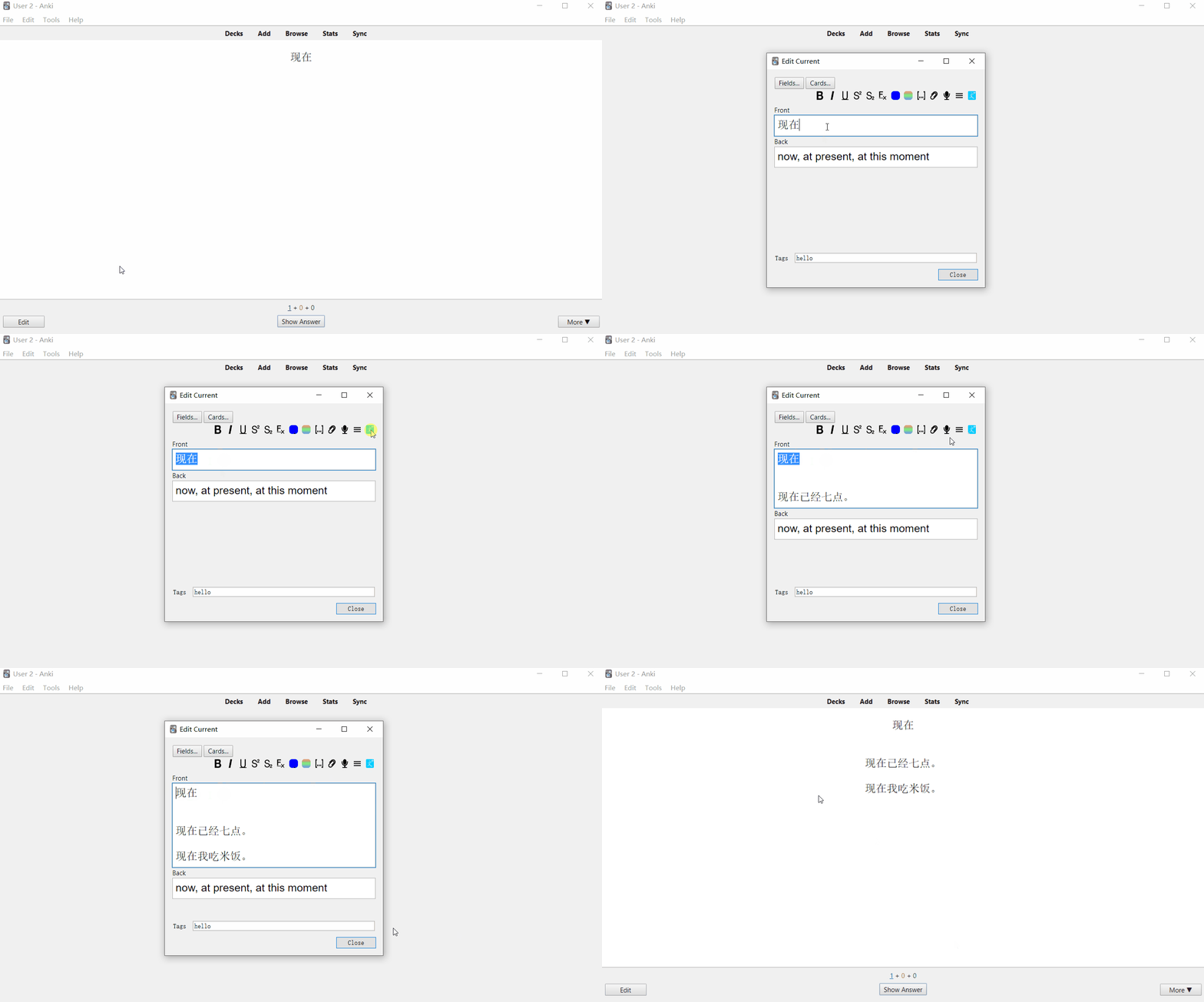
  • Add random sentence in one click
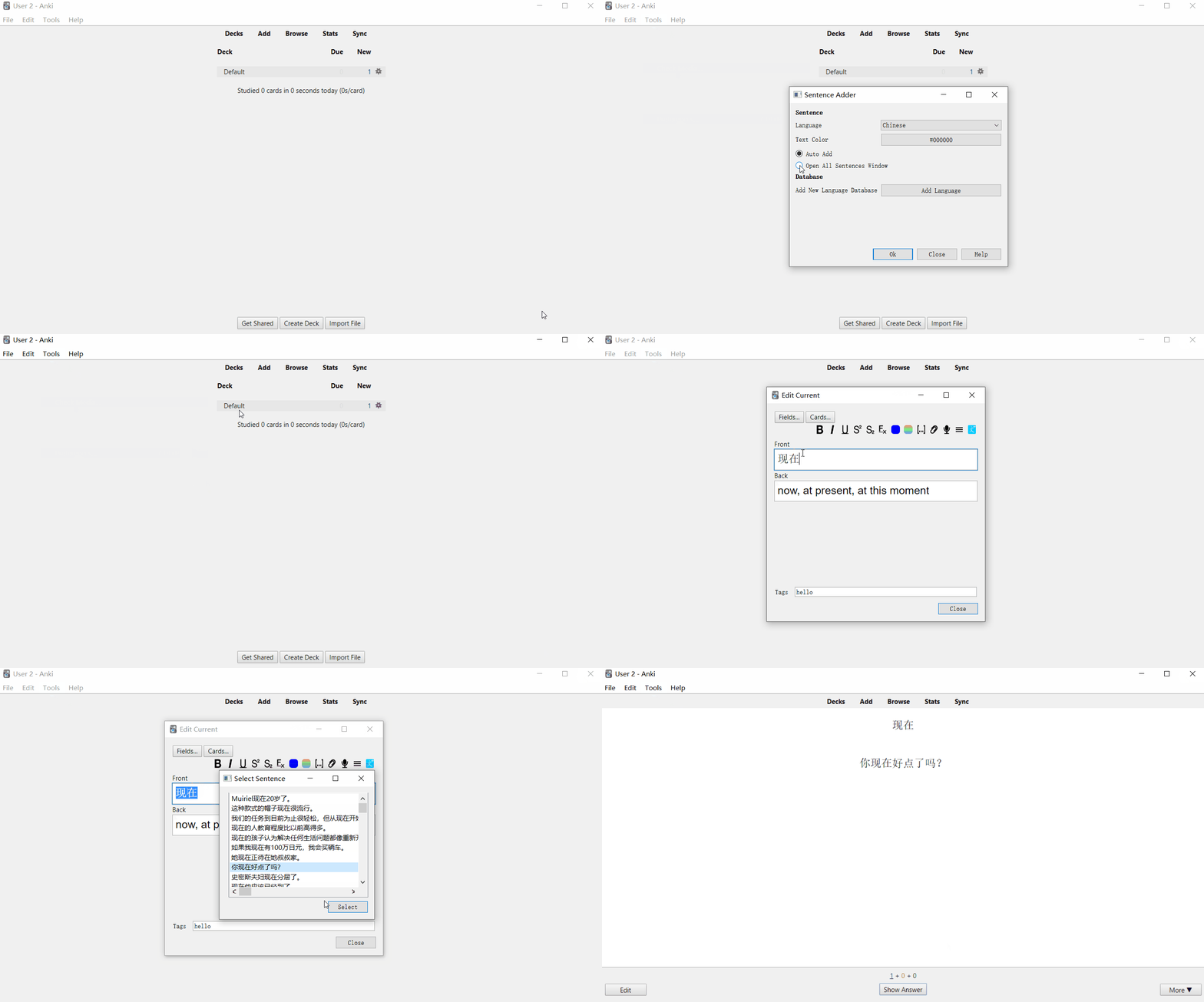
  • View list of all sentences matching the selected word
  • Batch add sentences to many notes at once
  • Change language (Require restart of Anki to apply changes)
  • Change color of sentences
  • Add sentence pair (sentence and its translation)
  • Wrap word and sentence in html tag
  • Limit sentences by minimum and maximum length
  • Add sentence pair (sentence and its translation)
  • Options apply immediately, no restart needed
  • Choose which field the sentences are added to, from the editor or the menu
  • UI fixes

Install

  1. Download Addon

Anki -> Tools -> Add-ons -> Get Add-ons...

Paste the code 1682655437 and install.

  1. Restart Anki and open the Addon to add new languages.
  2. Download language of choice from tatoeba.
  3. Open the installed Addon in Anki

Anki -> Tools -> Sentence Adder...

  1. Click Add new language
  2. Enter language name
  3. Select downloaded language tsv file
  4. Click create to create/add new language to the Addon
  5. Restart Anki to apply changes

Adding sentences to field in Anki

  1. First change preferences for the Anddon There are two preferences a. Auto add sentences: Automatically add random sentences matching the words b. Open all sentences window: View list of all sentences and select as per choice from the list

  2. Select any text in editor window

  3. Click add button to add sentences

Demo Add Random Sentences Add random sentence to edit field

View all sentences View list of all sentences

Updates

Update 2026-08-31 (v1.1.0) Existing sentence databases and config.json keep working, no re-import needed.

Fixes

  • Batch adder works again. It failed with Error: 'word_color' (the config was read before it was loaded), with an empty error (writing to a translation field that was left empty), and with a stuck progress window that needed a force quit.
  • Selecting notes of more than one note type no longer stops the batch run.
  • Words are searched without their field html, so <b>word</b> matches again.
  • A word containing ', % or _ no longer breaks or widens the search.
  • "Sentences contain spaces" now matches whole words anywhere in the sentence, including at the start, at the end and before punctuation.
  • Asking for more sentences than a word has no longer returns nothing.
  • "Database not exists!" after moving, reinstalling or copying the add-on: databases are found in the current lang_db folder again.
  • Whether a database holds sentence pairs is read from the database itself.
  • Changing options or adding a language applies without restarting Anki.
  • A wrongly formatted tsv no longer leaves an empty language behind, and a large tatoeba file shows import progress.

Update 25-06-2024

  • Do not need to restart when adding database or changing config

Update 15-02-2024

  • Batch edit ui fixes
  • Progress bar with note count changes

Update 30-01-2023

  • Batch edit ui fixes

Update 29-01-2023

  • Add sentence pair (sentence and its translation)
  • Wrap word and sentence in html tag
  • Bug fixes

Update 16-06-2022

  • Option to limit character length in sentences
  • Option to auto add multiple sentences
  • Option to remove language database
  • Option to add different color for words and sentences
  • Auto upgrade old config.json to new config
  • Preserved generated database in user_files
  • Bug fixes

(Before updating, save a copy of lang_db and config.json folder from Anki2/addons21/1682655437/ into Anki2/addons21/1682655437/user_files/)

Update 24-03-2021 Change options for sentences containing spaces. For example in English language there are spaces between words unlike Chinese language. So, update the addons with options Sentences contain space and change it to use. But before update, it is recommended to save a copy of lang_db and config.json folder from Anki2/1682655437/ and paste it to Anki2/1682655437/ after update.

View demo

Update 22-03-2021

  • Batch sentences adder

View Source Code Sentence Adder Anki Addon

README

Sentence Adder Anki Addon - For any languages

Add sentences to Anki editor window in one click

Select a word in edit field and click add button to add sentences to that fields matching the words. Also create/add sentences for any languages. The sentences database created using tatoeba language tsv files. Download language tsv file from tatoeba.

Requires Anki 2.1.50 or newer (Qt6 or Qt5 build).

Install

Make backup before installing addons.

Download addon from AnkiWeb
Sentence Adder Anki Addon

Download from release page
Sentence Adder Anki Addon

Features

  • Create new language database from tatoeba files or your own tsv
  • Add random sentence in one click
  • View list of all sentences matching the selected word
  • Batch add sentences to many notes at once
  • Choose which field the sentences are added to, from the editor or the menu
  • Change color of sentences, wrap word and sentence in html tag
  • Add sentence pair (sentence and its translation)
  • Limit sentences by minimum and maximum length
  • Options apply immediately, no restart needed

Usage

Tutorials

Install

  1. Install Addon from AnkiWeb
Anki -> Tools -> Add-ons -> Get Add-ons...

Paste the code 1682655437 and install.

  1. Restart Anki and open the Addon to add new languages.
  2. Download language of choice from tatoeba
    View Demo Download Sentences data tsv files
  3. Open the installed Addon in Anki
Anki -> Tools -> Sentence Adder...
  1. Click Add new language
  2. Enter language name
  3. Select downloaded language tsv file
  4. Click create to create/add new language to the Addon
    View demo Create/Add Language database

Adding sentences to a field in Anki

  1. First change preferences for the Addon
    There are two preferences
    a. Auto add sentences: Automatically add random sentences matching the words
    b. Open all sentences window: View list of all sentences and select as per choice from the list

  2. Select any text in editor window

  3. Click add button to add sentences

By default the sentences go into the field the cursor is in. To always use the same field, click the gear button next to the add button: it opens the same options, with Add sentences to field as a list of the fields of the note being edited.

Batch adding sentences

Anki -> Browse -> select notes -> Edit -> Sentence Batch Adder...

Pick the field holding the words and the field the sentences should go to. When the language database holds sentence pairs, a field for the translation can be picked as well; leave it empty to keep the translation under each sentence in the same field. Overwrite existing fields replaces what those fields hold instead of appending. Words that had no matching sentence are counted in the message at the end and listed in user_files/not_found_<date>.txt inside the add-on folder.

The whole run is one undo step: Edit -> Undo puts every note back.

Options

The options window (Tools -> Sentence Adder..., or the gear button in the editor) has four tabs:

Sentences - which language database is used, how many sentences a word gets, the shortest and longest sentence to use (0 for no limit), whether words are matched whole (for languages written with spaces), and whether clicking the editor button adds sentences straight away or opens a list to pick from.

Fields - which field the sentences go to and which field the translations go to. Leave the translation field empty to keep each translation under its sentence. Opened with the gear button in the editor, both are drop downs of the fields of the note you are editing.

Style - colours for the word and the sentence, and your own html around {{word}} and {{sentence}}, with a preview of the result.

Languages - the databases in this profile with their sentence counts, and the buttons to add or remove one.

Using your own tsv file

Untick Sentences downloaded from tatoeba.org in the create dialog, then a tab separated file with one sentence per line is enough:

I like cats.
She reads a book.

For sentence pairs also tick File contains sentences pair and put the translation in the second column:

私は猫がε₯½γγ§γ™γ€‚	I like cats.
ζœ¬γ‚’θͺ­γ‚€γ€‚	Read a book.

Files downloaded from tatoeba keep their own column order (id language text for sentences, id sentence id translation for pairs), so leave the tatoeba option ticked for those.

Demo

demo

Sentences Database

tatoeba

Development

See development.md.

My other Anki addons and decks

Shared Decks and Addons

License

Mani
GPL 3.0 View Licence