Align LaTeX to baseline

AnkiWeb addon 1721577833

Aligns rendered LaTeX images to the equation baseline using preview.sty’s depth information, with optional PNG support requiring a dvipng --depth adjustment.
AI-generated summary; may contain mistakes.

formattingappearancebugfix-workaround

Open on AnkiWeb GitHub Find alternatives

AnkiWeb

Votes
0 (👍 0 · 👎 0)
Updated
2025-06-02
Anki versions
2.1.1~
License
AGPL-3.0 (from the GitHub repository)
Virus scan
No ClamAV match A match does not prove malware. No match does not prove that the code is safe.
Languages
Python
Description language
en

Maintenance

stale

  • Last update or commit: 2025-06-02 (517 days before the snapshot).
  • Commits in the last year: 0.
  • Issues: 0 open, 0 closed.
  • Pull requests: 0 open, 0 merged.

Will it work on my Anki?

Version branches
Min AnkiMax AnkiUpdated
2.1.1+2025-06-02
History across monthly snapshots

Loading…

Similar addons

Better Markdown Anki

Renders Anki flashcards with enhanced markdown, LaTeX math, syntax highlighting, theme-aware styling, and interactive cloze toggles via React-based note types.

formattingappearancecard-templatescloze

25 votes 65% approval 👍 21 · 👎 4 ⭐ 31 Anki 2.1.66~ Updated 2026-10-15
Flashcards Grid Preview

Displays all cards from the selected deck in a customizable, paginated grid with hover/click flipping, flip-all mode, and LaTeX rendering, though images, audio, and other media are unsupported.

formattingshortcutsappearancecard-templates

1 votes 21% approval 👍 1 · 👎 0 ⭐ 0 Anki 2.1.1~ Updated 2025-09-22
LaTeX Note Importer

Imports LaTeX files into Anki as flashcard notes, supporting tags and HTML, though it is no longer maintained.

importobsolete

9 votes 56% approval 👍 8 · 👎 1 ⭐ 36 Anki 2.1.48~ Updated 2023-07-03

Description

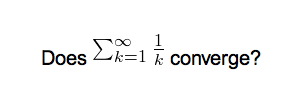
By default, Anki renders LaTeX and includes the final images as-is. However, the bounding box of the resulting image might not necessarily coincide with the actual baseline of the equation. Using the widely available preview.sty, one can access the depth -- the offset from the baseline -- of the generated image and correct for that.

The Anki manual sports a picture of the default PNG rendering:
I've generally found it to be a bit better with SVGs + some CSS that just vertically centres the pictures:

This add-on gives a further improvement upon that:

In comparison with 1337660446, this add-on was written from scratch and tested with Anki 2.1+.

To use the add-on, you will need to include preview.sty in your LaTeX preamble:

% Header
\documentclass{article}
\usepackage[active,tightpage]{preview} % XXX
\usepackage{xcolor}
\begin{document}
\setlength{\parindent}{0in}
\setlength{\abovedisplayskip}{0pt}     % XXX better bounding boxes
\begin{preview}                        % XXX
% Footer
\end{preview}                          % XXX
\end{document}

If you use PNG output and not SVG output (which I would however advise against) then you will need to further adjust the LaTeX build process to include a --depth argument in the call to dvipng. For that, I suggest using 937148547.

README

Align LaTeX images to baseline

[!Tip] This is available as add-on 1721577833

By default, Anki renders LaTeX and includes the final images as-is. However, the bounding box of the resulting image might not necessarily coincide with the actual baseline of the equation. Using the widely available preview.sty, one can access the depth -- the offset from the baseline -- of the generated image and correct for that.


The Anki manual sports a picture of the default PNG rendering:

I've generally found it to be a bit better with SVGs + some CSS that just vertically centres the pictures:

This add-on gives a further improvement upon that:

In comparison with 1337660446, this add-on was written from scratch and tested with Anki 2.1+.


To use the add-on, you will need to include preview.sty in your LaTeX preamble:

% Header
\documentclass{article}
\usepackage[active,tightpage]{preview} % XXX
\usepackage{xcolor}
\begin{document}
\setlength{\parindent}{0in}
\setlength{\abovedisplayskip}{0pt}     % XXX better bounding boxes
\begin{preview}                        % XXX
% Footer
\end{preview}                          % XXX
\end{document}

If you use PNG output and not SVG output (which I would however advise against) then you will need to further adjust the LaTeX build process to include a --depth argument in the call to dvipng. For that, I suggest using 937148547.