Flashcards Grid Preview

AnkiWeb addon 398324052

Displays all cards from the selected deck in a customizable, paginated grid with hover/click flipping, flip-all mode, and LaTeX rendering, though images, audio, and other media are unsupported.
AI-generated summary; may contain mistakes.

formattingshortcutsappearancecard-templates

Open on AnkiWeb GitHub Find alternatives

AnkiWeb

Votes
1 (πŸ‘ 1 Β· πŸ‘Ž 0)
Updated
2025-09-22
Anki versions
2.1.1~
License
MIT (from the license file in the package)
Virus scan
No ClamAV match A match does not prove malware. No match does not prove that the code is safe.
Languages
Python, JSON, Ignore List
Description language
en

Maintenance

stale

  • Last update or commit: 2025-09-22 (405 days before the snapshot).
  • Commits in the last year: 0.
  • Issues: 0 open, 0 closed.
  • Pull requests: 0 open, 0 merged.

Will it work on my Anki?

Version branches
Min AnkiMax AnkiUpdated
2.1.1+2025-09-22
History across monthly snapshots

Loading…

Similar addons

Quad Reveal

Displays up to four note fields in clean, customizable boxes after the answer is revealed, with side-by-side or 2Γ—2 layouts, image zoom, and a show/hide hotkey.

review-flowshortcutsappearanceaccessibility

2 votes 34% approval πŸ‘ 2 Β· πŸ‘Ž 0 Anki 2.1.66~ Updated 2026-10-01
Awesome Dashboard

Replaces Anki's deck and review screens with a customizable widget dashboard featuring activity heatmaps, Pomodoro timer, habit tracking, exam countdowns, Quizlet-style study modes, card previews, six themes, and four languages.

review-flowstatisticsprogress-trackingtimerquiz
5 votes 57% approval πŸ‘ 5 Β· πŸ‘Ž 0 ⭐ 2 Anki 26.09.2~ Updated 2026-10-04

Description

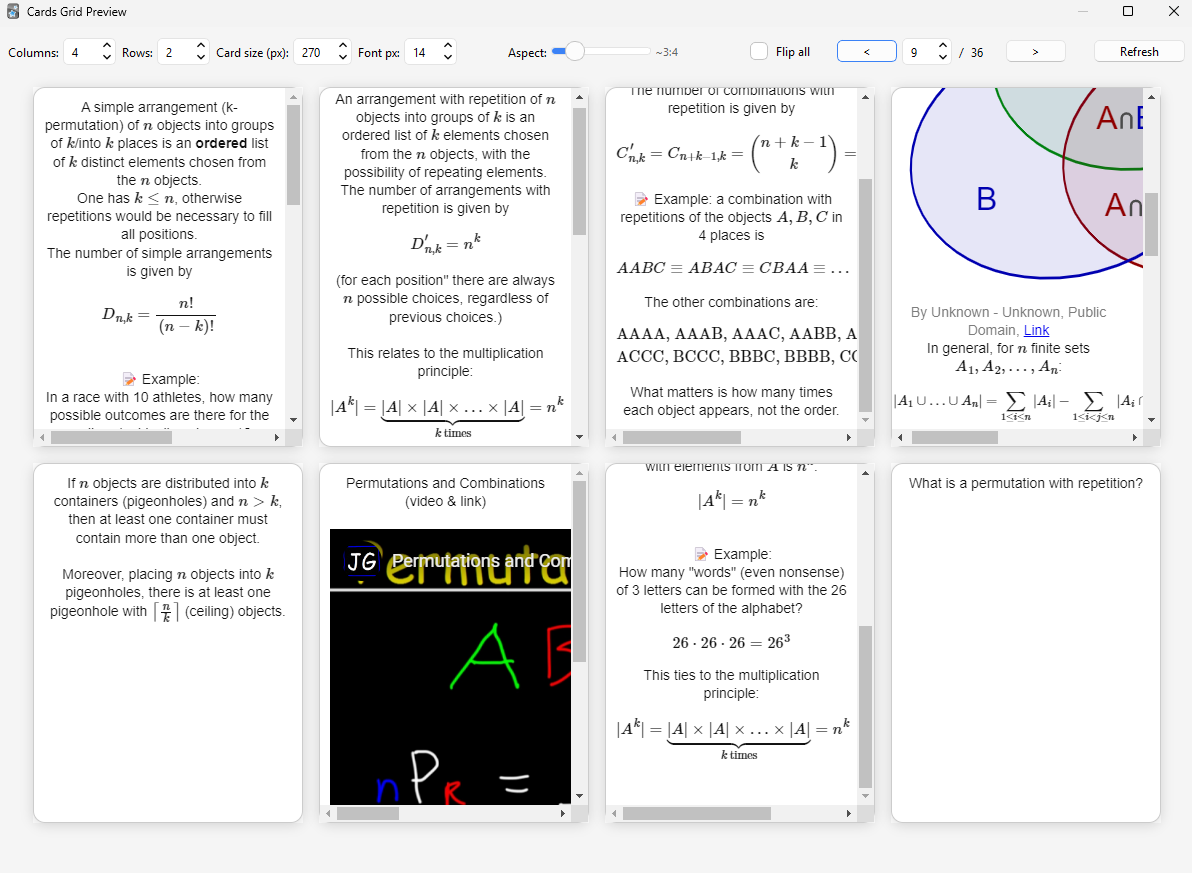
An Anki add-on that displays all cards from the currently selected deck in a customizable, paginated grid view. Perfect for previewing at a glance all the cards in a visual deck.

screenshot

Features

  • Responsive grid layout: Adjustable columns and rows per page
  • Card customization:
    • Variable card size and font size
    • Adjustable aspect ratio from tall to wide formats
  • Interactive flipping:
    • Hover over cards to see the back side with smooth 3D animation
    • Click cards to manually flip them
    • Toggle "Flip all" to show all answers at once
  • Smart pagination: Navigate large decks efficiently with page controls
  • Full LaTeX and media support:
    • Complete MathJax v3 with Anki's default packages (ams, mathtools, physics, braket, cancel, color)
    • Supports both \( \) and $ $ for inline math, \[ \] for display math

⚠️ Images, audio, and other media are not supported.

Usage

  1. Select any deck in Anki's main window
  2. Open via Tools β†’ Cards Grid Preview or press Ctrl+Shift+G
  3. Use the toolbar to customize:
    • Adjust grid dimensions and card size
    • Change font size and aspect ratio
    • Navigate between pages for large decks
    • Toggle flip-all mode

README

Anki Flashcards Grid Preview

An Anki add-on that displays all cards from the currently selected deck in a customizable, paginated grid view. Perfect for previewing at a glance all the cards in a visual deck.

screenshot

Features

  • Responsive grid layout: Adjustable columns and rows per page
  • Card customization:
    • Variable card size and font size
    • Adjustable aspect ratio from tall to wide formats
  • Interactive flipping:
    • Hover over cards to see the back side with smooth 3D animation
    • Click cards to manually flip them
    • Toggle "Flip all" to show all answers at once
  • Smart pagination: Navigate large decks efficiently with page controls
  • Full LaTeX and media support:
    • Complete MathJax v3 with Anki's default packages (ams, mathtools, physics, braket, cancel, color)
    • Supports both \( \) and $ $ for inline math, \[ \] for display math

[!WARNING]
Images, audio, and other media are not supported.

Usage

  1. Select any deck in Anki's main window
  2. Open via Tools β†’ Cards Grid Preview or press Ctrl+Shift+G
  3. Use the toolbar to customize:
    • Adjust grid dimensions and card size
    • Change font size and aspect ratio
    • Navigate between pages for large decks
    • Toggle flip-all mode

Notes

  • Cards render using their actual front/back templates (same as review mode)
  • Pagination automatically adjusts when you change grid dimensions
  • Great for visual learners and deck overview sessions
  • Works with all card types including cloze deletions

Requirements

Anki 2.1.50+ (Qt5/Qt6)

Development

  • Files live in addons21/cards_grid_preview.
  • On change, restart Anki (or use the Add-ons screen β†’ View Files β†’ "Reload Add-ons").

License

MIT