Bold Color Shortcut

AnkiWeb addon 1759040096

Fork of Quick Colour Changing (AI-detected; may be wrong)

1 other version of this addon exists. Compare versions ↓

Adds editor keyboard shortcuts to quickly change selected text color, with an option to bold it, configurable via a settings file.
AI-generated summary; may contain mistakes.

formattingshortcuts

Open on AnkiWeb GitHub Find alternatives

AnkiWeb

Votes
10 (πŸ‘ 8 Β· πŸ‘Ž 2)
Updated
2021-04-01
Anki versions
2.1.16~
License
MIT (from the GitHub repository)
Virus scan
No ClamAV match A match does not prove malware. No match does not prove that the code is safe.
Languages
HTML, Python, JSON
Description language
en

Maintenance

abandoned

  • Last update or commit: 2022-06-28 (1587 days before the snapshot).
  • Commits in the last year: 0.
  • Issues: 1 open, 1 closed.
  • Pull requests: 0 open, 1 merged.
  • Median first response: 19 hours (1 answered issues and pull requests).

Will it work on my Anki?

Version branches
Min AnkiMax AnkiUpdated
2.1.02.1.16+2021-04-01
History across monthly snapshots

Loading…

Compare versions

The original addon and its forks. The best value in each column is in bold.

VersionWorks on Anki 26.09.3MaintenanceLast activity VotesApprovalGitHub starsNotes
Quick Colour Changing original supported abandoned 19 Oct 2023 πŸ‘ 106 Β· πŸ‘Ž 18 78% –
↳ Bold Color Shortcut this addon (AI-detected; may be wrong) likely abandoned 28 Jun 2022 πŸ‘ 8 Β· πŸ‘Ž 2 49% 0

Forks can add features or work in a different way. Read the description before you change to another version. Fork detection is incomplete, so other versions can exist.

Similar addons

Highlight Color Shortcut

Highlights selected text in eight configurable colors via Ctrl+Alt plus the color's first letter, with an optional bold setting and support for standard or hex color codes.

formattingshortcuts

21 votes 65% approval πŸ‘ 18 Β· πŸ‘Ž 3 ⭐ 0 Anki 2.1.16~ Updated 2021-04-01
Quick Colour Changing has 1 fork β†’

Lets you define shortcut keys that apply specific colours to selected text in the editor, with customizable shortcuts and colours via Config in Anki 2.1.

formattingshortcuts

124 votes 78% approval πŸ‘ 106 Β· πŸ‘Ž 18 Anki 23.10~ Updated 2023-10-19
Anki Quick Highlighter fork

Quickly highlights selected note text using customizable background and foreground colors, with an optional keyboard shortcut configurable through the add-on's settings.

formattingshortcutsfork-or-reupload

2 votes 34% approval πŸ‘ 2 Β· πŸ‘Ž 0 ⭐ 0 Anki 25.09.4~ Updated 2026-06-12
Set Color and Maybe Format

Configurable keyboard shortcuts set text foreground colors while editing or browsing with a field selected, and a modifier key also toggles formatting such as bold, italic, underline, superscript, or subscript.

formattingshortcuts

2 votes 0% approval πŸ‘ 0 Β· πŸ‘Ž 2 Anki 2.1.43~ Updated 2021-04-11

Description

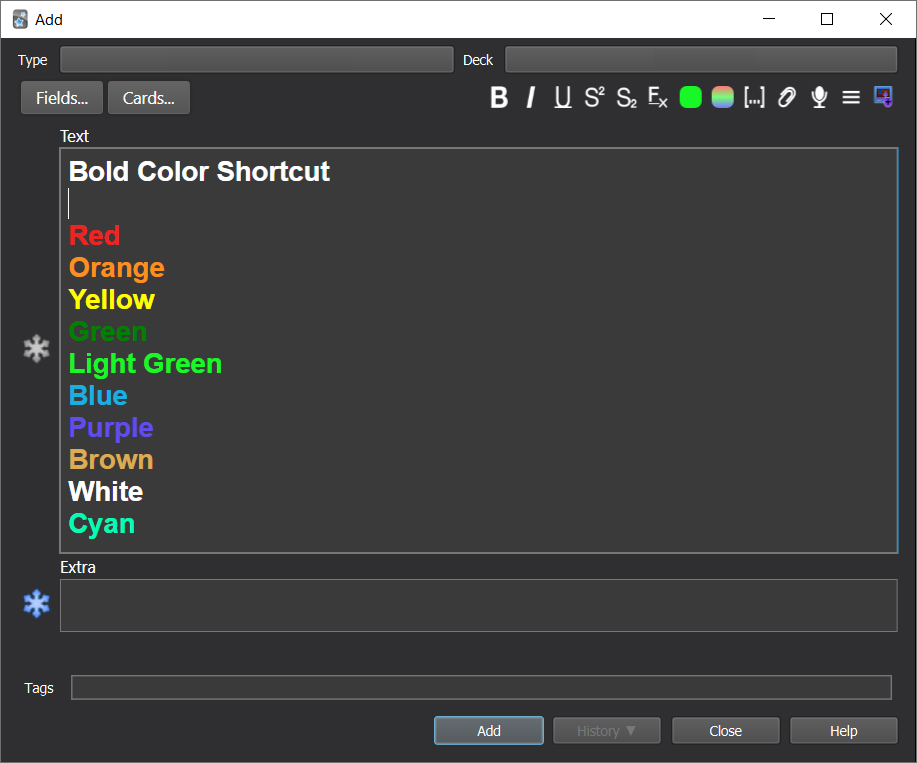
Bold Color Shortcut https://github.com/BigFatDuck1/boldcolorshortcut-anki Change color of text and bold it quickly. Simple anki addon for adding keyboard shortcuts to quickly change the color of selected text, similar to the default Ctrl + B for bold or Ctrl + I for italic in the editor. You can toggle whether you want the text to be bolded as well by changing the config.json file: "bold": "on" to "bold": "off". Current default is:
  • Red
  • Orange (+ alt)
  • Yellow
  • Green
  • Light Green
  • Blue
  • Purple
  • Brown (N)
  • White
  • Cyan (D)
Shortcut is Ctrl + Shift + (First letter) (exceptions placed in brackets, e.g. `Ctrl + Shift + Alt + O` for orange or `Ctrl + Shift + D` for cyan) Make sure the keyboard shortcut you have chosen does not overlap with other anki keyboard shortcuts, as those take precedent! Credits: Based on Quick Colour Changing ("https://ankiweb.net/shared/info/2491935955")

README

Bold Color Shortcut

Change color of text and bold it quickly.

Screenshot

Screenshot

Installation

Easiest way to install is to get it here: https://ankiweb.net/shared/info/1759040096

Description

Simple anki addon for adding keyboard shortcuts to quickly change the color of selected text, similar to the default Ctrl + B for bold or Ctrl + I for italic in the editor.

The default configuration will turn the text red when Ctrl + Shift + R is pressed. You can add use other shortcut key names like Ctrl + M or F11 as well.

You can toggle whether you want the text to be bolded as well by changing the config.json file: "bold": "on" to "bold": "off".

Current default is

  • Red
  • Orange (+ alt)
  • Yellow
  • Green
  • Light Green
  • Blue
  • Purple
  • Brown (N)
  • White
  • Cyan (D)
  • Grey (E)
  • Pink (K)

Shortcut is Ctrl + Shift + (First letter)
(exceptions placed in brackets, e.g. Ctrl + Shift + Alt + O for orange or Ctrl + Shift + D for cyan)

Colour names can be standard colour names like "red", or red/green/blue colour codes like #ffffff.

Make sure the keyboard shortcut you have chosen does not overlap with other anki keyboard shortcuts, as those take precedent!

Screenshots

Screenshot

Screenshot

Screenshot

Screenshot


Credits

Based on Quick Colour Changing (https://ankiweb.net/shared/info/2491935955)