Ankicord Review Only

AnkiWeb addon 1786199948

Fork of Ankicord - Discord Rich Presence (discontinued)

1 other version of this addon exists. Compare versions ↓

Shows Discord Rich Presence only during active review sessions and clears it elsewhere, with separate card counters, optional learning counts, and a configurable inactivity status.
AI-generated summary; may contain mistakes.

sync-integrationreview-flowfork-or-reupload

Open on AnkiWeb GitHub Find alternatives

AnkiWeb

Votes
2 (👍 2 · 👎 0)
Updated
2026-07-22
Anki versions
24.11~
License
AGPL-3.0 (from the license file in the package)
Virus scan
No ClamAV match A match does not prove malware. No match does not prove that the code is safe.
Languages
Python, JSON
Description language
en

Maintenance

active

  • Last update or commit: 2026-07-22 (102 days before the snapshot).
  • Commits in the last year: 2.
  • Issues are turned off.
  • Pull requests: 0 open, 0 merged.

Will it work on my Anki?

Version branches
Min AnkiMax AnkiUpdated
24.11+2026-07-22
History across monthly snapshots

Loading…

Compare versions

The original addon and its forks. The best value in each column is in bold.

VersionWorks on Anki 26.09.3MaintenanceLast activity VotesApprovalGitHub starsNotes
Ankicord - Discord Rich Presence (discontinued) original supported abandoned 22 Sep 2024 👍 39 · 👎 3 81% 23 obsolete, archived
↳ Ankicord Review Only this addon supported active 22 Jul 2026 👍 2 · 👎 0 34% 0

Forks can add features or work in a different way. Read the description before you change to another version. Fork detection is incomplete, so other versions can exist.

Similar addons

Description

Ankicord Review Only

Shows Discord Rich Presence only while you are actively reviewing cards.

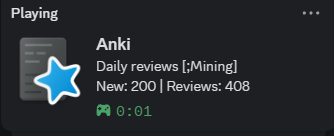
Discord Rich Presence preview

This fork is for people who keep Anki open in the background while doing something else, such as mining. Ankicord Review Only shows Discord Rich Presence only during reviews and clears it everywhere else.

This add-on is a fork of AnkiCord - Discord Rich Presence (Customized by Shige).

Features

  • Rich Presence only during active reviews
  • Clears Anki activity on the home screen and while browsing or editing cards
  • Separate new and review card counters
  • Counts cards from the selected deck and its subdecks
  • Optional learning-card counter
  • Configurable inactivity status
  • Native settings window available from the Tools menu

Requirements

  • Desktop Anki 24.11 or newer
  • Discord desktop application running
  • The original Ankicord add-on must be removed or disabled

Configuration

Open:

Tools > Ankicord Review Only Settings...

The inactivity status is enabled by default. After one minute without reviewer activity, the status changes to Slacking Off. Showing a question, showing an answer, or rating a card resets the timer.

Support and Source Code

GitHub repository

Report a problem

Maintenance notice: This add-on was created primarily for personal use and is shared as-is. Bug reports are welcome, but fixes, updates, and support are not guaranteed.

Licensed under AGPL-3.0-or-later.

README

Ankicord Review Only

pypresence

An Anki add-on that publishes Discord Rich Presence only during an active review session.

Discord Rich Presence while reviewing

Why This Fork Exists

This is a personal fork of Ankicord, created for using Anki alongside other desktop apps.

This fork is for people who keep Anki open in the background while doing something else, such as mining. Ankicord Review Only shows Discord Rich Presence only during reviews and clears it everywhere else.

Installation

  1. Download Ankicord Review Only <version>.ankiaddon from the latest release.
  2. In Anki, open Tools > Add-ons > Install from file....
  3. Select the downloaded .ankiaddon file.
  4. Restart Anki.

Remove or disable the original Ankicord add-on first. This fork declares it as a conflict so both add-ons do not publish Rich Presence at the same time.

Configuration

Open Tools > Ankicord Review Only Settings..., or select Ankicord Review Only in Tools > Add-ons and choose Config.

Default card-count configuration:

"count_deck": "on",
"counts": ["new", "review"]

This reports only the deck selected for the review session, including subdecks, and respects Anki's daily limits. Enable Learning in the settings dialog to include learning cards.

Default idle configuration:

"idle_detection": "on",
"idle_timeout_minutes": 1,
"idle_status": "Slacking Off"

The idle timer resets when Anki shows a question, shows an answer, or you rate a card. It does not rely on counts changing, so learning and relearning cards are not incorrectly marked idle. The workload counters and review-session timer remain visible while idle.

See config.md for every setting.

Credits

This project is derived from:

License

This project is free to use, copy, modify, fork, and redistribute under the GNU Affero General Public License v3.0 or later (AGPL-3.0-or-later).

See LICENSE and THIRD_PARTY_NOTICES.md.