AJT Browser Play Button - Play audio in browser ▶️

AnkiWeb addon 182970692

Fork of Play audio in browser (AI-detected; may be wrong)

1 other version of this addon exists. Compare versions ↓

Adds a Browser toolbar play button that plays [sound:] tags in note field order, including selected text or fields via context menu and the alt+m shortcut.
AI-generated summary; may contain mistakes.

shortcuts

Open on AnkiWeb GitHub Find alternatives

AnkiWeb

Votes
16 (👍 16 · 👎 0)
Updated
2026-01-11
Anki versions
25.09.9~
License
AGPL-3.0 (from the GitHub repository)
Virus scan
No ClamAV match A match does not prove malware. No match does not prove that the code is safe.
Languages
Python, JavaScript, CSS, Elixir, JSON
Description language
en

Maintenance

active

  • Last update or commit: 2026-10-27 (5 days before the snapshot).
  • GitHub Actions workflows: 1.
  • Commits in the last year: 2.
  • Issues: 0 open, 1 closed.
  • Pull requests: 0 open, 1 merged.
  • Median first response: less than 1 hour (1 answered issues and pull requests).
  • Outside pull requests: 100% of 1 merged.

Will it work on my Anki?

Version branches
Min AnkiMax AnkiUpdated
2.1.312.1.402021-07-30
2.1.412.1.442021-07-30
2.1.452.1.492021-12-26
2.1.502.1.542022-12-15
2.1.552.1.662023-01-17
23.1024.05.92023-11-03
24.0625.01.92024-09-17
25.0225.08.92025-03-07
25.0925.09.9+2026-01-11
History across monthly snapshots

Loading…

Compare versions

The original addon and its forks. The best value in each column is in bold.

VersionWorks on Anki 26.09.3MaintenanceLast activity VotesApprovalGitHub starsNotes
Play audio in browser original unknown abandoned 27 Dec 2020 👍 6 · 👎 1 49% –
↳ AJT Browser Play Button - Play audio in browser ▶️ this addon (AI-detected; may be wrong) likely active 27 Oct 2026 👍 16 · 👎 0 81% 7

Forks can add features or work in a different way. Read the description before you change to another version. Fork detection is incomplete, so other versions can exist.

Similar addons

Play audio in browser has 1 fork →

Adds a Browser button and Alt+M shortcut that finds and plays [sound:...] tags, showing an error if none or a dialogue when several exist and limiting playback to selected text.

shortcuts

7 votes 49% approval 👍 6 · 👎 1 Updated 2020-12-27
Play field audio

Plays audio files referenced by [sound:...] tags in any field via the right-click context menu, without switching to review mode.

note-management

1 votes 21% approval 👍 1 · 👎 0 Anki 25.09.2~ Updated 2025-10-10

Description

This tiny add-on adds a play button to the Anki Browser's toolbar. When clicked, it looks for [sound:...]-tags on the selected note and plays them in the order of their appearance on the note's fields. If there is selected text, the action is limited to the sound tags that appear only in the selected text. If you select Play field in the context menu, the action is limited to the currently selected field. Each field that contains audio has a play button next to its name. Pressing on the button plays all audio files in the field. Audio can be directly played with a shortcut: alt + m. A demo can be viewed on .

Screenshot.

Configuration

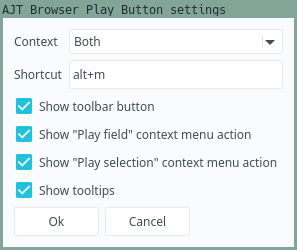
To configure the add-on, open the Anki Add-on Menu via Tools > Add-ons and select AJT Browser Play Button. Then click the Config button on the right-side of the screen. Alternatively, open the Anki Browser and click Edit > AJT Browser Play Button settings....

Settings.

If you hover over a setting, it brings up a tooltip explaining what it does.

Support what I do

I would not have been able to develop this add-on without the support of my patrons. Thanks so much!

Join our community

Want to discuss the add-on? Join our chat room.

Contribute

Click here if you would like to contribute on GitHub.

README

icon

AJT Browser Play Button

Rate on AnkiWeb Chat Channel Patreon GitHub

This tiny add-on adds a play button to the Anki Browser's toolbar. When clicked, it looks for [sound:...]-tags on the selected note and plays them in the order of their appearance on the note's fields. If there is selected text, the action is limited to the sound tags that appear only in the selected text.

If you select "Play field" in the context menu, the action is limited to the currently selected field.

Each field that contains audio has a play button next to its name. Pressing on the button plays all audio files in the field.

Audio can be directly played with a shortcut: alt + m.

A demo can be viewed on .

screenshot

Screenshot.

Installation

Install from AnkiWeb, or manually with git:

git clone 'https://github.com/Ajatt-Tools/BrowserPlayButton.git'
ln -sr BrowserPlayButton/browser_play_button ~/.local/share/Anki2/addons21/BrowserPlayButton

Configuration

To configure the add-on, open the Anki Add-on Menu via Tools > Add-ons and select AJT Browser Play Button. Then click the Config button on the right-side of the screen.

Alternatively, open the Anki Browser and click Edit > AJT Browser Play Button Options....

screenshot

Settings.

If you hover over a setting, it brings up a tooltip explaining what it does.

Acknowledgements