AJT Flexible Grading - keyboard-driven reviewing ⌨️

AnkiWeb addon 1715096333

Enables keyboard-driven Anki reviewing with hjkl answer keys, front-side grading, configurable shortcuts, hidden or disabled buttons, Pass-Fail mode, answer color coding, zoom controls, and last-grade display.
AI-generated summary; may contain mistakes.

review-flowshortcutsappearance

Open on AnkiWeb GitHub Find alternatives

AnkiWeb

Votes
26 (👍 24 · 👎 2)
Updated
2026-09-01
Anki versions
26.08.9~
License
AGPL-3.0 (from the GitHub repository)
Virus scan
No ClamAV match A match does not prove malware. No match does not prove that the code is safe.
Languages
Python, CSS, JSON
Description language
en

Maintenance

active

  • Last update or commit: 2026-10-30 (2 days before the snapshot).
  • GitHub Actions workflows: 3.
  • Commits in the last year: 79.
  • Issues: 2 open, 4 closed.
  • Pull requests: 0 open, 6 merged.
  • Median first response: less than 1 hour (9 answered issues and pull requests).
  • Outside pull requests: 80% of 5 merged.

Will it work on my Anki?

Version branches
Min AnkiMax AnkiUpdated
2.1.352.1.442021-09-03
2.1.452.1.492022-08-25
2.1.502.1.542022-12-16
2.1.552.1.622023-04-17
2.1.632.1.662023-05-19
24.0124.05.92024-06-08
24.0625.08.92024-11-22
25.0926.07.92026-06-05
26.0826.08.9+2026-09-01
History across monthly snapshots

Loading…

Similar addons

AJT Autocopy 📋

Copies configured card fields to the clipboard when selecting cards in Browser, viewing front/answer sides in Reviewer, or loading notes in Editor, aiding bulk editing and clipboard-monitor workflows.

sync-integrationnote-management

9 votes 70% approval 👍 9 · 👎 0 ⭐ 2 Anki 26.09.9~ Updated 2026-10-20
Answer Aura - Grade color glow feedback

Flashes a brief colored glow around the card after each answer to reflect the grade, with customizable colors, glow settings, grade mappings and per-deck toggles.

review-flowappearance

1 votes 21% approval 👍 1 · 👎 0 ⭐ 0 Anki 25.09~ Updated 2026-07-07

Description

Bring keyboard-driven reviewing to Anki 2.1.

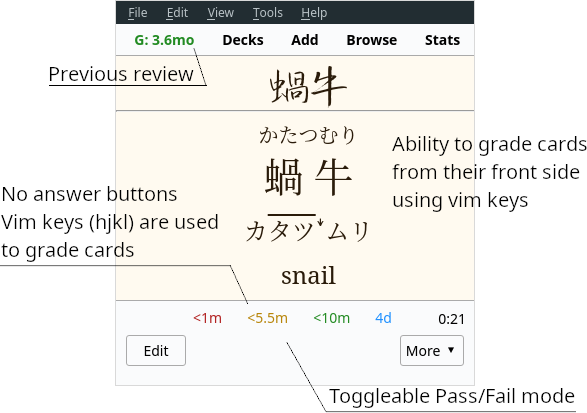
Ajatt-Tools Flexible Grading for Anki 2.1 significantly overhauls the reviewing process. It puts keyboard first and allows you to go through your reps by pressing hjkl while having your hands lay naturally on the home row of the keyboard. It goes further by removing answer buttons and letting you rate your cards from the question side.

Features

  • Scroll without using the mouse with keyboard shortcuts (shown under "Scroll" in Options).
  • Configurable answer keys. Put mouse away when doing your reviews. Defaults:
    • h - Fail
    • j - Hard
    • k - Good
    • l - Easy
    • u - Undo
  • Flexible grading. Rate cards from their front side. Save yourself a few extra keypresses if you know that you know the answer.
  • Color coding for answers. Default colors:
    • Fail - Red
    • Hard - Orange
    • Good - Green
    • Easy - Blue
  • Remove answer buttons. Possible options:
    • Hide. Completely remove answer buttons (enabled by default).
    • Disable. Disabled buttons are unusable and un-clickable.
  • Toggleable Pass-Fail mode. Removes Hard and Easy buttons and keybindings. Make decisions easier by having to choose whether you know a card or not instead of how well you know it. Avoid being stuck in Ease Hell by using this feature in combination with the recommended Options Groups settings.
  • Last rate is shown on the toolbar. It is possible to click on it and bring up the Anki browser with the card selected.
  • Consistent key mappings for the 1234 keys. 2, 3 and 4 always rate Hard, Good and Easy respectively. Only relevant for the V1 scheduler. V2 scheduler does this out of the box.
  • Zoom shortcuts. Adds zoom shortcuts that aren't present in vanilla Anki. To zoom in, press Ctrl+Plus. To zoom out, press Ctrl+Minus. The add-on can remember previous zoom levels and restore them when Anki changes state.
  • An option to turn off the indicator that tells you whether a card is new, review, or learn.
  • An option to press the k key to flip the card while the card is in question state. This means that users can easily flip a card and rate it "good" by pressing kk.

Flexible Grading with answer buttons enabled.

Usage

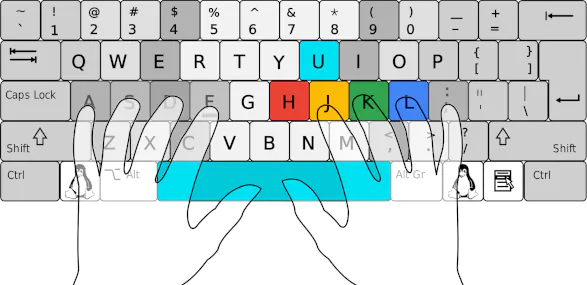
Keep your fingers on home row keys. The following fingers are used:

  • Thumbs - Reveal answer, rate Good.
  • Right hand:
    • Index - Again, Hard, Undo.
    • Middle - Good.
    • Ring - Easy.

Configuration

To configure the add-on select AJT > Flexible Grading Options.... The most optimal settings come out of the box:

  • Answer buttons are hidden forcing you to use the vim keys.
  • Flexible grading and Pass-Fail are enabled.

Support what I do

I would not have been able to develop this add-on without the support of my patrons. Thanks so much!

Join our community

Found a bug? Tell us in the chat room.

Contribute

Click here if you would like to contribute on GitHub.

Changelog

README

AJT Flexible Grading

Rate on AnkiWeb Chat Channel Patreon GitHub

Bring keyboard-driven reviewing to Anki 2.1.

screenshot

Ajatt-Tools Flexible Grading for Anki 2.1 significantly overhauls the reviewing process. It puts keyboard first and allows you to go through your reps by pressing hjkl while having your hands lay naturally on the home row of the keyboard. It goes further by removing review buttons and letting you grade your cards from the question side.

Features

  • Vim bindings. Put mouse away when doing your reviews.
    • h - Fail
    • j - Hard
    • k - Good
    • l - Easy
    • u - Undo
  • Flexible grading. Grade cards from their front side. Save yourself a few extra keypresses if you know that you know the answer.
  • Color coding for answers. Default colors:
    • Fail - Red
    • Hard - Orange
    • Good - Green
    • Easy - Blue
  • Remove answer buttons. Possible options:
    • Hide. Completely remove answer buttons (enabled by default).
    • Disable. Disabled buttons are unusable and un-clickable.
  • Toggleable Pass-Fail mode. Removes Hard and Easy buttons and keybindings. Make decisions easier by having to choose whether you know a card or not instead of how well you know it. Avoid being stuck in Ease Hell by using this feature in combination with the recommended Options Groups settings.
  • Last grade is shown on the toolbar. It is possible to click on it and bring up the Anki browser with the card selected.
  • Consistent key mappings for the 1234 keys. 2, 3 and 4 always grade Hard, Good and Easy respectively. Only relevant for the V1 scheduler. V2 scheduler does this out of the box.
  • Zoom shortcuts. Adds zoom shortcuts that aren't present in vanilla Anki. To zoom in, press Ctrl+Plus. To zoom out, press Ctrl+Minus. The add-on can remember previous zoom levels and restore them when Anki changes state.
  • An option to turn off the indicator that tells you whether a card is new, review, or learn.
  • An option to press any answer key to flip the card while the card is in question state. This means that users can easily flip a card and rate it "good" by pressing kk.

screenshot

Flexible Grading with answer buttons enabled.

Installation

Install from AnkiWeb.

Contributing

Install manually with git:

git clone --recurse-submodules 'https://github.com/Ajatt-Tools/FlexibleGrading.git'
ln -sr FlexibleGrading/flexible_grading ~/.local/share/Anki2/addons21/flexible_grading

Usage

Keep your fingers on home row keys. The following fingers are used:

  • Thumbs - Reveal answer, grade Good.
  • Right hand:
    • Index - Again, Hard, Undo.
    • Middle - Good.
    • Ring - Easy.

keyboard

Configuration

To configure the add-on select AJT > Flexible Grading Options....

The most optimal settings come out of the box:

  • Answer buttons are hidden forcing you to use the vim keys.
  • Flexible grading and Pass-Fail are enabled.

Compatibility

Make sure to disable other add-ons that may affect answer buttons or shortcuts, for example:

Our community

Join our Matrix room to learn Japanese, discuss Ajatt-Tools projects, ask questions and make friends.

If you enjoy this add-on, please consider supporting my work by pledging your support on Patreon. Thank you so much!