Answer Aura - Grade color glow feedback

AnkiWeb addon 1047332191

Flashes a brief colored glow around the card after each answer to reflect the grade, with customizable colors, glow settings, grade mappings and per-deck toggles.
AI-generated summary; may contain mistakes.

review-flowappearance

Open on AnkiWeb GitHub Find alternatives

AnkiWeb

Votes
1 (πŸ‘ 1 Β· πŸ‘Ž 0)
Updated
2026-07-07
Anki versions
25.09~
License
MIT (from the GitHub repository)
Virus scan
No ClamAV match A match does not prove malware. No match does not prove that the code is safe.
Languages
Python, JSON
Description language
en

Maintenance

active

  • Last update or commit: 2026-07-07 (117 days before the snapshot).
  • Commits in the last year: 2.
  • Issues: 0 open, 0 closed.
  • Pull requests: 0 open, 0 merged.

Will it work on my Anki?

Version branches
Min AnkiMax AnkiUpdated
23.1025.09+2026-07-07
History across monthly snapshots

Loading…

Similar addons

Flash Feedback

Flashes a brief, configurable colored overlay after each review answer, with per-button colors and toggles, adjustable duration, fade and opacity, plus a click-through design that handles rapid key presses.

review-flowappearance

2 votes 34% approval πŸ‘ 2 Β· πŸ‘Ž 0 ⭐ 4 Anki 23.10~ Updated 2026-05-30
Overlayer for Anki

Adds a draggable, always-on-top overlay with global grading, flipping, audio and undo hotkeys, customizable styling, grading sounds, and an escalating Focus Dim system to keep reviews on track.

review-flowshortcutsappearanceaccessibility

3 votes 21% approval πŸ‘ 2 Β· πŸ‘Ž 1 Anki 2.1.2~ Updated 2026-04-14
ButtonColors4Anki

Colors Anki's answer buttons red, orange, green and blue for each rating, with a flash animation on click, working automatically across all card types with no configuration.

appearance

1 votes 21% approval πŸ‘ 1 Β· πŸ‘Ž 0 Anki 2.1.1~ Updated 2026-05-19

Description

You tap an answer button, the next card slides in… and a second later you catch yourself thinking "wait β€” did I actually get that one right?" πŸ€”

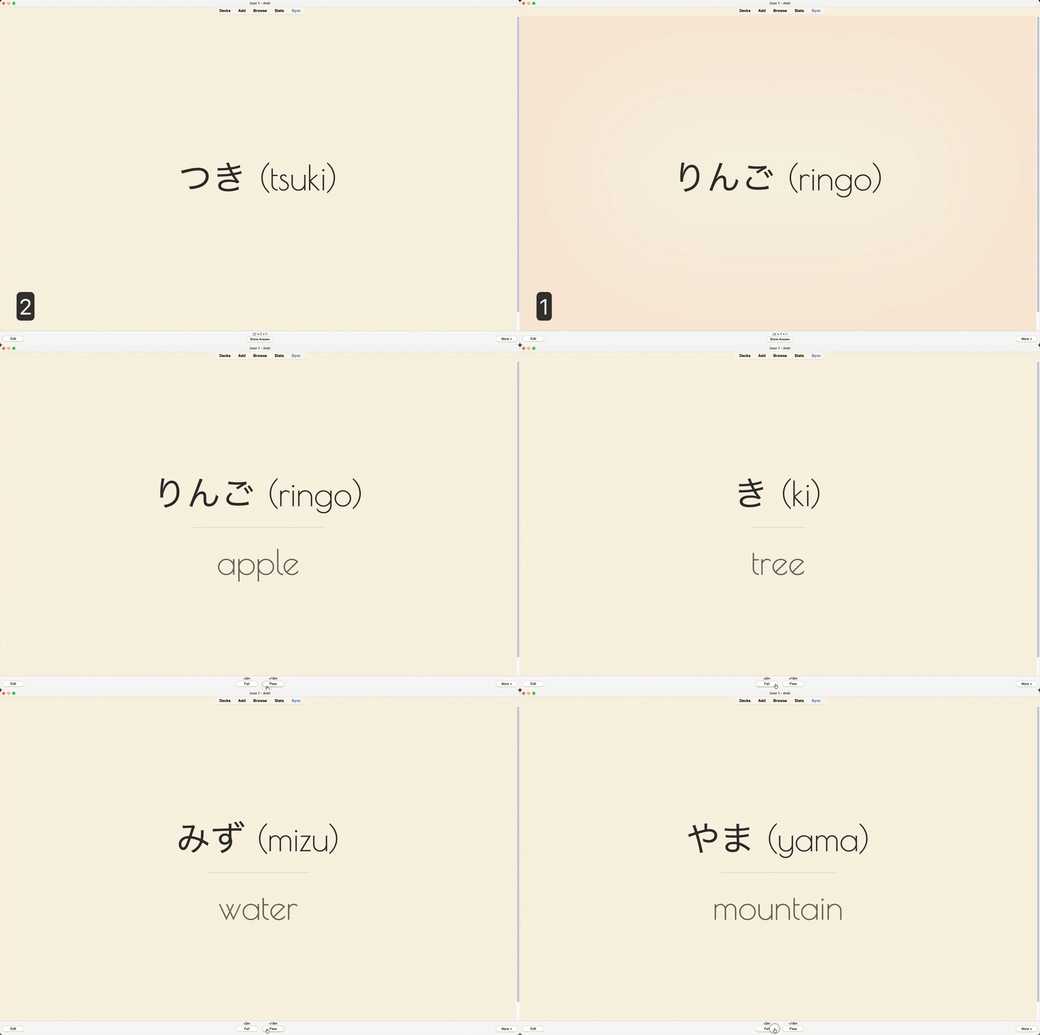
I built Answer Aura because that kept happening to me. Now the moment you answer, a soft glow washes over the card in the color of your grade:

  • 🟒 Green β€” you knew it
  • 🟑 Yellow β€” so‑so
  • πŸ”΄ Red β€” Again

It's gone by the time the next card shows up. You don't really read it, you just kind of feel how the card went.

demo

Make it yours πŸŽ›οΈ

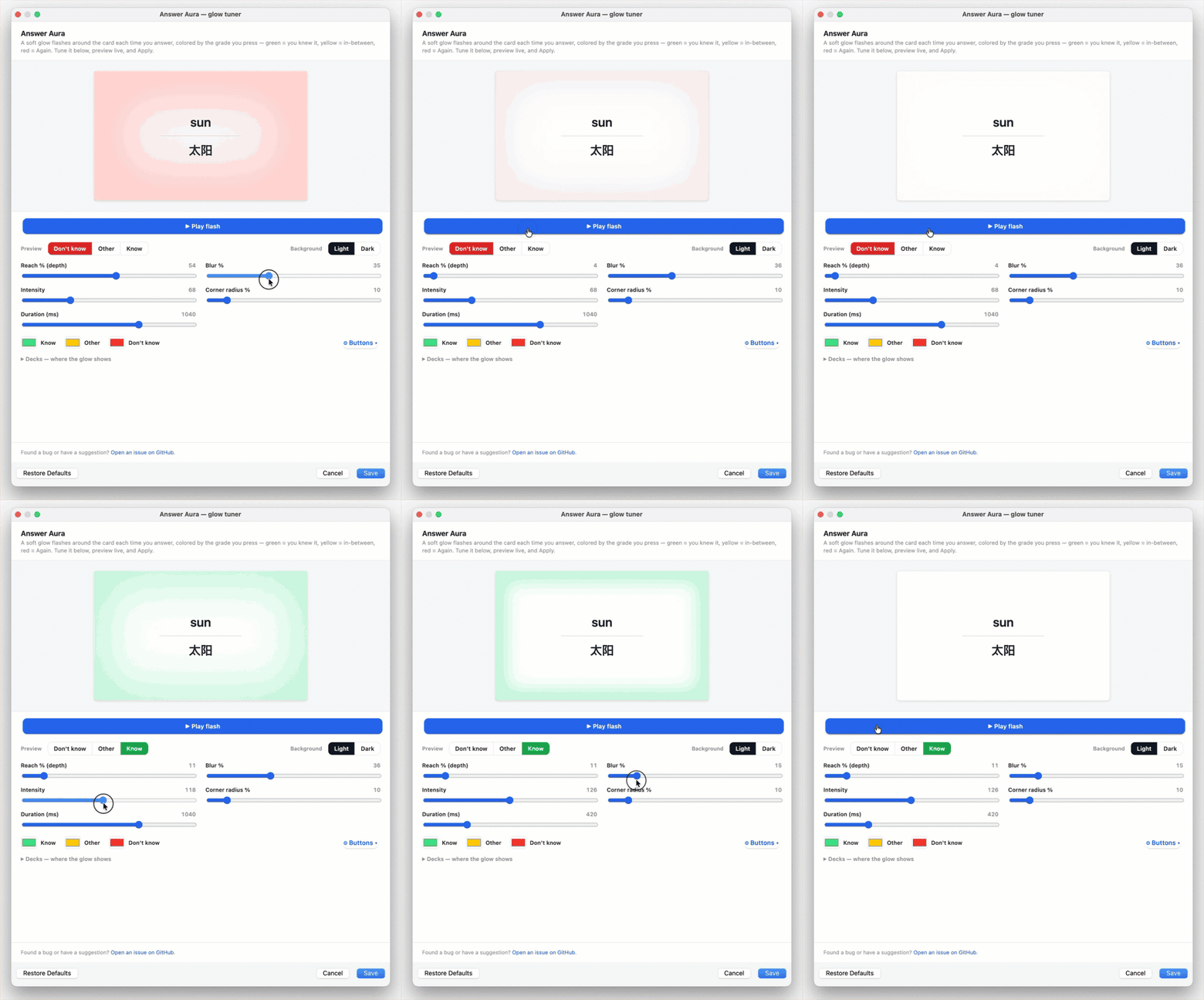
Open Tools β†’ Answer Aura β€” glow tuner (or the add-on's Config button), drag the sliders, and watch the live preview β€” it matches your real cards exactly. Happy with it? Hit Save. No restart, no config files.

tuner

  • 🎨 Colors β€” pick your own for each grade
  • 🌫️ Reach, blur, intensity, corners β€” from a whisper-thin edge to a full-card wash
  • 🎯 Grades β€” map each Anki button (Again / Hard / Good / Easy) to a color, or switch some off
  • πŸ“š Decks β€” turn the glow off in decks where you don't want it

Good to know

The glow follows the grade you record, not a specific key, so it works whether you answer with number keys, an hjkl add‑on, or the mouse. By default Again is red and the rest are green, with yellow waiting for whatever you map to it.

🐞 Found a bug or have an idea?

Open an issue on GitHub

That's the whole idea. Now go do your reps.

Source & issues: github.com/privetyaolega/anki-answer-aura

README

✨ Answer Aura

You tap an answer button, the next card slides in… and a second later you catch yourself thinking "wait β€” did I actually get that one right?" πŸ€”

I built Answer Aura because that kept happening to me. Now the moment you answer, a soft glow washes over the card in the color of your grade:

  • 🟒 Green β€” you knew it
  • 🟑 Yellow β€” so‑so
  • πŸ”΄ Red β€” Again

It's gone by the time the next card shows up. You don't really read it, you just kind of feel how the card went.

Answer Aura during a review

Make it yours πŸŽ›οΈ

Open Tools β†’ Answer Aura β€” glow tuner (or the add‑on's Config button), drag the sliders, and watch the live preview β€” it matches your real cards exactly. Happy with it? Hit Save. That's it β€” no restart, no config files.

Tuning the glow

What you can tune:

  • 🎨 Colors β€” pick your own for each grade
  • 🌫️ Reach, blur, intensity, corners β€” from a whisper‑thin edge to a full‑card wash
  • 🎯 Grades β€” decide which Anki button (Again / Hard / Good / Easy) shows which color, or switch some off entirely
  • πŸ“š Decks β€” turn the glow off in the decks where you don't want it (master toggle + per‑deck)

Good to know

The glow follows the grade you record, not a specific key, so it works whether you answer with number keys, an hjkl add‑on, or the mouse. By default Again is red and the rest are green, with yellow waiting for whatever you map to it.

🐞 Found a bug or have an idea?

Open an issue β†’ https://github.com/privetyaolega/anki-answer-aura/issues

That's the whole idea. Now go do your reps.

License

MIT