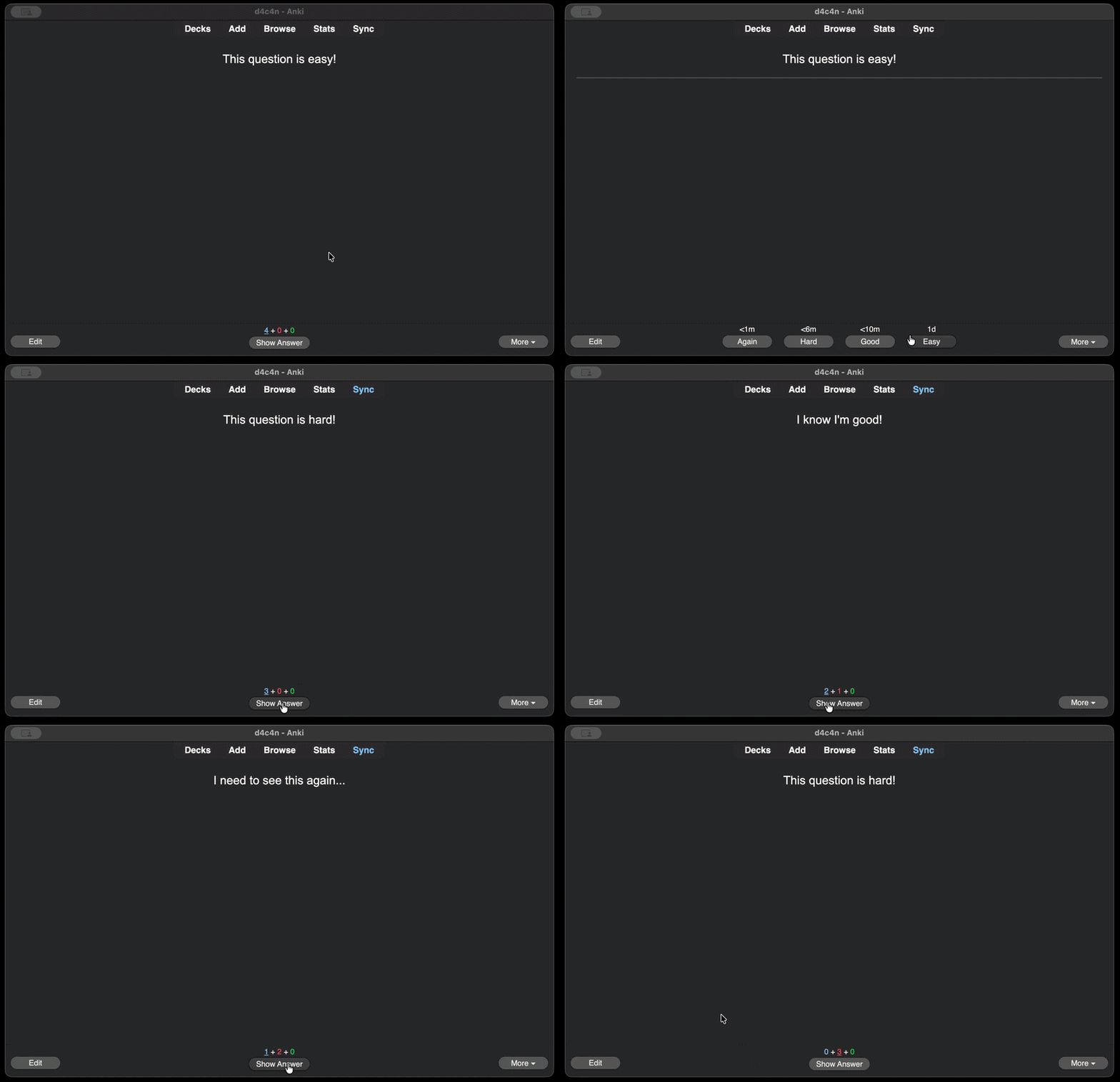
Flash Feedback

AnkiWeb addon 696740575

Flashes a brief, configurable colored overlay after each review answer, with per-button colors and toggles, adjustable duration, fade and opacity, plus a click-through design that handles rapid key presses.
AI-generated summary; may contain mistakes.

review-flowappearance

Open on AnkiWeb GitHub Find alternatives

AnkiWeb

Votes
2 (πŸ‘ 2 Β· πŸ‘Ž 0)
Updated
2026-05-30
Anki versions
23.10~
License
MIT (from the GitHub repository)
Virus scan
No ClamAV match A match does not prove malware. No match does not prove that the code is safe.
Languages
Python, JSON
Description language
en

Maintenance

active

  • Last update or commit: 2026-05-30 (155 days before the snapshot).
  • Test files: 1.
  • GitHub Actions workflows: 1.
  • Commits in the last year: 4.
  • Issues: 0 open, 0 closed.
  • Pull requests: 0 open, 0 merged.

Will it work on my Anki?

Version branches
Min AnkiMax AnkiUpdated
23.10+2026-05-30
History across monthly snapshots

Loading…

Similar addons

Overlayer for Anki

Adds a draggable, always-on-top overlay with global grading, flipping, audio and undo hotkeys, customizable styling, grading sounds, and an escalating Focus Dim system to keep reviews on track.

review-flowshortcutsappearanceaccessibility

3 votes 21% approval πŸ‘ 2 Β· πŸ‘Ž 1 Anki 2.1.2~ Updated 2026-04-14
Answer Aura - Grade color glow feedback

Flashes a brief colored glow around the card after each answer to reflect the grade, with customizable colors, glow settings, grade mappings and per-deck toggles.

review-flowappearance

1 votes 21% approval πŸ‘ 1 Β· πŸ‘Ž 0 ⭐ 0 Anki 25.09~ Updated 2026-07-07
ButtonColors4Anki

Colors Anki's answer buttons red, orange, green and blue for each rating, with a flash animation on click, working automatically across all card types with no configuration.

appearance

1 votes 21% approval πŸ‘ 1 Β· πŸ‘Ž 0 Anki 2.1.1~ Updated 2026-05-19
Anki FlowState

Adds countdown pressure bars with color warnings, shake and miss overlays, auto-flips cards on timeout, supports deck-specific limits, blur-to-reveal focus, and multilingual settings.

review-flowtimerdeck-managementappearance

7 votes 65% approval πŸ‘ 7 Β· πŸ‘Ž 0 Anki 2.1.66~ Updated 2026-03-11

Description

Flashes a brief colored overlay after each review answer β€” a quick visual cue without interrupting your flow.


Features

  • Per-button color and on/off toggle (Again / Hard / Good / Easy)
  • Configurable hold duration, fade-out duration, and peak opacity
  • GUI config dialog β€” no JSON editing (Tools β†’ Add-ons β†’ Config)
  • Non-blocking, click-through overlay; handles rapid key presses safely

Configuration
Open via Tools β†’ Add-ons β†’ Flash Feedback β†’ Config.
Options: main on/off switch, per-button color and enable toggle, hold duration (0–1000 ms), fade-out duration (40–400 ms), opacity (0.0–0.6).
Photosensitivity note: opacity is capped at 0.6 and defaults to 0.18. Keep it low.

Source & support
https://github.com/d4c4n/anki-flash-feedback

README

Flash Feedback

Flashes a brief colored overlay after each Anki review answer.

CI AnkiWeb License: MIT

demo

Features

  • Per-answer-button color + on/off toggle (Again / Hard / Good / Easy)
  • Configurable hold duration, fade-out duration, and peak opacity
  • GUI config dialog β€” no JSON editing (Tools β†’ Add-ons β†’ Config)
  • Non-blocking, click-through overlay; handles rapid key presses safely

Installation

From AnkiWeb (recommended)

Tools β†’ Add-ons β†’ Get Add-ons β†’ paste code 696740575

Manual

Download the .ankiaddon from Releases and double-click it, or unzip into your addons21/ folder.

Configuration

Open via Tools β†’ Add-ons β†’ (select add-on) β†’ Config.

Option Type Default Range Notes
enabled bool true β€” Master on/off switch
target_opacity float 0.18 0.0 – 0.6 Peak flash opacity. Capped at 0.6 to reduce photosensitivity risk.
hold_ms int 240 0 – 1000 How long to hold the flash before fading (ms)
fade_ms int 140 40 – 400 Fade-out duration (ms)
eases.1.enabled bool true β€” Flash on Again
eases.1.color hex #ff3b30 β€” Color for Again
eases.2.enabled bool true β€” Flash on Hard
eases.2.color hex #ff9500 β€” Color for Hard
eases.3.enabled bool true β€” Flash on Good
eases.3.color hex #34c759 β€” Color for Good
eases.4.enabled bool true β€” Flash on Easy
eases.4.color hex #0a84ff β€” Color for Easy

Photosensitivity note: target_opacity is hard-capped at 0.6 and defaults to 0.18. Keep it low. Disable the add-on if you experience discomfort.

Development setup

git clone https://github.com/d4c4n/anki-flash-feedback
cd anki-flash-feedback

# Symlink the source package into Anki's add-on folder (macOS path shown)
ln -s "$(pwd)/src/anki_flash_feedback" \
      ~/Library/Application\ Support/Anki2/addons21/anki_flash_feedback

Restart Anki to load the add-on. Config changes applied via the dialog take effect immediately (no restart needed). To see stdout/stderr from the add-on, launch Anki from a terminal:

/Applications/Anki.app/Contents/MacOS/anki

AnkiWeb version gating: the minimum supported Anki version is set in the AnkiWeb upload form, not in manifest.json. Do not add min_point_version to the manifest.

Running tests

Tests cover pure logic in core.py and run without Anki or Qt installed:

pip install pytest
python -m pytest

Building a release

python scripts/build.py
# β†’ dist/anki_flash_feedback.ankiaddon

The zip has __init__.py at the root (no top-level folder) and excludes __pycache__/, *.pyc, and meta.json β€” matching AnkiWeb's packaging requirements.

License

MIT β€” see LICENSE.

Contributing

Issues and pull requests welcome. Run ruff check and python -m pytest before submitting.