Quick Image Search

AnkiWeb addon 183246496

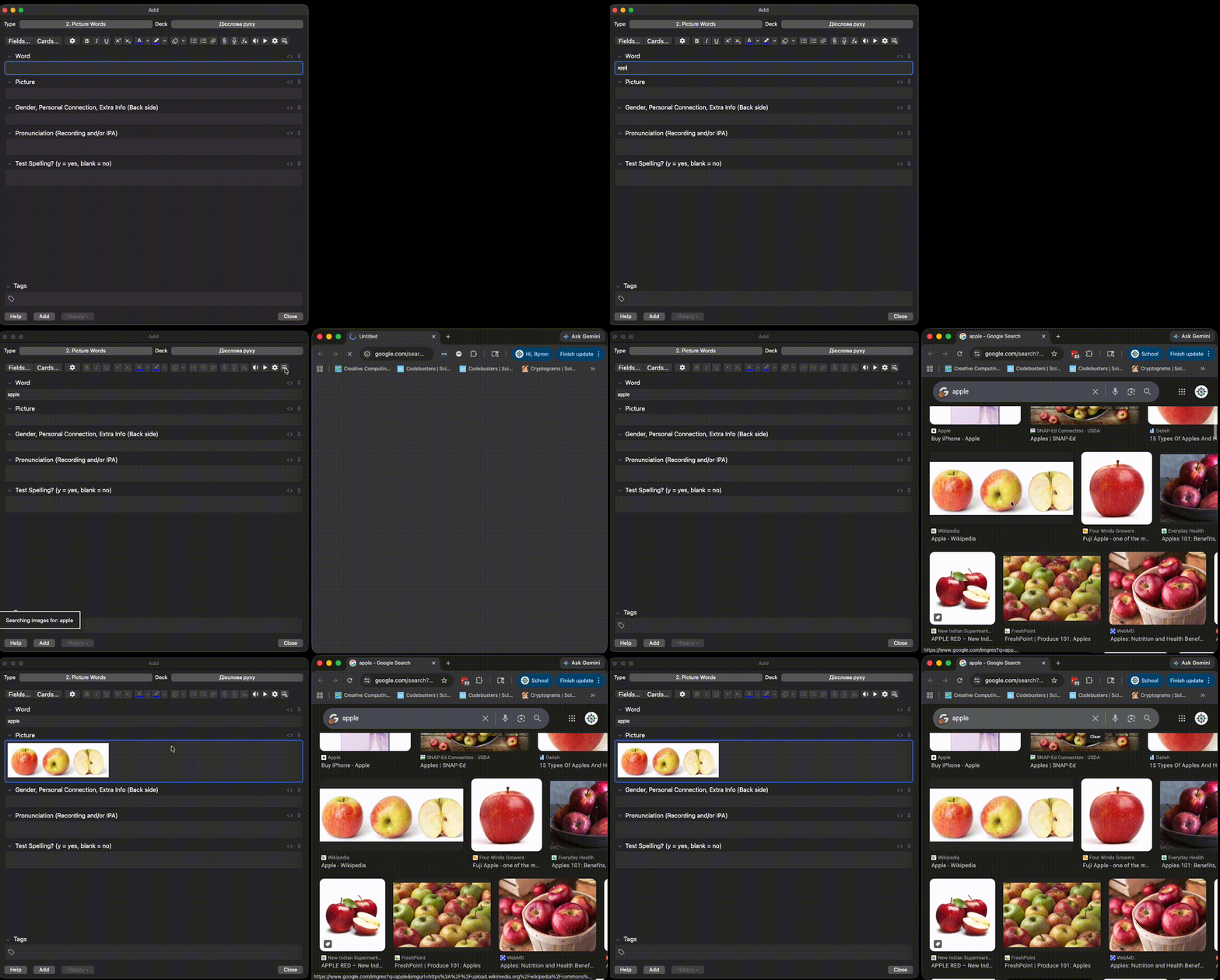
Adds a Search Images button to the Browse editor toolbar that opens a Google image search for a configurable note field, with domain and shortcut settings.
AI-generated summary; may contain mistakes.

card-creationshortcuts

Open on AnkiWeb GitHub Find alternatives

AnkiWeb

Votes
1 (πŸ‘ 1 Β· πŸ‘Ž 0)
Updated
2026-10-24
Anki versions
26.09.3~
License
MIT (from the GitHub repository)
Virus scan
No ClamAV match A match does not prove malware. No match does not prove that the code is safe.
Languages
Python, JSON
Description language
en

Maintenance

active

  • Last update or commit: 2026-10-25 (7 days before the snapshot).
  • GitHub Actions workflows: 1.
  • Commits in the last year: 34.
  • Issues: 0 open, 1 closed.
  • Pull requests: 0 open, 3 merged.
  • Median first response: 2386 hours (2 answered issues and pull requests).
  • Outside pull requests: 100% of 1 merged.

Will it work on my Anki?

Version branches
Min AnkiMax AnkiUpdated
2.1.5026.09.3+2026-10-24
History across monthly snapshots

Loading…

Similar addons

Image Search v3 fork

Searches multiple image providers using note fields or selected text and inserts chosen images into a configured field, with browsing, per-note-type settings, and smart replacement.

card-creationfork-or-reupload

3 votes 21% approval πŸ‘ 2 Β· πŸ‘Ž 1 ⭐ 2 Anki 26.05~ Updated 2026-10-16
Image Search has 1 fork β†’

Adds editor buttons that scrape Google Images from the first field's search term and insert or cycle images in the second field, with proxy and HTTPS-bypass settings.

card-creation

29 votes 26% approval πŸ‘ 12 Β· πŸ‘Ž 17 ⭐ 10 Updated 2018-01-23

Description

Adds a Search Images button to the editor toolbar in the Browse window. Clicking it opens an image search for the text in a configurable note field β€” making it easy to find images for your flashcards without leaving Anki.

Features

  • Toolbar button in the Browse window editor
  • Searches the configured note field (falls back to the first field if not found)
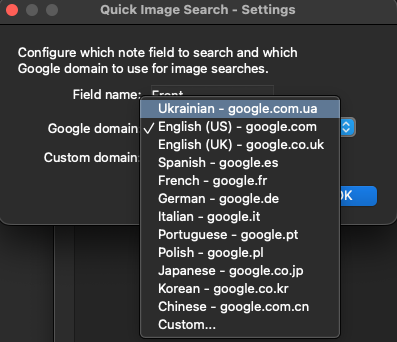
  • Supports 12 Google country domains plus a custom domain option
  • Configurable keyboard shortcut (default Ctrl+Shift+1, Shift+Cmd+1 on macOS)
  • Simple settings dialog

Configuration

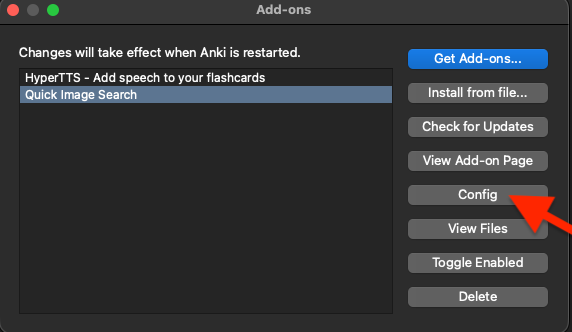
Go to Tools β†’ Add-ons β†’ Quick Image Search for Anki β†’ Config

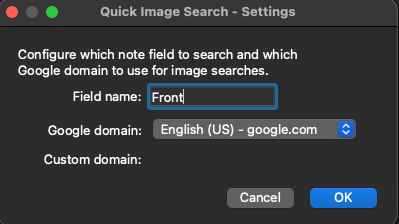
Field name β€” which note field to search (default: Front)

Google domain β€” which Google domain to use for language appropriate results (default: google.com.)

Shortcut β€” keyboard shortcut for the Search Images button (default: Ctrl+Shift+1). Clear it to disable the shortcut.

Source Code

github.com/bappelt/anki-quick-image-search

README

Quick Image Search for Anki

An Anki add-on that adds a Search Images button to the editor toolbar. Clicking it opens an image search for the text in a configurable note field β€” making it easy to find images for your flashcards without leaving Anki.

Features

  • Toolbar button in the Browse window editor
  • Searches the configured note field (falls back to the first field if not found)
  • Supports 12 Google country domains plus a custom domain option
  • Configurable keyboard shortcut (default Ctrl+Shift+1, shown as β‡§βŒ˜1 on macOS)
  • Simple settings dialog via Tools β†’ Add-ons β†’ Config

Installation

From AnkiWeb (recommended)

  1. In Anki, go to Tools β†’ Add-ons β†’ Get Add-ons...
  2. Enter code 183246496 (AnkiWeb page)
  3. Restart Anki

AnkiWeb installs get updates through Tools β†’ Add-ons β†’ Check for Updates.

From a .ankiaddon file

  1. Download quick_image_search-<version>.ankiaddon from the latest GitHub release
  2. In Anki, go to Tools β†’ Add-ons β†’ Install from file...
  3. Select the downloaded file and restart Anki

Install it only one way. Anki treats a copy installed from a file as a separate add-on from the AnkiWeb one, so with both enabled you get two Search Images buttons and two copies of the shortcut. If you switch, delete the old copy in Tools β†’ Add-ons first.

Configuration

Go to Tools β†’ Add-ons β†’ Quick Image Search for Anki β†’ Config

Setting Default Description
field_name Front Which note field to search
google_domain google.com Which image search domain to use
shortcut Ctrl+Shift+1 Keyboard shortcut for the button (leave empty to disable)

Supported domains include google.com, google.co.uk, google.de, google.fr, google.co.jp, and more β€” or enter a custom domain.

Requirements

  • Anki 2.1.50 or later
  • Tested on Anki 26.09.3

License

MIT

Show Your Support

Buy me a coffee