AnkiDraw - Draw and write using mouse and stylus with pressure support

AnkiWeb addon 1868980340

Fork of Touch Screen - draw and write on your cards

4 other versions of this addon exist. Compare versions ↓

Enables freehand drawing and writing on Anki cards with mouse or pressure-sensitive stylus, including smoothing, calligrapher modes, color and background options, and adjustable canvas/toolbar controls.
AI-generated summary; may contain mistakes.

review-flowshortcutsappearancefork-or-reupload

Open on AnkiWeb GitHub Find alternatives

AnkiWeb

Votes
97 (πŸ‘ 95 Β· πŸ‘Ž 2)
Updated
2026-09-19
Anki versions
24.11~
License
GPL-3.0 (from the GitHub repository)
Virus scan
No ClamAV match A match does not prove malware. No match does not prove that the code is safe.
Languages
Python, JavaScript, JSON
Description language
en

Maintenance

active

  • Last update or commit: 2026-09-19 (43 days before the snapshot).
  • GitHub Actions workflows: 1.
  • Commits in the last year: 49.
  • Issues: 7 open, 23 closed.
  • Pull requests: 1 open, 26 merged.
  • Median first response: 8 hours (29 answered issues and pull requests).
  • Outside pull requests: 100% of 3 merged.

Will it work on my Anki?

Version branches
Min AnkiMax AnkiUpdated
2.1.12.1.492023-09-29
2.1.5024.11+2026-09-19
History across monthly snapshots

Loading…

Compare versions

The original addon and its forks. The best value in each column is in bold.

VersionWorks on Anki 26.09.3MaintenanceLast activity VotesApprovalGitHub starsNotes
Touch Screen - draw and write on your cards original unknown abandoned 23 Dec 2023 πŸ‘ 70 Β· πŸ‘Ž 22 66% 27
↳ AnkiDraw - Draw and write using mouse and stylus with pressure support this addon likely active 19 Sep 2026 πŸ‘ 95 Β· πŸ‘Ž 2 93% 73
↳ annotate : writing, rectangles, highlight,lines, eraser (AI-detected; may be wrong) likely active 26 Jul 2026 πŸ‘ 6 Β· πŸ‘Ž 0 61% –
↳ AnkiDraw - Draw and write using mouse and stylus with pressure supportfixed lisi (AI-detected; may be wrong) supported stale 11 Dec 2024 πŸ‘ 1 Β· πŸ‘Ž 0 21% –
↳ ε‘η‰Œε±εΉ•δΉ¦ε†™ | Write on your screen (AI-detected; may be wrong) likely abandoned 4 Feb 2024 πŸ‘ 6 Β· πŸ‘Ž 2 41% 1

Forks can add features or work in a different way. Read the description before you change to another version. Fork detection is incomplete, so other versions can exist.

Similar addons

Minimalistic Drawing Panel

Adds a lightweight drawing and handwriting scratchpad to card review, supporting mouse, touch, stylus and pen input, colours, thickness levels, erasers, Surface Pen erasing, and auto-clearing between cards.

review-flow

2 votes 34% approval πŸ‘ 2 Β· πŸ‘Ž 0 ⭐ 0 Anki 25.07~ Updated 2026-07-02
Review Scratchpad: Type & Draw

Adds a resizable scratchpad to the review screen for typing or drawing answers, with pen pressure support, a clear button, night mode, and automatic clearing on each new card.

review-flowshortcutsquiz

1 votes 21% approval πŸ‘ 1 Β· πŸ‘Ž 0 Anki 2.1.66~ Updated 2026-10-07

Description

Initially based on the Anki-TouchScreen addon, updated ui and added pressure pen/stylus capabilities, perfect freehand(line smoothing) and calligrapher functionality.

If this addon was useful, please leave a star at the top right of the GitHub page

Website to test the drawing functionality: https://rytisgit.github.io/Anki-StylusDraw/

Draw Demonstration

Changes

  • Added Multiple Colour selection
  • Added Zen mode(menu toggle to hide toolbar completely but allow drawing, until it is canceled)
  • Added option to change the background color of the canvas, change the alpha channel in color selection to add transparency.
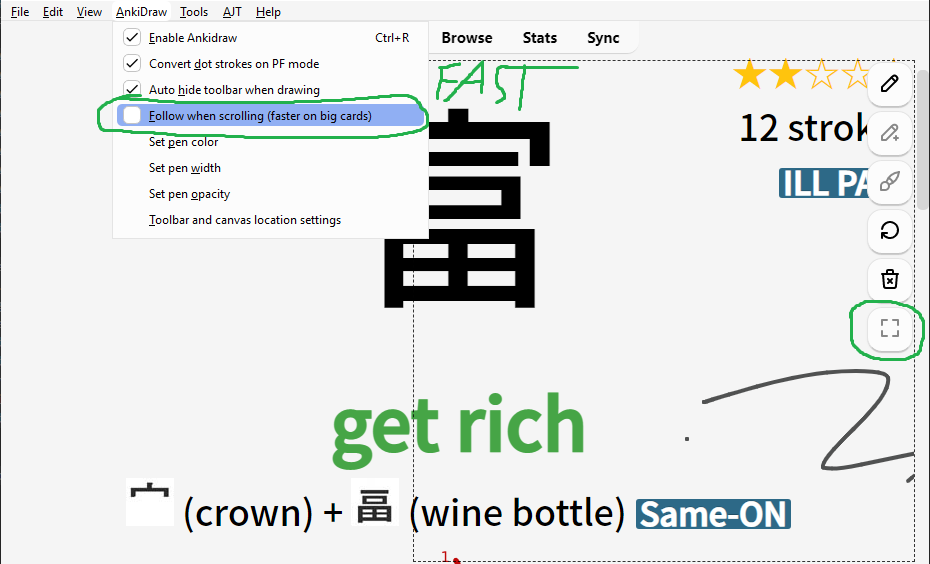
  • Added follow screen mode(menu option) and small canvas mode(alt + b) to increase drawing speed on very big cards
  • Added toolbar location configuration and other small fixes.
  • Fixed "resize not defined" error. Thanks huandney.
  • Updated UI, add option to convert dots, hide cursor and ui while drawing. Thanks rin-w
  • Added Perfect Freehand mode(https://github.com/steveruizok/perfect-freehand)
  • Added Calligrapher mode(https://github.com/atomanyih/Calligrapher)
  • Added pressure sensitivity
  • Increased drawing speed
  • Added , for showing/hiding, . for clearing, alt + c for calligrapher mode and alt + x for perfect freehand mode
  • Added standalone website to test drawing
  • Work around a Windows Pen bug which makes 2 primary pointers appear when drawing in Anki
  • Fixed unintended on click actions and text writing cursor placement on high dpi displays

Hardware

Tested to work with a Huion H1161, Windows Pen enabled.

For best experience:

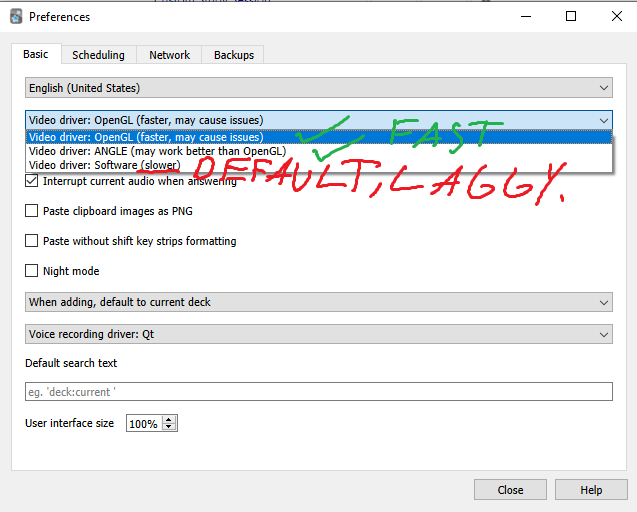
  • don't use software rendering(enable hardware acceleration)
  • turn on use pen as a mouse with Windows Pen
  • if drawing is slow on big cards turn on follow mode or small canvas

https://docs.ankiweb.net/platform/windows/display-issues.html

Run echo auto > %APPDATA%\Anki2\gldriver6 in windows cmd for Qt6:

Or echo auto > ~/.local/share/Anki2/gldriver6 in linux for Qt6:

Switch away from Software in Qt6

Change rendering in settings for Qt5:

Dont use software rendering in Anki settings Check use pen as mouse in Windows pen settings

Turn On Follow when scrolling or small canvas if drawing is slow on very big cards:

Turn On Follow when scrolling or small canvas if drawing is slow on very big cards

For developers

You are more than welcome to contribute! While I may not be able to support every user of this addon, I will do my best to help any developer willing to open PR implementing new features or fixing bugs.

README

Anki-StylusDraw

Initially based on the Anki-TouchScreen addon, updated ui and added pressure pen/stylus capabilities, perfect freehand(line smoothing) and calligrapher functionality.

Website to test the drawing functionality: https://rytisgit.github.io/Anki-StylusDraw/

Draw Demonstration

Changes

  • Added background color selection
  • Added follow screen mode(menu option) and small canvas mode(alt + b) to increase drawing speed on very big cards
  • Added toolbar location configuration and other small fixes.
  • Fixed "resize not defined" error. Thanks huandney.
  • Updated UI, add option to convert dots, hide cursor and ui while drawing. Thanks rin-w
  • Added Perfect Freehand mode(https://github.com/steveruizok/perfect-freehand)
  • Added Calligrapher mode(https://github.com/atomanyih/Calligrapher)
  • Added pressure sensitivity
  • Increased drawing speed
  • Added , for showing/hiding, . for clearing, alt + c for calligrapher mode and alt + x for perfect freehand mode
  • Added standalone website to test drawing
  • Work around a Windows Pen bug which makes 2 primary pointers appear when drawing in Anki

Hardware

Tested to work with a Huion H1161, Windows Pen enabled.

For best experience:

  • don't use software rendering(enable hardware acceleration)

  • turn on use pen as a mouse with Windows Pen

  • if drawing is slow on big cards turn on follow mode or small canvas

https://docs.ankiweb.net/platform/windows/display-issues.html

Run echo auto > %APPDATA%\Anki2\gldriver6 in cmd for Qt6

Switch away from Software in Qt6
Qt5 rendering change Switch away from Software in Qt5 Check use pen as mouse in Windows pen settings
Turn On Follow when scrolling or small canvas if drawing is slow on very big cards

Old Description

Implements same drawing/writing mechanism as in AnkiDroid. Your writing is NOT intended to remain on the cards after review - same as in AnkiDroid.

Use the menu View β†’ TouchScreen to activate/change settings.

Use Ctrl + R to toggle the touchscreen.

Use icons which will show up in the top right corner of the review screen to temporarily hide/clean the board. Enjoy!

Warning: the version for Anki 2.0 has limited functionality, and may sometimes not work as expected; since the release of Anki 2.1, the old version is not supported.

Changelog:

  • 0.2.6 - make "undo" action available under Alt + Z
  • 0.2.4 - add support for enhanced image occlusion, add a fix for "a double click bug" by LaucianK
  • 0.2.3 - bug fix release, improvements to undo button, styling and performance
  • 0.2.1 - minor fix for the buttons/canvas positioning
  • 0.2 - added "undo" option, improved the support of long cards plus other minor improvements

Disclaimer

Important parts of Javascript code were inspired by creativejs tutorial. I recommend you check out the resource if you are interested in learning JS.

This add-on works well with Anki Night Mode.

For developers

You are more than welcome to contribute! While I may not be able to support every user of this addon, I will do my best to help any developer willing to open PR implementing new features or fixing bugs.