Multi-column note editor (2025 edition)

AnkiWeb addon 1876579195

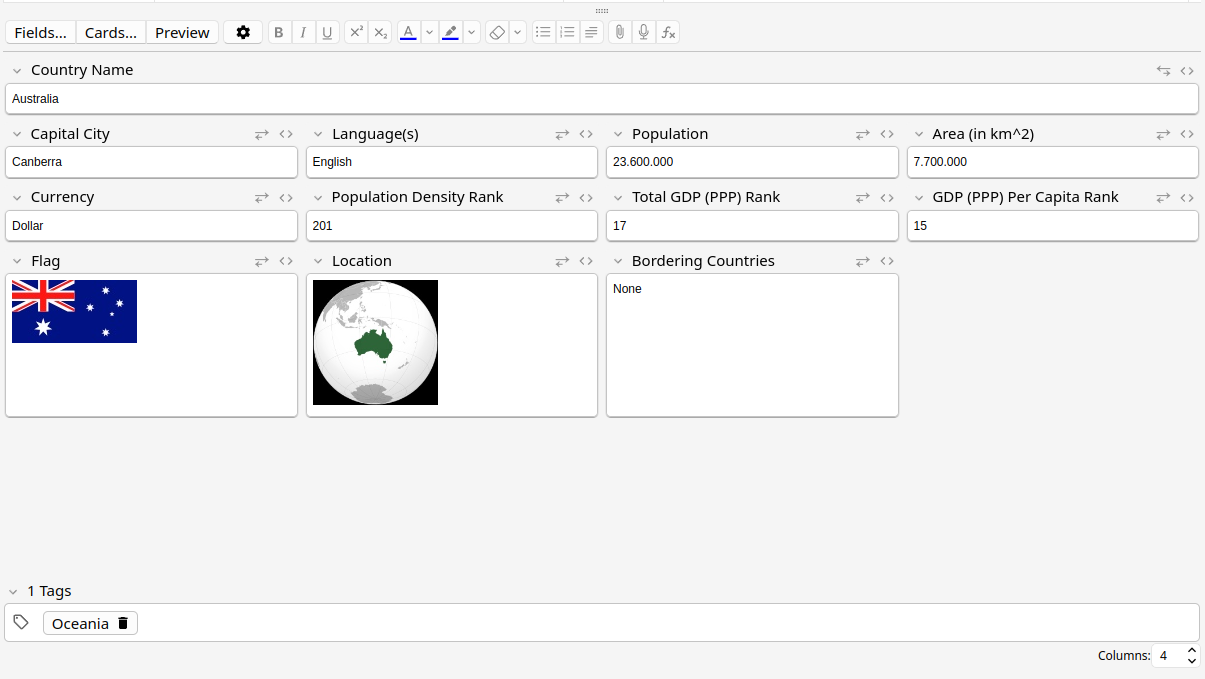
Displays note editor fields in configurable multi-column layouts, with per-note-type column counts, a quick column input box, and expandable full-width fields.
AI-generated summary; may contain mistakes.

note-managementappearance

Open on AnkiWeb GitHub Forum topic Find alternatives

AnkiWeb

Votes
7 (πŸ‘ 7 Β· πŸ‘Ž 0)
Updated
2026-07-07
Anki versions
24.11~
License
GPL-3.0 (from the license file in the package)
Virus scan
No ClamAV match A match does not prove malware. No match does not prove that the code is safe.
Languages
JavaScript, Python, CSS
Description language
en

Maintenance

active

  • Last update or commit: 2026-07-07 (117 days before the snapshot).
  • Commits in the last year: 2.
  • Issues: 0 open, 5 closed.
  • Pull requests: 0 open, 0 merged.
  • Median first response: 20 hours (3 answered issues and pull requests).

Will it work on my Anki?

Version branches
Min AnkiMax AnkiUpdated
24.11+2026-07-07
History across monthly snapshots

Loading…

Similar addons

Multi-column note editor

Displays note editor fields in multiple adjustable columns, with per-note-type and per-context settings and options to make selected fields span an entire row.

note-managementappearance

55 votes 62% approval πŸ‘ 41 Β· πŸ‘Ž 14 ⭐ 6 Anki 2.1.49~ Updated 2021-11-02
Grid Fields has 1 fork β†’

Displays the note editor in multiple columns using automatic, manual, or custom grid-area layouts, with shortcuts to toggle modes and temporarily widen a field.

note-managementshortcutsappearance

11 votes 52% approval πŸ‘ 9 Β· πŸ‘Ž 2 ⭐ 1 Anki 2.1.43~ Updated 2021-04-09

Description

Change the note editor to see your fields inside multiple columns. A new input box at the bottom of the window allows you to easily and quickly change how many columns you see. Each note type can have its own custom number of columns, and any field with a lot of content can be toggled to take up a full line again.


-- Changelog --

1.6 - (2026-07-07)

  • Changed window detection strategy for better interoperability with other add-ons

1.5 - (2025-10-20)

  • More fixes for field height stretching. No longer breaks with PgUp/PgDown and fixes (subtle) inconsistent border shadow clipping.

1.4 - (2025-10-16)

  • Improve field height calculation. Fixes some fields getting cut off.

1.3 - (2025-01-15)

  • Proper support for multiple windows with an editor open at the same time (and fix crash when closing one of them)
  • Fix excessive config saving on load

1.2 - (2025-01-14)

  • Fix positioning of expander when "Show Duplicates" button is visible
  • Add an animated outline on the field when expanded/contracted to easily see where it moved to

1.1 - (2025-01-01)

  • Fix tabbing order to match the visual order instead of original order
  • Expander button now colored when expanded (matches the code expander next to it)
  • Fix a very minor bottom border protrusion (1px) on some fields

README

This Anki add-on lets you change the note editor to see your fields inside multiple columns. A new input box at the bottom of the window allows you to easily and quickly change how many columns you see. Each note type can have its own custom number of columns, and any field with a lot of content can be toggled to take up a full line again.

https://github.com/user-attachments/assets/a348d53f-061e-4f7c-bc50-bdf70a148395

AnkiWeb Link

Known issues:

  • (wontfix) Modifying the field order in the note model may scramble field settings since we can only target the field index. Manually redoing your columns takes 2 seconds, so do that.