Ignore accents in browser search

AnkiWeb addon 1924690148

Automatically converts each browser search term to ignore accents and diacritical marks, preserving grouping, negation, quoting, and keywords; now obsolete since Anki natively supports this.
AI-generated summary; may contain mistakes.

searchobsolete

Open on AnkiWeb GitHub Find alternatives

AnkiWeb

Votes
55 (πŸ‘ 49 Β· πŸ‘Ž 6)
Updated
2020-11-28
Anki versions
2.1.28~
License
GPL-3.0 (from the GitHub repository)
Virus scan
No ClamAV match A match does not prove malware. No match does not prove that the code is safe.
Languages
Python
Description language
en

Maintenance

abandoned

  • Last update or commit: 2022-02-14 (1721 days before the snapshot).
  • Commits in the last year: 0.
  • Issues: 3 open, 4 closed.
  • Pull requests: 1 open, 0 merged.
  • Median first response: 186 hours (5 answered issues and pull requests).

Will it work on my Anki?

Version branches
Min AnkiMax AnkiUpdated
2.1.02.1.232020-06-14
2.1.28+2020-11-28
History across monthly snapshots

Loading…

Similar addons

Browser search result highlighter

Highlights browser search matches within notes, including field code, tags, regex and overlapping matches, with auto-scroll, scrollbar indicators and customizable settings.

search

18 votes 82% approval πŸ‘ 18 Β· πŸ‘Ž 0 ⭐ 6 Anki 24.11~ Updated 2026-06-06
Browser sticky search

Adds a persistent second search box to the browser whose terms stay until manually cleared, with search history and grouped AND concatenation.

search

3 votes 44% approval πŸ‘ 3 Β· πŸ‘Ž 0 ⭐ 0 Anki 25.07.5~ Updated 2025-08-24
Browser instant search

Makes browser search live as you type, saves queries after two seconds of inactivity, highlights invalid searches in red, and still shows error popups when pressing Enter.

search

2 votes 34% approval πŸ‘ 2 Β· πŸ‘Ž 0 ⭐ 0 Anki 24.11~ Updated 2025-02-14

Description

This add-on is obsolete. Please do not use it.

This feature is part of Anki now. You can enable it with the setting: Tools -> Preferences -> Editing -> Browsing -> [x] Ignore accents in search (slower)

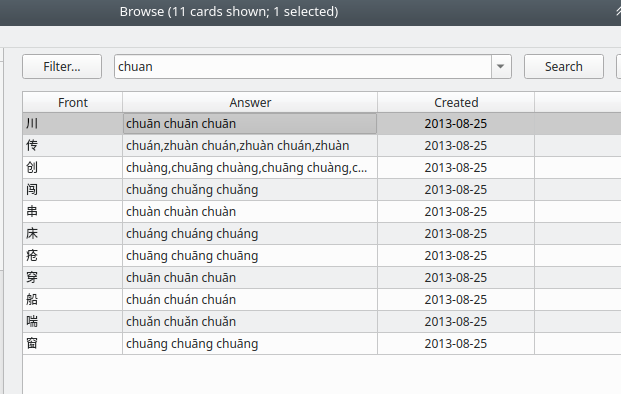
Ignore accents and diacritical marks used by various languages when searching in the card browser and match only against the base characters. This allows you to enter only the base characters in the browser search bar even if your notes have the words written with the marks included.

Changes in 2.4:

  • Fix handling deck searches where the quotes are after the keyword. I.e: deck:"my deck" Changes in 2.3:
  • Now handles negation, grouping, and 'and|or' keywords
  • Doesn't mangle your search term quoting or keyword order Changes in 2.2:
  • Fix handling of negated terms (e.g.: -is:due) Changes in 2.1:
  • Correctly handle deck names with spaces Changes in 2.0:
  • Reworked to continue working with newest Anki releases. Changes in 1.9:
  • Fix broken widget order around the search bar Changes in 1.8:
  • Anki 2.1 support. The add-on will no longer receive updates for Anki 2.0.x Changes in 1.7
  • Supports any language, although searches are now slower.

README

anki-ignore-accents

Anki add-on that forces browser search to always ignore accents/diacritical marks. Compatible with Anki 2.1.28 and newer.

Ignore accents

Since version 2.1.24, Anki allows you to search in the browser while ignoring accents or diacritial marks by adding a marker to each word you want to search for: nc:something. This is not very intuitive for those who frequenty rely on this behavior or when multiple terms are included in the search.

This add-on will do the hard work for you and ensure every term in your search is automatically converted to nc:myword without you doing anything else. Once the add-on is installed, the behavior is always enabled and it will always modify your browser searches.

The add-on has no effect on any term that includes the : character as they are considered special Anki keywords. You cannot search for field:myword. Besides being difficult to implement, searching with field:nc:myword is not supported by Anki anyway.

Grouping, negation, and and|or keywords are safe to use normally; the add-on will find the right terms to annonate and preserve the quoting (previous versions stripped quoting).

My test string:

"deck:Chinese::Let's learn words" black -(cat and ( mouse or carrot )) with "orange" -(dog or rabbit) is:new -house deck:"inner quotes test!"

Produces this result:

"deck:Chinese::Let's learn words" nc:black -(nc:cat and ( nc:mouse or nc:carrot )) nc:with "nc:orange" -(nc:dog or nc:rabbit) is:new -nc:house deck:"inner quotes test!"