USMLE Daily Subdecks (Created by drgmb)

AnkiWeb addon 1937582734

Automates daily USMLE filtered-deck creation from high-yield and error tags, offering one-click rebuild and optional automatic rebuild on startup that respects the rollover hour.
AI-generated summary; may contain mistakes.

filtered-decksdeck-management

Open on AnkiWeb GitHub Find alternatives

AnkiWeb

Votes
0 (πŸ‘ 0 Β· πŸ‘Ž 0)
Updated
2026-03-15
Anki versions
2.1.1~
License
MIT (from the AnkiWeb description)
Virus scan
No ClamAV match A match does not prove malware. No match does not prove that the code is safe.
Languages
Python, JSON
Description language
en

Maintenance

stale

  • Last update or commit: 2026-03-15 (231 days before the snapshot).
  • Commits in the last year: 4.
  • Issues: 0 open, 0 closed.
  • Pull requests: 0 open, 0 merged.

Will it work on my Anki?

Version branches
Min AnkiMax AnkiUpdated
2.1.1+2026-03-15
History across monthly snapshots

Loading…

Similar addons

Filtered Deck From Tag has 1 fork β†’

Creates a filtered deck from a right-clicked tag in the browser sidebar, with configurable supplemental searches, card limits, automatic unsuspending, and default ordering.

taggingfiltered-decks

27 votes 77% approval πŸ‘ 25 Β· πŸ‘Ž 2 ⭐ 7 Anki 2.1.56~ Updated 2023-02-19

Description

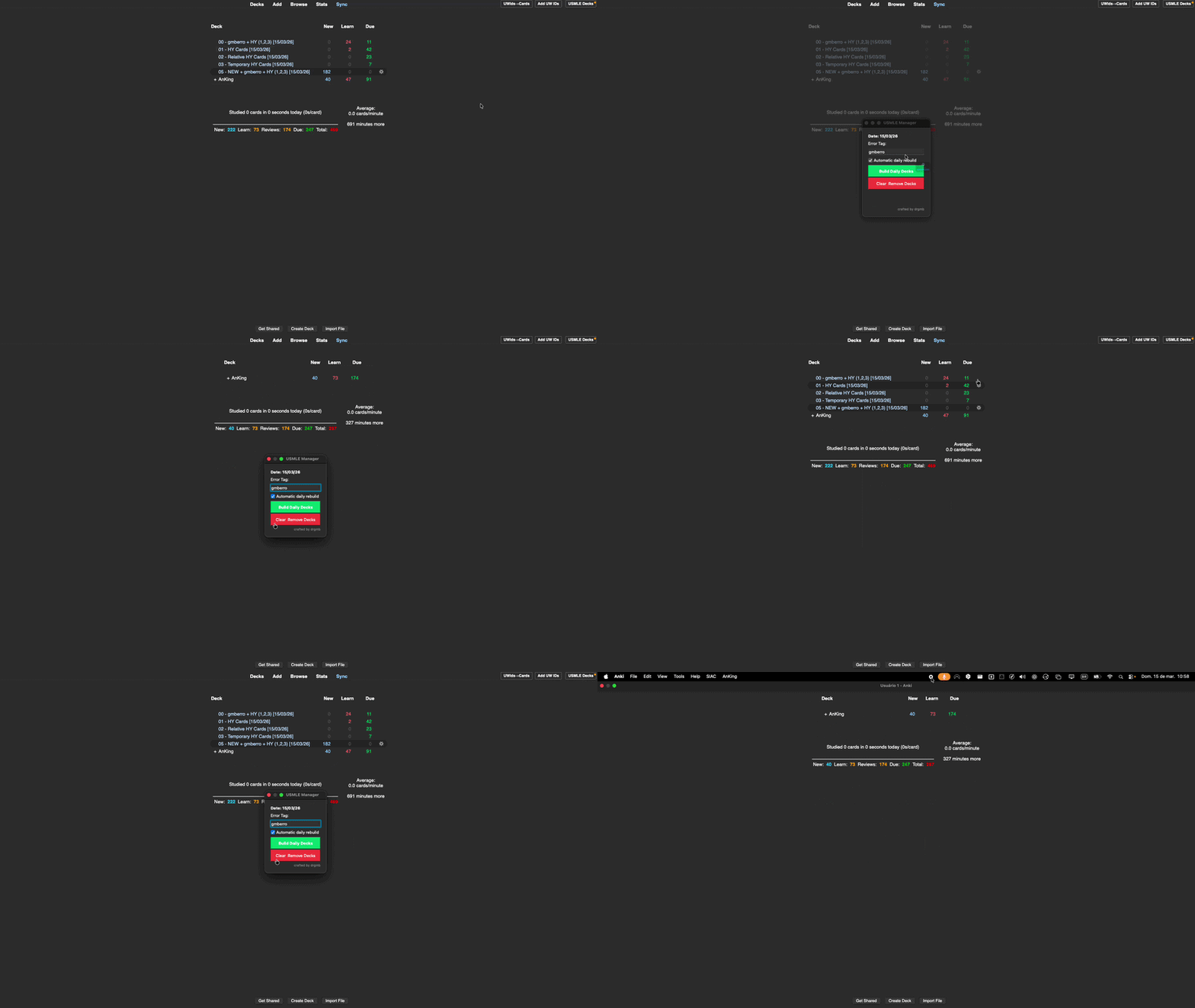
Automates daily filtered deck creation for USMLE study using High Yield tags. Eliminates the manual overhead of rebuilding filtered decks each day.
Features

  • Filtered deck creation from HY tags (1-HighYield, 2-RelativelyHighYield, 3-HighYield-temporary)
  • Configurable error tag for cards you got wrong
  • New cards deck combining error tag + HY tags
  • One-click clear and rebuild
  • Optional automatic daily rebuild on Anki startup (respects rollover hour)

Deck Structure

  • 00 β€” Due cards with error tag AND any HY tag
  • 01 β€” Due + learning cards tagged 1-HighYield
  • 02 β€” Due + learning cards tagged 2-RelativelyHighYield
  • 03 β€” Due + learning cards tagged 3-HighYield-temporary
  • 05 β€” New cards with error tag AND any HY tag

Setup

  • Open Tools β†’ ⚑ USMLE Decks
  • Set your error tag (default: gmberro)
  • Optionally enable "Automatic daily rebuild"
  • Click "Build Daily Decks"

Requirements Anki 23.10 or later.

How Auto-Rebuild Works On Anki startup the addon compares sched.today against the last build day. If different, it silently clears and rebuilds β€” no dialog, only a brief tooltip. Respects the configured rollover hour.

A Note from the Author This addon does its job β€” it surfaces the most relevant cards and meaningfully improves review quality. However, after extended use I noticed a side effect worth mentioning: knowing the high-yield cards are already covered tends to reduce the motivation to finish the remaining deck. If you are someone who is driven by clearing everything to zero, be aware of this dynamic. Use the decks as a priority filter, not a replacement for your full daily review.

Crafted by drgmb β€” MIT License

README

USMLE Daily Decks

Anki License: MIT GitHub

Automates daily filtered deck creation for USMLE study using High Yield tags. Eliminates the manual overhead of rebuilding filtered decks each day so you can focus on reviews.

USMLE Daily Decks Demo

Features

  • Filtered deck creation from HY tags (1-HighYield, 2-RelativelyHighYield, 3-HighYield-temporary)
  • Configurable error tag for cards you got wrong
  • New cards deck combining error tag + HY tags
  • One-click clear and rebuild
  • Optional automatic daily rebuild on Anki startup (respects Anki's rollover hour)

Deck Structure

Prefix Deck Name Pattern Contents
00 [error_tag] + HY (1,2,3) [date] Due cards with error tag AND any HY tag
01 HY Cards [date] Due + learning cards tagged 1-HighYield
02 Relative HY Cards [date] Due + learning cards tagged 2-RelativelyHighYield
03 Temporary HY Cards [date] Due + learning cards tagged 3-HighYield-temporary
05 NEW + [error_tag] + HY (1,2,3) [date] New cards with error tag AND any HY tag

Installation

AnkiWeb: Tools β†’ Add-ons β†’ Get Add-ons β†’ paste the addon ID

Manual: Download .ankiaddon β†’ Tools β†’ Add-ons β†’ Install from file

Setup

  1. Open Tools β†’ ⚑ USMLE Decks
  2. Set your error tag (default: gmberro)
  3. Optionally enable "Automatic daily rebuild"
  4. Click "Build Daily Decks"

Requirements

  • Anki 23.10 or later

How Auto-Rebuild Works

On Anki startup, the addon compares the current sched.today value against the last build day. If different, it silently clears old decks and rebuilds. No dialog is shownβ€”only a brief tooltip notification. Uses Anki's internal day counter, so it respects the configured rollover hour.

Author & License

Crafted by drgmb

MIT License
