Dictionaries Available
You can choose between Collins, Macmillan and BaBla.
Features Available
Features for Collins
Query all definitions and phonetic transcriptions for a word.
Features for Macmillan
Query all definitions, example phrases and phonetic transcriptions for a given word.
Features for Babla
Query only words translated for a destination language.
Usage
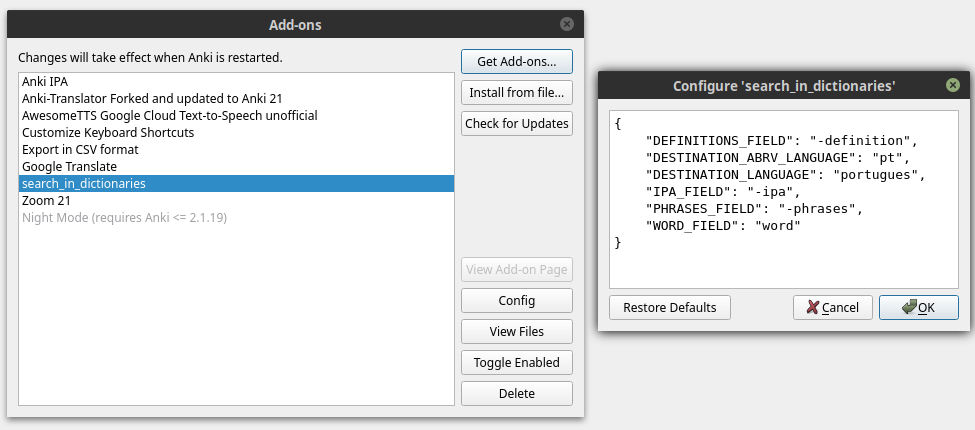
Configure your dictionary, go to menu Tools --> Add-ons or type: Ctrl+Shft+A
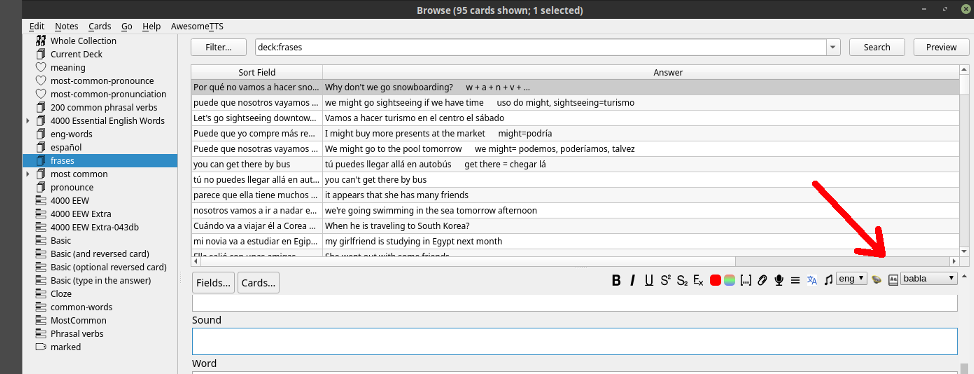
Translating
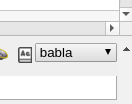
Only choose the dictionary in the drop-down-list and click on the button.
Configurations
WORD_FIELD is the field to be used for queries.
DEFINITIONS_FIELD is used in conjuction with the name of choose dictionary.
For example: if configuration is:
"DEFINITIONS_FIELD":"-definitions"
and you choose the dictionary Collins than:
you need in your card a field named: collins-definitions
PHRASES_FIELD works in the same way as DEFINITIONS_FIELD
IPA_FIELD works in the same way as DEFINITIONS_FIELD
DESTINATION_ABRV_LANGUAGE is used only for Babla dictionary.
DESTINATION_LANGUAGE is used only for Babla dictionary.
If you don't know the abreviation of your destination language, access the site:
https://bab.la/
access the dictionary section, choose your language and look into the address bar.
Installation
This Add-On is also posted on the [Anki Add-Ons Website].
You can use the Add-On Installer, which is integrated into Anki, to install the Translator.
Or you can download this project as a zip and uncompress the folder into your Anki Addon folder (../addons21/Anki-Translator-master).
Source-code
The source code of this Add-On is found in https://github.com/danilobatistaqueiroz/search-in-dictionaries.git
