Symbols As You Type

AnkiWeb addon 2040501954

1 other version of this addon exists. Compare versions ↓

Inserts Unicode symbols into cards by typing predefined key sequences, with a customizable symbol list that syncs per profile to AnkiWeb.
AI-generated summary; may contain mistakes.

card-creationformatting

Open on AnkiWeb GitHub Find alternatives

AnkiWeb

Votes
203 (πŸ‘ 186 Β· πŸ‘Ž 17)
Updated
2026-01-25
Anki versions
25.09.2~
License
AGPL-3.0 (from the README)
Virus scan
No ClamAV match A match does not prove malware. No match does not prove that the code is safe.
Languages
Python, JavaScript, JSON
Description language
en

Maintenance

stale

  • Last update or commit: 2026-01-25 (280 days before the snapshot).
  • Commits in the last year: 2.
  • Issues: 26 open, 27 closed.
  • Pull requests: 2 open, 5 merged.
  • Median first response: 208 hours (37 answered issues and pull requests).
  • Outside pull requests: 100% of 5 merged.
  • Forks that may still be maintained: "Symbols As You Type (updated for 23.10)" (1957191470).

Will it work on my Anki?

Version branches
Min AnkiMax AnkiUpdated
2.1.025.09.2+2026-01-25
History across monthly snapshots

Loading…

Compare versions

The original addon and its forks. The best value in each column is in bold.

VersionWorks on Anki 26.09.3MaintenanceLast activity VotesApprovalGitHub starsNotes
Symbols As You Type this addon original likely stale 25 Jan 2026 πŸ‘ 186 Β· πŸ‘Ž 17 87% 30
↳ Symbols As You Type (updated for 23.10) likely abandoned 16 Dec 2023 πŸ‘ 6 Β· πŸ‘Ž 1 49% 0

Forks can add features or work in a different way. Read the description before you change to another version. Fork detection is incomplete, so other versions can exist.

Similar addons

BiDi Tools for right-to-left languages

Adds editor buttons for setting left-to-right or right-to-left direction on entire lines/blocks or selected text, plus inserting Unicode characters that control bidirectional text.

formatting

14 votes 78% approval πŸ‘ 14 Β· πŸ‘Ž 0 ⭐ 1 Anki 2.1.65~ Updated 2026-02-22
Symbols

Adds a symbol menu accessible via Ctrl+S, with favourites, a last-used symbol, and customizable character sets configured through add-on settings.

card-creationformattingshortcuts

107 votes 74% approval πŸ‘ 88 Β· πŸ‘Ž 19 Anki 23.12~ Updated 2026-05-19
ReviewSymbols

Adds a review context menu for inserting extra symbols such as IPA, Greek, Cyrillic and mathematical characters, with editable symbol lists via a simple JSON configuration file.

formatting

2 votes 9% approval πŸ‘ 1 Β· πŸ‘Ž 1 Updated 2018-12-22
Custom editor keymap

Customizes editor keyboard shortcuts to insert characters, HTML, JavaScript, or file contents based on configured key-and-modifier mappings, including Arrow+Alt symbols.

shortcutsobsolete

1 votes 21% approval πŸ‘ 1 Β· πŸ‘Ž 0 Anki 2.1.46~ Updated 2021-10-13

Description

This plugin lets you quickly insert Unicode symbols into cards by typing a predefined key sequence.

GETTING STARTED:

  1. Install the plugin.
  2. Start typing with symbols!

A list of symbols is available through the Options window (see below), and a list of default symbols are also available online. Symbols are synced with AnkiWeb per-profile, which means different users can each have their own custom set of symbols.

NOTE: Symbol insertion in the card browser search bar is currently NOT working for Anki 2.1.41+.

This plugin is NOT compatible with the "Multi-Column Note Editor" plugin. If you would like similar functionality, please use this updated multi-column plugin instead: https://ankiweb.net/shared/info/2064123047

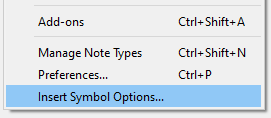
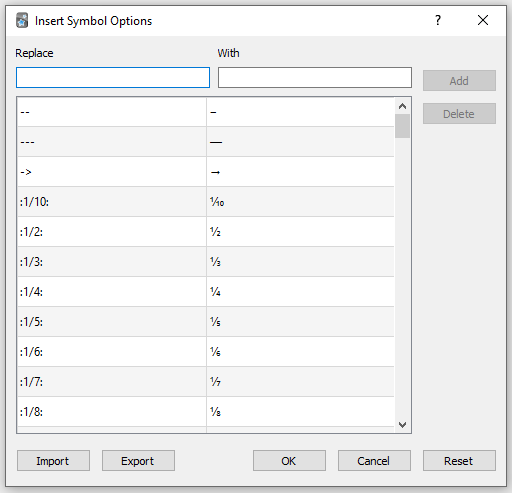
ADDING YOUR OWN SYMBOLS: The symbol list is fully customizable, and you can add, import, and export your own list of symbols through the Options window. To open the Options window, click on the "Insert Symbol Options..." menu item in the Tools menu. If the plugin was just installed, you may need to restart Anki for the menu to show up:
This should bring up the following window:
FAQ: Q: Can I insert bold text, italics, superscripts/subscripts, etc.? A: Yes! Normally, all symbols are treated as text, but if a key starts/ends with :: (eg. ::key::), the corresponding symbol will be treated as raw HTML. When entering HTML certain characters will need to be escaped.

Note: If a symbol ends with a HTML tag, the tag will still be active when the next character is pressed (ie. if the inserted symbol was <b>some text</b>, the next character one types will still be bold).

Q: Can I insert symbols in the card browser? A: This plugin supports symbol insertion in both the card editor and card browser. However, please note that while inserting symbols into the search bar of the card browser works most of the time, it is not guaranteed to work all the time (eg. with emojis and other complex symbols).

Q: What kind of keys (text to replace) can I use? A: Keys must contain at least one non-whitespace character and must not be duplicates of other keys. Whitespace (space, tab, new line, etc.) at the start/end of keys will be removed.

Note: It is up to the user to make sure keys do not conflict with each other (ie. if key and key key are both keys, the second will never trigger since the first replacement will always occur first).

Q: What kind of values (symbols to insert) can I use? A: Values must contain at least one character. Multiple keys can map to the same value, and HTML is supported (see above).

Q: Are there any conflicting add-ons? A: This plugin is NOT compatible with the "Multi-Column Note Editor" plugin. If you would like similar functionality, please use this updated multi-column plugin instead: https://ankiweb.net/shared/info/2064123047. Please let us know if you discover any additional conflicts.

SOURCE CODE / BUG REPORTS: The source code of is available on GitHub. Please report any issues, along with how to reproduce the problem, to the GitHub page!

Helpful information to provide would include:

  • Anki version
  • Operating system and system language
  • Other installed plugins
  • An example of how to reproduce the problem

README

Symbols As You Type

This Anki plugin lets you quickly insert Unicode symbols into cards by typing a predefined key sequence.

demo

Getting Started:


  1. Install the plugin from AnkiWeb (plugin ID: 2040501954).
  2. For a list of available symbols, open the Options window (see below) or refer to the list of default symbols.

Features:


  • Large variety of symbols including Greek letters, mathematical characters, currency, and more.
  • Symbol list is fully customizable and is synced to AnkiWeb per profile.
  • Compatible with Anki 2.0 and 2.1

Adding Your Own Symbols:


The symbol list is fully customizable, and you can add, import, and export your own list of symbols through the Options window. To open the Options window, click on the "Insert Symbol Options..." item in the Tools menu. If the plugin was just installed, you may need to restart Anki for the menu to show up:

symbol-options-menuitem

This should bring up the following window:

symbol-options-popup

License:


This plugin is licensed under the GNU Affero General Public License version 3, same as Anki.