🎨 ColorCoding 🌈 - Automatically Color Specific Words

AnkiWeb addon 2113325087

Automatically colors predefined words in card fields using customizable word-color pairs, supporting HTML/HEX colors, JSON datasets and optional bold formatting.
AI-generated summary; may contain mistakes.

formattingbeta

Open on AnkiWeb GitHub Find alternatives

AnkiWeb

Votes
21 (👍 18 · 👎 3)
Updated
2025-08-26
Anki versions
24.04~
License
Not found (this does not mean that the addon has no license)
Virus scan
No ClamAV match A match does not prove malware. No match does not prove that the code is safe.
Languages
JSON, Python, JavaScript
Description language
en

Maintenance

stale

  • Last update or commit: 2025-08-26 (432 days before the snapshot).
  • Commits in the last year: 0.
  • Issues: 4 open, 3 closed.
  • Pull requests: 0 open, 0 merged.
  • Median first response: 5766 hours (4 answered issues and pull requests).

Will it work on my Anki?

Version branches
Min AnkiMax AnkiUpdated
2.1.024.04+2025-08-26
History across monthly snapshots

Loading…

Similar addons

Insert HTML wrapper for your style

Wraps selected text in customizable HTML tags using a button or hotkeys, letting users style important words per note type through CSS.

formattingshortcuts

3 votes 44% approval 👍 3 · 👎 0 ⭐ 1 Anki 25.09.2~ Updated 2026-02-16
Auto-Recolor

Automatically colorizes Japanese card text according to pitch accent patterns, with customizable colors, deck targeting, optional temporary front-side display, and permanent bulk recoloring.

note-managementformatting

1 votes 21% approval 👍 1 · 👎 0 Anki 25.02~ Updated 2025-04-14

Description

ColorCoding - Anki Add-on

Improve your learning strategy with the ColorCoding add-on. This tool allows you to set specific font colors for different terms and automatically colors these preset words when editing cards. Consistently color-coding your Anki cards can effectively enhance memory retention.
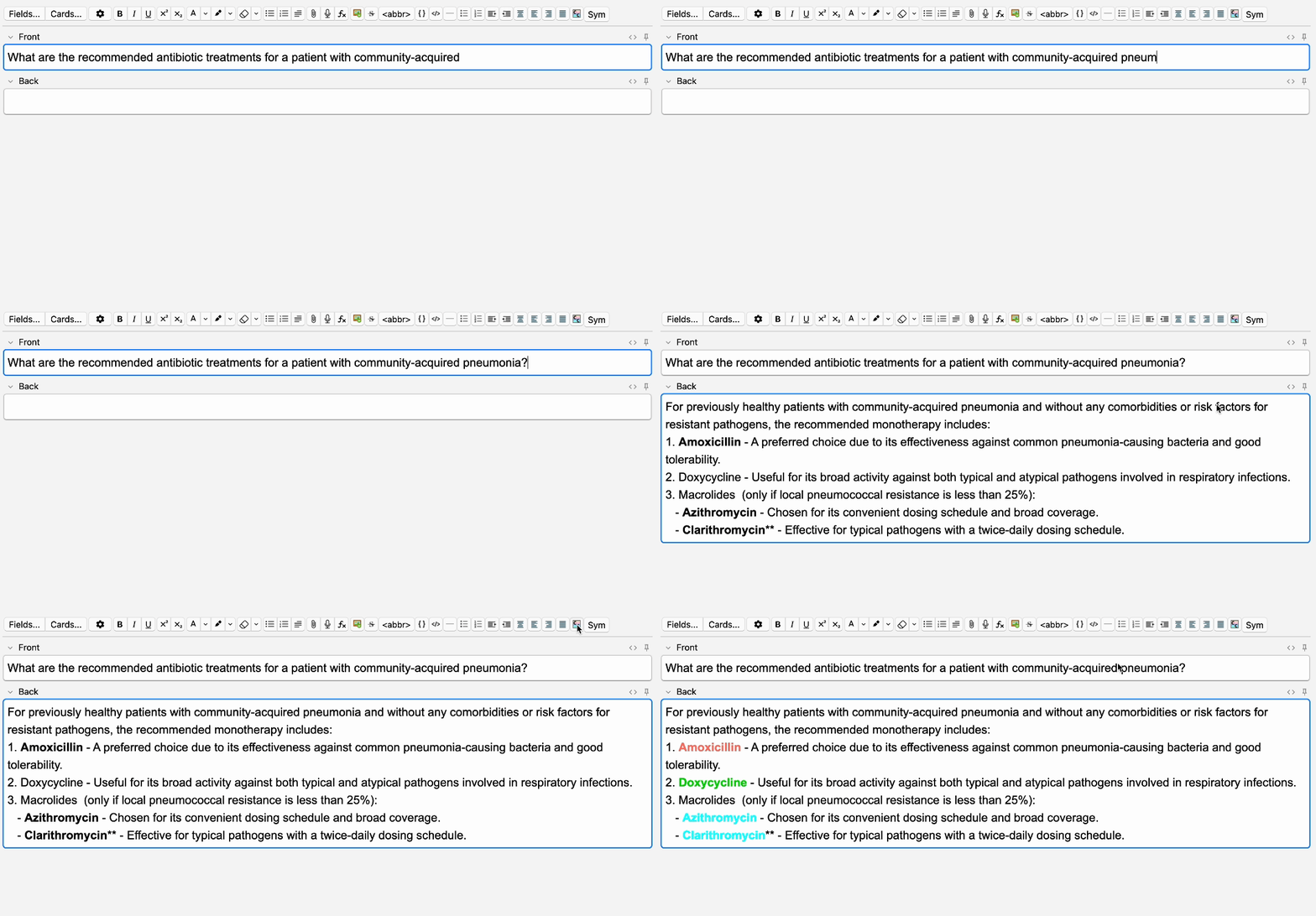
How to use ColorCoding

1. Settings

Within Anki, open “Tools” -> “Color Coding…” to set up word-color pairs.

Make sure there are no empty spaces in your word definitions.

Alternatively, you can manually provide data in JSON format, e.g.,

[{"word": "penicillin", "group": "", "color": "red"}, 
{"word": "doxycycline", "group": "", "color": "green"},
...
].

via “Tools” -> “Color Coding…” -> "Modify Manually".

2. Coloring

Once you want to color your words, press the ColorCoding button. This automatically colors all defined words in the field that is currently being edited.

All available HTML color names and HEX color codes can be used. One color can be set for as many words as you want, allowing specific font colors to be used for either a single term or an entire group of words.

Preset words will automatically be colored while typing within the Add window.

Accessing Preset Datasets

  1. English Medication List: here
  2. German Medication List: here
  3. English Medication List (Christina Ton Version): here

Have you created a ColorCoding and you think it might benefit others as well? We encourage you to share your dataset! Feel free to reach out via GitHub.

Updates

  • 2024-09-11 Added option to toggle bold formatting on or off (see Font Settings).
  • 2024-09-10 Improved functionality, including new export options to share custom datasets.
  • 2024-08-24 Improved functionality, with great support from FelixKohlhas.
  • 2022-02-02 Initial Release Color Coding

Help and Support

This add-on is still under development. Please report any bug reports or feature requests.

Contact

schubertmc


2022 - 2024

README

🎨 ColorCoding 🌈

ColorCoding - Anki Add-on

Improve your learning strategy with the ColorCoding add-on. This tool allows you to set specific font colors for different terms and automatically colors these preset words when editing cards. Consistently color-coding your Anki cards can effectively enhance memory retention.

Installation

Please follow the instructions on the anki web page.

How to use ColorCoding

1. Settings

Within Anki, open “Tools” -> “Color Coding…” to set up word-color pairs.

Make sure there are no empty spaces in your word definitions.

Alternatively, you can manually provide data in JSON format, e.g.,

[{"word": "penicillin", "group": "", "color": "red"}, 
{"word": "doxycycline", "group": "", "color": "green"},
...
].

via “Tools” -> “Color Coding…” -> "Modify Manually".

2. Coloring

Once you want to color your words, press the ColorCoding button. This automatically colors all defined words in the field that is currently being edited.

All available HTML color names and HEX color codes can be used. One color can be set for as many words as you want, allowing specific font colors to be used for either a single term or an entire group of words.

Preset words will automatically be colored while typing within the Add window.

Updates

  • 2024-08-24 Improved functionality, with great support from FelixKohlhas.
  • 2022-02-02 Initial Release Color Coding

Datasets

Preset datasets for color group word pairs are currently available for German and English medication lists.

Accessing the Preset Datasets

  1. English Medication List: here
  2. German Medication List: here
  3. English Medication List (Christina Ton Version): here

These can then be manually inserted into the addon via “Tools” -> “Color Coding…” -> "Modify Manually".

Help and Support

This add-on is still under development. Please report any bug reports or feature requests.

Contact

schubertmc


2022 - 2024