Text Tools in Right-Click Menu

AnkiWeb addon 2143302836

Adds a Text Tools menu to the editor's right-click menu with formatting, insertion, and editing commands, plus configurable quick items, user words, and optional reviewer support.
AI-generated summary; may contain mistakes.

formatting

Open on AnkiWeb GitHub Find alternatives

AnkiWeb

Votes
12 (πŸ‘ 10 Β· πŸ‘Ž 2)
Updated
2026-04-03
Anki versions
25.09.2~
License
MIT (from the GitHub repository)
Virus scan
No ClamAV match A match does not prove malware. No match does not prove that the code is safe.
Languages
Python, JavaScript, JSON
Description language
en

Maintenance

active

  • Last update or commit: 2026-10-05 (27 days before the snapshot).
  • Test files: 8.
  • GitHub Actions workflows: 1.
  • Commits in the last year: 50.
  • Issues: 0 open, 2 closed.
  • Pull requests: 0 open, 1 merged.
  • Median first response: 2 hours (2 answered issues and pull requests).

Will it work on my Anki?

Version branches
Min AnkiMax AnkiUpdated
2.1.5425.09.2+2026-04-03
History across monthly snapshots

Loading…

Similar addons

Add Hyperlink

Adds a dialog and context menu entries for inserting, editing, and unlinking hyperlinks in note fields, with configurable keyboard shortcuts.

formattingshortcutsfork-or-reupload

86 votes 90% approval πŸ‘ 83 Β· πŸ‘Ž 3 ⭐ 5 Anki 2.1.65~ Updated 2023-06-18
Add Table has 1 fork β†’

Inserts customizable HTML tables through a dialog or keyboard shortcut, or converts selected pipe-delimited markdown-like text into a table; it does not edit existing tables.

formattingshortcutsfork-or-reupload

144 votes 93% approval πŸ‘ 140 Β· πŸ‘Ž 4 ⭐ 7 Anki 2.1.65~ Updated 2023-06-18

Description

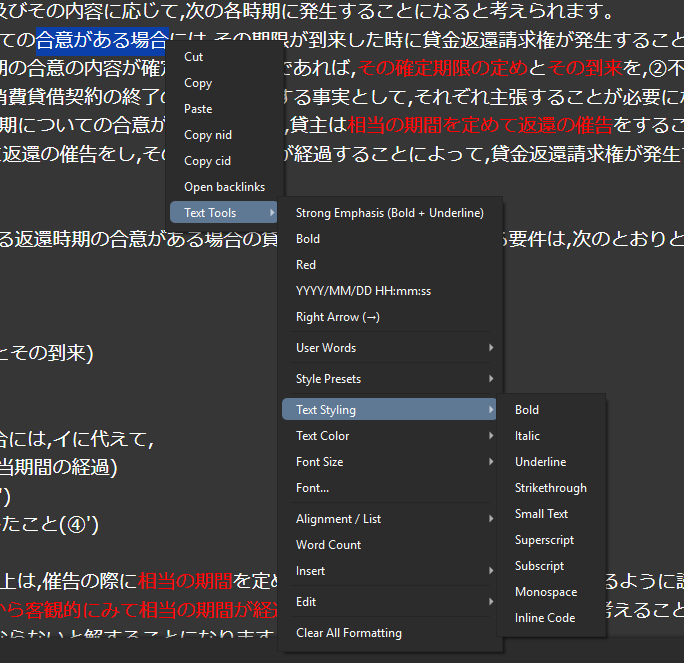
Add a Text Tools menu to the editor right-click menu so common formatting, insertion, and editing commands are always close at hand.

Screenshot: editor right-click menu

Features

  • Formatting: bold, italic, underline, strikethrough, small text, superscript, subscript, monospace, inline code
  • Colors & size: text color, highlight color, font size presets, font selection dialog
  • Layout: text alignment, indent/outdent, ordered and unordered lists
  • Insert: links, images, ruby text, tables, date/time, math snippets, blockquotes, horizontal rules, and special characters
  • Edit: cut, copy, paste, paste as plain text, remove link, select all, undo/redo, clear all formatting
  • Extras: style presets and word count

Optional features

Quick Items

  • Choose frequently used commands for quicker access.
  • Show them near the top of the Text Tools menu or directly at the top level of the right-click menu.

User Words

  • Register your own words or short snippets and insert them from the User Words submenu.
  • Show them inside Text Tools or directly at the top level of the right-click menu.

Reviewer support

The add-on can also show Text Tools in the reviewer right-click menu. Most reviewer-side features are available when Edit Field During Review (Cloze) is installed.

Config

Open:

Tools -> Add-ons -> Text Tools in Right-Click Menu -> Config

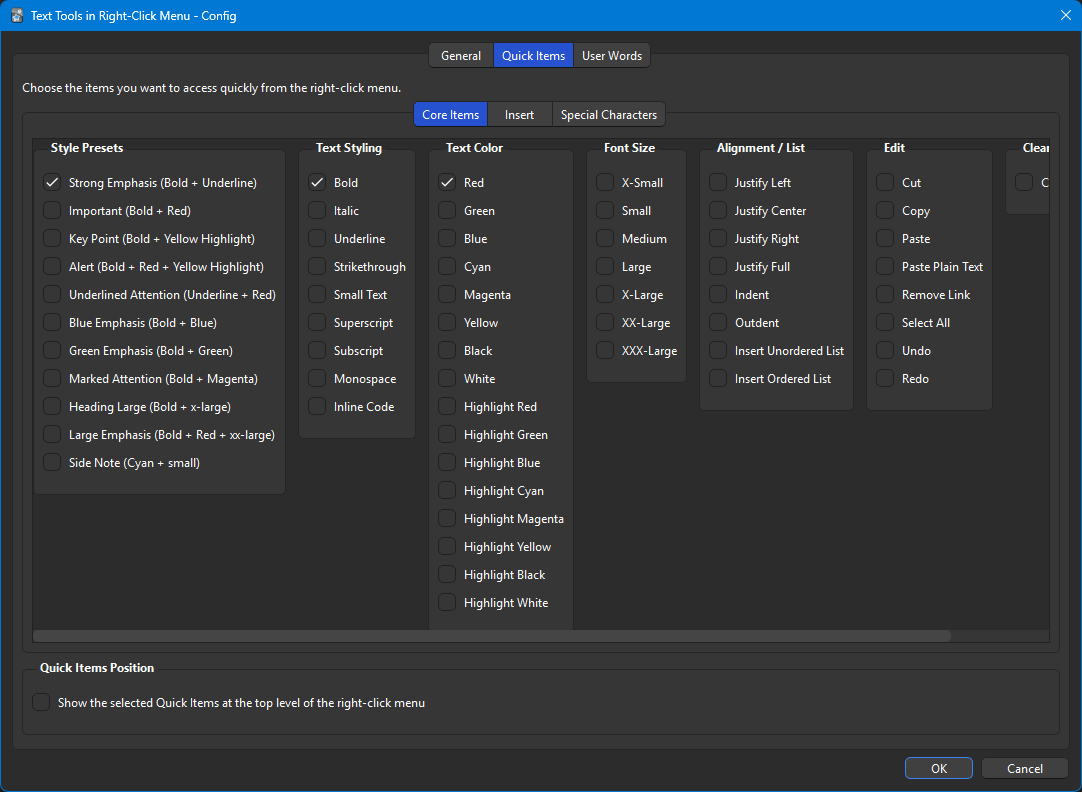
The configuration window has three tabs:

  • General: show Text Tools in the editor and/or reviewer right-click menu
  • Quick Items: choose frequently used items and optionally display them at the top level of the right-click menu
  • User Words: add, edit, remove, reorder, import, or export your own words as plain text and optionally display them at the top level of the right-click menu

Screenshot: config window

Changelog

  • 2026-04-04
    • Improved local image insertion by importing local files into Anki's media collection before insertion
    • Improved cut, copy, and paste behavior
  • 2026-03-08
    • Rewrote the add-on from the ground up
    • Renamed the add-on from Text Formatting and Editing in the Context Menu to Text Tools in Right-Click Menu
    • Added style presets, ruby insertion, table insertion, and other improvements
  • 2025-04-15
    • Fixed an issue that prevented the configuration window from opening
  • 2023-09-03
    • Added a note about the reviewer context menu to the configuration window
  • 2023-08-16
    • Added the User Words feature
  • 2023-07-29
    • Added an option to display Quick Items at the top level of the right-click menu
  • 2023-07-27
    • Added a configuration window
    • Added the Quick Items feature
    • Fixed several bugs
  • 2023-03-19
    • Initial release

README

Text Tools in Right-Click Menu

An Anki add-on that adds a Text Tools menu to the editor right-click menu, making common formatting, insertion, and editing commands much easier to reach.

Screenshot: editor right-click menu

Highlights

  • Text styling, colors, font sizes, alignment, lists, and clear-format helpers
  • Insert helpers for links, images, ruby text, tables, date/time, math snippets, blockquotes, and special characters
  • Quick Items and User Words for faster access to frequently used actions
  • Reviewer-side support, with broader functionality when Edit Field During Review (Cloze) is installed

Repository Layout

  • Text-Tools/: the shipped Anki add-on package
  • docs/: screenshots plus GitHub and AnkiWeb-facing documentation
  • scripts/: release helpers such as .ankiaddon packaging
  • tests/: automated checks for config migration, menu definitions, action dispatch, menu building, and packaging
  • tests-js/: DOM-level automated checks for reviewer-side web commands

Development

Install Ruff if needed:

py -3 -m pip install ruff
npm.cmd install

Run lint and formatting:

py -3 -m ruff check .
py -3 -m ruff format .

Run tests:

py -3 -m unittest discover -s tests -v
npm.cmd run test:js

Build a clean .ankiaddon package:

py -3 scripts/build_ankiaddon.py

This writes dist/Text-Tools.ankiaddon and packages the contents of Text-Tools/ at the archive root while excluding generated files such as __pycache__/, *.pyc, and user-specific files inside Text-Tools/user_files/ except README.txt.

Release Flow

  1. Run the lint and format commands above.
  2. Run through the manual smoke test checklist in docs/MANUAL_TEST_CHECKLIST.md.
  3. Build dist/Text-Tools.ankiaddon.
  4. Push a version tag such as v2.1.0 to create a GitHub release automatically.
  5. Upload the generated .ankiaddon file to AnkiWeb manually.

The GitHub Actions workflow at .github/workflows/release.yml runs Ruff, Python tests, DOM tests, builds dist/Text-Tools.ankiaddon, and attaches that file to the GitHub release for the pushed tag.