Transparent Text is a lightweight Anki editor add-on for hiding selected text without deleting it.
Make text invisible on your Anki cards while keeping it inside the note, where it remains
searchable, editable, and stored normally.
Select any text in the Anki editor and hide it with one click or a keyboard shortcut.
The hidden text stays in your note but does not appear normally during card review.
This makes Transparent Text useful for hidden hints, mnemonics, memory aids, helper words,
personal reminders, keywords, vocabulary hints, study notes, and extra information
that you want to keep available without displaying it on the card.
Preview
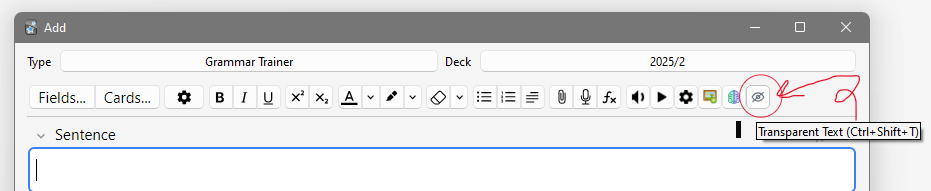
Hide selected text directly from the Anki editor
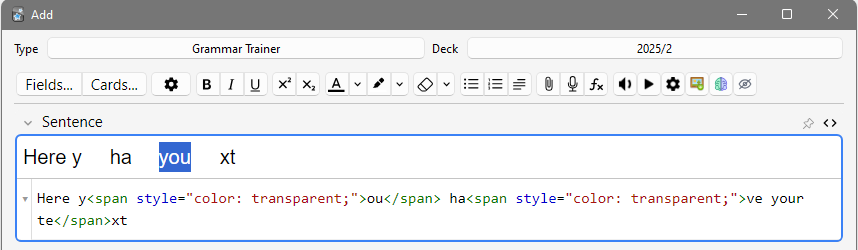
The hidden text remains inside the note and can still be searched and edited
What It Does
Transparent Text lets you hide selected text in Anki without creating additional
fields or modifying your card templates.
The selected text becomes visually transparent, but the text itself remains part of the
note. You can search for it in the Anki Browser, edit it later, or make it visible again.
Features
- Hide selected text in the Anki editor
- One-click hide/show toggle
- Keyboard shortcut support
- Hidden text remains searchable in the Anki Browser
- Hidden text remains editable
- Text remains stored inside the original Anki note
- No extra fields required
- No card template changes required
- No additional configuration or settings
- Works with normal Anki synchronization
- Lightweight and minimalistic
- Light Mode and Dark Mode compatible
Useful For
- Hidden hints
- Mnemonics and memory aids
- Helper words
- Personal reminders
- Vocabulary hints
- Keywords and searchable information
- Extra study notes
- Memory cues
- Additional information you do not want visible during review
- Keeping Anki cards clean and distraction-free
How It Works
- Select text inside the Anki editor.
- Click the Transparent Text button or use the keyboard shortcut.
- The selected text becomes invisible.
- The text remains inside your Anki note.
- Search or edit the hidden text normally when needed.
- Select the hidden text again and toggle it to restore its visibility.
How the Text Is Hidden
Transparent Text uses color: transparent; to make the selected text invisible.
The text is not deleted, encrypted, or moved to another field. It remains part of the
original Anki note.
Because the text is made transparent rather than assigned a fixed colour, it remains
invisible when switching between Anki Light Mode and Dark Mode.
No Extra Fields or Templates
Transparent Text is designed to be simple. You do not need to create an additional Anki
field, modify your card template, or configure complicated settings.
Select the text you want to hide, toggle it, and continue editing your note normally.
Support
If you find a useful way to use Transparent Text, discover a problem, or have an idea
for improving the add-on, feel free to share it.
Report an issue or suggest a feature on GitHub
Related Add-ons
FocusFlow
— study sessions, productivity tools, and progress tracking.
Focus Mode Suite
— hide Anki interface elements for a more focused review workspace.