Sentence Builder

AnkiWeb addon 378748827

Builds sentences by arranging interactive word tiles instead of typing answers, with customizable card layout, optional answer check, and cross-platform Anki support.
AI-generated summary; may contain mistakes.

formattingshortcutsappearancecard-templatesquizmobile-compatible

Open on AnkiWeb GitHub Find alternatives

AnkiWeb

Votes
1 (πŸ‘ 1 Β· πŸ‘Ž 0)
Updated
2026-09-22
Anki versions
25.07.1~
License
MIT (from the license file in the package)
Virus scan
No ClamAV match A match does not prove malware. No match does not prove that the code is safe.
Languages
Python, CSS, Handlebars, JSON
Description language
en

Maintenance

active

  • Last update or commit: 2026-09-22 (40 days before the snapshot).
  • Commits in the last year: 9.
  • Issues: 0 open, 0 closed.
  • Pull requests: 0 open, 0 merged.

Will it work on my Anki?

Version branches
Min AnkiMax AnkiUpdated
23.0925.072026-09-05
25.07.1+2026-09-22
History across monthly snapshots

Loading…

Similar addons

Drag Drop

Creates interactive drag-and-drop flashcards where you label images or sort items into categories, with instant feedback, shuffling, theme and layout options, across Anki Desktop, AnkiDroid and AnkiMobile.

card-creationappearancecard-templatesquizmobile-compatible

3 votes 44% approval πŸ‘ 3 Β· πŸ‘Ž 0 ⭐ 1 Anki 25.07~ Updated 2026-10-02
Minimalistic Typing Panel

Adds a customizable floating typing panel and scratchpad for Anki review, letting users type answers or notes before revealing cards, with auto-clear and shortcut forwarding.

review-flowshortcutsappearancequiz

1 votes 21% approval πŸ‘ 1 Β· πŸ‘Ž 0 ⭐ 0 Anki 25.07.1~ Updated 2026-09-07
Anki Japanese Crossword Generator

Generates printable A4 and interactive Japanese crossword puzzles from Anki vocabulary in both directions, with customizable clues, previews, answer keys, history, and solved-note tagging.

exporttaggingquiz

1 votes 21% approval πŸ‘ 1 Β· πŸ‘Ž 0 ⭐ 2 Anki 2.1.1~ Updated 2026-08-21
VocabMaster

Enhances vocabulary learning across multiple languages by generating AI articles and example sentences and giving instant feedback on your own sentence practice, with customizable feedback language and dark/light themes.

card-creationaiquiz

1 votes 21% approval πŸ‘ 1 Β· πŸ‘Ž 0 ⭐ 0 Anki 2.1.1~ Updated 2024-12-09
AI_LEARNING_HUB

Turns Anki vocabulary decks into nine AI-generated language games with multilingual exam-level practice, hints, offline word matching, and customizable fast or detailed question generation.

aigamificationclozequiz

3 votes 44% approval πŸ‘ 3 Β· πŸ‘Ž 0 Anki 26.09~ Updated 2026-10-20

Description

Sentence Builder is an interactive Anki add-on for sentence building, word order, grammar, and language learning.

Build sentences by arranging interactive word tiles instead of typing the entire answer. Practice sentence construction, word order, grammar, vocabulary, translation, sentence structure, and active recall directly inside Anki.

See the prompt, arrange the words into the correct sentence, and check your answer. The finished cards work on Anki Desktop, AnkiMobile, AnkiDroid, and AnkiWeb.

Quick Preview
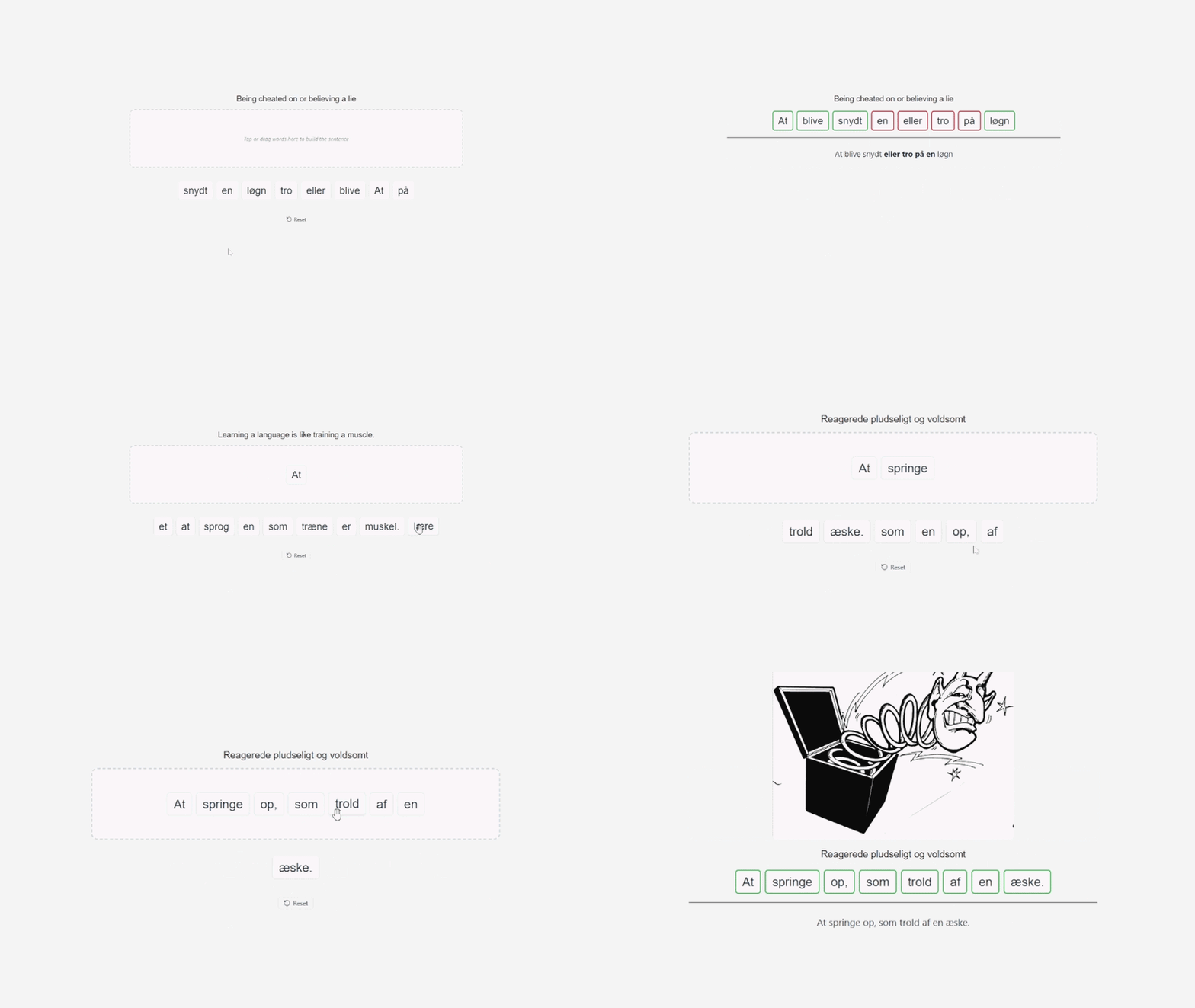
Arrange word tiles to build the correct sentence

Interactive Sentence Building

The answer is divided into interactive word tiles. Select and arrange the words to reconstruct the target sentence.

This turns a normal answer into an active sentence construction and word order exercise instead of simply revealing the answer.

  • Sentence construction
  • Word order
  • Grammar practice
  • Vocabulary practice
  • Sentence structure
  • Translation exercises
  • Active recall
  • Language learning

Check & Answer Reveal

Use the optional Check button to verify the sentence you built. You can also enable automatic answer reveal after all words have been placed.

Customize Your Cards

Customize the Sentence Builder card like a normal Anki card. Adjust the layout, text, controls, and images to fit your study setup.

  • Top, Center, or Bottom position
  • Left, Center, or Right alignment
  • Custom controls position
  • Adjustable content width
  • Custom font family and font size
  • Adjustable image size
  • Light Mode and Dark Mode

Features

  • Interactive sentence building
  • Word tiles
  • Word order practice
  • Grammar and vocabulary practice
  • Translation exercises
  • Keyboard shortcuts
  • Optional Check button
  • Automatic answer reveal
  • Custom card layout
  • Custom typography
  • Custom controls position
  • Adjustable content width
  • Adjustable image size
  • Light and Dark Mode
  • Standard Anki card templates

Good For

  • Language learning
  • Foreign language practice
  • Grammar exercises
  • Vocabulary learning
  • Sentence structure
  • Word order exercises
  • Translation practice
  • Active recall
  • Sentence construction

How It Works

Create or configure a Sentence Builder note type and add the sentence you want to practice. During review, the words appear as interactive tiles that you select and arrange to build the correct sentence.

A card can include Prompt, Sentence, Subprompt, Audio, and Notes.

Getting Started

After installing the add-on, create or configure the Sentence Builder note type and its card templates.

Use Tools β†’ Sentence Builder to customize the card layout, typography, controls, images, and answer behavior.

Works Across Anki

Sentence Builder cards use standard HTML, CSS, and JavaScript, so the finished cards can be reviewed on Anki Desktop, AnkiMobile, AnkiDroid, and AnkiWeb.

The desktop add-on is used to create and configure the note type and settings. Once your cards are set up, you can review them on your preferred Anki platform.

Simple by Design

Sentence Builder focuses on one task: building sentences by arranging words.

Instead of typing or simply revealing the answer, you actively construct the sentence and practice word order, grammar, vocabulary, and sentence structure.

Support

If you find a bug, have a feature request, or have an idea for improving Sentence Builder, feel free to report it on GitHub.

Report an issue or suggest a feature on GitHub


Related Add-ons

FocusFlow β€” study sessions, focus tools, and progress tracking.

Drag Drop β€” interactive drag-and-drop exercises for Anki.

Mouse Buttons as Review Shortcuts β€” use mouse buttons and scrolling as Anki review shortcuts.

README

Sentence Builder - Anki Add-on

Sentence Builder Demonstration

A lightweight, robust add-on for Anki Desktop that provides customizable styling, card alignment, and interactive word assembly for language learning cards.

Features

  • Interactive sentence construction with word tiles and keyboard shortcuts.
  • Customizable vertical positioning (Top, Center, Bottom) and horizontal alignment (Left, Center, Right).
  • Native Anki dark mode and light mode support.
  • Configurable typography, line width, and image dimensions.
  • Optional check button and automatic answer reveal upon sentence completion.
  • Cross-platform card templates compatible with Anki Desktop, AnkiMobile (iOS), and AnkiDroid (Android).

Installation

Method 1: Install Package File

  1. Download Sentence_Builder.ankiaddon.
  2. In Anki, open Tools -> Add-ons.
  3. Click "Install from file..." in the lower right corner.
  4. Select Sentence_Builder.ankiaddon and restart Anki.

Method 2: Manual Directory Installation

  1. Open Anki and navigate to Tools -> Add-ons -> View Files.
  2. Copy the Sentence_Builder folder into the opened addons21 directory.
  3. Restart Anki.

Note Type Setup

Create or configure an Anki Note Type named "Sentence Builder" with the following fields:

  • Prompt: The source text or prompt to translate.
  • Sentence: The target sentence to be reconstructed.
  • Subprompt: Optional grammatical hints or supplementary context.
  • Audio: Optional audio playback tag, such as [sound:audio.mp3].
  • Notes: Optional detailed grammatical explanations or vocabulary notes.

Template Files

  1. Front Template: Copy the contents of templates/front.html into the Front Template editor.
  2. Back Template: Copy the contents of templates/back.html into the Back Template editor.
  3. Styling: Copy the contents of templates/styling.css into the Styling editor.

Settings

Access configuration via Tools -> Sentence Builder... or through the Add-ons manager.

  • Vertical Position: Aligns cards to the top, center, or bottom of the review window.
  • Horizontal Alignment: Aligns content to the left, center, or right.
  • Controls Position: Position of card controls (Top Right, Top Left, Bottom Right, Bottom Left).
  • Line Width: Sets maximum width in pixels for content blocks (400px to 1200px).
  • Font Family: Selects the typeface used for word tiles and sentence text.
  • Font Size: Base font size in pixels.
  • Image Size: Maximum display size for media images (Small, Medium, Large, Extra Large).
  • Check Button: Enables or disables a manual verification button on the front card.
  • Answer Reveal: Automatically transitions to the back card when all words are placed.

Compatibility

The Python add-on runs on Anki Desktop (Windows, macOS, and Linux) to provide configuration and CSS injection. The card templates use standard HTML, CSS, and JavaScript, operating on AnkiMobile (iOS), AnkiDroid (Android), and AnkiWeb without requiring desktop add-on execution.

License

This project is licensed under the MIT License. See the LICENSE file for details.