This add-on automatically adjusts the daily new card limit of a deck based on a deadline.
You choose a deck, set a target date, and the add-on calculates how many new cards per day are needed to finish the remaining new cards by that date.
It updates the deck-specific limit:
Deck Options > Daily Limits > New cards/day > This deck
It does not create or rename option presets.
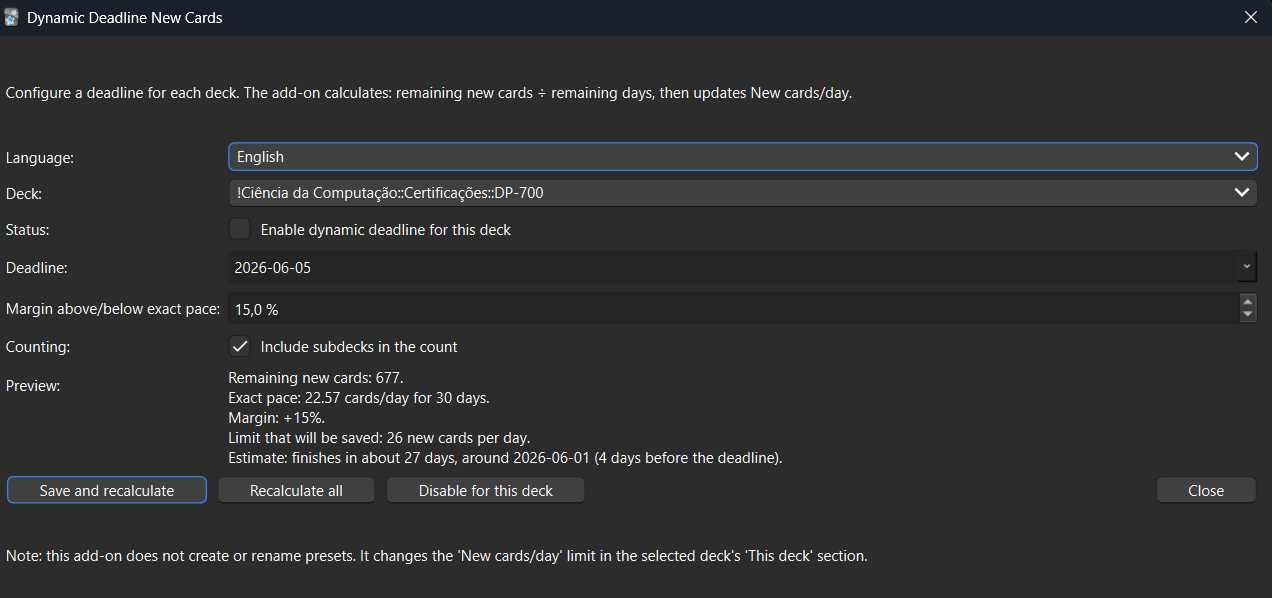
Features
- Set a deadline for a specific deck
- Automatically calculate the required new cards per day
- Optionally include subdecks
- Add a percentage margin above or below the exact target
- Preview the estimated finish date
- Preview the calculated daily new card limit
- Recalculate manually from the Tools menu
- Recalculate automatically when opening Anki, after sync, periodically, and after adding notes
Margin example
If you have 150 new cards and 30 days left:
- 0% margin = 5 new cards/day
- +20% margin = 6 new cards/day, likely finishing earlier
- -10% margin = a lighter pace, likely finishing later
Usage
Go to:
Tools > Dynamic Deadline: Configure...
Then select a deck, choose a deadline, set your options, and save.
Telemetry (Anki Census)
This add-on includes the embedded Anki Census client.
It works in zero-config mode for end users:
- no setup is required
- it reuses shared global census state when available
- it does not create duplicate census collectors in the same Anki session
If participation is paused in any add-on using Anki Census, this add-on respects that global setting automatically.
Notes
This add-on changes the deck-specific new card limit, not the shared preset limit. This means it is intended to affect only the selected deck's "This deck" daily new card setting.
Please test carefully with your own deck setup and report issues through the support page.
Changelog
07/05/2026 Sync fix: The add-on now ensures that updated deck-specific new card limits sync correctly to mobile devices by applying the limit before syncing, clearing temporary daily overrides, and using improved deck-saving methods.
08/05/2026 Census integration: Embedded the Anki Census client with fail-safe initialization, shared global state reuse, and automatic respect for global participation opt-out.