🧠 Synapse – The Ultimate Anki Workspace

AnkiWeb addon 236979321

Adds an all-in-one study workspace with study plans, deadlines, Pomodoro timer, notebook, PDF viewer, mind maps, AI assistant, gamified XP, ranks, streaks, and themes.
AI-generated summary; may contain mistakes.

aistatisticsprogress-trackinggamificationtimer

Open on AnkiWeb GitHub Find alternatives

AnkiWeb

Votes
1400 (👍 1383 · 👎 17)
Updated
2026-10-29
Anki versions
26.09.3~
License
MIT (from the license file in the package)
Virus scan
No ClamAV match A match does not prove malware. No match does not prove that the code is safe.
Languages
Python, JavaScript, HTML, JSON, CSS
Description language
en

Maintenance

active

  • Last update or commit: 2026-10-29 (3 days before the snapshot).
  • Test files: 29.
  • Commits in the last year: 11.
  • Issues: 9 open, 9 closed.
  • Pull requests: 3 open, 4 merged.
  • Median first response: 356 hours (9 answered issues and pull requests).
  • Outside pull requests: 0% of 4 merged.

GitHub

Repository
mobesamedia/synapsepro · more by mobesamedia
Stars
⭐ 102 · forks 22 · open issues 12
Last commit
2026-10-29
License
A license file that GitHub does not recognize
Languages
Python, HTML, JavaScript, CSS
Tests
29

Will it work on my Anki?

Version branches
Min AnkiMax AnkiUpdated
25.09.426.09.3+2026-10-29
History across monthly snapshots

Loading…

Similar addons

The Widget Addon

Transforms Anki's home screen into a customizable study dashboard with 34+ coordinated light/dark scenes, drag-and-drop widgets, progress stats, a review calendar heatmap, and countdown timers.

statisticsprogress-trackingappearance

1 votes 21% approval 👍 1 · 👎 0 Anki 2.1.1~ Updated 2026-10-29

Description

Title

Turn your Anki into a modern and beautiful Version and make your studies more efficient. Hey! I am a medical student from Germany, and I have been working solo on this project in my free time. I am also a graphic/web designer to earn some money while I study so I have some experience in this. I really hope you enjoy my add-on and that it helps you on your academic journey!

Synapse replaces scattered add-ons with a single, cohesive Productivity Suite. Whether you are a medical student, law student, or language learner, this add-on helps you stay efficient, motivated, and focused.

Demo


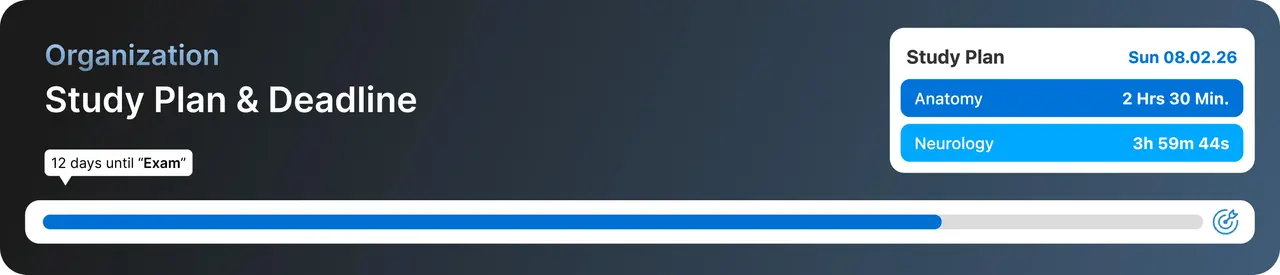
Organization: Never Miss a Deadline

  • Study Plan Configurator: Input your exam date and subjects. You can also let an AI generate your plan!
  • Multiple Deadlines: Add and manage more than one deadline at a time.
  • Deadline Bar: A visual countdown on your deck browser keeps your goals in sight.
  • Study Plan Widget: Shows exactly which subject you need to focus on today.
  • Study Plan Timeline: See where you are in your plan, upcoming days, and their difficulty at a glance.

Organization


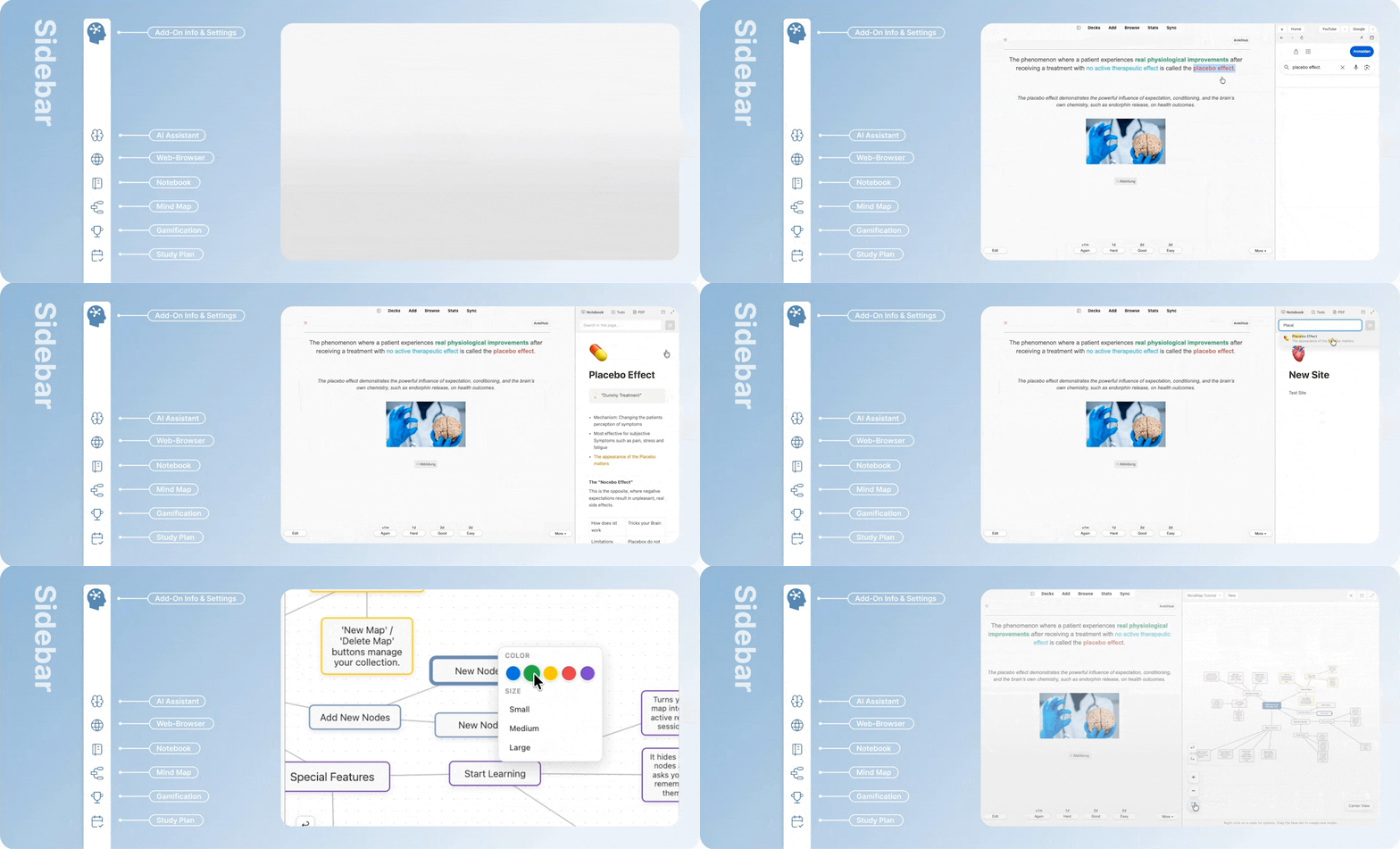
Productivity Tools (The Sidebar)

Access powerful tools directly from the left sidebar without leaving Anki:

  • AI Assistant: See detailed explanations below.
  • Mind Map Tool: Create mind maps to visualize connections between concepts directly inside Anki.
  • Notebook: A quick scratchpad with collapsible toggle notes, a built-in To-Do manager, and a PDF Viewer, all auto-saved to your profile.
  • Website Sidebar: Keep Google Search, YouTube, or other sites open side-by-side with your cards.
  • Pomodoro Timer: Integrated timer with customizable work/break intervals.
  • Focus Music: Built-in player with Jazz, Rain, Library Sounds, and Alpha Waves, or upload your own audio files.

Sidebar


Gamification: Make Studying Rewarding

Stop dreading your reviews. Get rewarded for every minute you study.

  • XP & Leveling System: Earn XP for time spent and cards reviewed. Can you reach Level 100?
  • 21 Unique Ranks: Progress from "Anki Starter" to "Anki Admiral" with animated badges.
  • Streaks: Visualize your consistency and protect your streak.
  • Daily Challenges: Get dynamic tasks (e.g., "Review 100 cards") for bonus XP.

Game


AI Assistant

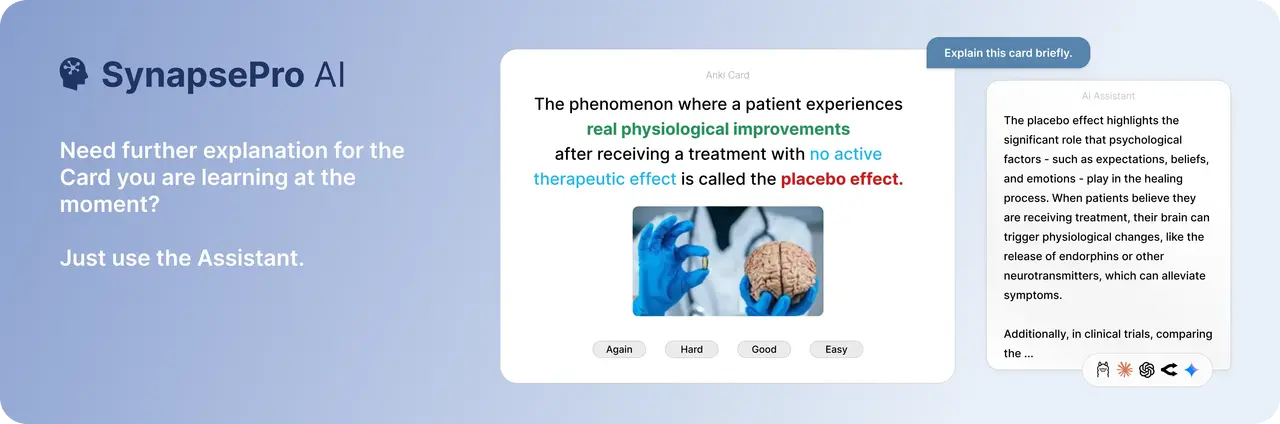
The add-on includes a fully integrated AI chat sidebar that can explain cards, generate mnemonics, create quizzes, and answer any question, based on your current card or anything you type.

Choose from 5 different AI providers, use whatever works best for you:
OpenAI   •   Google Gemini   •   Anthropic Claude   •   OpenRouter   •   Ollama (Local)

Important: This add-on is completely non-profit, I earn nothing from it. Cloud providers (OpenAI, Gemini, etc.) require your own API key so you pay only for what you actually use. With Ollama, everything runs locally at zero cost.

AI


Themes & Customization

  • Dark Mode Ready: Looks great in both light and dark themes.
  • Medical/Law/General Facts: Get a new interesting fact every day on your dashboard.
  • Interface Language: Supports English, German, French, Spanish, Portuguese, Vietnamese, Chinese, Hindi, and more.

Themes

Themes


Compatibility: Tested with Anki 25.09.4 to 26.05.0 (Qt6).

Support: If you enjoy this add-on, please leave a thumbs up! For bug reports or questions, contact me: help.synapse.pro@gmail.com

Links:         


Thank You!

README

Synapse for Anki

Synapse – The Ultimate Anki Workspace

A modern, all-in-one workspace that brings planning, focus, organization, insights, and motivation directly into Anki Desktop.

Website · Report an issue · Support

About Synapse

Synapse extends Anki with an integrated productivity environment designed to keep your study workflow in one place. Plan sessions, track progress, organize notes and PDFs, create mind maps, use focus tools, and stay motivated through gamification—without leaving Anki.

Highlights

Study & planning Knowledge workspace Motivation & insights
Daily study plans Notebook and task lists XP, ranks, and streaks
Deadlines and countdowns Built-in PDF viewer Measurable daily challenges
Pomodoro and session timers Mind maps with recall hints Review statistics and trends
Grade-focused study modes Website sidebar and web search Session summaries and earned XP

Additional features include:

  • A configurable launcher sidebar with keyboard shortcuts
  • An optional AI assistant supporting OpenAI, Gemini, Anthropic, OpenRouter, DeepSeek, Ollama, and llama.cpp-compatible servers
  • A redesigned music player with local audio and optional SoundCloud support
  • Light and dark modes, multiple color themes, and multilingual interface text
  • Full-screen workspaces for Notebook, Mind Map, and Website Viewer

What's new in 1.6.0

  • FreeMap for diagrams and visual notes, with images, local icons, and Anki links
  • Classic, Focus, and Overview layouts for the Custom Deck Overview
  • Timer Analytics with study time by deck
  • AI formula rendering, answer copying, layout settings, and DeepSeek API support
  • Basic, reversed, and Cloze cards in the PDF Card Creator
  • More consistent Dark Mode, per-feature sidebar widths, and Polish as the tenth language

Requirements

  • Anki Desktop 25.09.4 or newer
  • Windows, macOS, or Linux with Anki's bundled Qt 6 WebEngine
  • Internet access only for features that deliberately use an online service, such as cloud AI providers, SoundCloud, or the website sidebar

AnkiMobile and AnkiDroid do not load desktop add-ons.

Installation

AnkiWeb

  1. In Anki Desktop, open Tools → Add-ons → Get Add-ons.
  2. Enter the Synapse add-on code shown on its AnkiWeb page.
  3. Restart Anki.

Manual installation

  1. Quit Anki completely.
  2. Place the downloaded Synapse folder inside Anki's addons21 directory.
  3. Start Anki again.

Privacy and online features

Synapse is primarily a local desktop add-on. After you accept the onboarding privacy notice, it sends selected setup categories and version information once to the developer's Supabase database. It does not include card content, learning statistics, names, email addresses, credentials, or device identifiers.

Online features connect only when required or used. AI requests go directly to the provider you select, and API keys are stored locally in the current Anki profile. See PRIVACY.md for complete details about data storage and network behavior.

AI output and bundled daily facts may be inaccurate. They are study aids and not medical, legal, or other professional advice.

Support

If you encounter a problem, please include your operating system, Anki version, Synapse version, steps to reproduce the issue, and relevant lines from Help → About → Copy Debug Info.

Never include API keys, private card content, or personal URLs in a report.

License

The source code is licensed under the MIT License. Synapse branding, images, animations, and audio are excluded and remain All Rights Reserved by MobesaMedia. Licenses for bundled third-party libraries are listed in THIRD_PARTY_NOTICES.md.