Anki HTML Exporter
Export your cards to an HTML page you can read, search and print in any browser
— with every card rendered by Anki's own engine, so the export looks like
the reviewer rather than an approximation of it. The same dialog serves the
page live from the running collection, reads the cards aloud (Narrator,
with an OpenAI API key), and plays them as a rapid presentation (Hypnagog).
Real Anki rendering
Cards go through card.render_output(), the same template engine the reviewer
uses, and each side is placed in its own frame together with Anki's
reviewer.css, Anki's theme variables and the note type's own stylesheet, on a
body carrying the usual card cardN classes.
That means the following just work:
- cloze deletions, conditional sections,
{{FrontSide}}
- the built-in filters (
hint, furigana, text, cloze, type:) and filters
added by other add-ons
- LaTeX images and MathJax (
\(…\), \[…\])
- note types with their own JavaScript, such as AnKing or Ankizin — including
the
$/jQuery global the reviewer provides
- night mode, for the page and the cards
A frame per card side is what keeps many note types on one page from fighting
over body, img and hr#answer, and from overwriting each other's scripts.
Cards you can work through
The export is not a printout of your cards, it is your cards: click a cloze
deletion to reveal it, click an occlusion mask to lift it, and switch on study
mode to get only the front with the answer a space bar away. Anki's own
rendering already carries all of it — the answer of a deletion, the shapes of an
occlusion — so nothing is approximated.
Anki's own image occlusion note type is drawn by the export itself, masks,
colours and Toggle Masks button included; Image Occlusion Enhanced notes keep
their SVG masks and gain a click to take them off.
Find your way around a big export
Filter… opens a panel over the page with deck and tag trees, note types,
card states and flags — each with a card count. The trees fold, so a collection
with thousands of tags still opens as a short list. Tick a deck and everything
below it comes along; combine facets to narrow down; use the arrow on a row to
jump to its first card. Whatever you exported stays one search away from being readable.
Or browse live, without exporting at all
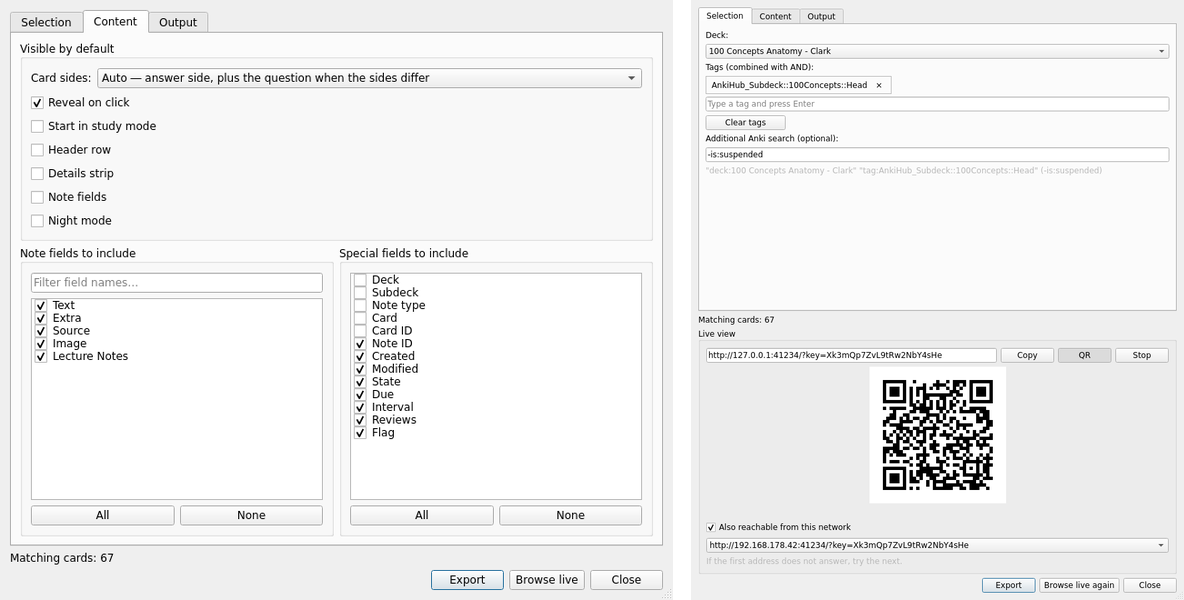
Browse live, the second button in the export dialog, serves your collection
to your browser while Anki runs. Nothing is written anywhere — cards render as
you scroll, pictures come out of your media folder — and the panel offers the
whole collection: every deck, every tag, plus Anki's own search syntax. Change
the scope whenever you like and the page follows.
The decks and tags the dialog was pointed at arrive as ticks in the filter
panel, so changing them there replaces the dialog's choice rather than adding
to it.
It is the same page as the export, so study mode, click-to-reveal, shuffling and
printing all work — shuffling deals the whole scope, not just the cards you have
scrolled to. Optionally it can be reached from your own network, so a
phone or a second computer can read along — with a QR code to point the
camera at instead of typing out the address, in Anki and in the page itself. The
code carries the cards you are reading, so the phone opens where you are. It carries a key, and nothing in
it writes to your collection.
The page is built for a phone, not merely tolerable on one: the bar keeps its
shape at any width, controls are large enough for a thumb, and each card
reflows exactly as it would in Anki on the same screen. A card you are done
with is swiped away, left or right; the rest close up and the next ones follow.
Narrator — the cards read aloud
Narrate, the third button, opens the cards of the dialog as a narrated
slide show in the browser. Each card is shown as the export shows it; a
language model writes a short spoken telling of it, and text-to-speech reads
it. This uses OpenAI's API and needs an OpenAI API key, entered on the
page. Each narration is one model call and one speech call — roughly one to
two cents per card with the default models — and nothing is spent without a
key. The key is kept in the add-on's config only.
- Pick cards by deck, tag, note type, card state or flag, or with any Anki
search; browser, learning, creation or random order.
- The front is shown first, the back a few seconds into the narration or on
Enter; the cloze asked on the card is marked.
- The length per card (10 seconds to 2 minutes) is a ceiling: a thin card
stays short. The narration is in the card's language, or in one you set;
thirteen voices; playback speed up to 2× with the pitch kept.
- Image occlusion cards: the region under the mask is shown to the model,
which reads the hidden label, and the narration is about that structure.
- Ask about the card by microphone or by typing; the answer is spoken in the
same voice.
- A QR code opens the page on a phone in the same network, over HTTPS.
- Export the scope as an audiobook (MP3, a chapter per card) or a video
(MP4); needs
ffmpeg. The dialog says what it would cost first.
- Today's spend is shown on the page; a daily budget can be set; scripts and
audio are cached, so a card narrated once costs nothing again.
Hypnagog — the cards as a rapid presentation
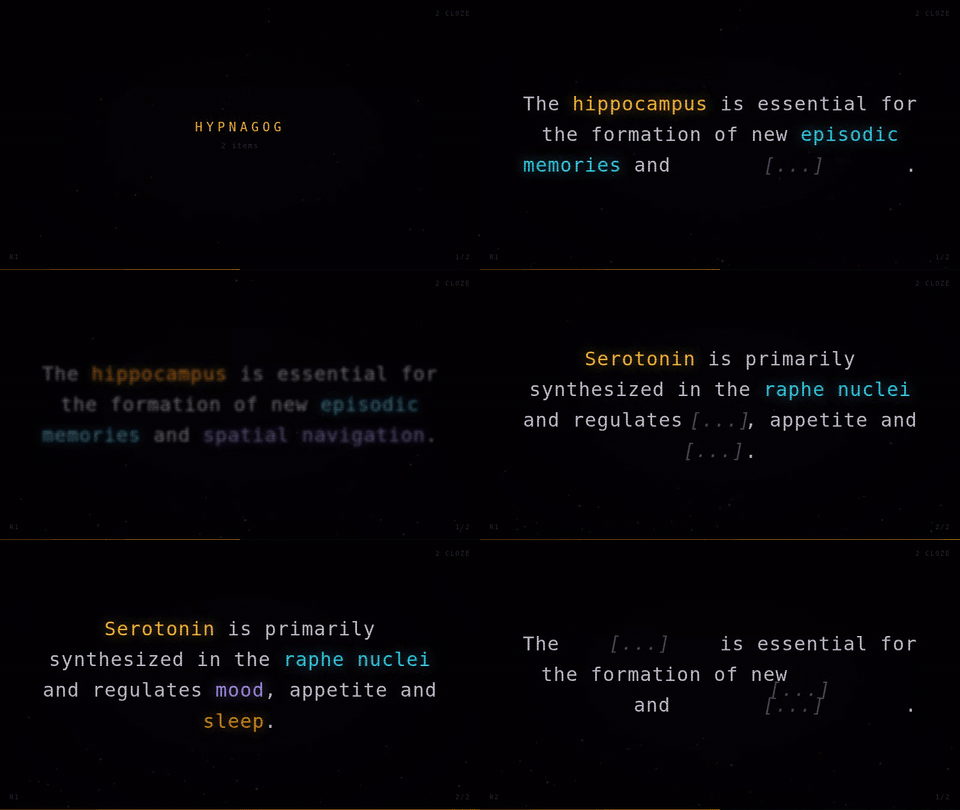
Hypnagog, the fourth button, opens the cards as a full-screen
presentation in the browser: each fact flashes for an instant, shows — a
cloze target blanked and then revealed in its own colour, an answer fading in
under its question — and fades out; after a round the deck reshuffles. It
starts at once on the dialog's cards; an options sheet (the O key) picks due,
new, all, leech or recently failed cards, how many, how long each shows, and
the look, with or without CRT effects and ambient tones. Needs no key.
Built for big collections
Cards are built as they come into view and released again once they are well
out of it, so scrolling a deck of thousands does not leave the browser carrying
a thousand live documents. What you uncovered — cloze deletions, occlusion
masks, hints — comes back when you scroll back. Load all and Print turn
that off, because there everything at once is the point.
Built to stay readable
Cards carry a numbered badge, a gutter and an outline, and each side sits under
its own front / back strip — so even a card made of full-page images reads as
one object. Note fields are collapsed to a single teaser line each and expand
on click; images inside them are capped to a preview height and open full size
on click. Tags are shown as families plus a count, expandable in full.
The header row, the details strip and the note fields all start closed — they
are reference material, not the card. Only the running number and the per-card
switches stay visible.
Which sides you see
Auto, the default, shows the answer and adds the question only for cards
whose answer does not already contain it. A standard template repeats the front
on the back, and a cloze answer is the same text revealed — showing the question
separately would just show it twice — but a card whose back carries different
information does need both. The exporter works this out per card by comparing
the words of the two sides, which also handles a cloze in the middle of a
sentence.
Q + A, A and Q are there when you want to decide yourself. Note that
Anki's answer side is not "the answer" — for a standard template it is question
and answer — so A and Q + A render it with the {{FrontSide}} part
removed, while Auto keeps it whole.
Mass toggles
One control bar switches every card at once; each card's header chips override it
for that card alone:
- the side selector above, the one filled control in the bar because it decides
what a card shows at all; switches that are on are tinted, switches that are
off stay quiet, so the bar is read rather than deciphered
- special fields as a compact strip: note ID, created, modified, state, due,
interval, review count, flag — plus deck, note type, card template and card ID
if you want them repeated from the header. Individually selectable
- note fields: every field of every note type in the export, including ones
no template uses — individually selectable, with expand/collapse all
- study mode and reveal on click, for working through the cards rather
than reading them, and shuffle to deal them again in a new order
- Filter…, the navigation panel over decks, tags, note types, states and
flags
- night mode, an info bar switch, a search box over text, fields,
tags and decks, a print size (large / medium / small), and load all /
print for find-in-page and printing
Whatever you leave set in the dialog is how the export opens; readers' changes
are remembered per export.
Printing
A card is laid out for a screen, so at 1:1 one card fills a sheet. The Print
button lays the cards out for paper first: the frames are relaid out at the
width they will be printed from — the card reflows the way it would on a phone,
at its own font size — and each card is then scaled by a mild factor, per card
rather than per side, so it never gets torn between two columns and leaves the
rest of one empty. medium and small put two cards per row.
On the sample used during development, 13 cards went from 28 pages to 10 / 5 / 4.
Every card keeps its outline and number on paper.
Media
Copied directly out of your media folder, so audio, video, fonts and SVG all
survive. [sound:…] becomes a playable <audio>/<video> element.
Cards that point at pictures on the web can have those fetched as well, so the
export still shows them offline. That is off by default and goes through Anki's
own HTTP client — the one the editor uses when you paste a URL into a note. In
a shared deck those addresses were chosen by whoever built the deck.
Output
- a folder with
index.html, media/, css/, js/ — MathJax and jQuery are
bundled only when a card needs them
- or a single self-contained
.html with media embedded
Selecting cards
Deck, any number of tags (AND), and optionally a free-form Anki search
(is:due, -tag:leech, added:30, …). Suspended and buried cards stay out
unless you tick them in. From the browser you can also export exactly the
cards you have selected.
Tools → Export to HTML…, or the browser's context menu.
Requirements
Anki 2.1.50 or later. AnkiConnect is no longer required. Working directly
with the collection is what gives this version access to the real rendering
engine, and it is considerably faster. The narrator needs an OpenAI API key
and, for its exports, ffmpeg; everything else needs nothing beyond Anki.
Known limitations
Occlusion text labels are placed without measuring the glyphs the way the
reviewer's canvas does, so their white plate can sit a pixel or two off;
rectangles, ellipses and polygons are exact. Media that a template builds in
JavaScript at runtime cannot be detected and is not copied. Add-ons only affect
the export if you allow their card_will_show hook to run.
Source & feedback
🔗 https://github.com/GitCrush/anki-html-exporter-plugin
deep_intervention@posteo.de