AI scorer - Type answer and get AI Score about the correctness of your answer

AnkiWeb addon 357495808

Semantically evaluates typed Anki answers using multiple AI providers, providing a 0–10 score, improvement tips, review suggestions, configurable prompts, and multilingual feedback.
AI-generated summary; may contain mistakes.

aiquiz

Open on AnkiWeb GitHub Find alternatives

AnkiWeb

Votes
2 (👍 2 · 👎 0)
Updated
2026-05-29
Anki versions
25.07.5~
License
Not found (this does not mean that the addon has no license)
Virus scan
No ClamAV match A match does not prove malware. No match does not prove that the code is safe.
Languages
Python, JSON
Description language
en

Maintenance

active

  • Last update or commit: 2026-05-29 (156 days before the snapshot).
  • Commits in the last year: 3.
  • Issues: 0 open, 0 closed.
  • Pull requests: 0 open, 0 merged.

Will it work on my Anki?

Version branches
Min AnkiMax AnkiUpdated
25.07.5+2026-05-29
History across monthly snapshots

Loading…

Similar addons

Drag Drop

Creates interactive drag-and-drop flashcards where you label images or sort items into categories, with instant feedback, shuffling, theme and layout options, across Anki Desktop, AnkiDroid and AnkiMobile.

card-creationappearancecard-templatesquizmobile-compatible

3 votes 44% approval 👍 3 · 👎 0 ⭐ 1 Anki 25.07~ Updated 2026-10-02
AttendingAI

Grades written Anki answers using an LLM, retrieves supporting material via semantic RAG, offers tutor explanations, analytics, batch assessment, and optional interval suggestions.

aischedulingreview-flowstatisticsquiz

1 votes 21% approval 👍 1 · 👎 0 ⭐ 1 Anki 25.02.6~ Updated 2026-01-10
Type alternative words as correct answers

Accepts multiple correct answers for typed-answer cards, separated by slashes, marking a typed match correct and hiding the other valid alternatives.

quiz

1 votes 21% approval 👍 1 · 👎 0 Anki 24.04.1~ Updated 2024-04-26
Answer Set - Multiple answers for "type in the answer" cards

Improves feedback on typed-answer cards by rearranging multiple correct answers, supporting optional and slash-separated alternatives, and grouping Indic combining marks for clearer differences.

quiz

19 votes 83% approval 👍 19 · 👎 0 ⭐ 11 Anki 25.03~ Updated 2025-03-18
Semantic search

Enables natural-language semantic card search via Voyage AI embeddings, optional Claude reranking and smart search, plus duplicate finding, card actions, and clinical vignette/guideline review modes.

aiduplicatessearch

8 votes 68% approval 👍 8 · 👎 0 Anki 2.1.1~ Updated 2026-04-05

Description

Score Answer AI for Anki

AI-powered semantic evaluation for Anki type: cards, with multilingual feedback, configurable prompts, and multi-provider support.

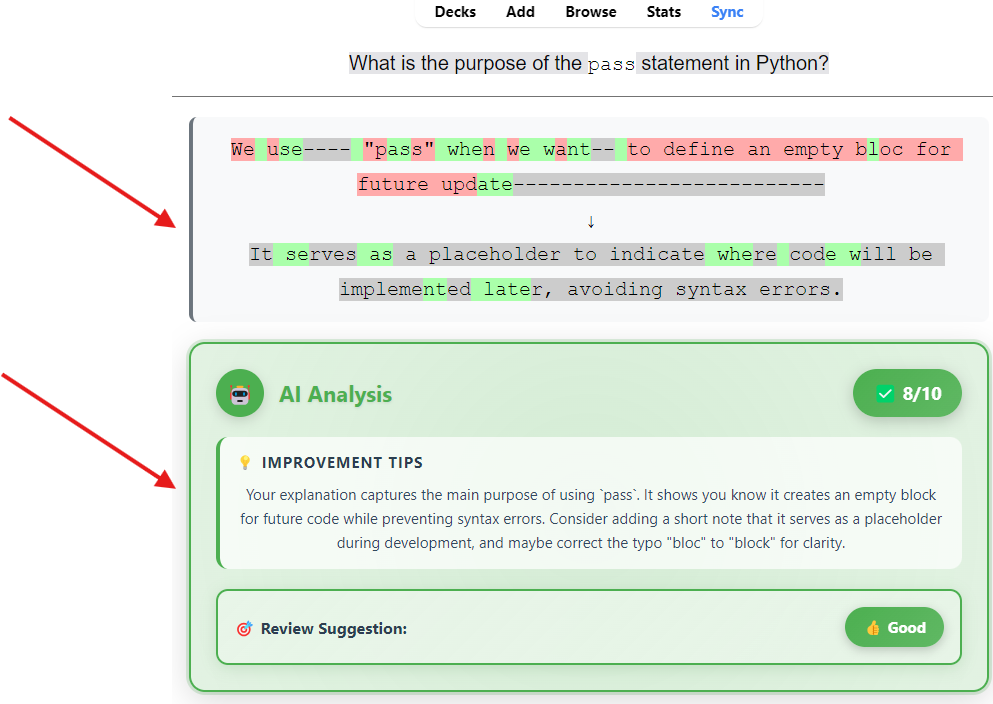
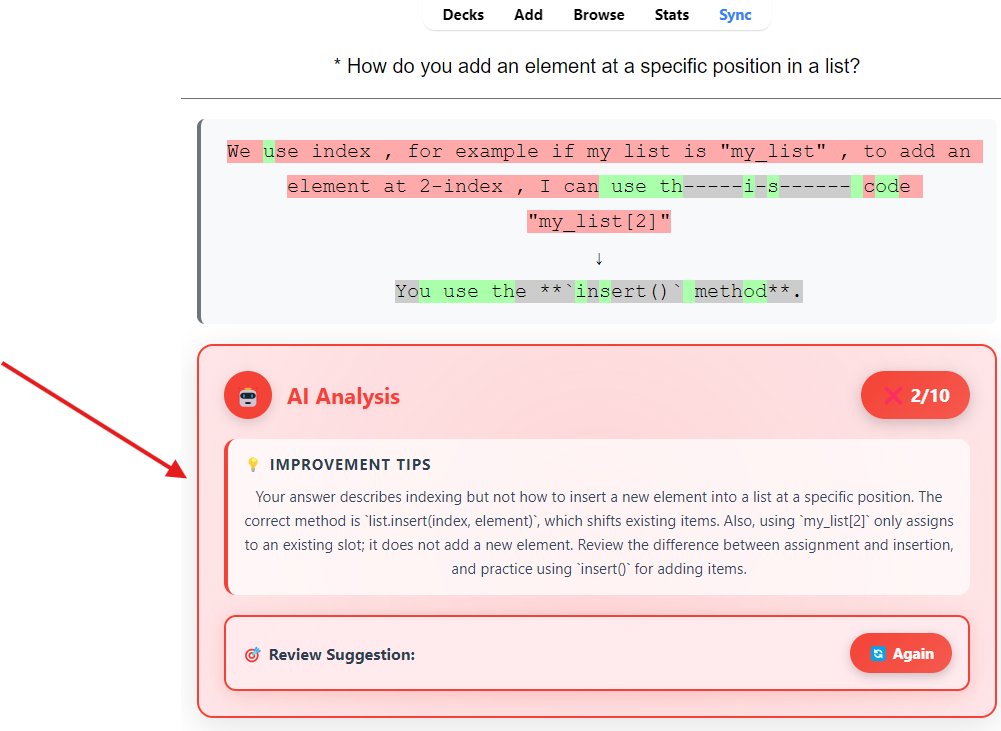
good evaluation bad evaluation

What This Add-on Does

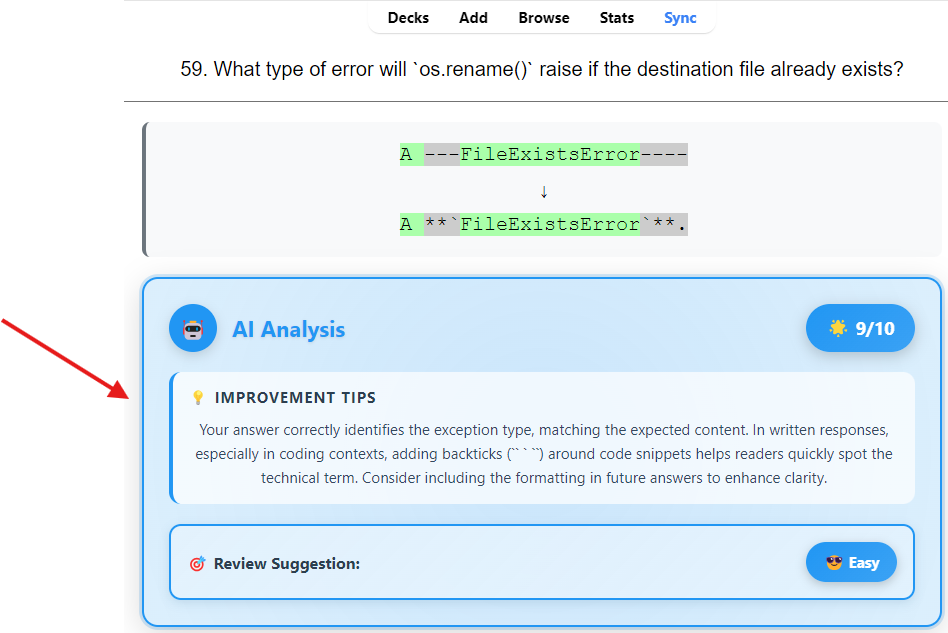
  • Evaluates typed answers semantically (not only exact text matching)
  • Gives structured feedback:
    • score (0-10) when available
    • improvement tips
    • review suggestion (Again, Hard, Good, Easy)
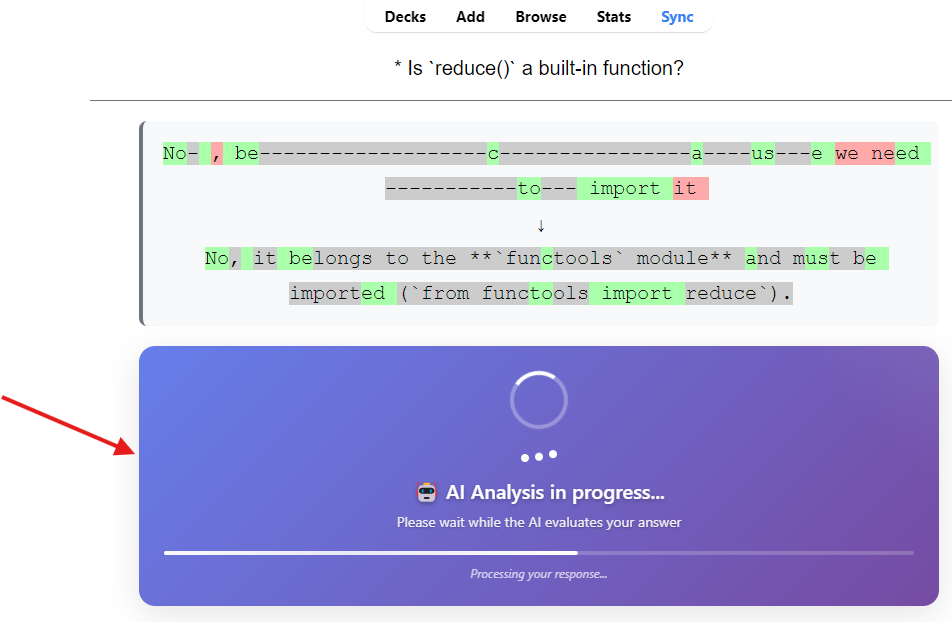
  • Runs analysis in background to keep review flow responsive
  • Supports multiple LLM providers from one config screen
  • Supports multilingual analysis and UI localization

This add-on is designed for Anki cards using typed answers ({{type:...}}).

Key Features

  • Multi-provider support: OpenAI, Gemini, Claude, DeepSeek, Groq, OpenRouter
  • Analysis language control: choose output language independently of your answer language
  • Interface language auto mode: config UI can follow Anki UI language
  • Custom prompt system:
    • optional custom system prompt
    • optional custom analysis prompt template with variables
    • reset to language defaults
    • copy defaults to clipboard
  • Custom model IDs:
    • add your own model IDs in provider tabs
    • persist custom IDs in config
  • OpenRouter resiliency:
    • recommended openrouter/free
    • fallback-aware connection test behavior
  • Error-safe scoring:
    • provider errors no longer show fake 5/10
    • displays N/A when analysis is unavailable

Supported Languages

Analysis feedback and UI labels currently support:

  • English
  • French
  • Spanish
  • German
  • Russian
  • Japanese
  • Chinese
  • Korean

Installation

  1. Open Anki.
  2. Go to Tools -> Add-ons -> Install from file... (or install by AnkiWeb code if published).
  3. Restart Anki.

Quick Start

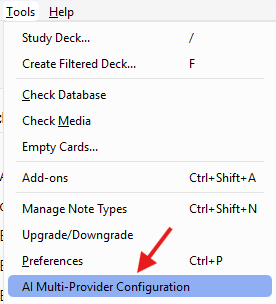
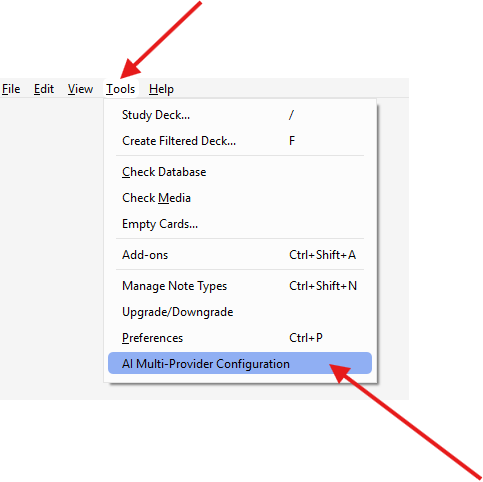
Config access from Tools

  1. Open Tools -> AI Multi-Provider Configuration.
  2. Select provider and model.
  3. Add your API key.
  4. Click Test API Connection.
  5. Select Analysis language.
  6. Save and review your type: cards as usual.

Configuration Guide

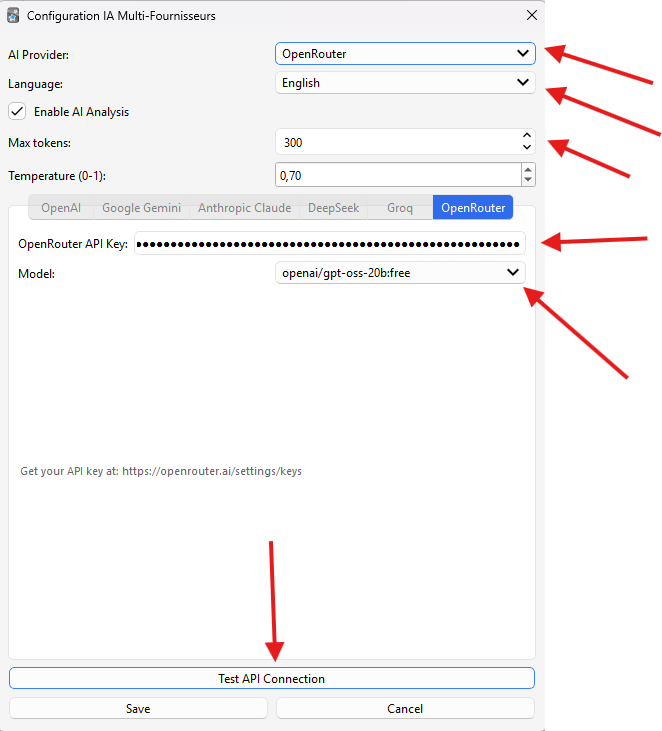
General Settings

  • AI Provider: active provider used for analysis
  • Analysis language: language for AI feedback (tips) and prompt intent
  • Enable AI analysis: global on/off
  • Max tokens: max output size
  • Temperature: response creativity/variance
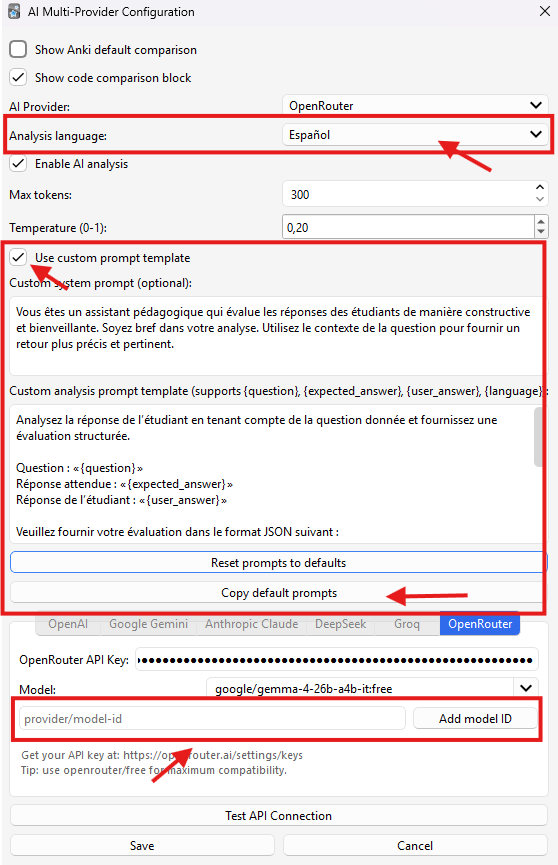
  • Show Anki compare: toggle native Anki comparison block
  • Show code compare: toggle side-by-side extracted text comparison

Prompt Customization

  • Use custom prompt template:
    • disabled: fields are read-only and show default placeholders
    • enabled: fields become editable
  • Custom system prompt: optional replacement for default system message
  • Custom analysis prompt template: supports:
    • {question}
    • {expected_answer}
    • {user_answer}
    • {language}
  • Reset prompts to defaults: injects default prompts for selected analysis language
  • Copy default prompts: copies language-specific defaults to clipboard

Provider Tabs

Each provider tab includes:

  • API key field
  • model selector
  • editable model field
  • Add model ID input/button to append custom model IDs

Custom model IDs are saved per provider in config and restored on restart.

Always test a model ID before using it in real reviews.
Some models may intermittently fail or be temporarily unavailable for unknown provider-side reasons.

OpenRouter Notes

OpenRouter availability can vary by model/provider at runtime.

Recommended defaults:

  • openrouter/free for highest compatibility
  • use specific :free variants only when needed
  • always run Test API Connection after changing model ID

If selected model test fails, the add-on may successfully validate via openrouter/free fallback.

Scoring Behavior

  • Normal case: shows score and review suggestion
  • Provider/API/parsing failure: shows N/A (not a fake numeric score)
  • Keeps failure details in feedback text for easier troubleshooting

Troubleshooting

"Connection error" or "Provider returned error"

  • Verify API key and provider account status
  • Try another model ID
  • For OpenRouter, start with openrouter/free
  • Reduce traffic / retry later (temporary provider saturation can happen)

Always getting English feedback

  • Check Analysis language in config
  • Ensure custom prompts do not force English
  • Use reset prompt defaults for the selected analysis language

Model works in one provider but not another

  • Model IDs are provider-specific
  • Use Add model ID and test each ID explicitly

Privacy

  • Card question/answer content is sent to selected AI provider for analysis
  • The add-on stores temporary in-memory cache for active session flow
  • No long-term local analytics storage is implemented by default
  • Provider-side retention policies depend on the provider you choose

Compatibility

  • Tested on modern Anki 25.x builds
  • Uses Anki reviewer hooks for typed-answer comparison and rendering

Screenshots

Main feedback Loading state Config UI 1 Config UI 2 Latest changes Config access from Tools

README

Score Answer AI for Anki

AI-powered semantic evaluation for Anki type: cards, with multilingual feedback, configurable prompts, and multi-provider support.

good evaluation bad evaluation

What This Add-on Does

  • Evaluates typed answers semantically (not only exact text matching)
  • Gives structured feedback:
    • score (0-10) when available
    • improvement tips
    • review suggestion (Again, Hard, Good, Easy)
  • Runs analysis in background to keep review flow responsive
  • Supports multiple LLM providers from one config screen
  • Supports multilingual analysis and UI localization

This add-on is designed for Anki cards using typed answers ({{type:...}}).

Key Features

  • Multi-provider support: OpenAI, Gemini, Claude, DeepSeek, Groq, OpenRouter
  • Analysis language control: choose output language independently of your answer language
  • Interface language auto mode: config UI can follow Anki UI language
  • Custom prompt system:
    • optional custom system prompt
    • optional custom analysis prompt template with variables
    • reset to language defaults
    • copy defaults to clipboard
  • Custom model IDs:
    • add your own model IDs in provider tabs
    • persist custom IDs in config
  • OpenRouter resiliency:
    • recommended openrouter/free
    • fallback-aware connection test behavior
  • Error-safe scoring:
    • provider errors no longer show fake 5/10
    • displays N/A when analysis is unavailable

Supported Languages

Analysis feedback and UI labels currently support:

  • English
  • French
  • Spanish
  • German
  • Russian
  • Japanese
  • Chinese
  • Korean

Installation

  1. Open Anki.
  2. Go to Tools -> Add-ons -> Install from file... (or install by AnkiWeb code if published).
  3. Restart Anki.

Quick Start

Config access from Tools

  1. Open Tools -> AI Multi-Provider Configuration.
  2. Select provider and model.
  3. Add your API key.
  4. Click Test API Connection.
  5. Select Analysis language.
  6. Save and review your type: cards as usual.

Configuration Guide

General Settings

  • AI Provider: active provider used for analysis
  • Analysis language: language for AI feedback (tips) and prompt intent
  • Enable AI analysis: global on/off
  • Max tokens: max output size
  • Temperature: response creativity/variance
  • Show Anki compare: toggle native Anki comparison block
  • Show code compare: toggle side-by-side extracted text comparison

Prompt Customization

  • Use custom prompt template:
    • disabled: fields are read-only and show default placeholders
    • enabled: fields become editable
  • Custom system prompt: optional replacement for default system message
  • Custom analysis prompt template: supports:
    • {question}
    • {expected_answer}
    • {user_answer}
    • {language}
  • Reset prompts to defaults: injects default prompts for selected analysis language
  • Copy default prompts: copies language-specific defaults to clipboard

Provider Tabs

Each provider tab includes:

  • API key field
  • model selector
  • editable model field
  • Add model ID input/button to append custom model IDs

Custom model IDs are saved per provider in config and restored on restart.

Always test a model ID before using it in real reviews.
Some models may intermittently fail or be temporarily unavailable for unknown provider-side reasons.

OpenRouter Notes

OpenRouter availability can vary by model/provider at runtime.

Recommended defaults:

  • openrouter/free for highest compatibility
  • use specific :free variants only when needed
  • always run Test API Connection after changing model ID

If selected model test fails, the add-on may successfully validate via openrouter/free fallback.

Scoring Behavior

  • Normal case: shows score and review suggestion
  • Provider/API/parsing failure: shows N/A (not a fake numeric score)
  • Keeps failure details in feedback text for easier troubleshooting

Troubleshooting

"Connection error" or "Provider returned error"

  • Verify API key and provider account status
  • Try another model ID
  • For OpenRouter, start with openrouter/free
  • Reduce traffic / retry later (temporary provider saturation can happen)

Always getting English feedback

  • Check Analysis language in config
  • Ensure custom prompts do not force English
  • Use reset prompt defaults for the selected analysis language

Model works in one provider but not another

  • Model IDs are provider-specific
  • Use Add model ID and test each ID explicitly

Privacy

  • Card question/answer content is sent to selected AI provider for analysis
  • The add-on stores temporary in-memory cache for active session flow
  • No long-term local analytics storage is implemented by default
  • Provider-side retention policies depend on the provider you choose

Compatibility

  • Tested on modern Anki 25.x builds
  • Uses Anki reviewer hooks for typed-answer comparison and rendering

Screenshots

Main feedback Loading state Config UI 1 Config UI 2 Latest changes Config access from Tools

Contributing

Issues and improvements are welcome.
When reporting bugs, include:

  • Anki version
  • add-on version/commit
  • provider + model ID
  • exact error text
  • steps to reproduce