GETTING STARTED
Download the Picmonic Anki Add-On (a pop-up window inside of Anki) that will enable you to quickly view any topic (Picmonic), high-yield facts, thumbnail image, and quick access links to open and play the 3-minute Picmonic mnemonic video in a new window. Relevant topics will have a blue underline. Just hover it with your cursor and you’ll see the pop-up window.
This add-on will work with any Anki deck!
You do not need a Picmonic account to use it!


CONFIGURATIONS
The add-on has several settings you can adjust to suit your preferences. You can access the settings via:
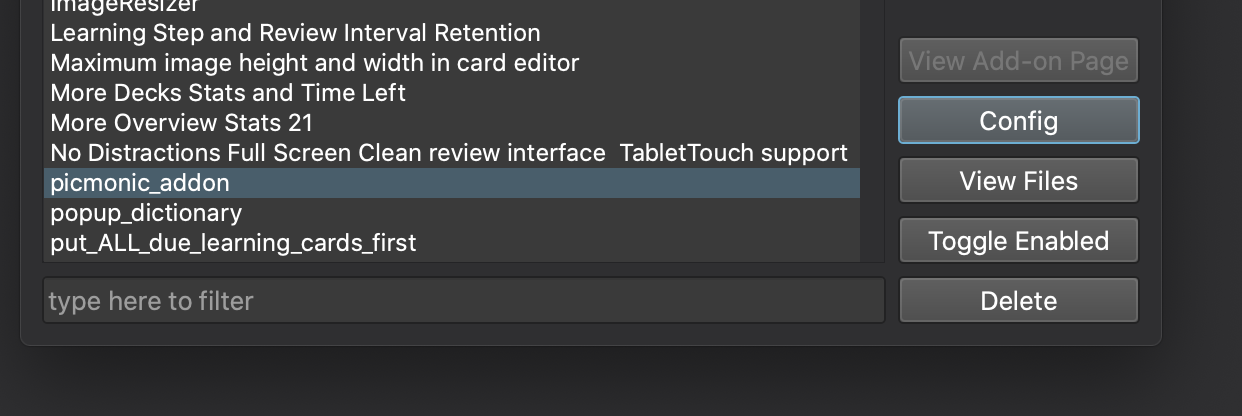
- Tools → Add-ons
- Find “Picmonic Anki Add-On” in the list and click it.
- Click “Config” button
MORE RESOURCES
Get access to 1,400 Picmonic video-quiz lessons covering the hardest to remember, highest yield need-to-know information in Medical and PA school. Use this exclusive Anki discount for 20% off a premium subscription.
FAQ
Is the Picmonic Anki Add-On Free?
- Yes, it’s 100% free to use for everyone. A Picmonic account is not required.
Do I need a Picmonic account?- No, you can download and use the Anki Add-On without signing up for Picmonic.
Can I use the Picmonic Anki Add-On with any deck? - Yes, the Picmonic Anki Add-On will work with any content set.
Does Picmonic make Anki decks?
- No, not yet! Reach out to feedback@picmonic.com if you’re interested in helping us create them.
Can I change the underline color?- Yes, see the CONFIGURATIONS section above.
Can I use both the Picmonic and Amboss Add-Ons at the same time? - Yes, however, the underlined terms may cause overlap. To fix this, there are a few settings you can modify. Refer to the CONFIGURATIONS section above.
Can I change the Picmonic eye if I’m using the Amboss Add-On?
- Yes, refer to the CONFIGURATIONS section above.
HELP & SUPPORT
Please let us know if you run into any bugs, mismatched topics, or if you have feedback on how this Add-On can be improved.
If you need help or see a bug, please contact us at feedback@picmonic.com.
Provide feedback and suggestions by clicking this link, or from inside the Anki Add-On via the feedback link in the bottom right corner.
CHANGELOG
09/29/2021 - v1.3.7
Release Notes:
- Fix "Request failed. TypeError: Cannot read property 'addEventListener' of null" issue.
07/07/2021 - v1.3.5
Release Notes:
- Fix conflicts with latest AMBOSS plugin
- Fix page shifting
- New loading indicator and animation
- New animation when showing pop up
05/04/2020 - v1.3.0
Release Notes:
- Support for multiple areas of study
- New user friendly configuration screen
01/27/2020 - v1.2.11
Release Notes:
- Housekeeping release. Bump version number to prompt for add-on upgrade.
01/27/2020 - v1.2.10
Release Notes:
- Fixed an issue which prevented some words from not being highlighted when using "Basic" card types
- Updated synonym list
11/30/2020 - v1.2.9
Release Notes:
- Fixed/added several synonyms
11/09/2020 - v1.2.8
Release Notes:
- Fixed an issue with highlighting words with single quotes such as “Light’s Criteria”
- Fixed preview showing a blank screen
11/04/2020 - v1.2.7
Release Notes:
- Decreased the size of the modal and made it scrollable to better work on smaller screens.
- Additional synonym fixes
- Modal appears/hides faster now. 300ms -> 100ms
11/02/2020 - v1.2.6
Release Notes: - Significantly improved the term matching
- Added case sensitive terms
- Added back the Picmonic Eye icon when using AMBOSS plugins. Can be enabled or disabled in the plugin settings.
- Added configuration for the underline color (can be changed in plugin configuration)
- Added analytics (can be disabled in plugin configuration)
LICENSE
AGPLv3
Credits
A special thanks to AMBOSS and the AMBOSS plugin.
Add-On Walkthrough
