HTML Editor Tweaks v0.2

AnkiWeb addon 410936778

2 other versions of this addon exist. Compare versions ↓

Improves the built-in HTML editor by prettifying HTML with Beautiful Soup, remapping a shortcut, choosing a monospace font, enlarging the editor, and disabling last-line cursor placement.
AI-generated summary; may contain mistakes.

formattingshortcutsappearancebeta

Open on AnkiWeb GitHub Find alternatives

AnkiWeb

Votes
8 (πŸ‘ 6 Β· πŸ‘Ž 2)
Updated
2020-03-22
Anki versions
2.1.24~
License
Not found (this does not mean that the addon has no license)
Virus scan
No ClamAV match A match does not prove malware. No match does not prove that the code is safe.
Languages
Python
Description language
en

Maintenance

abandoned

  • Last update or commit: 2021-01-02 (2129 days before the snapshot).
  • Commits in the last year: 0.
  • Issues: 7 open, 4 closed.
  • Pull requests: 1 open, 1 merged.
  • Median first response: 403 hours (6 answered issues and pull requests).
  • Outside pull requests: 50% of 2 merged.
  • Forks that may still be maintained: "Clickable Tags v2.0 (original)" (380714095), "Clickable Tags v2.0" (1739176371).

Will it work on my Anki?

Version branches
Min AnkiMax AnkiUpdated
2.1.222.1.24+2020-03-22
History across monthly snapshots

Loading…

Compare versions

The original addon and its forks. The best value in each column is in bold.

VersionWorks on Anki 26.09.3MaintenanceLast activity VotesApprovalGitHub starsNotes
HTML Editor Tweaks v0.2 this addon original likely abandoned 2 Jan 2021 πŸ‘ 6 Β· πŸ‘Ž 2 41% 8 beta
↳ Clickable Tags v2.0 likely stale 16 Jan 2025 πŸ‘ 35 Β· πŸ‘Ž 3 79% 5
↳ Clickable Tags v2.0 (original) likely stale 16 Jan 2025 πŸ‘ 35 Β· πŸ‘Ž 7 69% 5

Forks can add features or work in a different way. Read the description before you change to another version. Fork detection is incomplete, so other versions can exist.

Similar addons

Description

A set of tweaks to the built-in HTML editor. Hopefully an improvement for those who spend a lot of time editing cards. Somewhat alpha. Seems to work 99% of the time, but please make a backup of your collection first. If you encounter any issues, let me know on GitHub: https://github.com/luoliyan/anki-misc/issues Tweaks
  • Prettifies the HTML by running it through Beautiful Soup
    • Reformats pretty aggressively, which is what I wanted, but not everyone will like it
  • Remaps Ctrl+Shift+X to F12
  • Sets a decent monospace font (assumes Iosevka; edit __init__ .py to change)
  • Resizes the editor to something more reasonable than 400 x 300
  • Disables the default behaviour of loading the cursor on the last line (personal preference, yes)
Known Issues
  • Adds spurious space just before <sub> or <sup>
  • Incorrect handling of tags inside parentheses

README

Clickable Tags

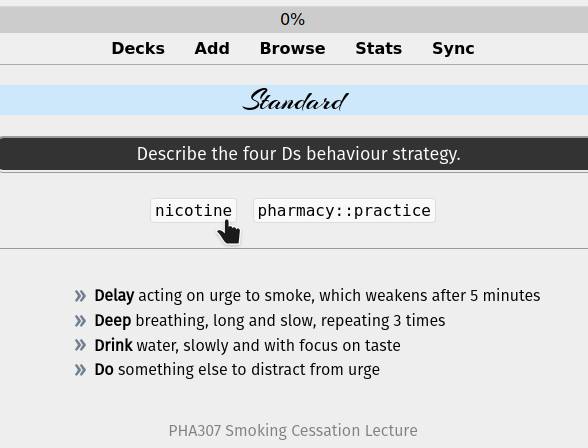
A stripped-down port of the Clickable Tags add-on to Anki 2.1.

Just add the {{Tags}} special field to your card template. The add-on will take care of the rest.

Single-click the tag to search for notes with that tag. Double-click to limit the search to the current deck.
Clickable Tags

HTML Editor Tweaks

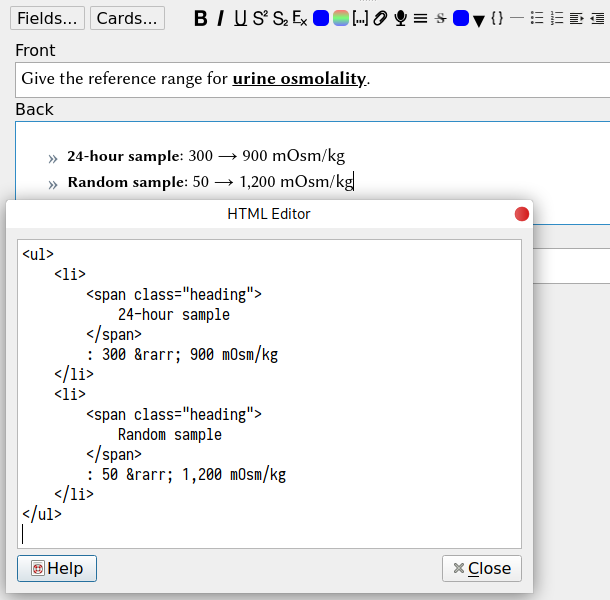
A set of tweaks to the built-in HTML editor. Hopefully an improvement for those who spend a lot of time editing cards.

Very alpha. Seems to work 99% of the time, but please make a backup of your collection first.

Tweaks

  • Prettifies the HTML by running it through Beautiful Soup
    • Reformats pretty aggressively, which is what I wanted, but not everyone will like it
  • Remaps Ctrl+Shift+X to F12
  • Sets a decent monospace font (assumes Iosevka; edit __init__.py to change)
  • Resizes the editor to something more reasonable than 400 x 300
  • Disables the default behaviour of loading the cursor on the last line (personal preference, yes)
HTML Editor Tweaks

Known Issues

  • Adds spurious space just before <sub> or <sup>
  • Incorrect handling of tags inside parentheses

Web View Styling

Show Cloze Length

  1. Clone or modify a Cloze note type.
  2. Add a Term field to the note, containing the text that is hidden by the cloze.
  3. Copy _showClozeLength.js into your collection.media directory.
  4. Add this to the note styling:
.hidden { color: transparent; }
  1. Add this to the front of the cloze card, at the bottom:
<div class="term hidden">{{Term}}</div>
<script src="_showClozeLength.js"></script>