Converts Chinese characters in any Anki field into Pinyin or Zhuyin ruby annotations displayed above the Hanzi, supporting simplified and traditional text.
card-creationformatting
Automatically fills Chinese flashcard fields with translations, Pinyin or Jyutping romanization, audio, simplified/traditional characters, frequency, and example sentences, plus tone coloring.
card-creationformattingcard-templatesdictionaryfork-or-reuploadbeta
Adds customizable ruby annotations (furigana/pinyin) to selected card text via toolbar button or shortcut key, with adjustable font size, text color, and error logging.
formattingshortcuts
Automatically fills Chinese flashcard fields with translations, Pinyin or Jyutping romanization, audio, traditional/simplified characters, Bopomofo, rubies, frequency data, and tone colors using built-in note types.
card-creationformattingcard-templatesdictionaryobsoletefork-or-reuploadbeta
Displays related words from chosen decks that share characters with the reviewed card, plus offline character decomposition with pinyin and hover glosses, linking related notes to the Browser.
review-flowsearchappearancedictionary
Automatically fills Chinese note fields from entered hanzi, providing translations, pinyin or Jyutping, audio, simplified/traditional characters, Bopomofo, frequency, example sentences, and tone coloring.
card-creationformattingcard-templatesdictionaryobsoletefork-or-reupload
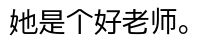 into
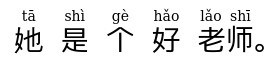 The way the addon achieves this is really quite simple. At its core is the recent addition of ruby characters to HTML. Here is a part of above example's ruby HTML:
 Then choose the deck, note type, and field with the Hanzi characters. If you already have a field with matching Pinyin, select the first option.
 The addon will match Hanzi and Pinyin together to the best of its ability. You can preview the output by selecting any one of the Hanzi on the left (from your own cards) and see the matched Hanzi and Pinyin on the right. Make sure to select a field for where the ruby output should go.
Here is an example of the addon generating Pinyin when there is no pre-existing Pinyin to match with the Hanzi.
 The addon goes beyond assigning Pinyin to individual Hanzi, which is error-prone — there are many Hanzi with multiple Pinyin readings. It instead first splits the Hanzi sentence (in which there are usually no spaces) into words, then looks up each word in an internal dictionary. While it may make the occasional mistake it is remarkably adept at assigning the right Pinyin.
There is also the option of generating a table of definitions from the internal dictionary:
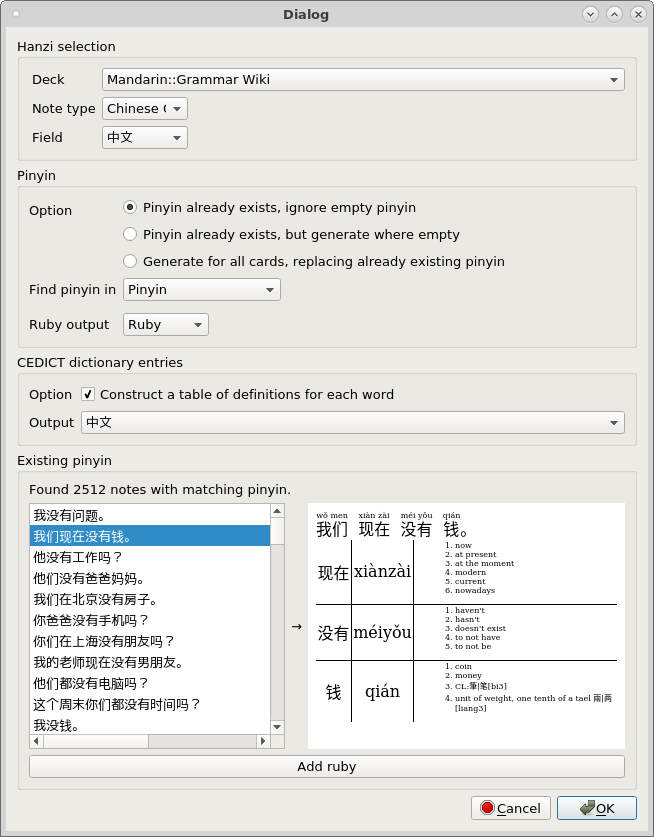 The addon restricts the dictionary entries to match the Pinyin readings, which it finds in the note if you specified a Pinyin field, or generates on its own if you haven't. The dictionary entries are also entirely in HTML, and come with CSS selectors for the word, Pinyin, and definitions columns. Remember to specify another field in the note where the table of definitions will go.
This addon would not have been possible without two third-party Python modules. I've used