Onigiri Kitchen · おにぎり食堂

AnkiWeb addon 427107295

Adds a pixel-art restaurant to Anki where reviews bring tipping guests, with a pomodoro timer, collectible pets, decorations, stats and a home-screen widget.
AI-generated summary; may contain mistakes.

statisticsprogress-trackinggamificationmotivationtimer

Open on AnkiWeb GitHub Find alternatives

AnkiWeb

Votes
2 (👍 2 · 👎 0)
Updated
2026-10-27
Anki versions
26.09.3~
License
MIT (from the GitHub repository)
Virus scan
No ClamAV match A match does not prove malware. No match does not prove that the code is safe.
Languages
JavaScript, Python, CSS, JSON
Description language
en

Maintenance

active

  • Last update or commit: 2026-10-27 (5 days before the snapshot).
  • Test files: 8.
  • GitHub Actions workflows: 1.
  • Commits in the last year: 103.
  • Issues: 0 open, 0 closed.
  • Pull requests: 0 open, 0 merged.

Will it work on my Anki?

Version branches
Min AnkiMax AnkiUpdated
23.1026.09.3+2026-10-27
History across monthly snapshots

Loading…

Similar addons

Pomodoro Bar

Times Pomodoro study sessions with fillable progress and review-counter bars, color-coded answer segments, optional rest periods, pause/resume, notices, and configurable goals, colors, and screen controls.

review-flowprogress-trackingtimer

1 votes 21% approval 👍 1 · 👎 0 ⭐ 0 Anki 2.1.1~ Updated 2026-10-06
My Pet

Turns photos of your pet into an animated pixel-art companion that sits, wanders, naps and plays in its own strip above the answer buttons while you review.

aigamificationmotivation

3 votes 44% approval 👍 3 · 👎 0 Anki 2.1.3~ Updated 2026-10-27

Description

A cozy pixel-art restaurant, pomodoro timer and shop pets. Made as a companion to Onigiri.

You study, guests arrive. You take a break, you get to enjoy them.

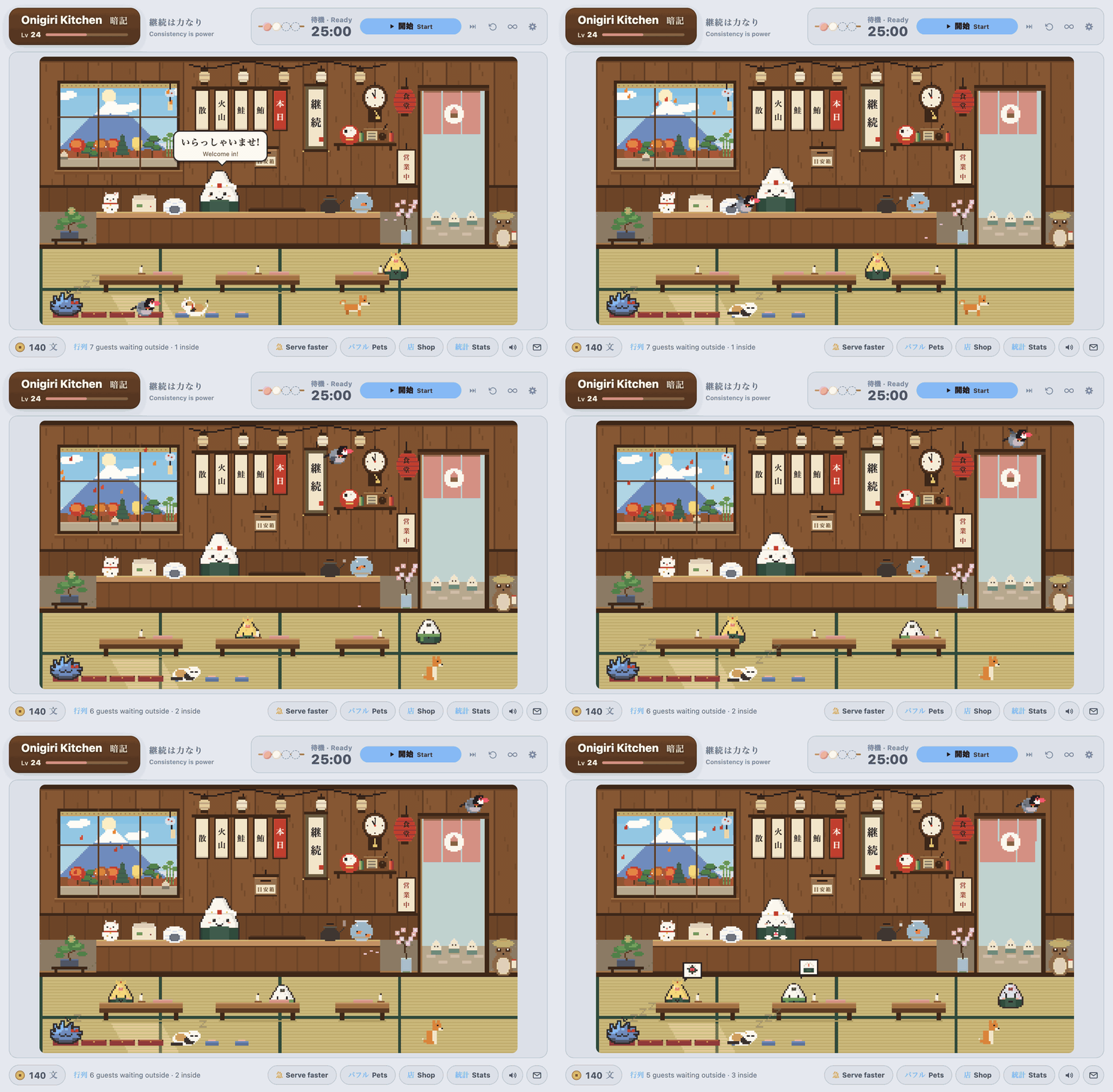
The restaurant, in motion

Features

  • A living pixel restaurant. Click Onigiri's restaurant widget to open it. Lanterns, a noren curtain in your theme colour, and a window onto Mt. Fuji that follows your real clock and the seasons.
  • Guests come from studying. Every 10 reviews in a deck brings a guest from that deck, and each deck has its own look. Getting a leech right sends a grumpy sour-plum guest who cheers up once fed.
  • Your Onigiri Specials are on the menu: guests order dishes from your Specials Book, so the menu grows with every Daily Special you finish, and golden guests order today's special. Rarer specials tip more (and once you've finished today's special in Onigiri, golden guests tip extra, the chef cheers and the 本日 tag gets a 済 seal), collecting them earns rewards for your restaurant (including a お品書き menu board), the chef announces each new dish, and he cheers when your Onigiri restaurant levels up.
  • A daily goal party: reach your daily card goal (100 by default, change it in settings) and your restaurant throws a little fireworks party the next time you visit.
  • Study in one big batch. No limit on waiting guests. After a big session, serve everyone at 4× speed or collect every tip at once. Reviews from your phone count too once synced (even the next morning, as takeout guests).
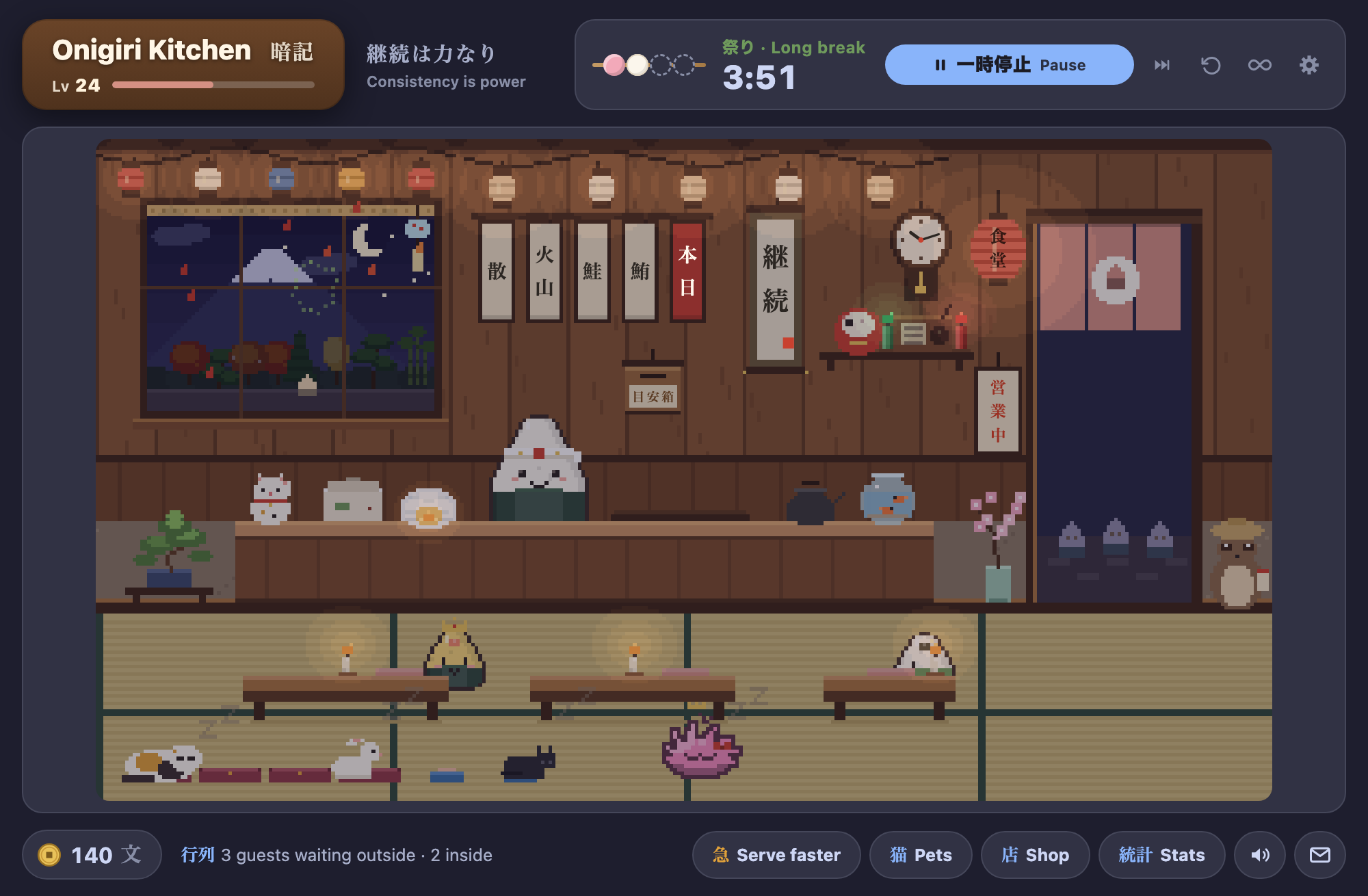
  • Pomodoro timer. One dango per focus session. It only counts while you're reviewing (it pauses after a couple of minutes idle: 2 by default, change it in ⚙). The restaurant opens when your break starts, and nudges you back when it ends. Long breaks are festival nights with fireworks. Prefer no breaks? Tap ∞ for endless focus: it counts up and every session still counts.
  • Pick a starter pet: Tama the cat, a puffle in your favourite colour, or a Java sparrow (grey, white, sakura or cinnamon) that flies around the restaurant. Adopt the others later from the shop.
  • Your shop pet. A gentle virtual pet. Studying feeds it, and it grows with total study days (never streaks), develops a personality, learns tricks and brings you gifts. Caring for it unlocks accessories, a happy-pet tip bonus, rare keepsakes and a treasure shelf. It can't get sick, run away or die.
  • The shop. Guests tip in mon. Spend it on a bonsai, wind chime, maneki-neko, daruma (4 focus sessions in a day grants its wish: +30 mon), goldfish and more. Some items unlock at higher restaurant levels (without Onigiri, you level up every 3 days you study). Puffle owners also get puffle colours, an igloo lamp and penguins strolling past the window.
  • More pets: milestone buys that move in, each with a perk. A rabbit, a black cat, a shiba, a fox, a tanuki and a crane. Tap the bed to tuck everyone in; it grows with every pet.
  • A forest outside your window. Pines, maples, cedars, sakura, bamboo and ginkgo trees line the road, one more for each milestone of cards you review (from 200 up to 100,000), and they follow the seasons, with Mount Fuji peering over them. The bonsai on the floor grows for most of a year from the day you buy it.
  • A real-time clock: a wooden wall clock, or tap it for a flip clock.
  • Candles on the tables and a green and red pair on the shelf: click one to light or snuff it. Lanterns and candles light themselves at dusk and go out at dawn.
  • Confetti and sakura petals when you finish a deck: 紙吹雪 bursts in from the sides and petals drift down over the "Congratulations" screen, with a little fanfare.
  • 統計 Stats, lots of them: The Stats button at the bottom of the kitchen ("You in numbers") opens a window with a page each for Today, Reviews, Pomodoro, Kitchen and Records (all but Today show a year by default, or 7 days, 30 days or all time). Stats are grouped under headings you can fold, and Records keeps your personal bests (most cards in a day, longest session, best streak, best retention and more) for any range and all time. Today flags a new record the day you set one, and Reviews shows how you're doing against the period just before. Today's cards, time, pace and how long what's due will take at your pace; cleared-day streaks and percentages (reviews only, or all cards) for every range, with focus and kitchen totals on the Reviews page too; pomodoro focus time, streaks, completion rate, best days and time-of-day patterns; your Anki reviews with a year heatmap, retention, answer buttons and your collection's new, young and mature cards; and the kitchen's guests, mon and pet.
  • Home-screen widget with the share of the last 30 days you studied, your daily average, 30-day retention and how long what's still due will take at your pace (big 2×2 widgets add a scene with all your pets (they nap while you focus), and progress to the next guest): add it to your Onigiri main menu from Onigiri's layout editor (or see it under your decks without Onigiri).
  • Several pets, your pick. Adopt more than one and flip between them on the Pets card: each has its own care, keepsakes and food dish. A hungry pet shows a thought bubble with the food it wants; tap it to feed. You're told when something unlocks by itself (Specials Book rewards, pet accessories, new shop items). Collect all is on the home-screen widget too, and unsaved settings ask before they're lost.
  • Your kitchen is safe. It's backed up every day, a save that can't be read is never overwritten, and ⚙ has Back up and Restore buttons for moving it to another computer.
  • A postcard of your restaurant: the envelope button makes a picture of the kitchen as it is right now, with your level, guests served and pets, to save or copy. Nothing is uploaded.
  • Keyboard friendly: Tab to the picture, arrow keys choose, Enter taps; plain letters open the shop (S), pets (P), stats (T) and the focus timer (F), and ? lists them. Anki's own shortcuts are never taken.
  • A guided tour the first time you open it, and a 目安箱 suggestion box for ideas and bug reports.
  • Matches your Onigiri theme: your colours, font and dark mode, or light by day and dark at night by your clock.

Night and festival

How to open it

Click the restaurant picture on Onigiri's main screen (Shift-click keeps Onigiri's normal view), click the shop-front icon next to Onigiri's buttons, click the dango timer in the corner, or use Tools → Onigiri Kitchen (Ctrl+Shift+K, or Cmd+Shift+K on a Mac).

Your data

Onigiri Kitchen never changes Onigiri's files. It reads your restaurant name, level, theme and Specials Book, and (unless you turn them back on in ⚙) hides Onigiri's 25% / 50% / 75% daily-special pop-ups while Anki is open. Your XP and Taiyaki coins are untouched. Onigiri is recommended but not required.

Bugs & ideas

Click the 目安箱 suggestion box on the restaurant wall, or use ⚙ → Suggest a feature / Report a bug, or open an issue on GitHub. Please report problems there rather than in AnkiWeb reviews, since I can't reply to reviews.

README

Onigiri Kitchen · おにぎり食堂

AnkiWeb

A cozy pixel-art restaurant, pomodoro timer and virtual pet for Anki, built as a companion to the Onigiri add-on.

You study, guests arrive. You take a break, you get to enjoy them.

The restaurant, in motion

In 30 seconds: every 10 reviews a guest walks in and, when you take a break, tips you in 文 (mon). Spend mon on decor and pets; a pomodoro timer is built in; Stats shows your numbers. Nothing ever punishes you: no streak to break, nothing that gets sick or dies.

Features

  • A living pixel restaurant. Click Onigiri's restaurant widget and your restaurant opens: lanterns, noren curtain in your restaurant's theme colour, and a window onto Mt. Fuji that follows your real clock and the season. Everything is drawn in code, with no image files.

  • Guests come from studying. Every 10 reviews in a deck brings a guest from that deck, and each deck gets its own look. Getting a leech card right sends a grumpy sour-plum guest who cheers up once fed. Finishing a focus session sends a golden guest. Guests are counted from Anki's review log for the day, so reviews on your phone count too, once synced (reviews that arrive after their day ended bring takeout guests).

  • Your Onigiri Specials are on the menu. Guests order dishes from your Onigiri Specials Book (every Daily Special you've finished), so the menu grows as your Book does, and golden guests order today's Daily Special. Rarer specials tip more (+1 mon for Uncommon up to +6 for Legendary), and once you've finished today's special in Onigiri, golden guests tip +3 more for it, the 本日 tag gets a 済 (done) seal, and the chef cheers and makes it for the tray. The chef cooks each order (tap him to make dishes ahead for the tray), and the menu tags on the wall show your newest specials. Collecting specials earns rewards: a specials board at 10 (tap it for a お品書き menu of everything the kitchen serves), a golden headband for the chef at 25, a golden frame for your first Epic and a legendary knife for your first Legendary. When you finish a new special, the chef announces it (and makes one) the next time you visit, and he cheers when your Onigiri restaurant levels up. Without Onigiri, the house onigiri flavours unlock as your restaurant levels up.

  • A daily goal party. Reach your daily card goal (100 by default, change it in ⚙) and your restaurant throws a little party with fireworks the next time you visit.

  • Study in one big batch, catch up later. There's no limit on waiting guests. After a big session, tap 急 Serve faster to serve everyone at 4×, and tap it again to collect every tip at once. Guests last until Anki's day rolls over, and anyone still waiting then takes takeout and still leaves a tip.

  • A forest outside the window, and a bonsai that grows. Japanese trees (pine, maple, cedar, sakura, bamboo, ginkgo) are planted along the road as your all-time review count climbs, and follow the seasons. The bonsai grows for most of a year from the day you buy it.

  • Pomodoro timer. One dango per focus session. When a break starts, the restaurant opens. When the break ends, you get a gentle nudge back to your cards. Long breaks are festival nights with fireworks. A small dango timer sits in the corner of Anki's main screens. Focus only counts while you're actually reviewing: after 2 minutes without activity (change it in ⚙) it pauses (and gives that time back), then resumes on your next card. The ↺ button next to the timer resets the cycle. Rather study without breaks? Tap ∞ endless focus: the clock counts up, no break pop-ups interrupt you, and every focus-length you study still counts as a finished session.

  • Choose your starter pet. The first time you open the kitchen, pick a partner: Tama the cat, a puffle (in the colour of your choice) or a 文鳥 Java sparrow (grey, white, sakura or cinnamon, with silver and cream in the shop), who flies about the restaurant between perches on the window sill, the menu rail, the door frame, the counter, the rice cooker and any empty place at the tables. The other two can be adopted later from the shop, and once you have more than one, the Pets card has a tab for each: every pet has its own care, style and keepsakes.

    Choosing a starter pet

  • Your shop pet. A virtual pet with needs (tummy, love, energy) that your studying fills. Tama (or your puffle or sparrow) grows with total study days (never streaks), develops a personality from your habits, learns tricks and brings you gifts. She can't get sick, run away or die. Days off just make her sleepy. Caring for her pays off: keep all three needs at 70+ and she beckons guests in (+1 tip). Daily petting and feeding unlock accessories (collar colours, a bandana, a golden bell, a fancy cushion, a kotatsu). Finding all 12 keepsakes gives +500 mon and a treasure shelf, and a very happy Tama sometimes brings rare golden ones. The Pet button opens its card (Care, Style and Keepsakes tabs); double-click the name to rename it. Tap the bed to tuck everyone in: it grows a spot for every pet who lives with you.

  • The shop. Guests tip in 文 (mon). Spend it on a bonsai, wind chime, maneki-neko, daruma, goldfish, radio and more, some unlocked by your Onigiri restaurant level (without Onigiri, you gain a level for every 3 days you've studied). The daruma paints its second eye after 4 focus sessions in a day and grants the wish: +30 文 once a day. The pets you didn't pick are 1,000 文 each, and extra puffle or sparrow colours 250 文.

  • Puffle extras. Once you have a puffle, extra puffle colours (250 文 each, swap any time), an igloo lamp for the counter and little penguins waddling past the window (more of them in winter) switch on too.

  • More pets. Big milestone purchases that move into the restaurant, each with a perk (hover one in the shop to see it): a rabbit, a black cat (your pet's best friend), a shiba, a fox, a tanuki and a red-crowned crane. At night and during focus sessions they all curl up on the bed.

  • A clock on real time. A wooden wall clock, or tap it for a flip clock with split-flap digits.

  • Candles on the tables. Click a candle to light or snuff it (with a little flame, sparks and a curl of smoke). The paper lanterns switch on and off together with a click. Lanterns and candles light themselves at dusk and go out at dawn.

  • 紙吹雪 confetti and sakura petals when you finish a deck: confetti bursts in from the sides and petals drift down from the top of the "Congratulations" screen, with a little fanfare.

  • 統計 Stats. The Stats button at the bottom of the kitchen ("You in numbers") opens a window with a page each for Today, Reviews, Pomodoro, Kitchen and Records (your personal bests: most cards, longest session, best streak and more), full of numbers and charts, for the last 7 days, 30 days, year or all time. Today: cards, time, pace, retention, and how long your due cards will take at your own pace. Pomodoro: focus time, streaks, completion rate, cards per session, best days, breaks and festival nights, time of day and weekday patterns, the last 30 days. Reviews (from Anki's history): a year heatmap, retention, answer buttons, time per card, your collection's new, young and mature cards. Kitchen: guests by type and deck, mon earned and spent, your pet and collection. Pomodoro and kitchen numbers are recorded from 1.8.0 on.

  • Home-screen widget. A small live pixel scene with guests waiting, mon, your pet's mood and review stats (the share of the last 30 days you studied, your daily average, 30-day retention and the time left today), plus Collect all (serve everyone waiting without opening the kitchen) and a Visit button. Big widgets (two by two) show all your pets and progress to the next guest. With Onigiri, add it from Onigiri's layout editor. Without Onigiri, it shows under your decks on Anki's main screen (you can turn it off in the add-on config).

  • A postcard of your restaurant. The envelope button next to the sound button makes a picture of the restaurant as it is right now, with your level, guests served, reviews and pets, to save as a PNG or copy. Nothing is uploaded.

  • A guided tour the first time you open it, which you can replay from ⚙.

  • 目安箱 suggestion box on the wall (and in ⚙) for feature ideas and bug reports.

  • Matches your Onigiri theme. It uses your Onigiri colours, font and dark mode automatically. In ⚙ you can also have light and dark follow your clock (light by day, dark at night) or stay one way.

  • Keyboard friendly. Tab to the restaurant picture, then the arrow keys step through everything you can tap, Enter taps it and Esc lets go. Plain letters open the buttons: S shop, P pets, T stats, F focus timer, , timer settings, M mute, C postcard, ? lists them. Nothing uses Ctrl, Cmd or Alt, so Anki's own shortcuts are never taken.

  • Mostly idle and fully optional: the chef, your pets, the menu tags (they play koto notes), the window, the lanterns, the bed and most decor all do something when clicked.

Night & festival Your pet The shop
Night The pet card The shop

The お品書き menu: tap the specials board to see your Specials Book

統計 Stats: pomodoro, review and kitchen numbers with charts

Confetti and sakura petals when you finish a deck

Pets

Pet Price Needs Perk
兎 Rabbit 1,500 文 — +5 mon for every finished focus session
三毛猫 Calico cat 1,000 文 — An extra treat for your pet with every guest (if you didn't start with the cat)
パフル Puffle 1,000 文 — Your pet's energy never drops below 40 (if you didn't start with a puffle)
文鳥 Java sparrow 1,000 文 — Your pet's tummy never drops below 40 (if you didn't start with the sparrow)
黒猫 Black cat 2,500 文 Lv 3 Your pet's love never drops below 40
柴犬 Shiba 4,000 文 Lv 5 +1 tip from every guest
狐 Fox 6,000 文 Lv 10 Sour-plum (leech) guests tip double
狸 Tanuki 9,000 文 Lv 15 End-of-day takeout tips are doubled
鶴 Crane 14,000 文 Lv 20 Every deck you finish brings a golden guest

They're long-term goals: a review earns about 0.35 mon on average, so the rabbit takes roughly 4,000 reviews. The full set takes about 3 months at 1,200 reviews a day, or under a year at 300 a day.

Install

  • From AnkiWeb (recommended): in Anki, go to Tools → Add-ons → Get Add-ons… and enter code 427107295 (AnkiWeb page). You'll get updates automatically.
  • From GitHub: download onigiri_kitchen.ankiaddon from the latest release and double-click it, or use Tools → Add-ons → Install from file…. Then restart Anki.

Onigiri is recommended but optional. Without it, the kitchen uses its own washi-paper theme.

Opening the kitchen: click the restaurant picture on Onigiri's main screen (Shift-click keeps Onigiri's own expand view), click the shop-front icon next to Onigiri's buttons, click the corner dango timer, or use Tools → Onigiri Kitchen (Ctrl+Shift+K, or Cmd+Shift+K on a Mac).

Home-screen widget

The widget in Onigiri's grid at different sizes

  • With Onigiri: open Onigiri's settings, go to the main menu layout editor, find Onigiri Kitchen · おにぎり食堂 in the add-on widgets list, and drag it onto your grid. Use the widget's width options in the editor to make it wider (2 columns looks best). It adapts to any size.
  • Without Onigiri: it appears under your deck list automatically. Set show_home_widget_without_onigiri to false in Tools → Add-ons → Onigiri Kitchen → Config to hide it.

Your data

  • Onigiri Kitchen never modifies Onigiri. It only reads your restaurant name, level, theme colours and font. Your XP and Taiyaki coins are untouched.
  • Kitchen progress (mon, decor, guests, Tama) is saved per profile in the add-on's user_files folder, which Anki keeps across updates. The file is named by a short id kept in the profile's own settings, so renaming a profile keeps its kitchen.
  • The kitchen lives on one computer. It isn't synced through AnkiWeb (your reviews are, and they bring guests on every device you open the kitchen on, but mon, decor and pets stay where you earned them). To move it, use ⚙ → Back up / Restore. Uninstalling the add-on deletes its folder, backups included, so back up first.
  • The save is backed up once a day (the last five are kept in user_files/backups), a save that can't be read is never overwritten, and ⚙ → Back up / Restore copies your kitchen to a file, for example to move it to another computer.
  • Nothing is sent anywhere. The bug-report button only opens a pre-filled GitHub issue in your browser.

Development

onigiri_kitchen/      the add-on (what gets installed)
  main.py             hooks, kitchen window, bridge commands
  state.py            save file, guests, mon, decor catalog
  pet.py              the pet: species, needs, growth, gifts
  pomodoro.py         wall-clock pomodoro timer
  onigiri_link.py     read-only access to Onigiri's data & theme
  review_stats.py     what Stats and the widget read from Anki's review log (records, missed days); Records are read incrementally
  savefile.py         reading, backing up and protecting the save file
  diag.py             the small rolling debug log
  web/                kitchen.js (pixel engine), chip.js (timer + widget hook), sound.js, css
dev/                  browser previews with mock data
build.sh              builds dist/*.ankiaddon and the AnkiWeb zip
tests/                Python tests (pytest, no Anki needed), the Stats and kitchen page smoke tests (node, the kitchen one
                      in headless Chrome via playwright) and anki_compat.py (checks the parts of Anki this reaches into)
tests_main/           main.py's hooks and commands, run against dev/anki_stub.py
dev/release_check.py  the version is the same everywhere (main.py, manifest, changelog); build.sh runs it
CHANGELOG.md          what changed in each release

CI (GitHub Actions) runs all of that on every push, and the Anki check against the oldest (23.10) and newest Anki. Locally: pip install pytest && python -m pytest tests && python -m pytest tests_main, then npx eslint onigiri_kitchen/web tests/*.js and node tests/stats_smoke.js.

Preview the kitchen in a browser (Anki loads scripts in <head>, and the preview reproduces that):

python3 dev/make_preview.py
python3 -m http.server 8791
# open http://localhost:8791/dev/anki_order.html?hour=21&night=1&ff=20

URL options: hour, night, ff (fast-forward seconds), stage (0–3), trait, panel, phase, long.

To test inside Anki, symlink or copy onigiri_kitchen/ into your addons21 folder and restart Anki.

Bugs & ideas

Click the 目安箱 suggestion box on the restaurant wall, or use ⚙ → Suggest a feature / Report a bug. Both open a pre-filled GitHub issue containing only version info. You can also open an issue directly.

License

Made by Thussenthan Walter-Angelo (@thussenthan).

MIT. Onigiri is a separate add-on by its own author, and this project isn't affiliated with it.