Notatki text notes importer addon for Anki

AnkiWeb addon 541850746

Imports notes written in plain-text Markdown files from a chosen directory into Anki, recursively parsing records to create or update Basic and Cloze notes.
AI-generated summary; may contain mistakes.

card-creationimportformatting

Open on AnkiWeb GitHub Find alternatives

AnkiWeb

Votes
0 (👍 0 · 👎 0)
Updated
2026-10-17
Anki versions
2.1.66~
License
AGPL-3.0 (from the license file in the package)
Virus scan
No ClamAV match A match does not prove malware. No match does not prove that the code is safe.
Languages
Python, JSON
Description language
en

Maintenance

active

  • Last update or commit: 2026-10-17 (15 days before the snapshot).
  • Test files: 35.
  • GitHub Actions workflows: 2.
  • Commits in the last year: 105.
  • Issues: 0 open, 0 closed.
  • Pull requests: 0 open, 0 merged.

GitHub

Repository
aradzie/notatki · more by aradzie
Stars
⭐ 2 · forks 0 · open issues 0
Last commit
2026-10-17
Languages
TypeScript, Python, JavaScript, PEG.js, CSS, Shell
Tests
35

Will it work on my Anki?

Version branches
Min AnkiMax AnkiUpdated
2.1.66+2026-10-17
History across monthly snapshots

Loading…

Similar addons

Anki Excel Sync

Batch exports Anki notes to .xlsx files organized by tag hierarchy and re-imports edits, preserving scheduling while allowing creation, modification, and deletion of cards.

importexportnote-managementtagging

28 votes 77% approval 👍 26 · 👎 2 ⭐ 26 Anki 25.09.4~ Updated 2026-05-18
Anki Markdown Notes

Imports and exports Markdown notes as Anki cards, converting Q/A entries into basic or reversed cards and mapping folders to decks.

card-creationimportexport

1 votes 0% approval 👍 0 · 👎 1 ⭐ 38 Anki 2.1.41~ Updated 2021-03-14

Description

Create Anki notes using plain text files and Markdown, then import them directly into Anki.

This addon is designed for people who love Anki’s spaced repetition system but prefer writing and managing notes in a normal text editor instead of Anki’s built-in editor.

It enables a workflow where you:

  1. Write notes in a simple human-readable text-based format.
  2. Store them in a regular directory.
  3. Import them into Anki automatically.

This makes it possible to:

  • Use a real editor like Visual Studio Code.
  • Version control your notes with Git.
  • Collaborate with others.
  • Avoid Anki’s proprietary binary deck format.

Motivation

Anki is an excellent spaced repetition system, but creating and managing notes has several drawbacks:

  • The built-in note editor UI is inconvenient for large-scale note creation.
  • Decks are distributed in a binary .apkg format, which makes:
    • version control difficult
    • collaboration difficult
    • reviewing changes impossible

This addon solves those problems by allowing notes to be written in plain text files.

How It Works

The addon imports notes from a directory containing text files written in a simple human-readable format.

Each file contains a list of note records.

Each record is written in Markdown, which allows:

  • formatting
  • LaTeX math
  • images

The addon:

  1. Asks the user to select a directory containing note files.
  2. Recursively scans the directory.
  3. Parses the note records.
  4. Creates or updates Anki notes.

Example Note Files

File astronomy.note:

!type: Basic
!deck: Astronomy

!front: The first planet from the Sun.
!back: Mercury
~~~

!front: The second planet from the Sun.
!back: Venus
~~~

!front: The largest planet in the Solar System.
!back: Jupiter
~~~

File geography.note:

!type: Cloze
!deck: Geography
!tags: Capitals

!text: The capital of {{c1::Mongolia::country}} is {{c2::Ulaanbaatar::city}}.
~~~

!text: The capital of {{c1::Syria::country}} is {{c2::Damascus::city}}.
~~~

File math.note:

!type: Basic
!deck: Math
!tags: Algebra

!front: Quadratic Formula
!back: $$ x = \frac{-b \pm \sqrt{b^2 - 4ac}}{2a} $$
~~~

!front: Euler's Formula
!back:
$$
\begin{align*}
    e^{ix}  &= \cos x + i \sin x \\
    e^{-ix} &= \cos x - i \sin x
\end{align*}
$$
~~~

Workflow

Typical workflow:

  1. Write notes in your editor.
notes/
  calculus.note
  algebra.note
  trigonometry.note
  1. Version control them.
git add notes
git commit
  1. Import into Anki using the addon.
File → Import Notatki...
  1. Select the directory with your notes.

The addon will parse and import everything.

  1. Maybe share your notes with others. Let them collaborate and contribute new notes.

Visual Studio Code Extension

To make writing notes easier, a companion VS Code extension is available.
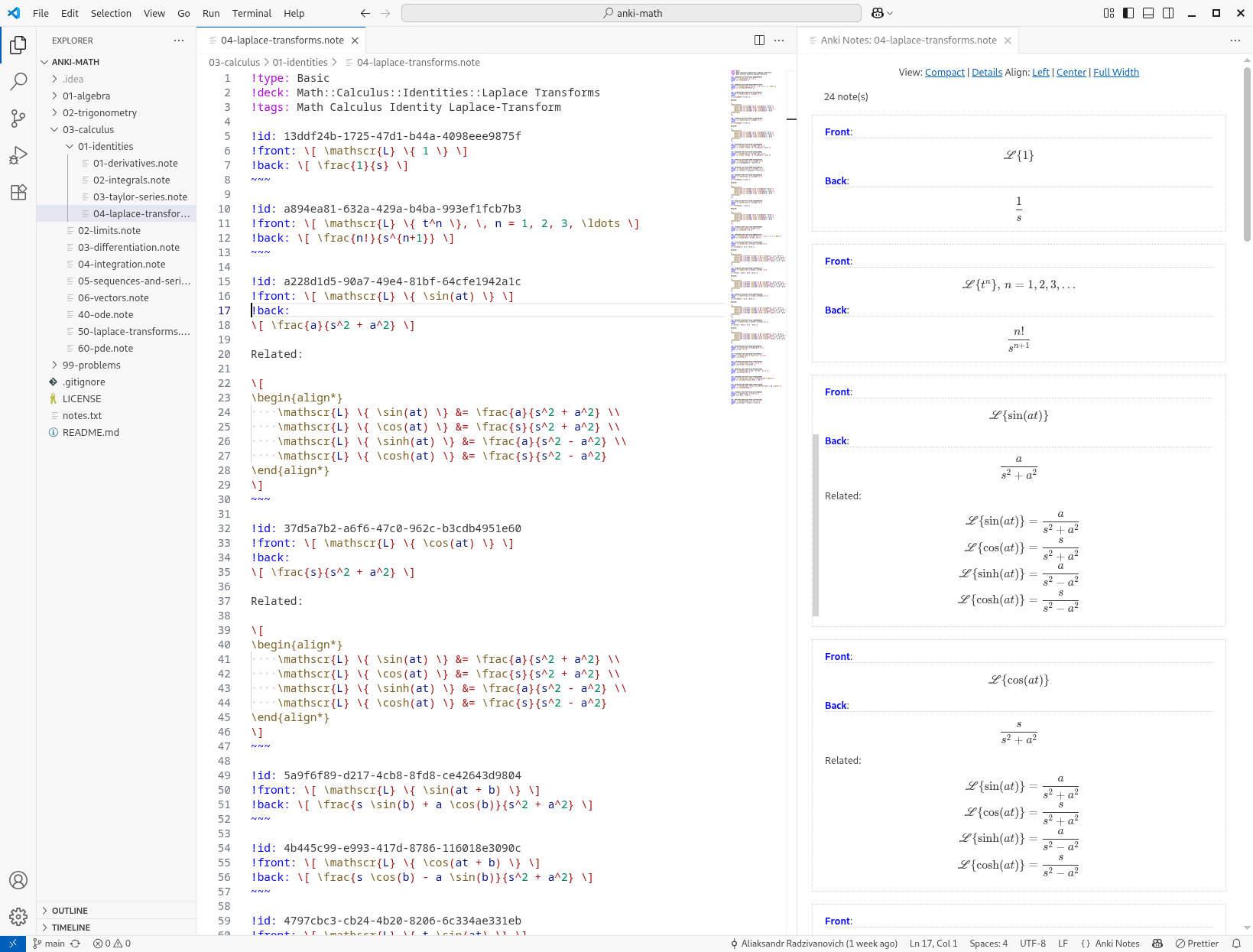
VSCode Screenshot

The extension provides:

  • syntax highlighting for note files
  • auto-completion
  • structural validation
  • note preview on the side

This makes writing Anki notes feel like writing documentation.

README

Create Anki notes using plain text files and Markdown

This is a collection of tools for maintaining custom collections of Anki notes in plain text files.

The tools include:

Motivation

Anki is an excellent spaced repetition system, but creating and managing notes has several drawbacks:

  • The built-in note editor UI is inconvenient for large-scale note creation.
  • Decks are distributed in a binary .apkg format, which makes:
    • version control difficult
    • collaboration difficult
    • reviewing changes impossible

So we designed a set of tool for people who prefer writing and managing notes in a normal text editor instead of Anki’s built-in editor.

It enables a workflow where you:

  1. Write notes in a simple human-readable text-based format.
  2. Store them in a regular directory.
  3. Import them into Anki automatically.

This makes it possible to:

  • Use a real editor (VS Code, Vim, etc.)
  • Version control your notes with Git.
  • Collaborate with others.
  • Avoid Anki’s proprietary binary deck format.

Text File Format

The notes are defined in a simple, human-readable text format that includes Markdown formatting and LaTeX math. Below are a few examples.

File astronomy.note:

!type: Basic
!deck: Astronomy

!front: The first planet from the Sun.
!back: Mercury
~~~

!front: The second planet from the Sun.
!back: Venus
~~~

!front: The largest planet in the Solar System.
!back: Jupiter
~~~

File geography.note:

!type: Cloze
!deck: Geography
!tags: Capitals

!text: The capital of {{c1::Mongolia::country}} is {{c2::Ulaanbaatar::city}}.
~~~

!text: The capital of {{c1::Syria::country}} is {{c2::Damascus::city}}.
~~~

File math.note:

!type: Basic
!deck: Math
!tags: Algebra

!front: Quadratic Formula
!back: $$ x = \frac{-b \pm \sqrt{b^2 - 4ac}}{2a} $$
~~~

!front: Euler's Formula
!back:
$$
\begin{align*}
    e^{ix}  &= \cos x + i \sin x \\
    e^{-ix} &= \cos x - i \sin x
\end{align*}
$$
~~~

Anki Addon

To simplify importing notes, we developed an Anki addon that imports all note files from a specified directory.

The addon:

  1. Asks the user to select a directory containing note files.
  2. Recursively scans the directory.
  3. Parses the note records.
  4. Creates or updates Anki notes.

Visual Studio Code Extension

To make writing notes easier, a companion VS Code extension is available.

VSCode Screenshot

The extension provides:

  • syntax highlighting for note files
  • auto-completion
  • structural validation
  • note preview on the side

This makes writing Anki notes feel like writing documentation.

Workflow

Typical workflow:

  1. Write notes in your editor.
notes/
  calculus.note
  algebra.note
  trigonometry.note
  1. Version control them.
git add notes
git commit
  1. Import into Anki using the addon.
File → Import Models and Notes...
  1. Select the directory with your notes.

The addon will parse and import everything.

  1. Maybe share your notes with others. Let them collaborate and contribute new notes.