HEATMAP#better— Daily Minimum & Streak Tracker
source: https://github.com/shukhratakmuradov-ux/my-anki-add-on
- Set a daily card minimum that must be met before Anki lets you close
- Blocks Anki from closing until your goal is reached — no more quitting early
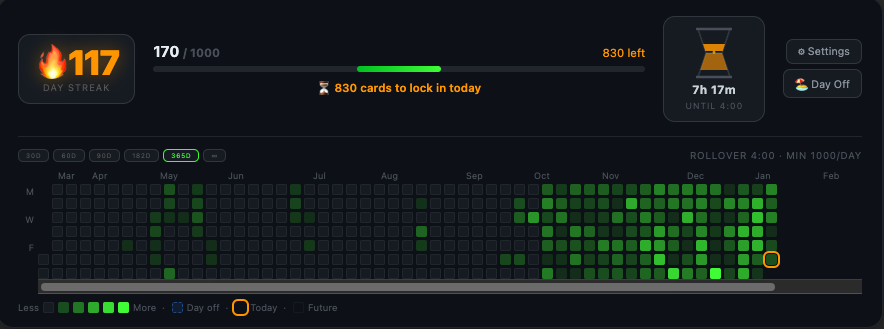
- Live progress widget embedded directly in the Deck Browser showing streak, today's count, progress bar, and remaining cards at a glance
- Animated sand timer showing exact hours and minutes remaining until your rollover hour
- 🔥 Streak counter that only increments on days you actually hit your minimum
- Legacy streak preservation — days before your chosen start date count with just 1 card reviewed, so your existing streak history is never lost
- 🏖️ Day Off system — mark any day as a rest day to protect your streak when life gets in the way, manageable from both the widget and a full calendar picker
- Activity heatmap calendar (like GitHub's contribution graph) showing your full review history with intensity-scaled colors — darker cells mean fewer cards, brighter means more
- Customizable heatmap color — pick any color from a color picker; intensity scaling is automatic
- Customizable heatmap period — 30d, 60d, 90d, 182d, 365d, or ∞ (your entire history), switchable with one click directly on the widget
- Full calendar grid with month labels, weekday alignment, and future day placeholders
- Hover tooltips on every heatmap cell showing exact date and card count
- Day boundaries use the exact same SQLite query as the Review Heatmap add-on — fully timezone and DST aware, matching your rollover hour perfectly
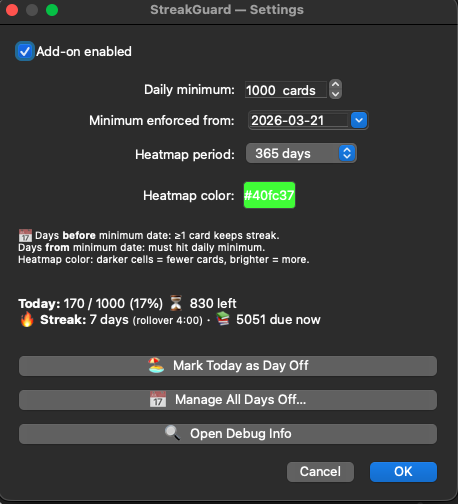
- All settings in one panel: daily minimum, streak start date, heatmap period, heatmap color, and days off manager
- Compatible with Anki 2.1.49+, Qt5 and Qt6
added(02.05.2026) new stats: Daily Status
Daily Stats Image (new section — not mentioned at all)
Generate a shareable 1080×1080 review stats image — a polished, social-media-ready card showing today's review count, yesterday's count, and a comparison line (e.g. "🔥 +47 more than prev day (+31%)")
8 hand-crafted visual themes — Midnight, Ocean, Forest, Sunset, Galaxy, Gold, Neon, and Arctic; each with unique gradient backgrounds, glow effects, accent colors, and optional star fields or grids
Personalized with your name — add your name to the image so it's unmistakably yours when posted to a study group or social media
Today vs yesterday comparison built in — the image automatically calculates the card-count delta and percentage change versus the previous day, with contextual emoji (🔥 up, 📉 down, ⚖️ same, 🚀 first day)
Send directly to Telegram groups — on macOS the addon automates the entire flow (opens the group and pastes the image); on other platforms it copies the image to your clipboard and opens the group in one step
Instagram Story export — dedicated one-click export that opens Instagram on the web with the image ready to paste as a Story
Copy to clipboard or save as PNG — share anywhere with ⌘V/Ctrl+V, or save a permanent PNG file to disk
7-day history strip in the stats dialog — see the last seven days as a mini timeline with ✅ (sent) / ⚠️ (not sent) badges so you always know which days you've already shared
"Sent" tracking per day — the addon remembers every day you've shared stats, preventing accidental duplicate posts and giving you an at-a-glance record of your sharing habit
Three ways to open the stats dialog — click the 📊 button directly in the Deck Browser widget, use the toolbar button, or press Ctrl+Shift+D from anywhere in Anki