⚙️ Editor: Move all Field Contents Up / Down

AnkiWeb addon 583035928

Fork of editor: move field contents down by one field (AI-detected; may be wrong)

2 other versions of this addon exist. Compare versions ↓

Moves all field contents up or down using hotkeys, with configurable step size, fixed relative positions, and optional field splitting.
AI-generated summary; may contain mistakes.

note-managementshortcuts

Open on AnkiWeb Find alternatives

AnkiWeb

Votes
2 (👍 2 · 👎 0)
Updated
2025-01-14
Anki versions
24.11~
License
Not found (this does not mean that the addon has no license)
Virus scan
No ClamAV match A match does not prove malware. No match does not prove that the code is safe.
Languages
Python, JSON
Description language
en

Maintenance

stale

  • Last update or commit: 2025-01-14 (656 days before the snapshot).

GitHub

No GitHub repository linked.

Will it work on my Anki?

Version branches
Min AnkiMax AnkiUpdated
24.0424.11+2025-01-14
History across monthly snapshots

Loading…

Compare versions

The original addon and its forks. The best value in each column is in bold.

VersionWorks on Anki 26.09.3MaintenanceLast activity VotesApprovalGitHub starsNotes
editor: move field contents down by one field original likely abandoned 29 Dec 2022 👍 2 · 👎 0 34% –
↳ ⚙️ Editor: Move all Field Contents Up / Down this addon (AI-detected; may be wrong) likely stale 14 Jan 2025 👍 2 · 👎 0 34% –
↳ Editor: mover conteudo dos campos (move field content) (AI-detected; may be wrong) likely stale 10 Nov 2024 👍 0 · 👎 0 – –

Forks can add features or work in a different way. Read the description before you change to another version. Fork detection is incomplete, so other versions can exist.

Similar addons

Quad Reveal

Displays up to four note fields in clean, customizable boxes after the answer is revealed, with side-by-side or 2×2 layouts, image zoom, and a show/hide hotkey.

review-flowshortcutsappearanceaccessibility

2 votes 34% approval 👍 2 · 👎 0 Anki 2.1.66~ Updated 2026-10-01
Sidebar table

Moves the browser's card/note table into the sidebar to maximize the editor area, toggled by menu or configurable shortcut, and optionally minimizes the tags editor.

note-managementshortcutsappearancebeta

5 votes 57% approval 👍 5 · 👎 0 ⭐ 0 Anki 2.1.66~ Updated 2023-04-22

Description

Credit

This addon was modified from this one

Default configurations:

There are no buttons

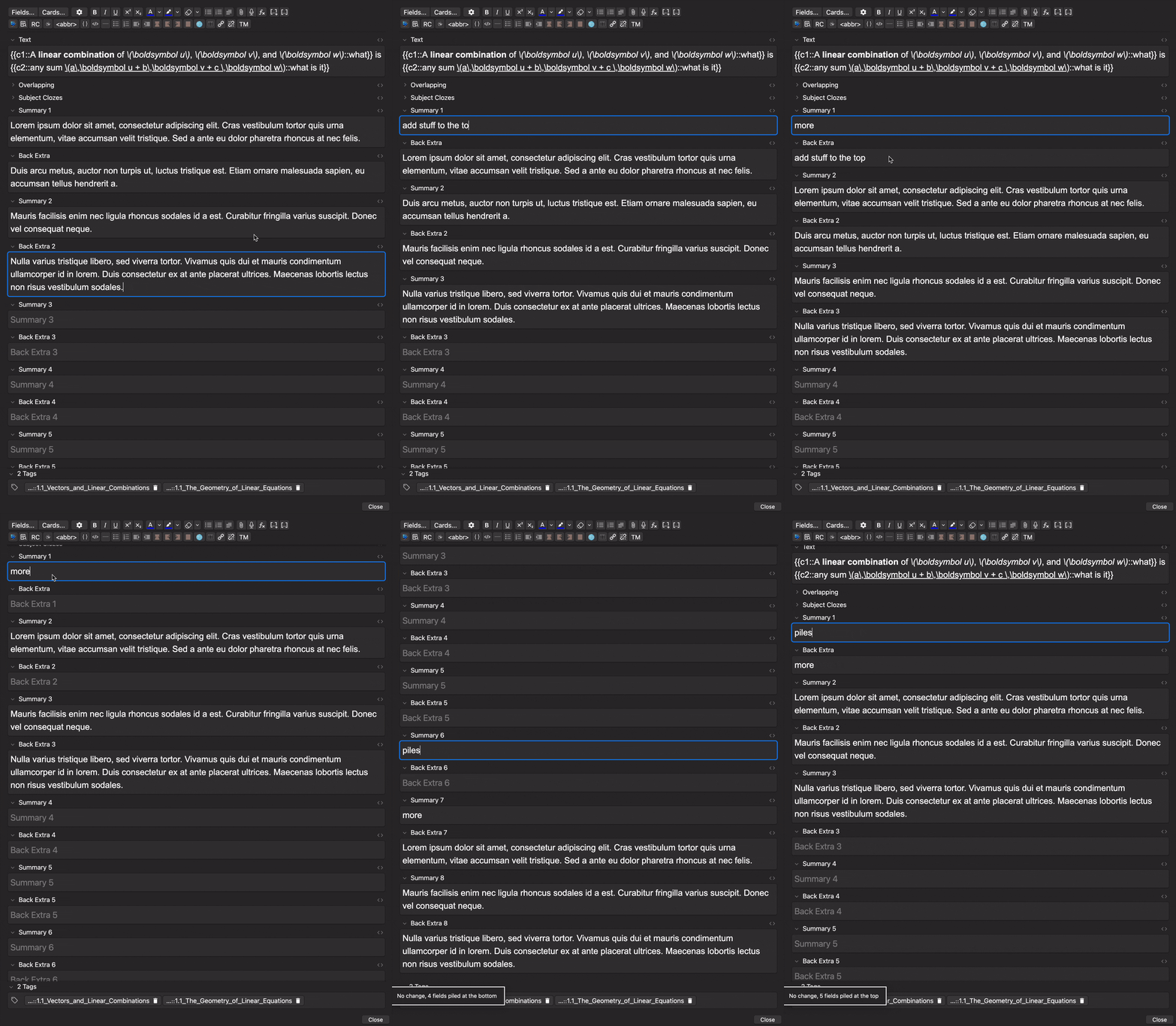
  • [hotkey] move fields down: Ctrl+R
  • [hotkey] move fields up: Ctrl+T
  • fixed relative positions: false
  • step size: 1
  • split fields: false

Configuration descriptions:

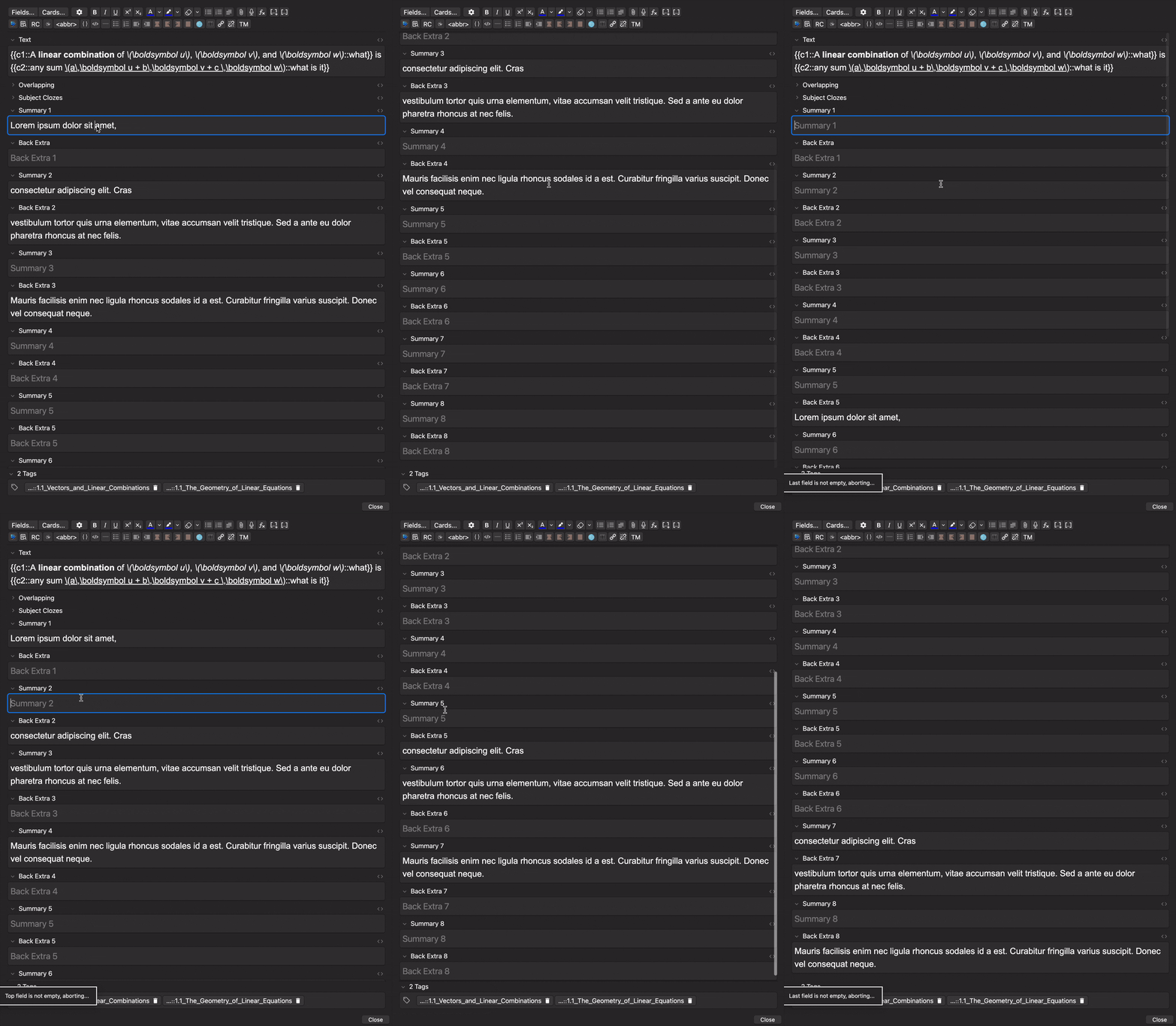
  • if fixed relative positions is set to true, fields will not pile at the top or bottom and empty fields between fields will be preserved
  • if step size is set to something like 2, then fields will only move down / up 2 fields at a time; this would be useful if your fields are all grouped in 2's
  • if split fields is set to true, when fields are moved down, the current field will be split so that the portion above the cursor remains and the portion below the cursor goes down.
    It will also attempt to strip <span>,<div>,<br>, and spaces before and after the selected field.
    Sort of buggy due to html stuff, use at your own risk.

Demonstration (default config):


Demonstration (fixed relative positions):


Known Issues

  • When you hold down the hotkey to move fields down, sometimes the bottom field duplicates and overwrites the field above. Idk why this happens, to be safe, try not to hold down the hotkey- tap it multiple times instead
  • Refreshes the image occlusion screen

❤️ Support 😊:

Has you found my addon really useful? If so, please give it a thumbs up thumbs up!

thumbs up

I've also created many high quality ✨shared decks✨.

"Buy Me A Coffee"